


A lender promising a massive loan at a low rate can look irresistible. This Business Funding message is designed to exploit that reaction.
The first reply is usually not the end of the pitch. It opens a longer conversation built around documents, urgency, and a supposed release fee.
Overview
The loan terms are meant to bypass caution
The message advertises financing from a supposed lender, CRK GROUP, using unusually large figures and generous repayment terms. The appeal is urgency, not a normal underwriting process.
The promised loan is used to justify a fee
Advance-fee fraud often starts with a processing, insurance, legal, or transfer charge. The payment is presented as a small hurdle before the much larger amount is released.
Personal records can become part of the loss
Once a target responds, the operators may request identity documents, bank information, company records, or signatures. Those details can be reused for impersonation or follow-up fraud.
You are looking at an advance-fee loan letter that borrowed the language of business funding so a cold pitch would feel like a desk rather than a bill.
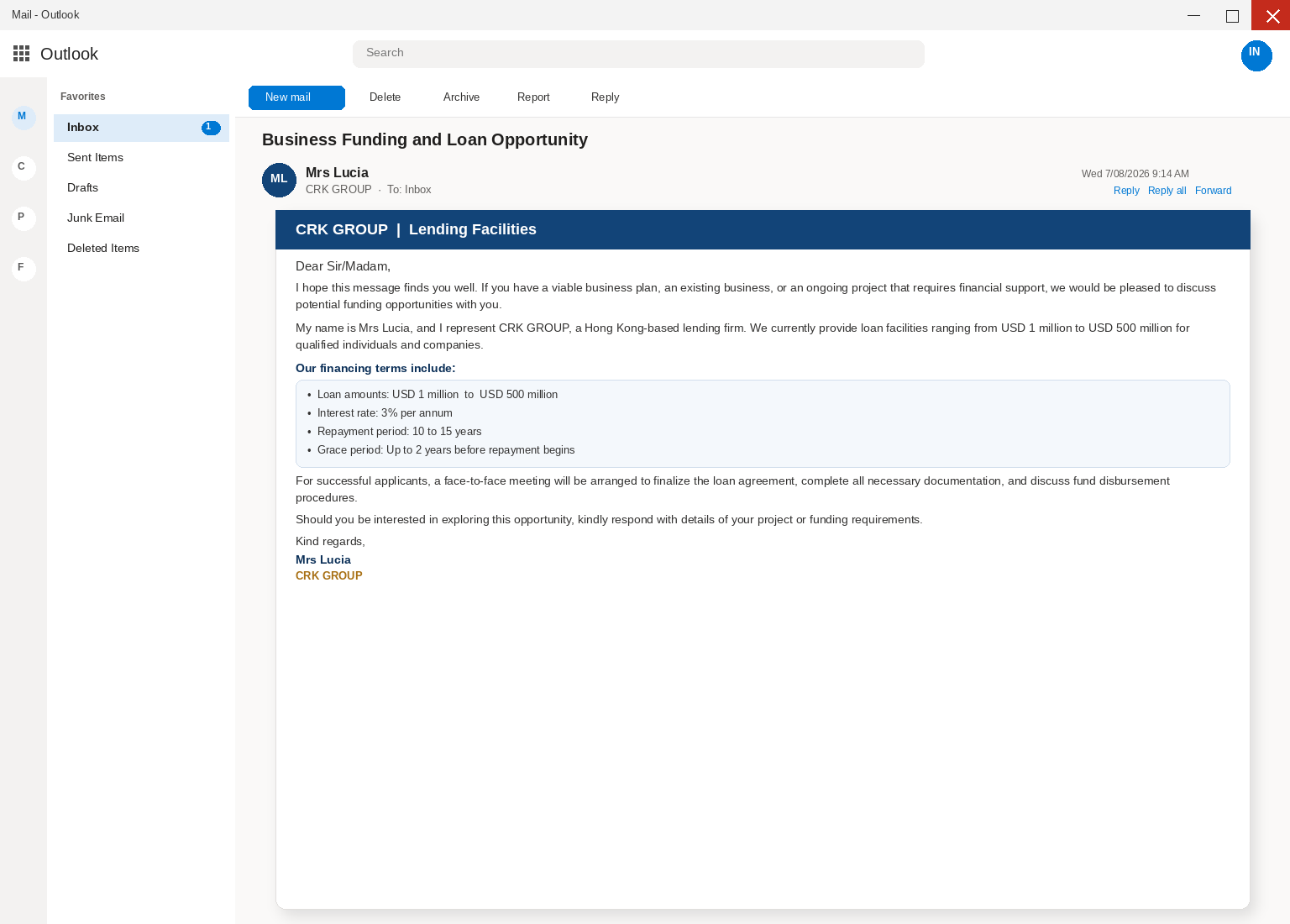
The pitch is a large facility from a supposed Hong Kong lending firm called CRK GROUP, signed by Mrs Lucia, for a recipient who never applied.
release money that is not there.
The loan never has to arrive, because a facility that does not exist never needs a disbursement date or a wire you can watch.
The letter claims CRK GROUP can lend from $1M to $500M at 3% a year.
It promises ten to fifteen years to repay and up to two years before the first payment.
before the first payment is due.
Those numbers are large enough to make a careful owner keep reading and quiet enough in the copy that they still sound like a facility rather than a jackpot.
A face to face meeting is promised for successful applicants, which is a courtesy that never has to happen because the fees are collected long before anyone books a room.
There is no licensed lending desk called CRK GROUP behind this mail, and the name on the letter is costume rather than a bank you can walk into.
Reputable lenders do not solicit strangers with unsolicited facilities at unusually soft rates, and they do not ask a cold inbox to prove a project before a credit file exists.
Anyone can type Mrs Lucia onto a From line and talk about Hong Kong as if a licensed desk already answered the phone.
A tidy signature does not prove a license, a book of funds, or a meeting that will ever be scheduled.
is no lender when someone promises credit and then asks you to pay first.
Any up-front fee the supposed lender wants before granting the money is a cue to walk away, especially when the ask is named as insurance, processing, or paperwork.
The Commission also says banks and other legitimate lenders will not promise or guarantee a loan before you apply, which is the opposite of a cold note,
that already lists facilities and a grace period.
and not to use a surprise message as the path to a deal they never started.
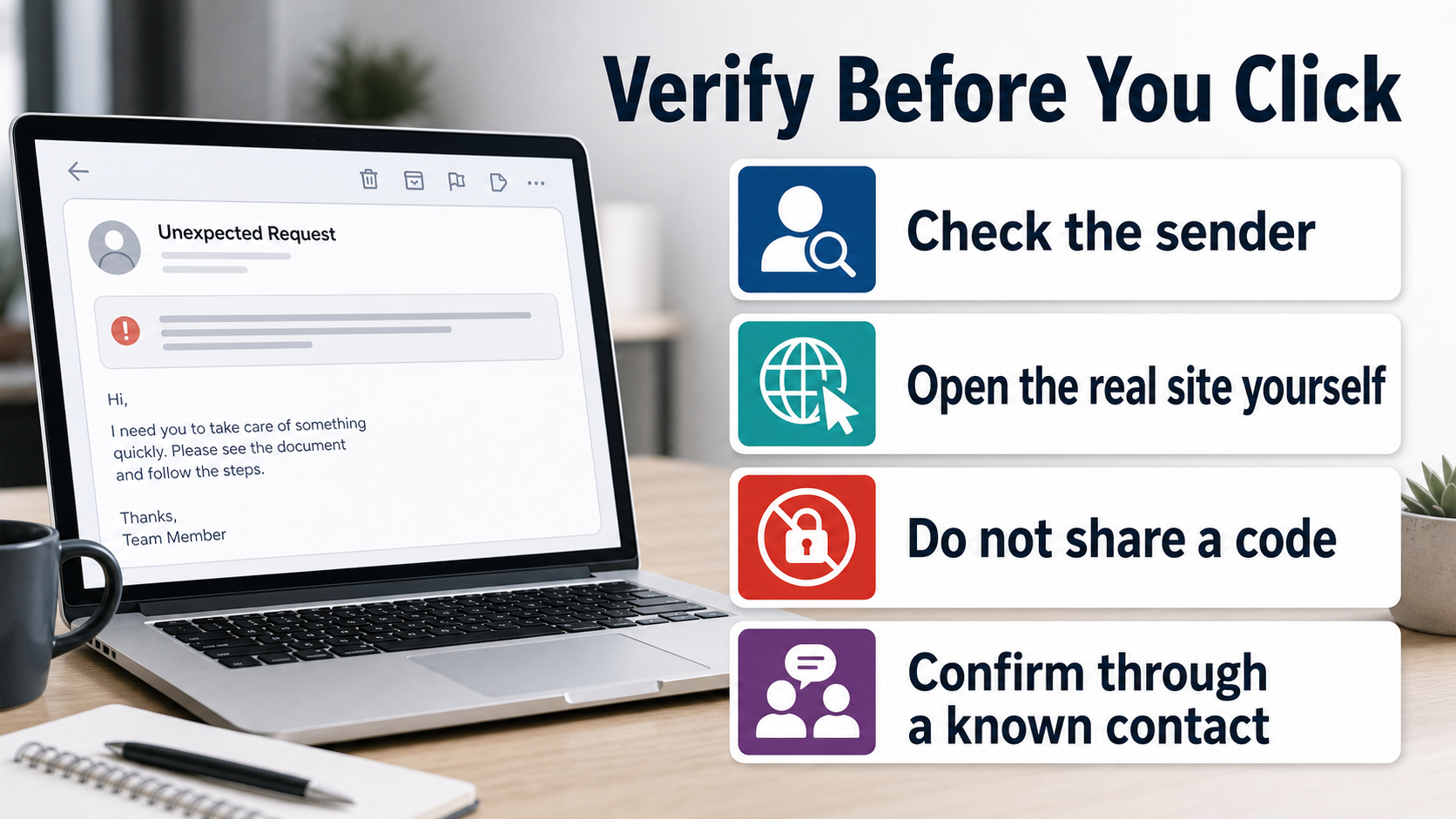
If a funding note feels off, you verify it without using anything in the note, which is the opposite of answering so a fee schedule can begin.
A facility that can only continue after you reply is a request for you rather than a loan process you already started.
A cold loan feels like a desk
Read the subject the way a tired owner reads it between two other alerts: Business Funding and Loan Opportunity.
Business already sounds like the shop you keep, funding already sounds like the work a lender would do, and opportunity already sounds like a result rather than a pitch.
reply box gets a chance.
The body leans on that feeling with language about a viable business plan, an existing business, or an ongoing project that requires financial support.
The letter only needs you to recognize the pressure, then treat the facility as a way to relieve it, which is a much cheaper trick than inventing,
a real book of funds with published terms.
A lender you can trust starts from a file you can find without the email, with a name, a license, and a page you type yourself.
This letter skips that paper on purpose, then asks you to supply the project details that will make the next note feel personal.
The terms are the costume
The advertised range, the advertised rate, the ten to fifteen year repayment, and the two year grace period are doing administration theater rather than offering a contract you can keep.
Those lines look like a term sheet a real desk would print after underwriting, which is why a careful person reads them twice instead of deleting the note.
A process described in those words still needs an application you made, a credit file you can see, and a result you can check without answering a stranger.
You cannot close a facility you never applied for, and an inbox is not an application just because a letter says a Hong Kong firm looked at it.
A company that never filled a form, never agreed to a rate, and never sat for a credit review is not sitting on a pending disbursement, no,
matter how gently the note talks about support.
look for a license rather than a mailbox.
because a living book of funds is on the other end.
Reply is the first product
has had time to land.
portal, or a credit process on a site you type yourself.
The FTC is blunt about paying for a promise, because you do not send money to see if a stranger will later send more, and you verify,
a lender on a path you already trust.
For a facility, that path is a site you type, a license you can check with a state regulator, or a government page that talks about advance-fee loans in public.
The fees have banking names
When the thread continues after that first reply, the ask is almost never labeled as a gift to a stranger.
It arrives as a processing fee, an insurance cost, a legal charge, or a transfer tax, which are names a real closing file already uses, so a,
tired owner treats them as paperwork rather than as the product.
Each name is doing the same job, which is to make a first payment feel like the last errand before cash lands rather than like the moment,
the costume can drop.
The Commission is explicit that any up-front fee a supposed lender wants before granting the money is a reason to leave, especially when the line item is,
insurance, processing, or paperwork.
Renaming the demand as a transfer tax or a legal stamp does not make a missing facility real, and it does not make CRK GROUP a desk,
you can sue on a Monday.
A second fee after the first one is the same loop the letter was built to start, dressed as a lost file rather than as a new demand.
- The funding subject promises a business opportunity, while the generic greeting shows no sign that a lender reviewed a real company.
- The greeting is Dear Sir/Madam, which is how a blast can land in any inbox without committing to a company name the sender actually knows.
- The body asks whether you have a viable business plan, an existing business, or an ongoing project that requires financial support, which turns ordinary owner worry into a reason to stay on the thread.
- It lists a large facility, a soft advertised rate, ten to fifteen years to repay, and up to two years before repayment begins, which is administration theater rather than a contract you can keep.
- Successful applicants are promised a face to face meeting to finalize an agreement, complete documentation, and discuss disbursement, which is a courtesy that never has to be booked.
- The close asks you to respond with details of your project or funding requirements, which is the door, not a kindness.
- There is no license number, no application portal you can type yourself, and no credit file the letter can show you without your reply.
- The later thread names processing, insurance, legal, or transfer costs as if a closing file were waiting, and those names are how they collect the first payment.
How The Scam Works
Step 1: A funding letter lands
The body is dressed as a lending desk rather than a pitch from a stranger, with a CRK GROUP heading, a Hong Kong claim, and a signature from Mrs Lucia.
Step 2: The name copies a Hong Kong lender
An owner who needs inventory, a contractor who wants a larger crew, and a founder who has a plan on paper all fit inside that one display name.
if you call a number you already have.
Step 3: The terms are the bait
The advertised range, the advertised rate, the long repayment, and the grace period make the offer look measured rather than theatrical, which is easier to finish between,
invoices than a same-day scare.
Step 4: Reply is the door they need
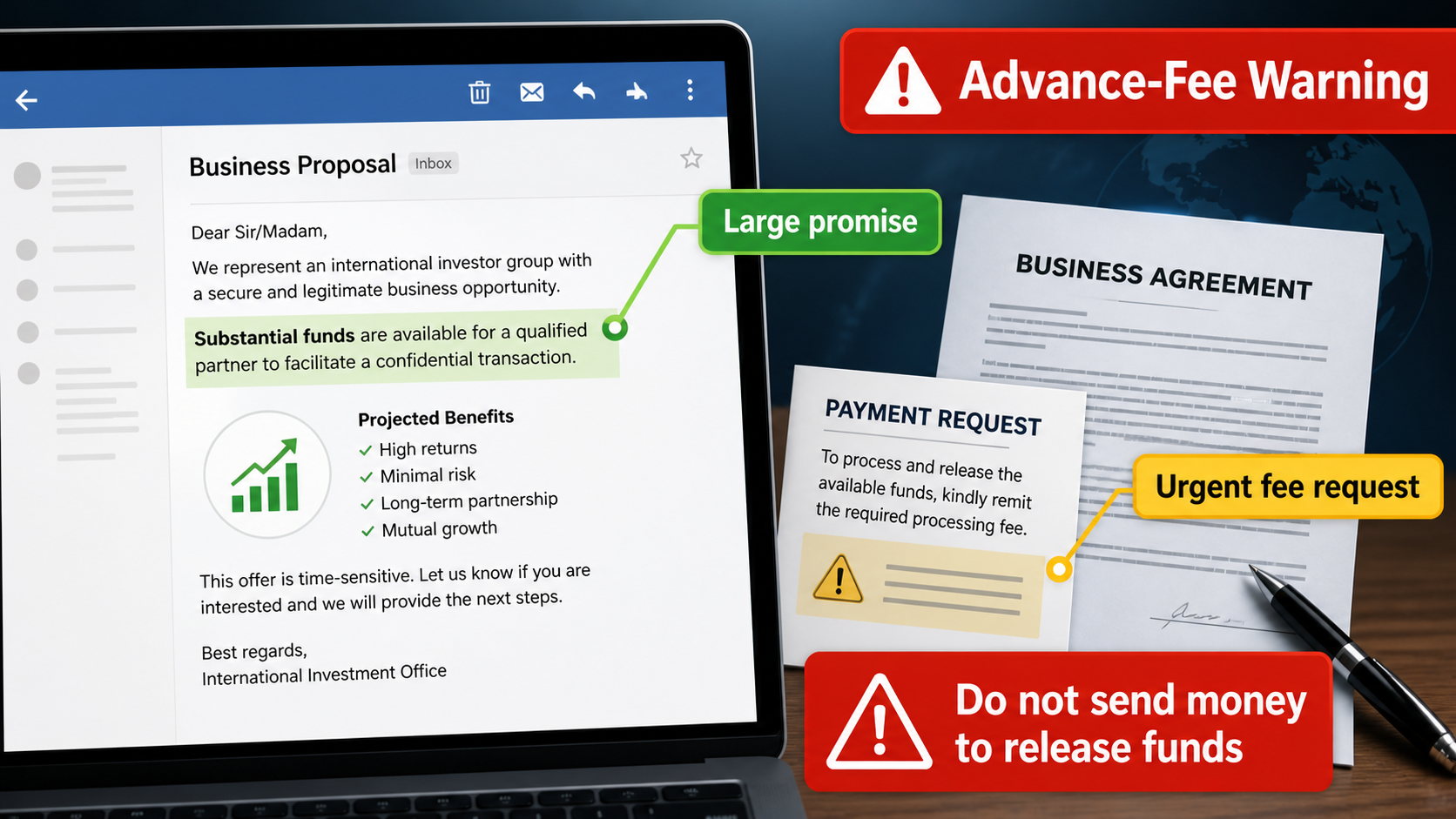
It is a request to pay processing costs, insurance, legal charges, or transfer taxes so a facility that does not exist can supposedly be released, which is,
a door rather than a disbursement.
credit file or a bank could finish a job.
Step 5: The fee never releases a loan
The story will be helpful: a clearance, a stamp, a processing delay, or a legal letter that has to be settled before the facility can move.
clumsy office that keeps losing paperwork.
Step 6: The money does not come back
Money sent toward a facility that does not exist does not come back when the story changes, and it does not come back when the sender stops writing.
Wires, cash services, gift cards, and cryptocurrency are hard to reverse once they leave, which is why advance-fee fraud prefers those rails when it can get them.
A bank transfer you approved because you asked for it is a different problem from a card you did not swipe, and time still matters on both,,
yet hope is not a recovery method.
Microsoft’s phishing page tells you to treat unexpected payment requests as a warning, and the FTC says the same thing in consumer language for loans you did not apply for.
Do not send a second fee to unlock the first one, and do not treat a new letterhead as a new office, because the thread is still the same conversation.
The advertised facility was never locked in a vault waiting for your processing charge, and it was never there.
Step 7: A second crew hunts your papers
sold to a later crew.
The FTC describes that second shift in its guide to refund and recovery scams, where someone claims they can get your money back if you pay them first.
Why an Unsolicited Loan Can Sound Real
A large promise catches attention because funding decisions can feel urgent and personal. The offer is designed to make a recipient imagine a solution before checking the lender.
Low rates and long repayment periods make the proposal look generous. In a real credit process, those terms would follow underwriting rather than an unexpected email.
The message may use formal words such as facility, mandate, or term sheet. Business vocabulary can decorate a story without proving that finance is available.
A legitimate lender has a verifiable identity before it requests records. The recipient should be able to find licensing and contact information without the sender’s help.
The Reply Starts a Carefully Managed Conversation
The first response tells the operator that a real person is interested. From there, the exchange can become more polished, personal, and demanding.
Documents, signatures, and invented case numbers can make the process seem organized. They are used to create momentum, not to complete a genuine loan review.
The scammer may congratulate the target on an approval that never occurred. That emotional lift makes a later request for a release charge feel easier to accept.
Each new email narrows the question to one payment or one document. The larger question, whether the lender exists, is pushed further into the background.
The Upfront Charge Is the Actual Product
Processing, legal, insurance, tax, and transfer explanations can all be invented. Their shared purpose is to move money from the applicant before any funding arrives.
Paying the first amount rarely closes the matter. A fresh obstacle often appears, along with a claim that the previous fee is already committed.
The promised loan is deliberately much larger than the requested payment. That comparison makes a risky charge look small even when it is impossible to recover.
No fee should be sent merely to unlock funds from an unverified lender. Independent legal and financial review belongs before any transfer, not after it.
Independent Due Diligence Changes the Conversation
Search regulator registers and company records using details found separately. A website or certificate supplied by the sender cannot be the final proof of legitimacy.
Call a published number after finding it through a reliable record. Ask whether the named employee, product, and proposed terms are genuine.
Discuss substantial financing with a trusted accountant, lawyer, or bank contact. A second pair of eyes is especially valuable when a proposal arrives unexpectedly.
If verification cannot be completed without using the email chain, stop there. A real finance company can withstand independent scrutiny before it asks for documents or money.
Company, Address, and Fulfillment Checks
A lender name is not a lending license
A polished company name and an overseas address do not establish that a lender is authorized to operate.
Check regulator records and independent contact details before sharing business information.
A proposal is not a verified credit agreement
A real lender explains underwriting, collateral, costs, and legal terms through an established process.
A sudden $500M offer to an unknown recipient should be treated as a serious warning sign.
Support must exist away from the email chain
Do not rely on a reply address or a number supplied by the pitch.
Find a verifiable corporate website and regulatory listing independently, then confirm who is actually communicating.
The fee request reveals the business model
The requested payment, not the loan promise, is the transaction the operators want completed. Additional fees can follow until the victim stops sending money.
What to Do if You Have Fallen Victim to This Scam
- Stop replying and preserve the original message, proposed agreement, payment instructions, and every attachment. Do not send a final “cancellation” payment to make the offer disappear.
- If you transferred money, call the bank or payment provider using a number you already trust. Ask whether the transaction can be recalled, flagged, or traced before further funds move.
- Secure bank, email, accounting, and document-storage accounts if you shared passwords or uploaded company records. Replace reused passwords through each real service.
- Tell any business partner who may receive a follow-up from the same people. Fraudsters sometimes reuse genuine company documents and names to make later requests seem credible.
- Review credit reports, company filings, and bank activity for unauthorized changes if identification details or account information were disclosed. Keep records of every contact with the scammer.
- Run Malwarebytes if you opened files that requested macros, software, or remote access. AdGuard can help limit visits to malicious pages and deceptive ads while you investigate the incident.
- Report the fraud to the appropriate financial and consumer-protection authorities, then ignore recovery services that demand money to retrieve a non-existent loan or lost funds.
Is Your Device Infected? Run a Free Malware Scan
Slow performance, constant pop-ups, or strange behavior? These are classic signs of a malware infection. A quick way to check is to scan your device with Malwarebytes Free, one of the most trusted malware removal tools available. If you only visited a scam page and didn’t download or install anything, this scan is optional.
The free version detects and removes the most common threats, including:
- Adware — the cause of those annoying pop-ups
- Browser hijackers — unwanted redirects and changed homepages
- Trojans and spyware — hidden programs stealing your data
- Potentially unwanted programs (PUPs) — software you never asked for
👉 Select your device below — Windows, Mac, or Android — then follow the simple steps to download Malwarebytes, scan your system, and remove any threats it finds. The scan usually takes 5 to 20 minutes.
Run a Malware Scan with Malwarebytes for Windows
Malwarebytes is one of the most popular and trusted anti-malware tools for Windows — and it’s completely free for removing infections. It catches threats that many antivirus programs miss, including adware, browser hijackers, and trojans. Follow the steps below to scan your PC and remove what Malwarebytes finds.
Download Malwarebytes
Click the button below to download the latest version of Malwarebytes for Windows from the official source. The free version is all you need — it will scan your computer and remove adware, browser hijackers, and other malicious software at no cost.
Download MalwarebytesOfficial installer for Windows 11 and 10. Your download starts right away.Want real-time protection? See Malwarebytes Premium Malwarebytes Free for WindowsScans and removes malware at no cost
-
Install Malwarebytes
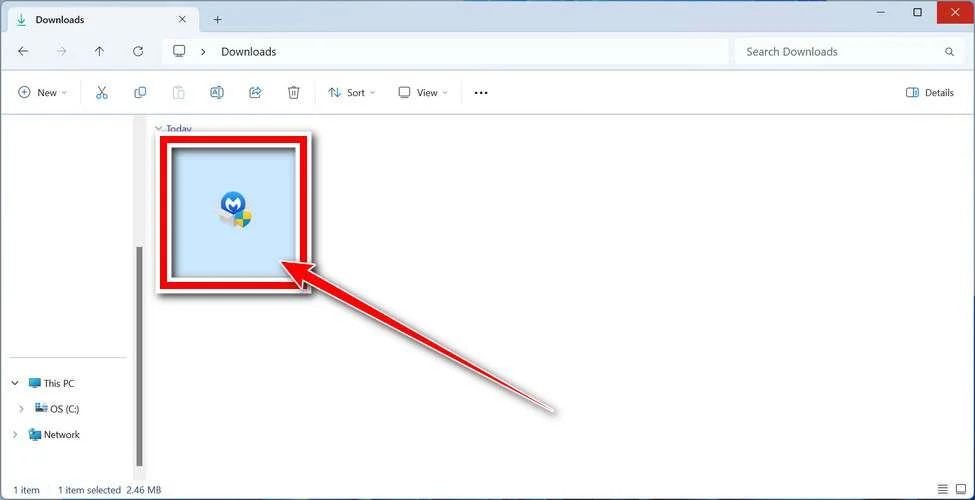
When the download finishes, open your Downloads folder and double-click the MBSetup file. If Windows shows a User Account Control pop-up, click “Yes” to allow the installation.
Follow the On-Screen Prompts to Install Malwarebytes
The setup wizard will walk you through a few quick screens:
-
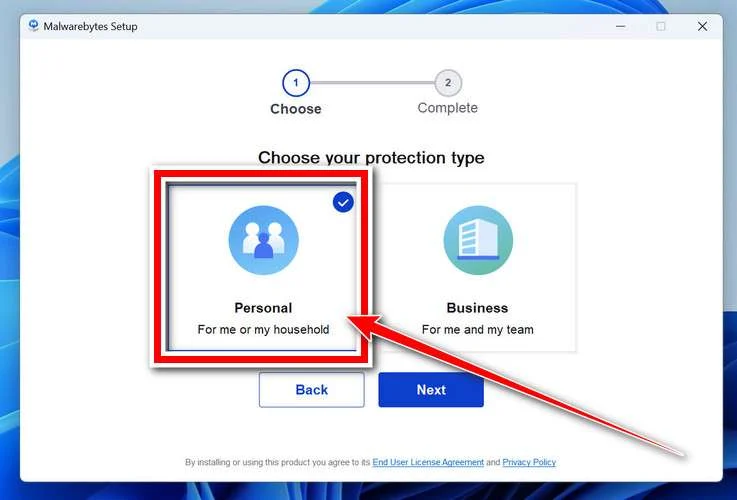
Choose where you’re installing the program — “Personal Computer” or “Work Computer” — then click Next.
-
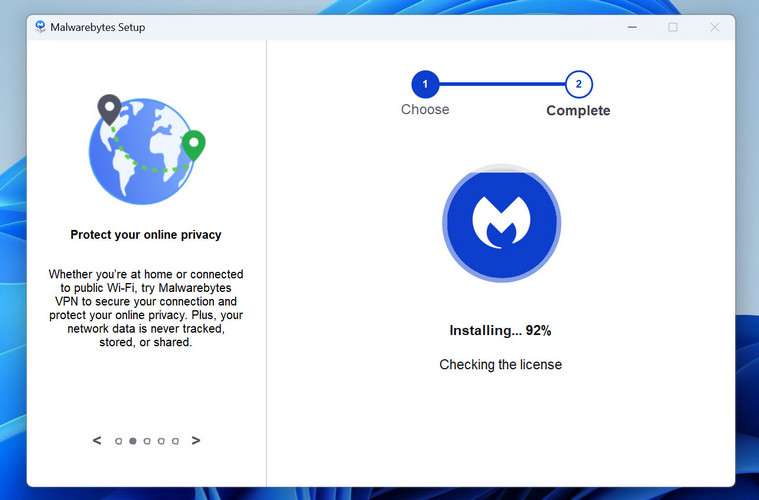
Malwarebytes will now install on your device. This usually takes under a minute.
-
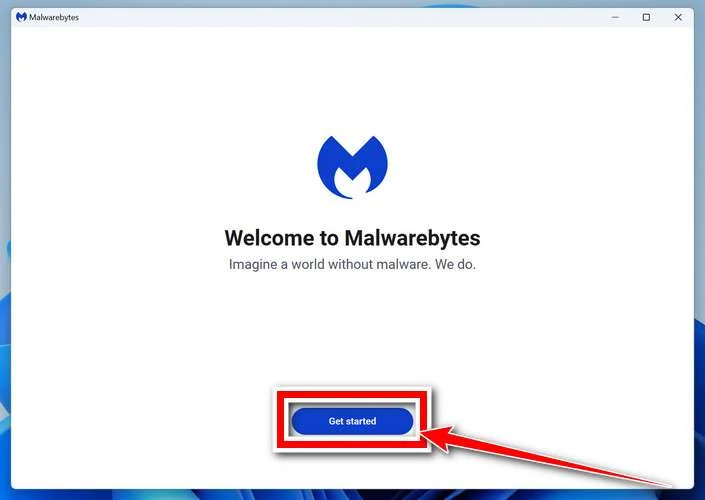
When installation is complete, the “Welcome to Malwarebytes” screen will open automatically.
-
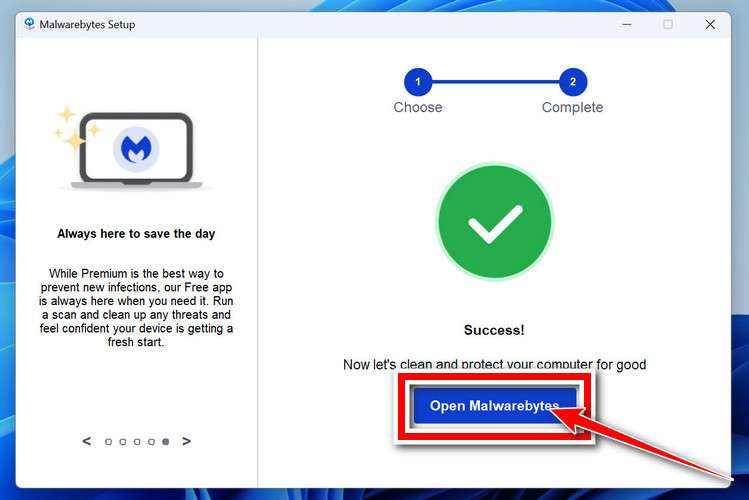
On the final screen, click Open Malwarebytes to launch the program.
-
Optional: Check for rootkits with a Custom Scan
You don’t need to change any settings for a normal scan. The standard Threat Scan in the next step is enough for most problems, so you can go straight to it.
If you also want to check for rootkits, use a Custom Scan. In current versions of Malwarebytes, rootkit scanning is only available there:
- On the Scanner tile, click the three-dot menu and select Advanced Scan.
- Choose Custom Scan. In its options, check Scan for rootkits.
- Select your system drive (usually C:\) as the location to scan, then start the scan. It takes longer than a Threat Scan.
- When it finishes, review and quarantine the results as described in the steps below.
Rootkit scanning isn’t available on Windows devices with ARM processors.
Start the Scan
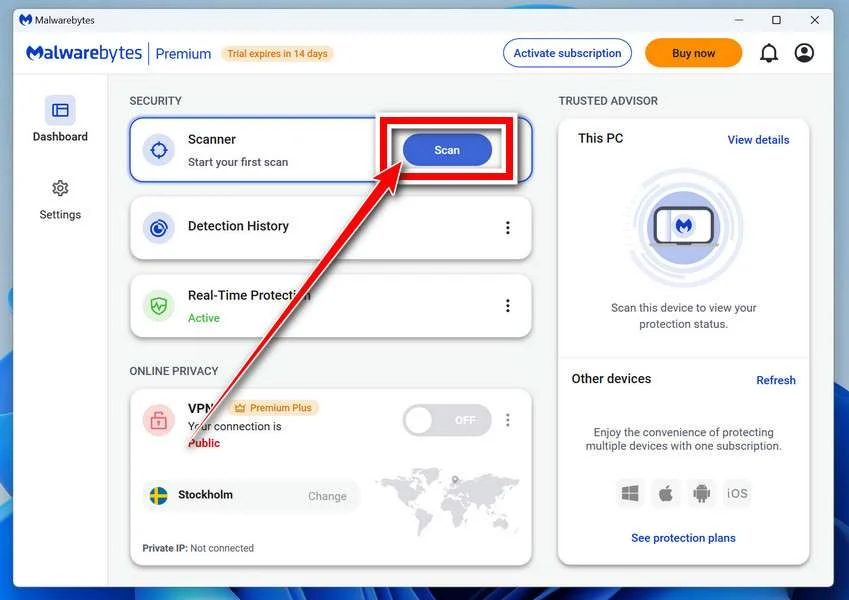
Click the blue Scan button. Malwarebytes will automatically update its virus database and start checking your computer for malware.
-
Wait for the Scan to Finish
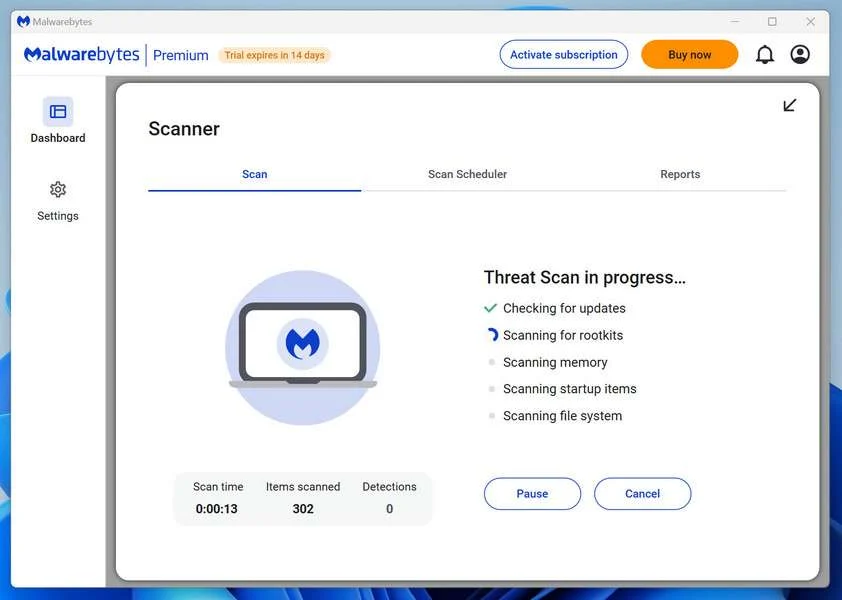
The scan checks your entire system for browser hijackers and other malicious programs, so it can take 5 to 20 minutes depending on your computer. Feel free to do something else — just check back occasionally to see the progress.
-
Quarantine the Detected Threats
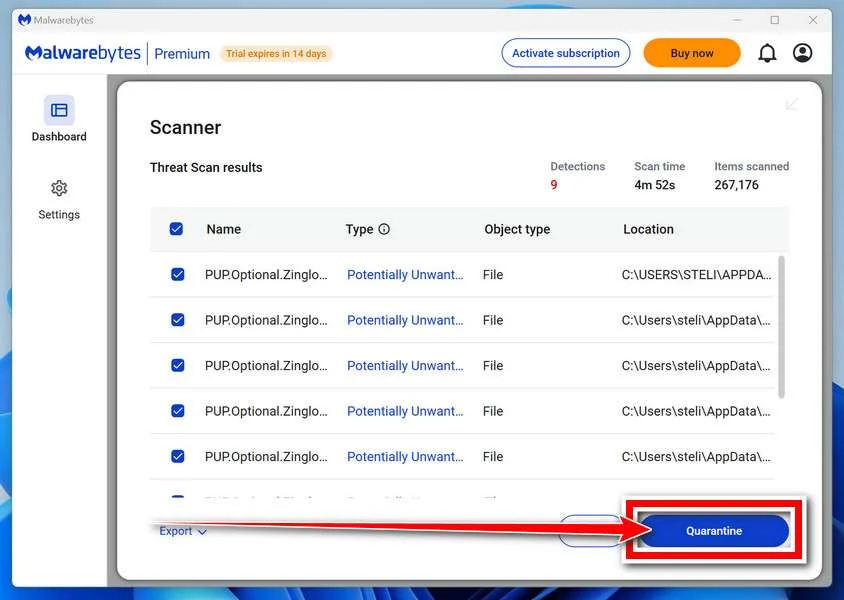
When the scan is done, you’ll see a list of everything Malwarebytes found — malware, adware, and potentially unwanted programs. Click the “Quarantine” button to remove all of them at once.
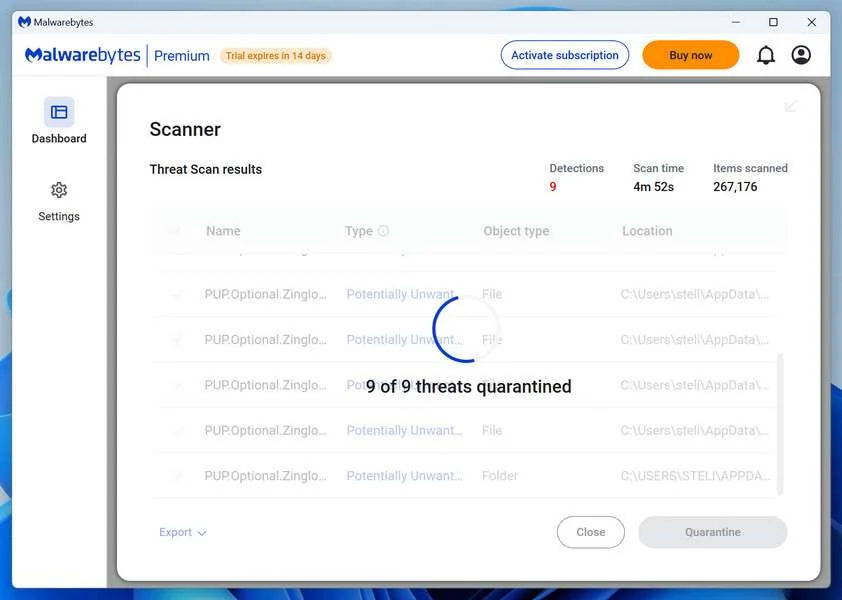
Malwarebytes will now remove the malicious files and registry entries and move them safely into quarantine.
-
Restart Your Computer
Some threats can only be fully removed after a reboot. If Malwarebytes asks you to restart, click Yes. Once you’re logged back in, Malwarebytes has finished removing the threats it found.
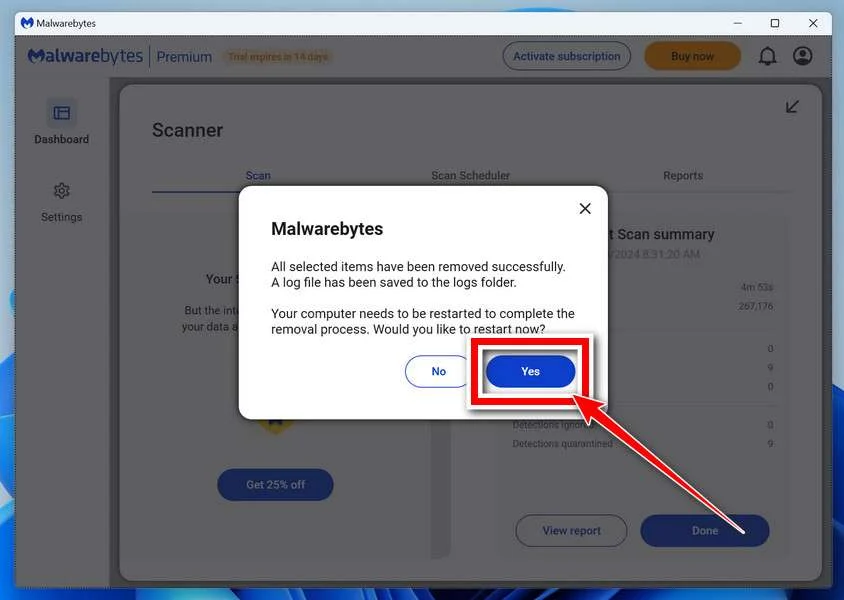
When the scan is done, check whether the problems you noticed have stopped. If they continue, see the options below.
If you are still having problems with your computer after completing these instructions, then please follow one of the steps:
- Run a computer scan with ESET Online Scanner
- Ask for help in our Windows Malware Removal Help & Support forum.
Run a Malware Scan with Malwarebytes for Mac
Malwarebytes for Mac is a free on-demand scanner that removes the malware other security software tends to miss — adware, browser hijackers, and unwanted programs included. Cleaning an infected Mac with Malwarebytes has always been completely free, and it’s our go-to recommendation. Follow the steps below to scan your Mac and remove what Malwarebytes finds.
-
Download Malwarebytes for Mac
Click the button below to download the latest version of Malwarebytes for Mac.
Download MalwarebytesOfficial installer for macOS. Your download starts right away.Want real-time protection? See Malwarebytes PremiumMalwarebytes Free for MacScans and removes malware at no cost -
Open the Malwarebytes setup file
When the download finishes, open your Downloads folder and double-click the setup file to begin the installation.
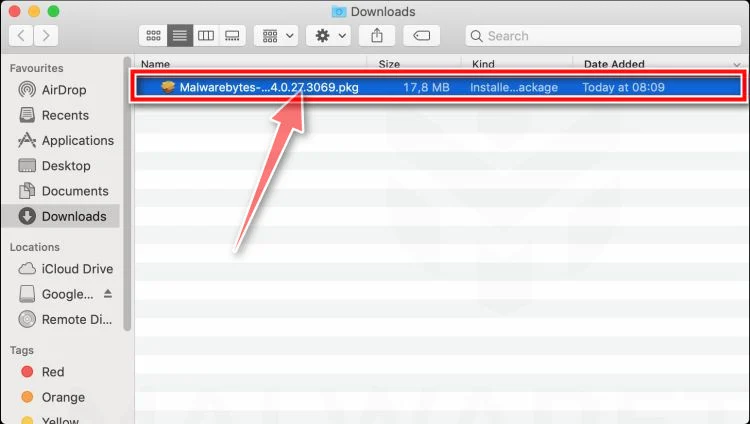
-
Follow the On-Screen Prompts to Install Malwarebytes
The Malwarebytes for Mac Installer will guide you through a few quick screens. Click “Continue” and keep following the prompts until the installation completes.
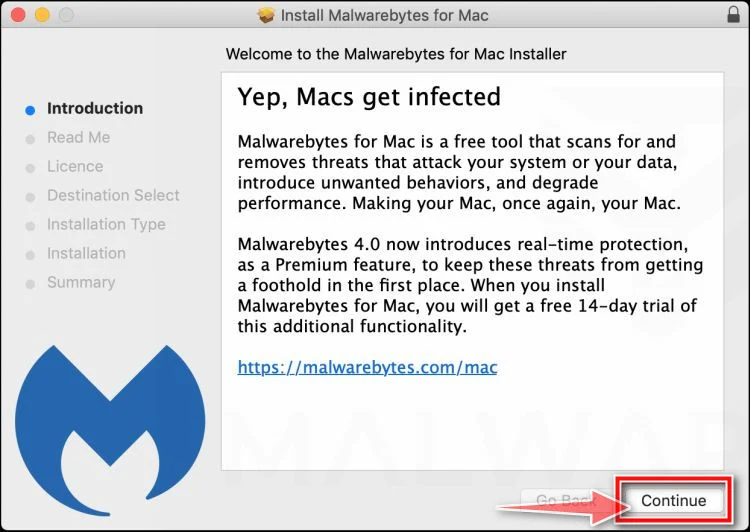
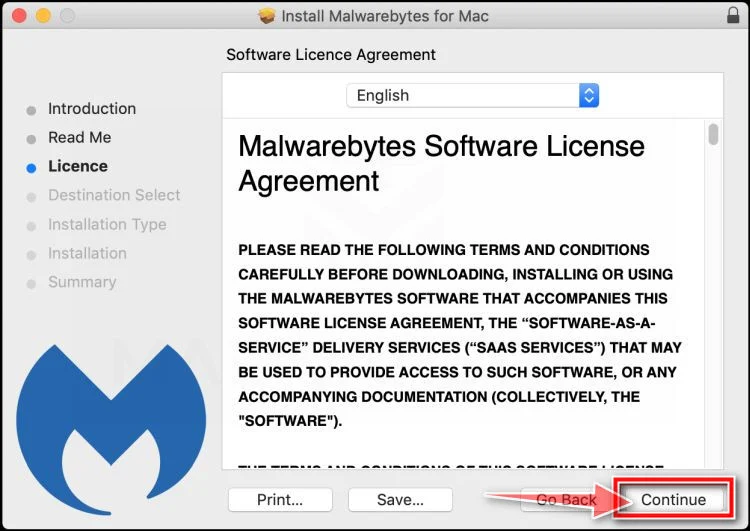
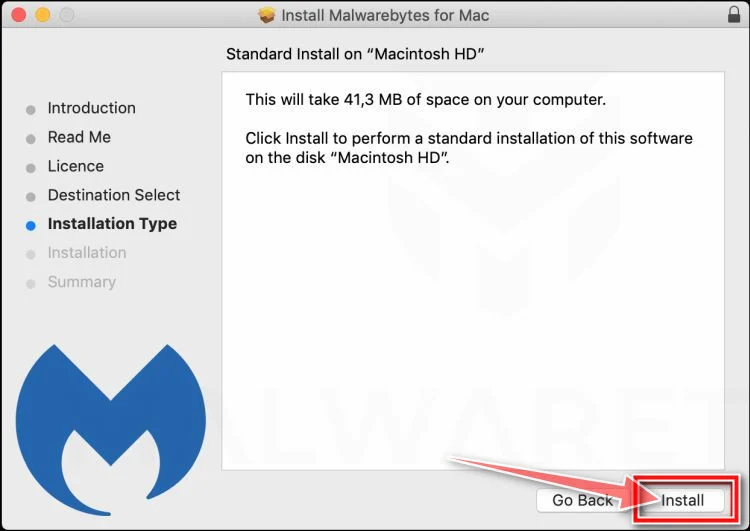
When the installation is complete, Malwarebytes opens to the Welcome to Malwarebytes screen. Click “Get started“.
Malwarebytes needs Full Disk Access to check your whole Mac. When it asks, open System Settings > Privacy & Security > Full Disk Access, turn on Malwarebytes (it may be listed as Malwarebytes Protection), and confirm with your password or Touch ID. Then return to Malwarebytes. On macOS Monterey and earlier, this setting is in System Preferences > Security & Privacy > Privacy.
-
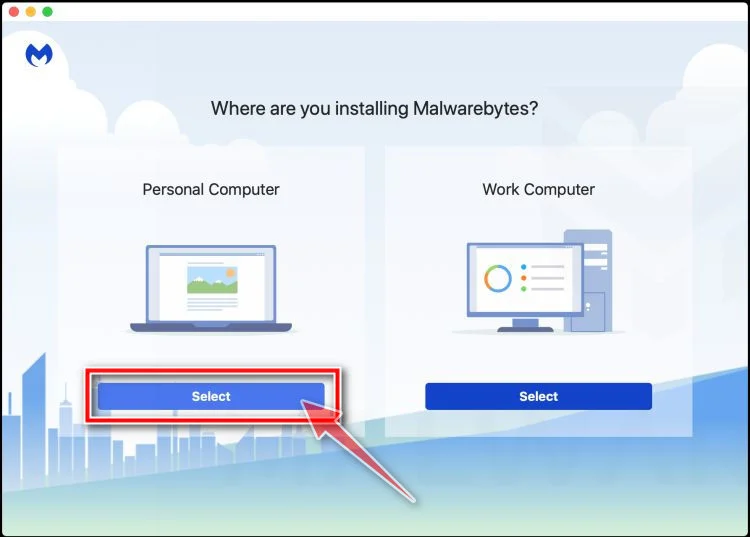
Select “Personal Computer” or “Work Computer”
Malwarebytes will ask what type of computer you’re installing it on. Click either Personal Computer or Work Computer, whichever applies.
-
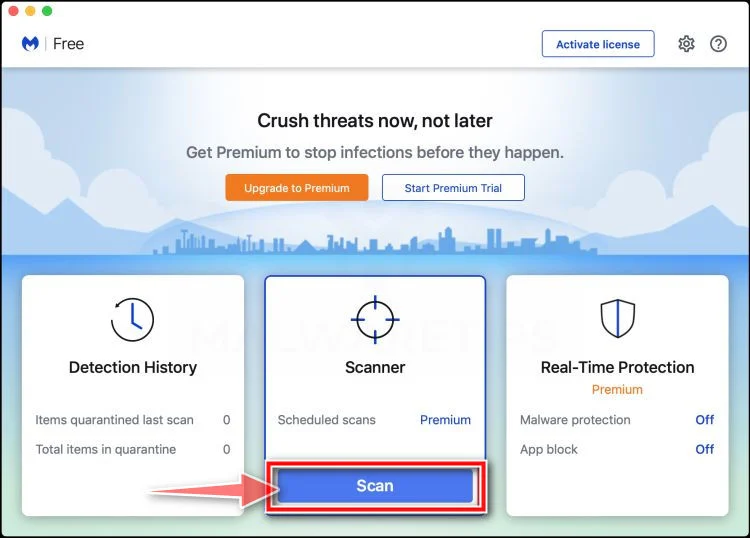
Start the Scan
Click the “Scan” button. Malwarebytes will automatically update its detection database and begin checking your Mac for malware.
-
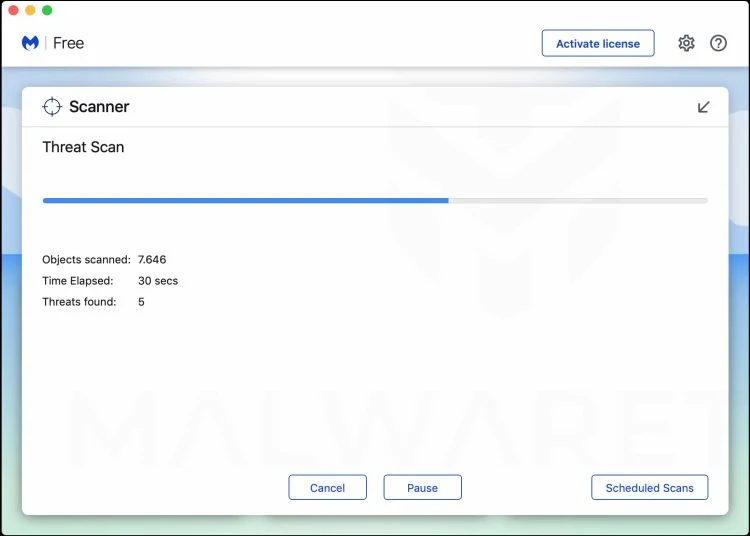
Wait for the Scan to Finish
Malwarebytes will scan your Mac for adware, browser hijackers, and other malicious programs. This can take a few minutes, so feel free to do something else — just check back occasionally to see the progress.
-
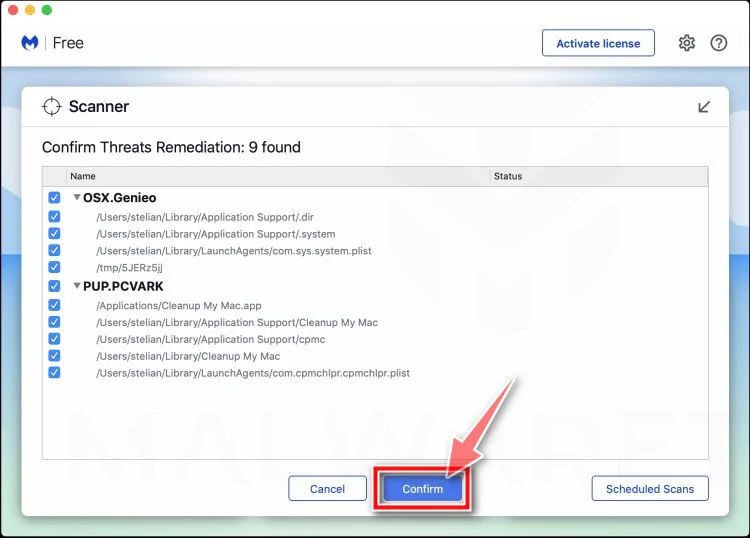
Quarantine the Detected Threats
When the scan is done, you’ll see a list of everything Malwarebytes found. Click the “Quarantine” button to remove all the threats at once.
-
Restart Your Mac
Malwarebytes will now remove all the malicious files it found. Some threats can only be fully removed after a reboot — if Malwarebytes asks you to restart, allow it. Once you’re logged back in, check whether the problems you noticed have stopped. If they come back, save the scan report and ask for help in our forum.
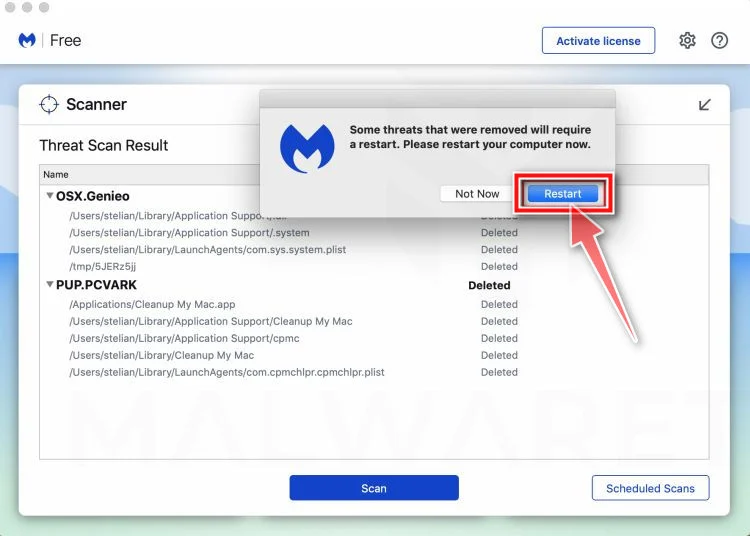
If the problems you noticed continue after the scan, see the options below.
If you are still experiencing problems while trying to remove a malicious program from your computer, please ask for help in our Mac Malware Removal Help & Support forum.
Run a Malware Scan with Malwarebytes for Android
Malwarebytes for Android scans your phone or tablet for malware, adware, and potentially unwanted apps. The free version scans only when you start a scan. Real-time protection, which checks apps automatically, is part of the paid Premium version.
-
Download Malwarebytes for Android.
You can download Malwarebytes for Android by clicking the link below.
Get Malwarebytes for AndroidOpens Google Play in a new tab.Want real-time protection? See Malwarebytes Premium for AndroidMalwarebytes for AndroidScans your phone and removes malware at no cost -
Install Malwarebytes for Android on your phone.
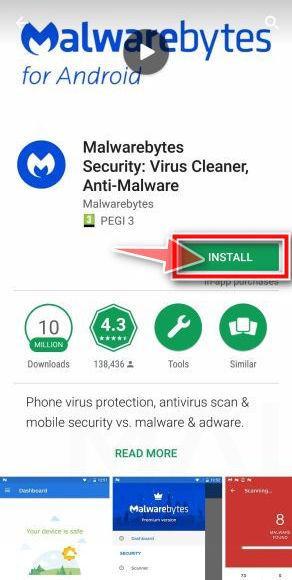
In the Google Play Store, tap “Install” to install Malwarebytes for Android on your device.
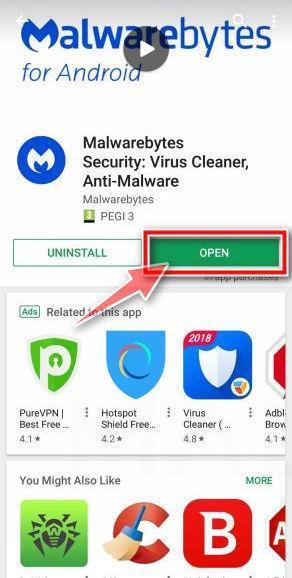
When the installation process has finished, tap “Open” to begin using Malwarebytes for Android. You can also open Malwarebytes by tapping on its icon in your phone menu or home screen.
-
Follow the on-screen prompts to complete the setup process
When Malwarebytes opens, it walks you through a short setup. Tap Get started and follow the prompts. If you see an offer for a trial or a paid plan, read it before you accept. You can skip it and keep using the free scanner.
Malwarebytes will ask for permission to access the files on your phone so it can scan them. Tap Allow, or turn on the permission in the Android screen that opens, then return to Malwarebytes.
-
Run a scan with Malwarebytes for Android
On the main screen, tap Scan now. In some versions, you open the menu, tap Scanner, and then tap Run a scan.
-
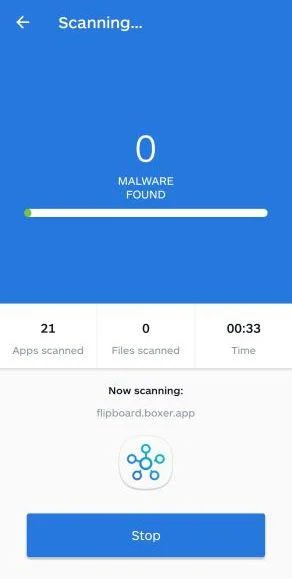
Wait for the Malwarebytes scan to complete.
Malwarebytes will now start scanning your phone for adware and other malicious apps. This process can take a few minutes, so we suggest you do something else and periodically check on the status of the scan to see when it is finished.
-
Remove the detected apps.
When the scan has been completed, you will see a list of the threats that Malwarebytes for Android has detected. Next to each detected item, tap the menu icon (three dots), then choose to uninstall the app or delete the file. Android then asks you to confirm. Tap OK or Uninstall to remove the app.
-
Restart your phone.
When the detected apps are removed, restart your phone if Malwarebytes asks you to. Then check whether the problems you noticed have stopped.
If the problems you noticed continue after the scan, see the options below.
If you are still having problems with your phone after completing these instructions, then please follow one of the steps:
- Ask for help in our Mobile Malware Removal Help & Support forum.
- Only as a last resort, reset your phone to factory settings. Read the warning below first.
- Back up your photos, videos, files, and messages, for example to your Google account or a computer.
- Make sure you know your Google account email and password. The phone asks for them after the reset. If you changed the password recently, Google recommends waiting 24 hours before you reset.
- On a Samsung phone, also make sure you know your Samsung account password.
- If you use an authenticator app for two-step verification, move your accounts to another device or save your backup codes first.
Stay Protected: Block Ads and Malicious Sites
No scan can prove a device is completely clean, so it helps to block threats before they reach you. Most infections start with a malicious ad or a fake download button — so blocking them at the source is your best defense.
We recommend AdGuard, which blocks malicious ads, phishing pages, and dangerous redirects before they can reach you.
👉 Download AdGuard and browse safely
Frequently Asked Questions
Could a legitimate lender ever contact a business by email?
Yes, but an unsolicited message alone is not proof of a legitimate offer. Verify the institution, license, underwriting process, and contact details independently.
Why are the loan terms so generous?
The unusually attractive terms are used to make a victim overlook missing due diligence and the later request for an advance payment.
What is an advance-fee loan scam?
It is a scheme in which the victim pays a supposed processing or release fee for financing that never arrives. New fees often follow the first payment.
Should I send documents to prove my company is real?
Not until the lender is independently verified. Sensitive business records and identity documents can be misused after they are sent.
Can the bank reverse a wire transfer?
It may be possible in some cases, especially when reported quickly. Contact the bank immediately and provide the exact transaction details.
Why do recovery services contact victims?
Some are secondary scams. They may use details from the original incident to sound informed, then charge a fee without recovering anything.
The Bottom Line
The Business Funding email is an advance-fee scheme dressed as a major loan opportunity. The size of the promise is there to make the requested fee look reasonable.
A real finance provider can be verified before documents or money change hands.
If a fee has already been paid, contact the payment provider immediately and keep every record.

Join the discussion
0 commentsShare your experience or ask a question about this article.
Discussion
Start the conversation
Have a question or something useful to share? Add the first comment.