


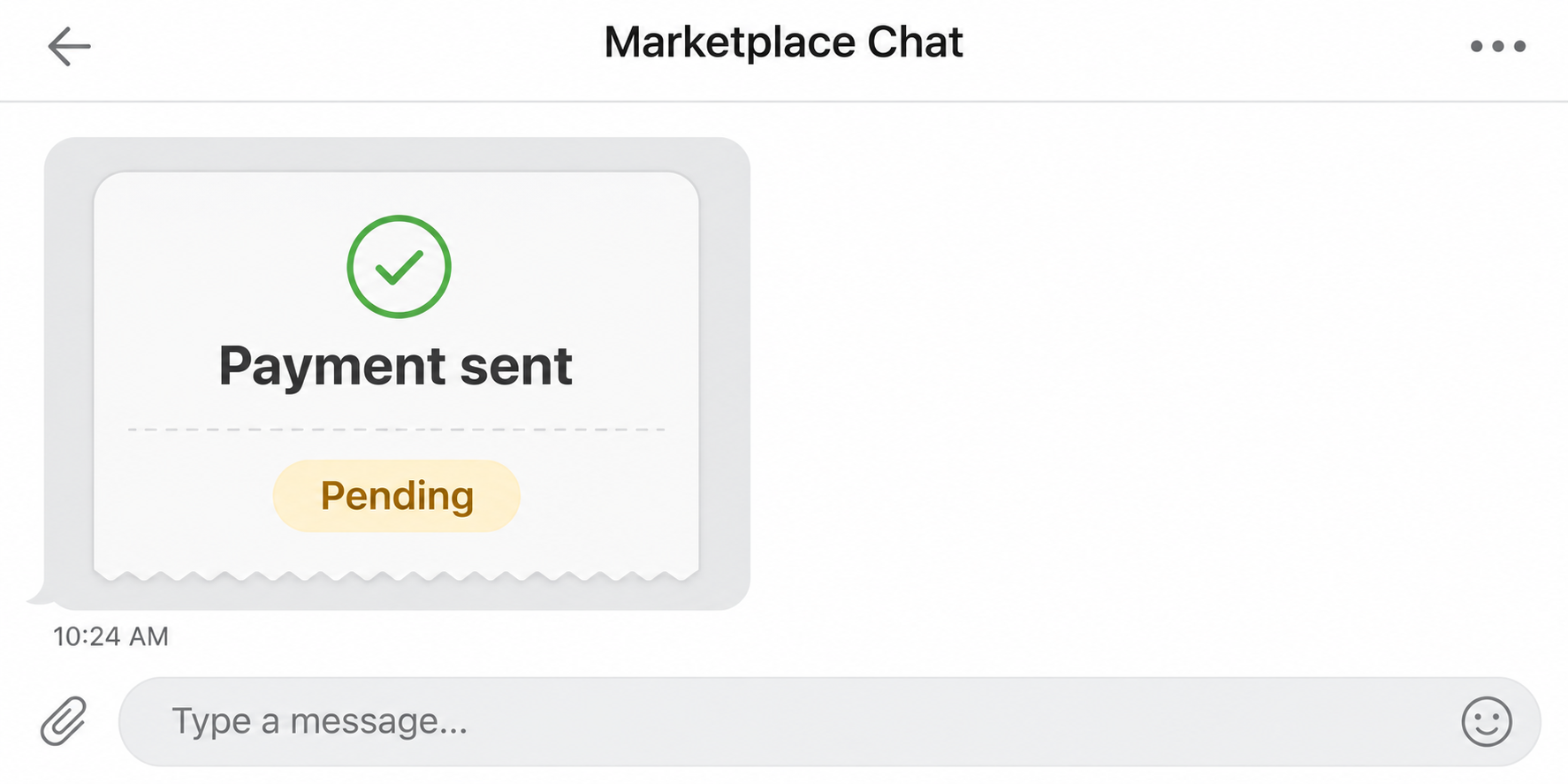
A buyer says the Cash App payment is already on its way. They send you a screenshot and ask you to hand over the item now.
You open Cash App and can’t find the same payment. Before you pack anything or refund anyone, check what the buyer’s image actually asks you to believe.
Overview
A buyer can show a receipt without paying you
In the Cash App fake payment screenshot scam, the buyer sends a picture that looks like a transfer and presses the seller to release the goods.
Cash App describes this marketplace pattern directly. The supposed confirmation looks convincing, but the money never appears in the seller’s account.
You don’t have to prove the picture was edited. Even an authentic screenshot from another account cannot establish that you received payment for your sale.
A real pending payment leaves an in-app record
Cash App’s receiving instructions say some incoming payments can be pending and need the recipient’s approval. You find and review those entries in Activity.
A screenshot that says Pending and an incoming payment in your Activity marked Pending are different things. One is a picture, the other is a record you can inspect.
A charge on the buyer’s card is not your receipt either. What matters is the direction, amount, status and recipient of the payment in the account you control.
The decision is about your item, not their deadline
Keep possession until the payment matches the sale and the transaction method follows the marketplace’s rules. A claimed delay doesn’t make it your responsibility to front the item.
- With no incoming record, don’t release the item or issue any refund based on the screenshot.
- With a pending incoming record, inspect it in your own Activity and resolve it before relying on the payment.
- With a matching completed record, still follow platform rules and stop if the buyer asks you to send money to a different account.
Check Your Own Activity Before You Look at the Picture Again
Open the app yourself, not from the buyer’s confirmation or a search result claiming to connect you to support. Confirm you’re signed into the account you gave the buyer.
Open Activity and find the specific transaction. If the buyer used a marketplace checkout instead, use the marketplace’s order and seller-payment record rather than expecting a separate Cash App entry.
A request for money isn’t a receipt. Check whether the record says money came in, went out, or was requested before tapping a button inside a genuine app.
Compare the amount and the other party with your sale agreement. An unrelated transfer for the same price isn’t enough if the sender or time doesn’t match.
If you’re expecting the buyer to pay a phone number, email or $Cashtag, verify the destination they say they used. Small typos can send money to a different account.
The buyer can raise a misdirected payment with Cash App from their side. You don’t owe them cash or merchandise for transfers you cannot find on your side.
If the app isn’t loading, treat that as a reason to wait. You cannot turn uncertainty about your connection into evidence that the sale was paid.
Ask the buyer to wait while you check, rather than feeding them transaction information. A stranger doesn’t need your sign-in code, available balance, or a screenshot of Activity.
A saved receipt image can help a platform investigate the buyer’s claims later. It isn’t a better verification tool than the in-app record it purports to show.
Set Up the Sale So the Receipt Isn’t a Judgment Call
Before someone arrives, decide which payment methods you will accept. If you use the marketplace’s checkout, tell the buyer you’ll check the platform’s order screen before releasing the item.
For a shipped sale, confirm that the order actually contains the item and address for that buyer. Follow the marketplace’s delivery steps instead of copying an address out of chat.
If the chat disagrees with the order, resolve it on the platform. Changing the destination privately can make it harder to show you shipped according to the order.
For local pickup, let the person know you’ll verify payment before handoff. If that means they won’t wait, you can keep the item and end the meeting.
Choose a public pickup setting when appropriate. If a person pressures you at your door or asks someone else to collect, don’t let that pressure override the agreement.
For higher-value items, a marketplace checkout may provide procedures a private transfer doesn’t. Check coverage for your marketplace and delivery method before completing the sale.
How the Cash App Fake Payment Screenshot Scam Works
Step 1: A buyer makes the sale feel settled
The person might agree to your price quickly and offer to pay before pickup. That sounds convenient, especially if you’re trying to sell an item today.
Once they’ve said they paid, the conversation shifts from negotiating to delivery. They may present pickup or shipping as the only remaining detail you need to settle.
You can set a payment rule before meeting anyone. Tell the buyer you won’t hand over the item until you verify payment through the agreed checkout.
Step 2: The image replaces the record you need
The screenshot may show your name, amount and a status that looks familiar. Those details give you something to recognize without giving you anything you control.
A buyer could also forward an email or show their phone across a table. Neither lets you confirm the receipt from the account supposed to receive the funds.
Don’t look for one special font or missing logo. Cash App’s interface can change, while the independent check works even when the image looks exactly right.
Step 3: You are asked to act before you can verify
The buyer might say the payment will clear once you ship, add tracking details, reply to an email, or send a small amount back.
At that point they’re asking you to risk the item or your own money for funds you haven’t established. Keep the goods and don’t send a second transfer.
Some versions add a fake notice that you need to upgrade your account. That is the business account upgrade scam, a separate demand often layered onto the missing payment.
Missing, Pending and Completed Are Different Seller Decisions
No record: The buyer may have used the wrong details, experienced a payment failure, or sent a false confirmation. None of those explanations justifies releasing the item.
If the buyer says they paid from a different account, compare the transaction on your side first. A story about a spouse or friend doesn’t locate the funds.
Pending: Read the transaction from your own Activity. A legitimate incoming entry may need acceptance, but a button in the buyer’s email doesn’t manage it for you.
Make sure it is an incoming payment you recognize, not an outgoing request that the buyer wants you to confirm. If it remains unresolved, hold the sale.
Completed: Check the matching amount and sender, and use the marketplace’s own instructions before shipping. An app completion record isn’t a promise of protection for an off-platform sale.
Cash App’s consumer guides recommend keeping transactions within a marketplace’s designated checkout when appropriate. A buyer who insists on changing the payment channel is asking you to change the deal.
The intended sale could require a shipping label generated from the order. Paying outside the platform can leave you without that order or its dispute process.
In particular, don’t accept an email claiming shipping tracking must be uploaded to a separate payment portal. If a platform requires tracking, its own listing or order should explain where.
Don’t refund a supposed overpayment as a standalone transfer. If money actually arrived and needs to go back, use the original transaction’s refund option or seek support’s guidance.
If the buyer wants the money returned elsewhere, don’t treat that destination as equivalent. A new transfer won’t necessarily resolve the original payment or any later dispute about it.
Three Seller Scenarios That Reveal What the Screenshot Misses
Pickup while the app is unavailable: A buyer shows you a completed payment, but you have no connection. You have a technology problem, not verified payment.
If both people agree, delay the handoff until your connection works. Don’t accept an email to stand in for the check you couldn’t make at the meeting.
A genuine request arrives: The seller opens Activity and sees a line for the right price. Looking closer, it asks the seller to send the money.
Decline the request and don’t confirm it just because the amount matches. The direction of a payment is as important as its amount and the other party.
A transfer went to a similar $Cashtag: The buyer may have a genuine outgoing receipt, but you have no corresponding incoming payment. Don’t ship while it remains unresolved.
Don’t send money to correct another person’s transfer. The buyer should take the error to their provider, while you wait for the agreed payment or cancel the sale.
In each example the buyer’s screenshot can look plausible. The deciding fact is a purchase or payment record that matches the transaction you personally agreed to complete.
What to Do If You Already Handed Over the Item or Paid a Fee
- Preserve the sale details. Save the listing, buyer profile, chat, receipt image, shipment information, and the time you handed over the item or sent money.
- Ask about the shipment promptly. If you shipped it, contact the carrier through its own channel to ask whether an intercept is still possible.
- Report the buyer in the marketplace. State that the proof was sent outside your actual payment record and include any order or case identifiers.
- Report any transfer you actually made. Open the relevant payment in Activity and follow Cash App’s reporting procedure, then contact the funding institution if appropriate.
- Secure the account if you shared access. Contact app support through its own channel if you gave away a login code or approved an unfamiliar device.
If a payment you sent still shows pending, a cancel option may exist for that transaction. Check now rather than waiting for the person who requested it to reply.
Explain the events accurately when reporting a loss. A payment you were tricked into making and a payment you never authorized can be handled differently.
Cash App cannot restore a bicycle or phone that was taken at pickup. Use the marketplace’s reporting route and consider a police report when property was taken.
Don’t arrange a confrontation with the buyer to retrieve an item. Give the platform or authorities the pickup details and use official channels to discuss recovery.
If all you received was the fake picture, you can end the deal without changing every password. Report the account and continue using your own verified records.
Save the evidence somewhere you can reach without the buyer’s profile. A marketplace account can disappear, and a chat thread might become inaccessible after you report it.
If someone later offers recovery for an upfront fee, keep it separate from the first dispute. Only your platform, provider or appropriate authority can explain its actual recovery process.
A bank or platform may give you a reference number. Keep it with the order and shipping records so you don’t restart the story with every support contact.
If you got the item back, update the marketplace report rather than deleting the records. It helps distinguish the attempted fake payment from the property loss that was prevented.
Frequently Asked Questions
Can a buyer fake a Cash App payment screenshot?
Yes, they can send an edited image or reuse a screenshot of a different transfer. Check the matching incoming record on your side instead of authenticating the picture.
Do I have to pay before accepting a pending payment?
Cash App documents reviewing an incoming pending entry from Activity. Don’t send a buyer money to clear a status or to make an absent transfer appear.
What if the buyer says it came out of their bank account?
Ask them to check with their provider from their own account. An outgoing debit on their side doesn’t tell you that the correct recipient received the money.
Is an email confirming the payment enough to ship?
No, a confirmation you received outside your account doesn’t replace the transaction record. Verify the sale in Cash App or your marketplace, as appropriate for the payment method.
Can a fake screenshot by itself access my Cash App?
Seeing an image isn’t the same as sharing your sign-in code. The account risk increases if you follow a request to log in, share credentials, or approve access.
What if a real incoming payment is larger than expected?
Don’t send the difference privately on demand. Ask support how to handle the original transaction, especially if the amount or sender doesn’t match the agreed sale.
The Bottom Line
Keep the item until your own payment record matches your sale. A screenshot, even one that looks authentic, isn’t reason to ship, hand over goods or send a refund.
If you’ve already released the item, preserve the conversation and contact the marketplace or carrier quickly. If you sent money or exposed a code, report that separately through Cash App.

Join the discussion
0 commentsShare your experience or ask a question about this article.
Community experiences
Did this happen to you?
Your experience could help someone recognize the same scam. Submit a private report for our team to review.
I experienced this tooReports are reviewed before publication. Sharing publicly is always your choice.
Discussion
Start the conversation
Have a question or something useful to share? Add the first comment.