


CheckPeople can publish a search listing about you even if you never opened an account. The CheckPeople opt-out hides that listing without buying a report.
The site also offers an account deletion request. That can cancel subscriptions and delete the account, but CheckPeople lists removal from people-search results as a separate action.
Overview
Start suppression with an email you can access
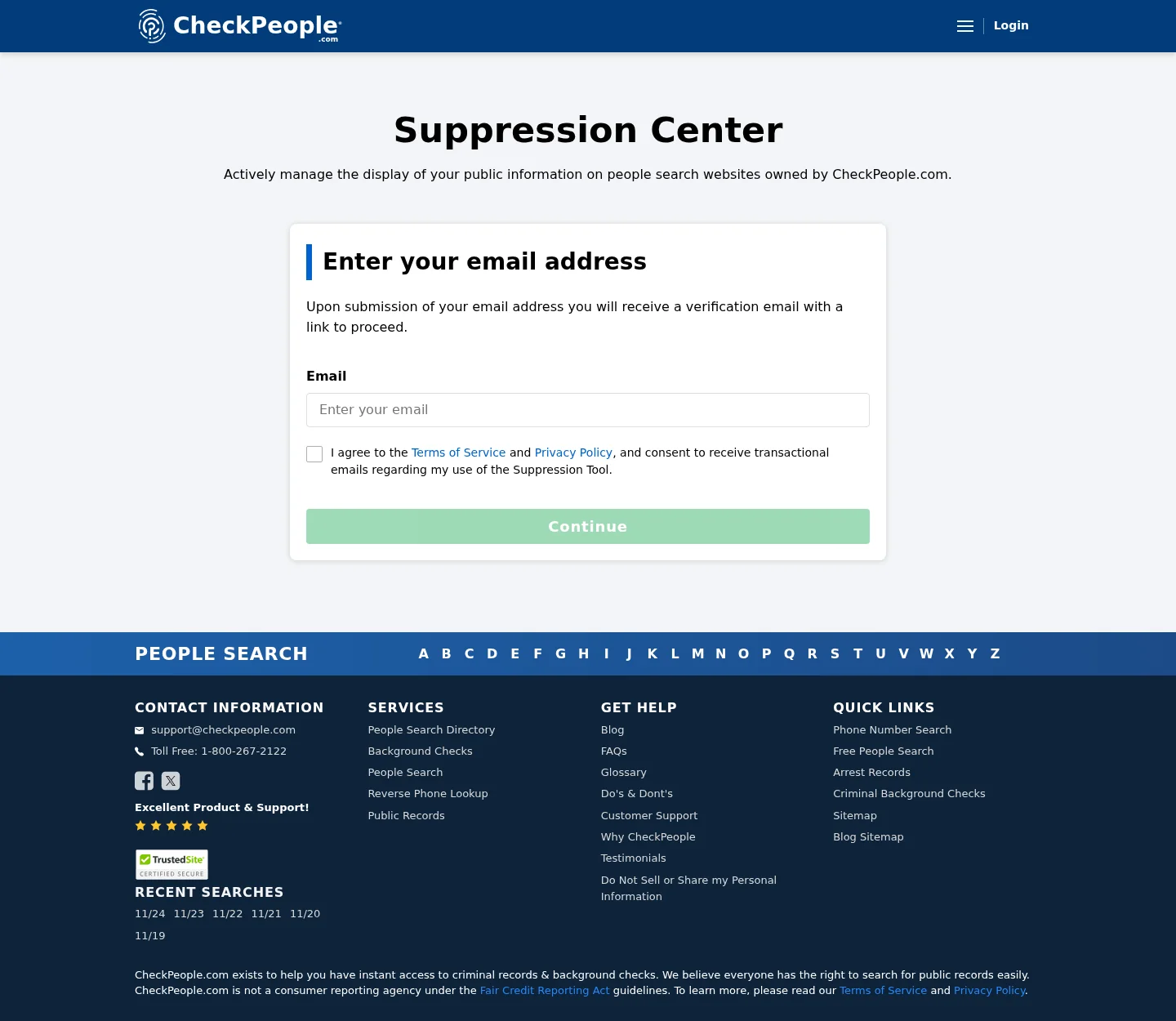
The current Suppression Center opens with an email field. CheckPeople says the message it sends contains the link needed to continue, so submitting your email is not the last step.
Check the difference between your account and your listing
Your account is the profile you use as a customer. Your listing is the record that people may find in a search, even if you never paid CheckPeople.
Choose the action by what you want to change
- Hide a public record: Use the Right to Opt-Out route, verify your email and complete the suppression request for the matching listing.
- Find out what CheckPeople stores: Use Right to Know to request a copy of user data instead of buying a background report.
- Close a customer account: Read the Right to Delete instructions and billing consequences, then verify whether a separate listing still appears.
Start the CheckPeople Opt-Out in the Suppression Center
Start at the CheckPeople Suppression Center. The public form starts by asking for your email address and explaining that you will receive a verification link.
You can also begin on CheckPeople’s data privacy page. The footer refers to selling or sharing personal information, but the privacy page explicitly describes removal from people-search results.
Check that you see the Suppression Center heading if you follow the route from the footer. The normal search box and the visible Login control are not the suppression form.
You do not need to buy the displayed report to check whether the listing is yours. The company says the opt-out applies whether or not you are a member.
Do not sign up for a trial just to reach a removal button. If you land on pricing or are asked for card details, reopen the verified opt-out address.
If you already used a paid search to find the record, keep enough information privately to recognize it during suppression. Do not forward or post the full report as evidence.
Check the spelling of the site before you enter an email. Search ads and removal services can offer different destinations even when they show the name CheckPeople in their titles.
There is a useful distinction between submitting a request yourself and hiring someone to do it. This guide uses the company’s free form and requires no removal service.
Verify Your Email Before Selecting a Listing
- On the Suppression Center page, enter an email address you can access. Check that you are using the removal form rather than registering for a normal account.
- Read the terms, privacy and transactional email consent next to the checkbox. If you agree, check the box and select Continue.
- Open the verification message you requested. Check where its link leads before opening it, especially if other people-search or privacy services have emailed you recently.
- After verification, follow the prompts to identify your record. Use your own information and check that any match refers to you rather than someone with the same name.
- Complete the request for that match and save the confirmation or make a note of when you finished. A verification message alone does not document a completed suppression.
Expect the email before selecting a listing. Some other sites do the reverse and email you after selecting the record, so do not apply their sequence here.
The initial form and privacy page can be inspected without entering personal data. We did not submit a request or test the parts that require access to a real inbox.
The public form asks for neither a password nor a card. If the message leads somewhere that asks for an unrelated password, stop and verify the destination.
If the current follow-up screen needs identifying details, provide only what the official screen requires. Start with the name and details that actually correspond to the listing.
If a result matches your name but has unfamiliar details, do not select it on that basis alone. Check whether it is genuinely yours before submitting a privacy request.
A past city may be more useful than your current one when distinguishing records. Do not fill in every address you have lived at just to make the search broader.
If a household member finds a record about themselves, point them to the official starting page. They can complete their own request without reusing your link.
The safest record to keep is a short note with the site, date and type of request. The verification link itself is not something to forward in a support discussion.
When several broker requests are pending at once, name the company in your notes. Similar-looking emails make it easy to record a response against the wrong site.
Why Right to Know and Right to Delete Are Not the Same as Opt-Out
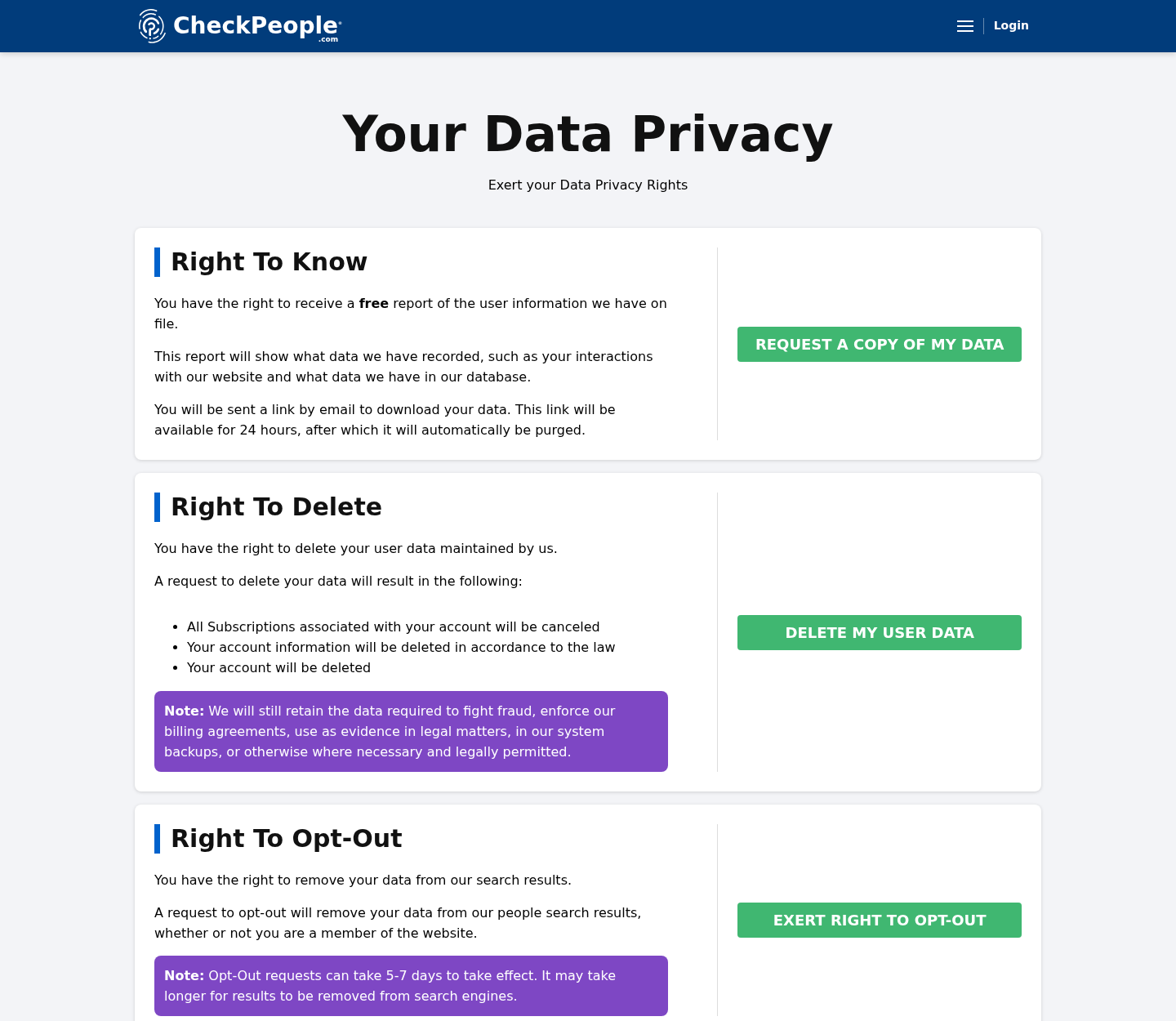
CheckPeople’s privacy page lists three choices. Read the short description beneath the heading; the one that sounds strongest is not necessarily the one that solves your problem.
Right to Know provides a copy of user data
CheckPeople describes this as a free report about the user information it has on file, including interactions with the site. It is not the paid report shown to searchers.
The privacy page says it emails a download link and makes that link available for 24 hours. That timing is for the data copy, not the separate suppression verification link.
If you request that report, open it privately and store it somewhere appropriate. The downloaded file contains information you may not want to leave on a shared computer.
Right to Delete affects your customer account
The page says a deletion request cancels subscriptions attached to the account and deletes account information and the account itself, subject to applicable rules and stated retention exceptions.
CheckPeople says it may retain records used for billing, fraud prevention, legal matters or other permitted purposes. Do not expect an account deletion to erase every company record immediately.
If you only want to stop paying, review your billing options and get a cancellation receipt. You may want that receipt before you decide whether to request account deletion.
If an unexpected charge already posted, check the merchant name on the statement and contact the merchant or your issuer as appropriate. Public listing suppression does not dispute a charge.
Before closing an account, preserve any receipts or confirmation numbers you need. Afterwards, check the next statement if billing was the reason you contacted the company.
For example, an account holder could stop a subscription and still show up in a public name search. Someone who never subscribed can skip the billing step entirely.
Right to Opt-Out targets search results
CheckPeople says this action removes your data from its people-search results whether or not you are a member. The Suppression Center describes its scope as CheckPeople-owned sites.
That wording is not a reliable way to identify every other domain. If an item still appears on a different site, verify who operates it and what its form covers.
If you want to close a customer account and hide a public listing, check both outcomes. One email or account status cannot establish that the other request is finished.
If you only need the public result hidden, there is no reason to request a full account-data export first. Start with the narrow request that addresses the visible exposure.
Check the Listing After the Published Wait
CheckPeople’s privacy page says opt-outs can take five to seven days to take effect and search engines may take longer. It does not specify business days in that notice.
Keep the date you completed the suppression, not only the time you received the verification message. When the published period passes, check the exact original page if you have it.
Do not buy a report to prove that a result is gone. The useful first check is whether the publicly accessible listing still identifies you at the same address.
Try Google’s outdated-content refresh if the source has changed but the search result still shows the old details. Use the exact affected URL.
If another domain still shows your details, identify that publisher first. As our guide to exposed personal data explains, an index and a source are separate.
Keep follow-up records without adding the exposed details to a publicly shared document. A URL, date and description of the matching information are often enough to explain the issue.
If the record is about a court or government filing, suppression does not change that filing. Ask the agency or court which process applies to correcting its own records.
A result can have your name but a different date, city or household. Recheck enough of the details to establish that it is the record you reported.
If a similar result appears later at a different address, keep that address separate from the old one. Ask support whether the first request covers it before repeating the submission.
A confirmation that a profile stopped showing on CheckPeople does not revoke a report someone already saved. Treat possession of a separate copy as a different issue.
What to Do if You Cannot Finish Suppression
- If Continue does not work, check the email field and the required consent checkbox. The button is not enabled with a blank form.
- If you do not receive the message, check spam and confirm the address you typed. Start again from the official page only after checking you did not miss a message.
- If you cannot find a match, try a name variant or location already associated with your listing. Do not choose someone else’s result just to advance through the form.
- If the request still cannot be completed, use CheckPeople’s published support details. Explain which screen failed and when, without sending passwords or payment details.
The form footer lists support@checkpeople.com and 1-800-267-2122. Check the official footer before calling, and tell support you need suppression rather than help buying a report.
Verify why support needs any additional information and how it will be used. Do not send a document because an unexpected email told you to.
If a search result is part of a threat or harassment, preserve evidence privately and prioritize your safety. Do not rely on a listing request to stop an active threat.
When the same record remains, give support the original result address and a date for the completed request. Ask whether they need a reference from your confirmation.
If you contact support because the email did not arrive, say that clearly. A missing first message is different from a submitted request that has not yet taken effect.
Keep your verification and billing conversations distinct if you are handling both. A response that answers the payment question does not tell you whether suppression went through.
If you used the wrong option, identify the receipt you received. A notice about a data download does not mean the company received a request to hide a listing.
Likewise, an account-closure message may solve your billing problem while leaving the original result visible. Use the listing URL to check whether you need a separate request.
If someone else sent you a link to the record, ask for the URL instead of asking them to buy a report or check on your behalf.
When you do reach support, ask which part of the process needs repeating. A new verification email will not help if the company already has a complete request.
Frequently Asked Questions
Can I opt out if I never opened a CheckPeople account?
Yes, CheckPeople says its opt-out covers members and nonmembers. Use the Suppression Center and verify your email as directed; you do not need a paid subscription.
Does the first email finish my request?
No, CheckPeople describes it as verification for continuing through the process. Select your matching record and finish the request before checking whether the listing has disappeared.
Will deleting my account automatically suppress the listing?
Do not assume that it will. CheckPeople lists account deletion and search-result opt-out separately, so verify the search result and use the Suppression Center if necessary.
How long does CheckPeople say listing removal can take?
The company says five to seven days for opt-outs to take effect. Search engines can retain an older result for longer, so check the actual source first.
Should I use the data-copy link to obtain a paid report?
No, the privacy page describes it as a copy of user data the company has on you. It is not a route to retrieve someone else’s report.
Does this change an official background check?
No, the request concerns CheckPeople’s own search results. If another report provider or an agency has inaccurate information, follow its correction or dispute procedure directly.
The Bottom Line
Use the CheckPeople opt-out to hide a public listing. Complete the email verification and the rest of the request, then revisit the exact record after the stated wait.
Use the other privacy options for a data copy or account closure. If you’re still visible elsewhere, identify that source separately instead of repeating the same request.

Join the discussion
0 commentsShare your experience or ask a question about this article.
Discussion
Start the conversation
Have a question or something useful to share? Add the first comment.