


The PrivateRecords.net opt-out page puts two privacy requests on the same screen. Only Remove My Information is designed to stop a listing from appearing in people searches.
If you chose Your Privacy Choices and still see your record, the form may have worked as designed. Here is how to use the other route and verify the difference.
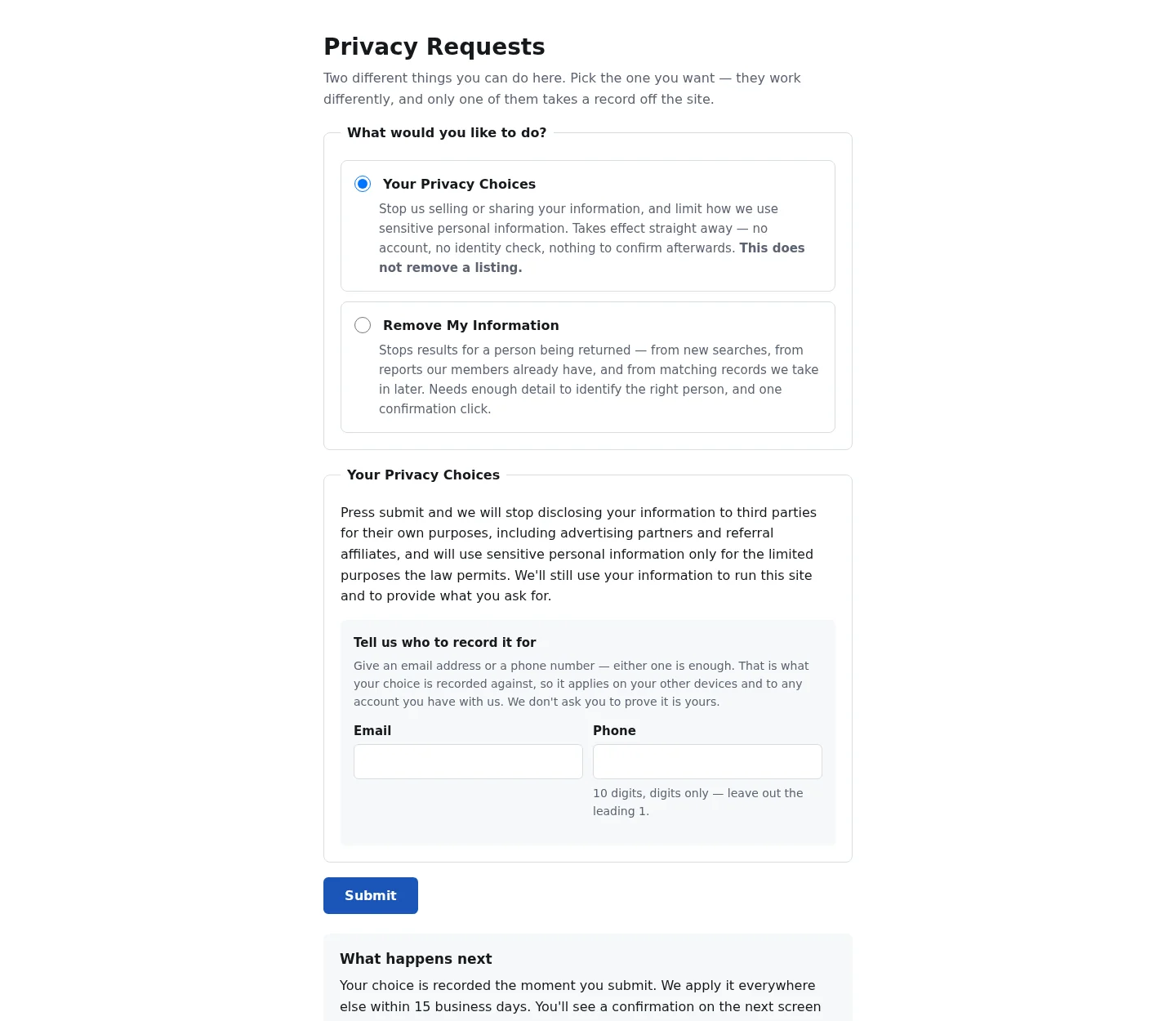
Overview
Your Privacy Choices limits sale or sharing
PrivateRecords describes this option as a request to stop sale or sharing and limit certain uses of sensitive information. The form explicitly says it does not remove a listing.
Remove My Information suppresses a person’s results
Choose this option if the problem is a record that appears when people search. The company asks for identifying details and requires you to confirm the request by email.
These are different requests with different receipts
- Visible record: Choose Remove My Information, complete the identification fields and follow the confirmation email before checking whether your listing still appears.
- Marketing or sharing concern: Choose Your Privacy Choices to record that preference. An on-screen receipt, rather than a confirmation email, is the expected outcome.
- Both problems: Deal with both goals rather than treating one receipt as proof of the other. Keep enough of a record to know which request you sent.
Start With the Current PrivateRecords.net Opt-Out Form
Use the official PrivateRecords privacy request page, which is headed Privacy Requests. Despite the word search in the address, the current page starts with two request options.
Older instructions may tell you to look up a record first and find a Remove button next to it. That is not how the form we inspected starts.
Look for the domain before you type anything. Do not start with a sponsored background report, an email you did not expect or a similarly named people-search site.
You should not need to buy a report to make either request. If you see a payment form or subscription offer, return to the privacy page.
If evidence matters because of harassment, keep the record address and a redacted screenshot before requesting removal. Keep that evidence privately rather than reposting the page with your details.
If you do not want to enter the required details into the form, consider the verified support route rather than supplying someone else’s information or inventing an identifier.
The main search page and this form have different jobs. The first advertises reports; the privacy page handles requests. An opt-out should not start with a paid report trial.
If you already pay for reports, deal with billing through the account or its verified support. Removing your personal listing is not the same as canceling your own subscription.
Keep the two tasks in separate notes if both apply. One is about what people can find about you, while the other is about a service you purchased.
Remove Your Listing With the Confirmed Request
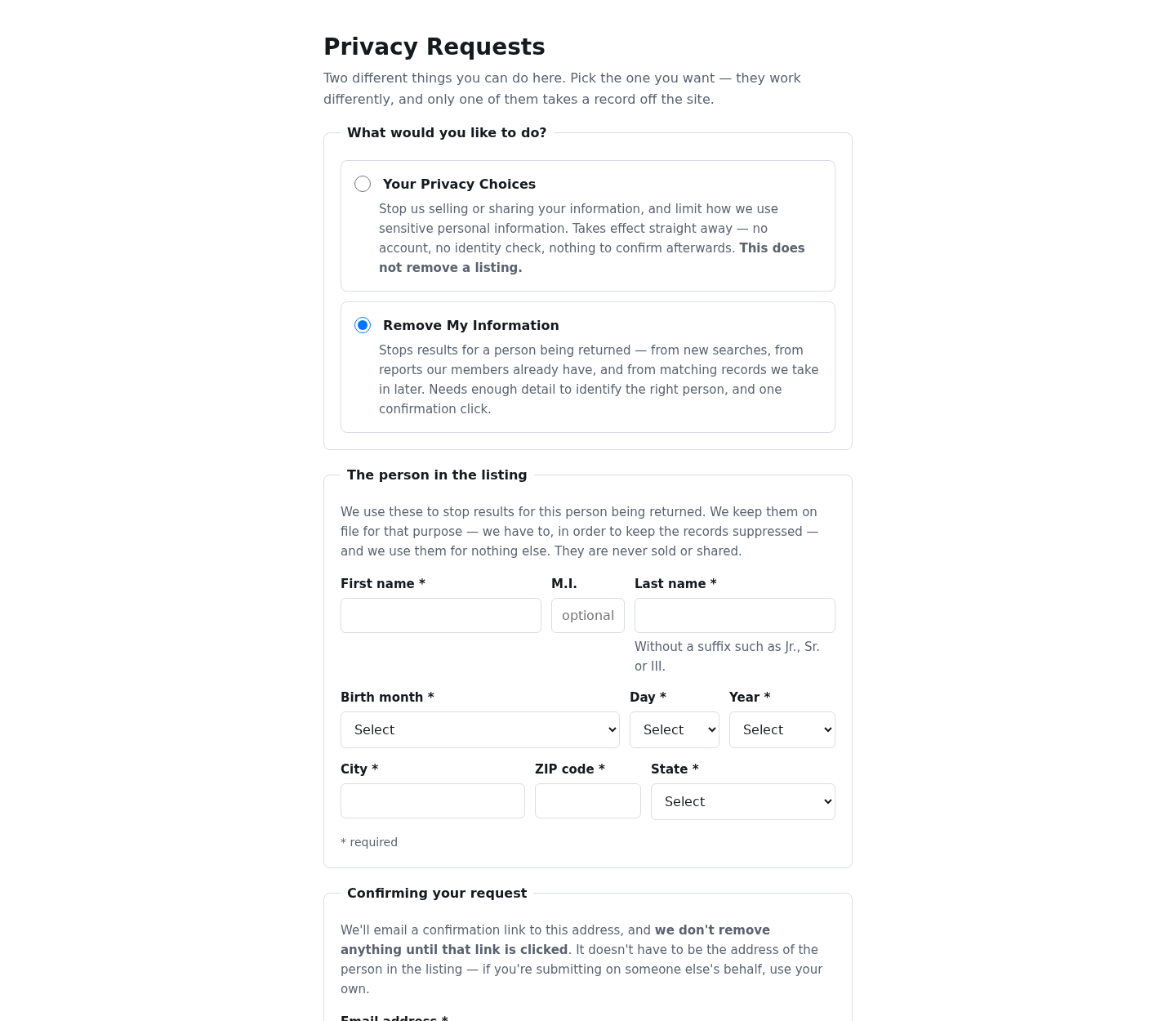
The direct removal view opens with the correct option selected. You can see the name, birth date and location fields before you enter or submit any information.
- Open the privacy page and select Remove My Information. Check the option is selected before you start filling fields, especially if your browser restored a previously used form.
- Enter your first and last name, date of birth, city, ZIP code and state. The middle initial is optional, and the form asks you to omit suffixes.
- Enter an email address you can access in the confirmation section. If this request is for your own record, leave the authorized-agent checkbox unselected.
- Select Submit and check for the screen telling you to look for an email. Keep the submission date, but do not share the confirmation link.
- Open the confirmation message you expected and verify its destination before using the link. The form says the company does not remove anything until the link is used.
- After the request is processed, check the site for your own record again. Save the result of that check separately from the confirmation that you submitted the form.
The live form asks for birth date and location details; it does not present a full street-address field in the removal section we inspected. Use the current labels.
The form says it retains the identification details to keep matching records suppressed. That is a different goal from deleting every trace of a person from the company’s systems.
Do not attach a government ID or send a Social Security number just to make a regular personal request. The form describes a signed-permission upload for authorized agents instead.
If you are acting for someone else, select that option only when you have their permission. The company asks for a signed PDF authorizing you to make the removal request.
Use your own inbox for the confirmation when acting with permission, as the form allows. Do not take control of another person’s email or ask them to forward unrelated mail.
Start with the details needed to identify your own record. If several addresses or spellings could apply, ask support which version to use instead of submitting every identifier you have.
The date fields make the removal request more sensitive than the preference form. If you are uncomfortable providing a full birth date, ask the company how phone verification works first.
Use an email account you can still access after you submit. A work inbox you are about to lose or a mistyped address prevents you from finishing the email step.
The reason to keep the confirmation private is that it can authorize a request. Share your case reference if support needs one, not a working confirmation link in a forum.
Limit Sale or Sharing Without Removing the Listing
Choose Your Privacy Choices when that is your goal. The current form asks for an email address or phone number, and says either one is enough.
Do not enter extra information merely because you can. The service says it records the preference against the identifier you provide so it can apply it beyond that browser.
Submit the preference and look for the confirmation on the next screen. The company says it records the choice immediately and applies it across its systems within 15 business days.
That route does not have an email link for you to click and it does not hide the record. Seeing your name after submitting it is not evidence of failure.
PrivateRecords also says it recognizes Global Privacy Control as a sale or sharing request. That browser signal does not substitute for the company’s separate confirmed removal form.
The California Attorney General’s privacy guidance distinguishes opting out of sale or sharing from other privacy rights. Do not assume the same terms or deadlines apply in every jurisdiction.
If you live in California, the state’s DROP tool provides a separate route for registered data brokers. Look up the company rather than assuming the brand is its registered name.
A browser privacy signal and a direct form leave different records. If you need to track the action, note what you enabled or which choice you made.
Neither setting prevents someone else from collecting information from a public source. The practical test here is whether the company did what it says this particular option does.
Check the Outcome Rather Than Trusting the Receipt
PrivateRecords says it acknowledges removal requests within 10 business days and completes them within 45 calendar days. It also says nothing is removed before you confirm by email.
These are the company’s published timings, not a measurement from a request we submitted. Take note of your submission and confirmation dates so you can explain a delay accurately.
If the email is missing, check your spam folder and confirm you chose the route that sends mail. That is more useful than repeatedly starting over on the other form.
The privacy page lists 888-270-9304 if the confirmation link does not arrive or you prefer not to use the form. Verify the number against that page before you call.
When you contact support, give the date, request type and the issue, such as a missing confirmation or a record that remains public. Ask for a case reference if available.
After confirmation and processing, compare the new result to the original listing rather than assuming that any result with your name is yours. Similar names may belong to different people.
If a matching record remains, note its address and how you found it. Ask support whether the confirmed request matched that record before you submit a duplicate request.
The form says suppression covers new searches, reports members still access on the service, and matching records the company acquires later. That is the stated scope, not independent testing.
It also says the company cannot recall a copy that someone already downloaded. You can ask about its own live results, but an exported copy is outside that promise.
A Google result can also reflect an old page. Check whether the old link still exposes the information at the source before assuming that a search snippet is current.
A name might remain in Google’s description after the company stops returning that person’s record. That situation needs an index check rather than a second privacy request.
On the other hand, if the source still exposes the same city and household details, save that URL privately. Its continued availability is stronger evidence than the search snippet alone.
During follow-up, ask for a status rather than offering more personal information up front. A support team can tell you which request details it needs to locate an earlier submission.
If you receive a message demanding payment for removal, do not use its link. Reopen the original form independently and verify the request using the phone number published there.
Save the stated timing on the day you apply, because a broker can update its process. A screenshot of the blank form is enough to document the instructions you followed.
If the request is rejected, record the explanation before trying again. A mismatch in identifying information calls for clarification, not guesses about which dates belong to a listing.
What to Do if Your Information Still Appears Elsewhere
- Find the exact page or service that still shows the information. Separate a PrivateRecords result, a search engine’s old snippet and a listing published by an unrelated broker.
- If PrivateRecords still shows the matching record, check whether you confirmed a removal request rather than only opting out of sale or sharing. Follow up using the verified contact.
- If the original page no longer shows the details, check whether the search result is outdated. Use Google’s refresh process when it applies to an already-corrected result.
- For a different broker, identify that broker’s privacy process. A request to PrivateRecords does not automatically stop another company from showing a copy taken from a separate source.
Keep confirmations in a private folder rather than a public thread. Store enough to track progress without putting your full identifiers together in one file.
For an immediate safety risk, prioritize support and a safety plan. Do not contact someone you believe is using the exposed information to threaten you.
If someone holds an offline copy, an online removal request cannot reach it. Document the specific use you are concerned about and get advice appropriate to that situation.
Do not assume all profiles are wrong, current or connected. Different sites can combine sources differently, so a correct match on one site does not confirm a match on another.
If you are also dealing with public search results, our guide to removing data from the source and search results explains why those checks should be tracked separately.
Frequently Asked Questions
Why is the record still there after I used Your Privacy Choices?
That choice limits sale or sharing and certain uses of sensitive data. It does not suppress a public people-search result; choose Remove My Information for that goal.
Which request requires me to open a confirmation email?
The removal route requires a confirmation link. The sale or sharing preference confirms on screen and does not require you to wait for a message.
Does the current form ask for a street address or card details?
The removal form we inspected asks for name, date of birth, city, ZIP code, state and an inbox for confirmation. It does not ask for card details.
Can PrivateRecords remove a copy a subscriber already downloaded?
The company says it cannot recall downloaded copies. It says the suppression does affect results still served by its site, including reports members still have access to there.
Does the PrivateRecords opt-out erase public records?
No, it affects what the company returns in its own service. It does not erase government or court records, or automatically remove results published by other brokers.
What can I do when the confirmation email never arrives?
Check that you chose removal and look in your spam folder. If the email is still missing, use the support number shown on the official privacy page.
The Bottom Line
For a PrivateRecords.net opt-out that hides a listing, select Remove My Information and confirm by email. Use Your Privacy Choices separately if you want to limit sale or sharing.
Keep the confirmation and check the exact result later. Neither route can recall a downloaded copy or take down records published by a different website.

Join the discussion
0 commentsShare your experience or ask a question about this article.
Your progress
Did these steps help?
Let us know how the guide worked for you.
Describe what you see and the step you reached. Keep passwords and other private information out.
Discussion
Start the conversation
Have a question or something useful to share? Add the first comment.