


A page that promises a free GTA 6 code can make it look as though other players are already claiming theirs.
The page may show you part of a code before it explains what it expects you to do for the rest.
Overview
The Giveaway Page Looked Busy Before You Did Anything
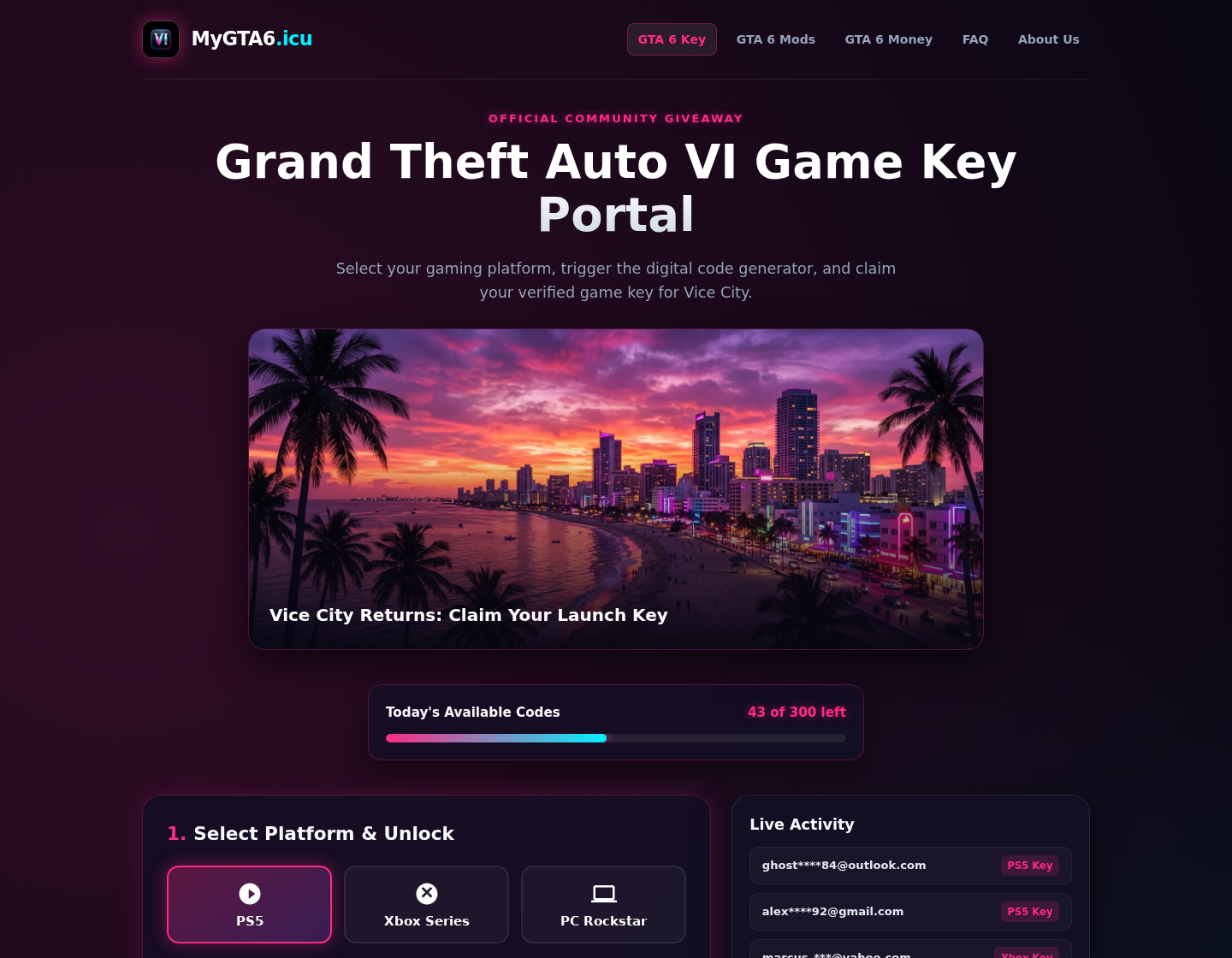
The site at mygta6[.]icu calls itself an official community giveaway and offers to generate a code for PlayStation, Xbox, or PC.
Its page showed 43 of 300 codes left on October 27, and that same count was still visible on November 29.
The counter sits above a list of masked email addresses, which the page presents as people who have recently claimed codes.
The same stock number across those captures cannot tell you how many copies were available, whether anyone received one, or whether the giveaway was authorized.
That is worth noticing because the page labels the number as today’s stock, rather than a record of how many codes it started with.
The Missing Part of the Code Is the Hook
Netcraft found that the page displayed part of a key and claimed the rest would become available only after at least two outside offers.
Those offers included prize draws, surveys, and product tests, which were unrelated to redeeming a game in the store for your console.
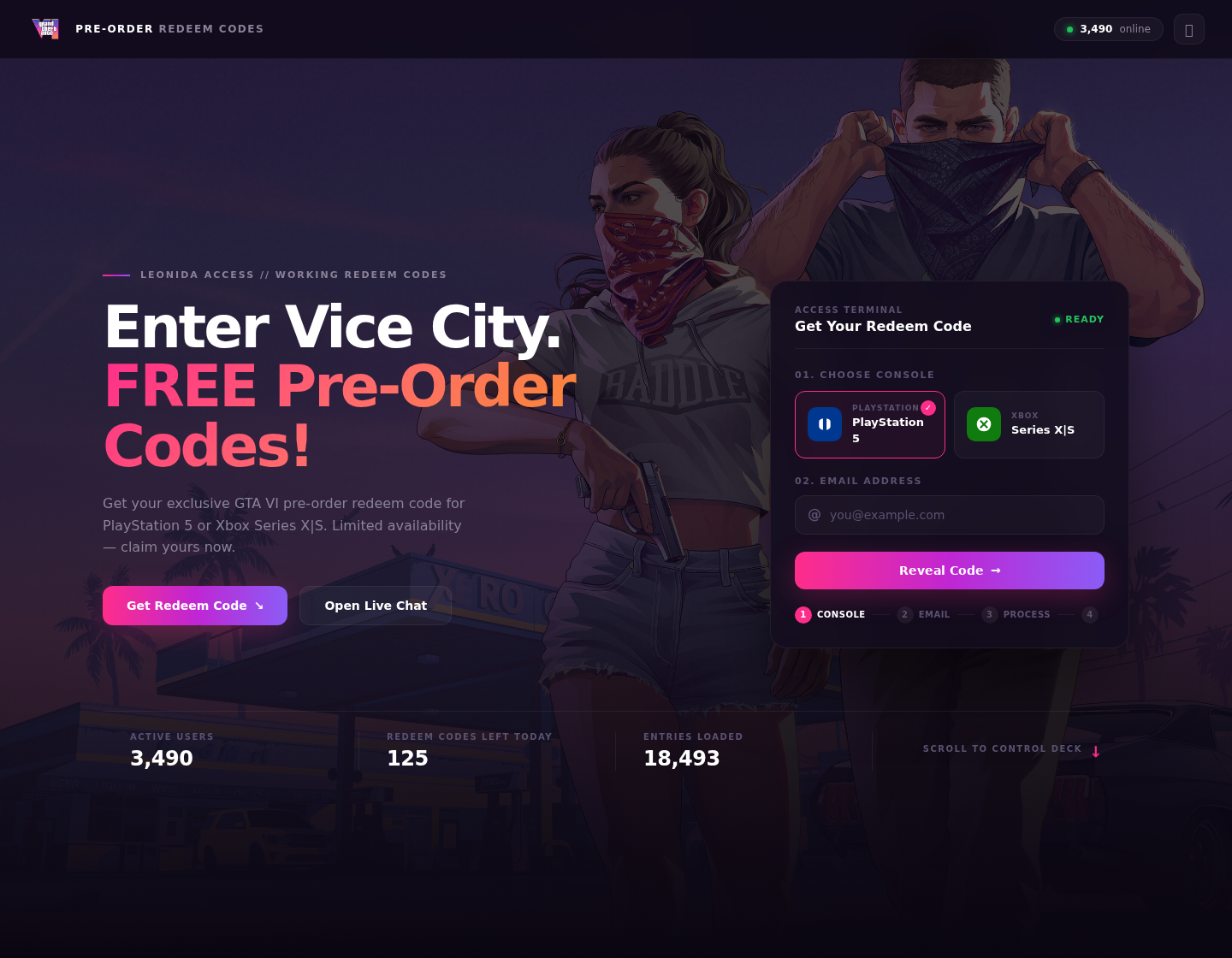
A similar page at gta6keycodes[.]com displayed a form for your email, a stock counter, and a choice between PS5 and Xbox Series consoles.
- You can see an email field and a code counter without seeing any evidence that the operator has codes to give away.
- A partial string is not an issued voucher, even when the site presents it next to the console you selected.
- The surveys are separate offers, so any contact or payment details you submit can go to another company rather than the console store.
A Survey Can Benefit the Site Without Giving You the Game
Malwarebytes documented a related giveaway funnel that routed visitors to tracked advertising offers after they were promised a free code.
An offer can pay a commission for a completed signup or install, which gives the referring site a reason to send you there.
That finding does not establish who ran the two named pages, what anyone earned, or whether every visitor was shown the same offers.
It does explain why the site can benefit from sending a player somewhere else even when the player never receives the game.
How the GTA 6 Code Generator Scam Works
Step 1: The Page Lets You Pick a Console Before Explaining the Deal
The first screen asks whether you want the game on PlayStation or Xbox, much like a real game offer would ask.
MyGTA6 also presents a PC option, even though that menu is not an official announcement that Rockstar has released a native PC version.
On the other page, the number of active users appeared alongside an email field and the promise that only a few codes remained.
Netcraft’s capture showed 3,490 active users there, and a later view still showed 3,490 even though the displayed code count had changed.
Step 2: The Page Makes a Few Characters Look Like a Reserved Code
After you choose a platform, the page wants the next screen to feel like the final part of a transaction you already started.
Netcraft described a partial code on each site, with the characters you would need for redemption held back until another task was complete.
A row of letters or numbers does not show that Sony or Microsoft issued anything, even if some characters look randomly chosen.
The page can display a partial string before any account has been credited, because showing characters is not the same as issuing a license.
You have nothing to lose by closing a tab that has never shown you a complete voucher or added anything to your account.
Step 3: Verification Turns Into a List of Sponsored Offers
In the path Netcraft documented, MyGTA6 sent visitors to a list of activities it called human verification rather than displaying a complete code.
In the visit Netcraft described, the requirement was to complete at least two offers, not to answer a simple question about the game.
The other generator used a countdown after displaying a partial code, making unrelated signups or downloads feel like the last chance to claim it.
You may see the term content locker for this setup, which means the promised item stays hidden until you do something for another site.
The difference matters because a survey company, trial provider, or app publisher may ask for information that a console store never needed.
A separate GTA 6 map offer used a similar lock for a companion download, but these pages promise a code for the full game.
A prize draw may ask for contact details, while a trial may ask for a payment method and set a renewal date.
Those are separate decisions, and the promise of a game key does not make it safe to agree to either one.
Step 4: The Sponsor’s Confirmation Is Not a GTA 6 Receipt
A confirmation from a survey service only tells you something about the survey, not whether a copy of the game was issued.
If an offer includes a trial, check whether that business sent a confirmation and whether it can bill you separately from the giveaway.
The app you installed or account you created could be real, even though it has no authority to deliver the game.
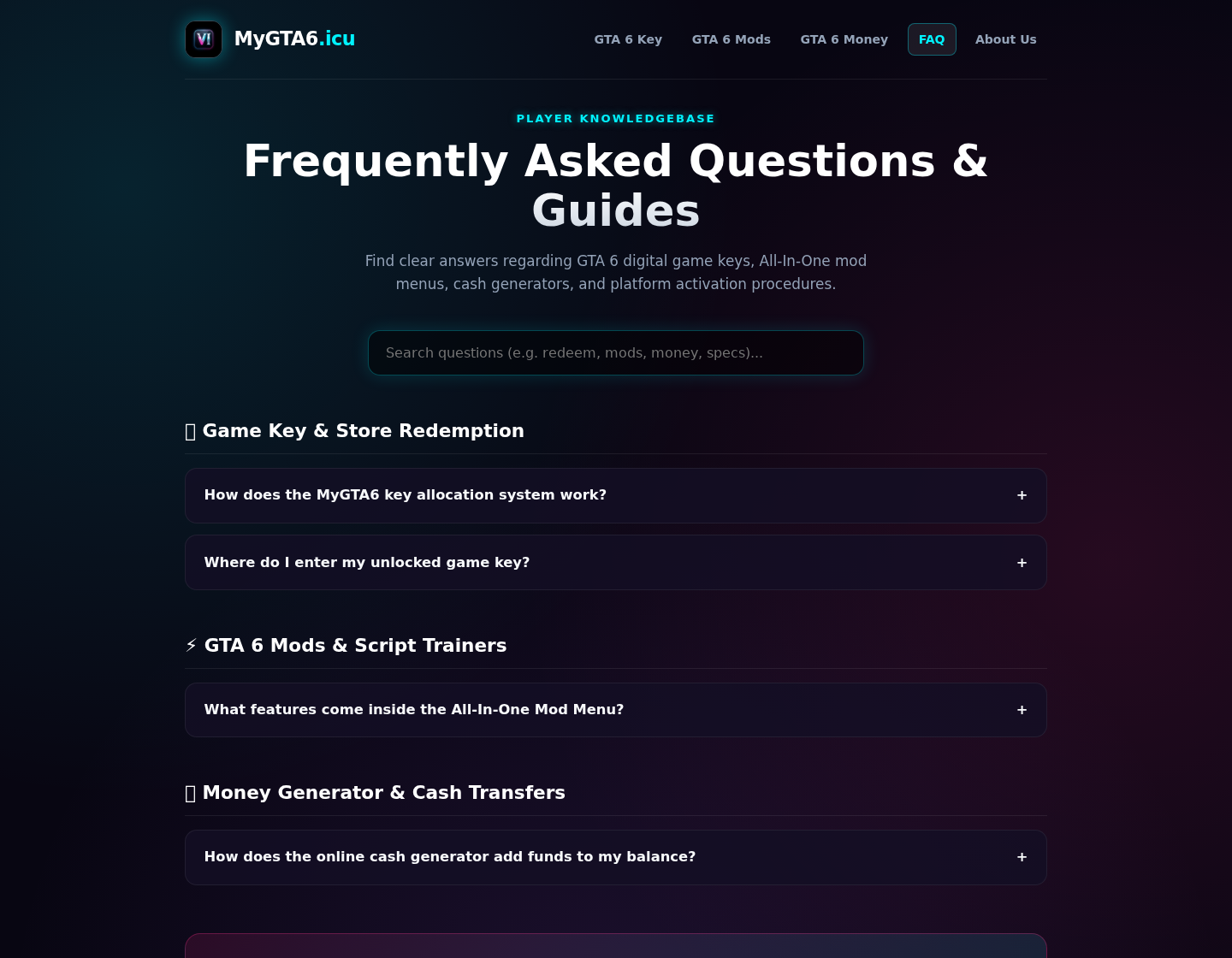
MyGTA6’s own FAQ claims that its codes come from sponsored batches, then names the real platform stores as places to redeem them.
Those store names are real, but listing them does not show that the site can allocate licenses for Sony, Microsoft, or Rockstar.
If a message says you have another task to complete, do not give it more information just because the page mentions a real store.
If an outside page introduces new terms, note who is making the offer before entering anything that would let them contact or bill you.
How to Redeem a Real GTA 6 Code
Start with a complete code from an independently verified seller or promotion, and keep the order confirmation until you see the correct product.
Visit Rockstar’s GTA VI page to confirm which platforms and buying routes the publisher lists before trusting a giveaway’s platform menu.
The console’s store checks what the code is for, so a giveaway’s own success screen cannot tell you whether it will work.
Redeem on PlayStation 5 or in the PlayStation Store
On PS5, open PlayStation Store, press the triangle button for the menu, then select More and Redeem Code while signed into your account.
Enter the 12-digit voucher and select Redeem, then verify the product or credit that appears and select Download when the store offers it.
On the web, Sony’s voucher instructions start from PlayStation Store and your profile menu, where you can choose Redeem Code without visiting a giveaway.
A PlayStation voucher is tied to its region, so check the seller’s region and the account you are using before trying again.
Sony distinguishes a voucher from a discount code, so a code for savings at checkout does not necessarily add the game to your library.
If you redeem on a shared console, check the profile before confirming because content cannot simply be moved between PlayStation accounts.
Redeem an Xbox Code Through Microsoft
Open Microsoft’s code redemption page, select Redeem code, and sign in with the personal Microsoft account that you use on your Xbox.
Enter the complete code and follow the prompts, checking the item and account before you finish redeeming it through Microsoft’s service.
If you expected GTA 6 and the service shows another item, do not complete the redemption until you have checked your receipt.
If a real code is rejected or already used, save the official error and contact the seller or platform without sending the code publicly.
Once the platform confirms redemption, check the library or account history for the item instead of relying on a separate email from the giveaway.
What to Do If You Have Fallen Victim to This Scam
- If all you did was open the page or pick a console, close it without submitting the form or opening any more offers.
- If you submitted only an email address, mark suspicious follow-up messages as spam and verify any claim directly with the company it names.
- If you entered a password, change it on the real service and wherever you reused it, then review account activity and enable two-step verification.
- If you started a trial, save the receipt and check whether the app store, phone carrier, or the provider itself handles the billing.
- If you supplied card information or see a charge you did not agree to, contact the card issuer through its own app or phone number.
- If you installed an unfamiliar app, remove that app and review its permissions rather than assuming closing the giveaway also removed it.
If You Gave Only Contact Details
Someone who has your email address can send a convincing message about a code you are expecting, without having access to your inbox.
Check unexpected delivery, support, and payment notices without opening their links, and use your mail app’s reporting tools to mark the message as spam.
Giving an email address alone is different from typing the email account’s password or giving someone a sign-in code from a text message.
If you did share a password or a sign-in code, start with the affected account’s own security settings and sign out unfamiliar sessions.
Work through the accounts that share that password, especially email accounts that other services use to send password reset links and security alerts.
If a message says your code has expired and demands a fresh payment or password, go directly to the service and check your account there.
If You Signed Up for a Trial or Found a Charge
Start with the receipt or bank statement, because the name handling the subscription may not match the name you saw during the giveaway.
For Google Play billing, open Play Store, tap your profile, choose Payments and subscriptions, open Subscriptions, and select the plan tied to the charge.
Tap Cancel subscription and follow the prompts, then verify the cancellation before you leave the subscription details or switch to another Google Account.
On iPhone, open Settings, tap your name, choose Subscriptions, select the relevant plan, and use Cancel Subscription if that option is available.
If you cannot find the plan in either store, check whether the company billed you directly or whether the charge appears on your phone bill.
Send a cancellation request through the identified provider’s real channel, and keep the date, case number, and any email confirming when billing ends.
For a charge you did not approve, use your card issuer’s dispute process and keep the records recommended in the FTC’s subscription guidance.
If your phone bill shows the charge, ask your carrier to identify the seller, dispute the line item, and discuss blocking further third-party billing.
If the subscription belongs to another account on your device, check that account’s receipts before assuming the provider failed to cancel it.
Keep the first confirmation and the last bill together so you can show when the trial started and whether charges continued after cancellation.
If You Installed an App to Complete an Offer
An installation is a separate exposure, not evidence that every app listed in the offerwall was malware or that viewing the page infected your device.
On Android, open Settings, go to Apps, select the unfamiliar app you installed for the offer, and choose Uninstall if it is available.
Open Play Store afterward, tap your profile, and use Play Protect to check whether it reports any other harmful apps.
On iPhone, press and hold the app, choose Remove App and then Delete App, and confirm deletion when the device prompts you.
Removing an app does not cancel its subscription, so go back to the billing provider and check renewal separately if you accepted a trial.
If the only thing that happened was a file download, do not open it to check its contents or prove what the offer sent.
Use the download list to locate the file without running it, and remove it if you are sure which file the page sent.
Frequently Asked Questions
Is the MyGTA6 Official Community Giveaway Run by Rockstar?
The wording appears on the giveaway itself, and the documented path leads to outside sponsored offers rather than an official Rockstar redemption process.
Use a promotion you can reach independently from the publisher or platform, not an official label written by the person making the offer.
Does a Partially Visible Code Mean I Have a Copy Reserved?
An incomplete code on a third-party page is not evidence of a reservation, because the console store cannot verify the part you were shown.
If the only way to reveal it is by installing apps or signing up for unrelated trials, leave without trying to finish it.
Can I Finish the Survey With a Second Email Address?
Using a different address does not make the promised code legitimate, and the outside offer may ask for other contact or payment details.
Close the page rather than trying to find a safer way through a process that cannot show you a valid code first.
Does Giving My Email Address Compromise My Gaming Account?
An email address does not give someone your password, but it does help them send messages that look like a continuation of the giveaway.
If you entered the password too, change it from the real account page and check for anything you do not recognize.
Do I Need a New Card After Opening the Giveaway?
Opening the page is not the same as supplying card details, so start by working out what you entered and whether any charges appeared.
If you entered the number or see an unfamiliar charge, tell your issuer exactly what happened and ask what protection it recommends.
If you merely gave a phone number and cannot see any charges, you can still check the next statement without assuming billing has started.
Why Is a Console Store Still the Safest Place to Enter a Code?
The store can show which product belongs to the complete code and apply it to your account without a third-party survey or trial.
If you already have a complete code from a legitimate source, type it into the platform’s own redemption page rather than a generator.
If a supposed support agent asks you to send back the full code, stop and verify that you are using the platform’s official help.
The Bottom Line
Do not complete offers for these GTA 6 generators, because a partial code and a busy feed are not proof of an issued voucher.
Redeem a complete code only through the console’s own service, and deal directly with the billing provider if you already started an offer.

Join the discussion
0 commentsShare your experience or ask a question about this article.
Community experiences
Did this happen to you?
Your experience could help someone recognize the same scam. Submit a private report for our team to review.
I experienced this tooReports are reviewed before publication. Sharing publicly is always your choice.
Discussion
Start the conversation
Have a question or something useful to share? Add the first comment.