


A message about your account arrives between practice and class. With teammates, sponsors, and followers watching that profile, even a routine-looking warning can feel urgent.
For a student-athlete, the difficult part is knowing which interruption deserves attention. Some messages are counting on you making that decision before you have a quiet minute.
Overview
Why a public athletic profile can attract unwanted attention
The FBI and NCAA warned student-athletes about sexual exploitation targeting their public visibility, including attention associated with name, image, and likeness activities.
NIL partnerships are legitimate. An athlete should not have to abandon business opportunities, team updates, or ordinary friendships to deserve privacy.
The problem is someone abusing that visibility. A familiar school name or reference to your sport can make a stranger’s message feel less random.
The account warning can be the opening, not the whole attack
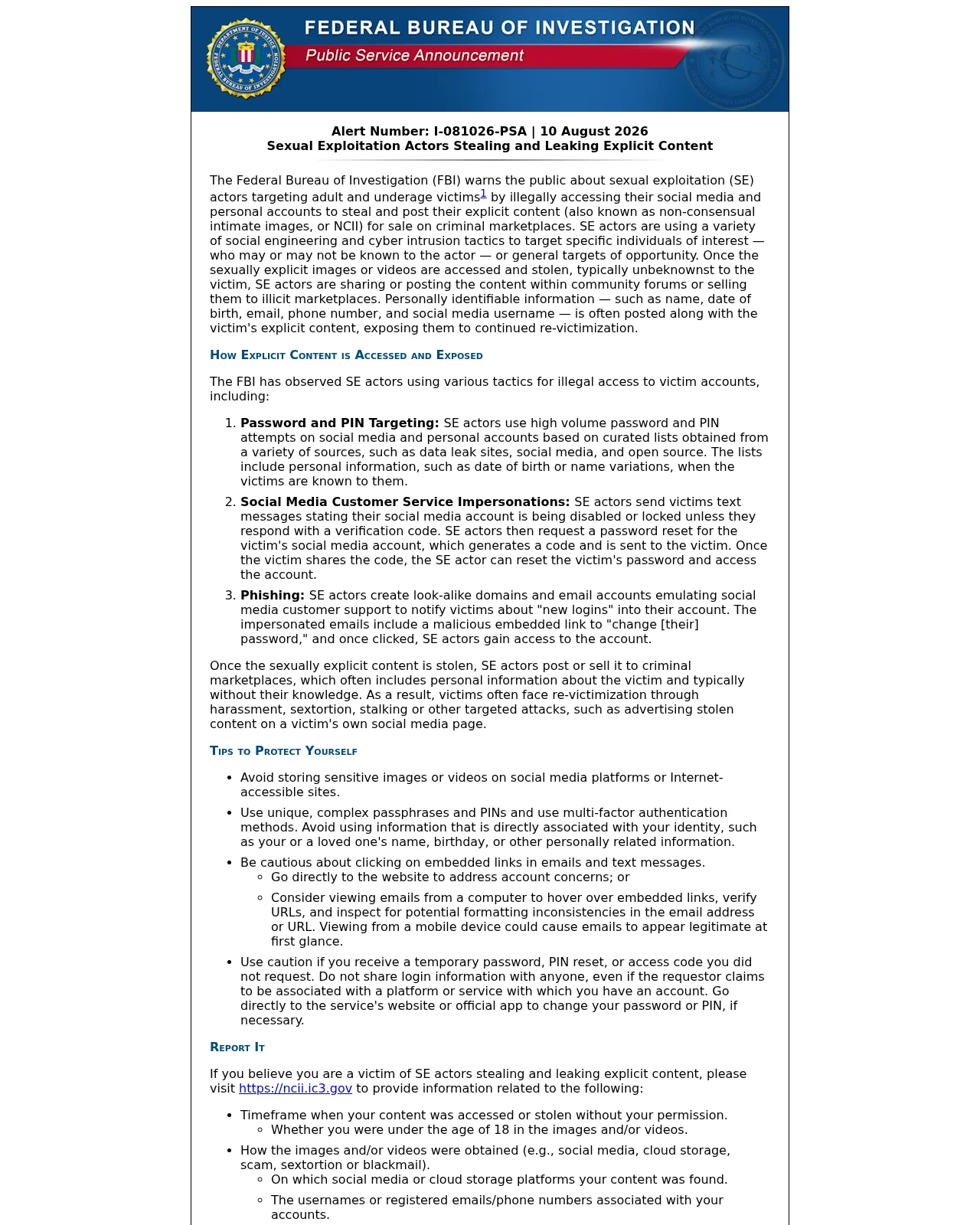
The FBI’s August 10, 2026 public alert describes fake support texts, password-reset phishing, and attacks against passwords and PINs.
Stolen intimate material may be shared or sold without the person’s knowledge. Subsequent abuse can include harassment, stalking, or sextortion.
These are separate problems, even when they happen together:
- Account takeover means someone obtained unauthorized access.
- Intimate-image abuse concerns private material distributed without consent.
- Sextortion adds a threat intended to force payment or other compliance.
You do not need to handle this as a private emergency
A threatening message is not a reliable forecast of your athletic future. Its sender does not get to decide whom you can trust or ask for help.
You can protect an account, document a threat, and seek support without publicly explaining your private life. Those actions do not require satisfying the offender first.
How the Student-Athlete Sextortion Scam Works
Step 1: An unexpected message borrows a familiar context
For example, imagine a notification arriving on a day when you are already answering messages about a competition or brand collaboration.
A reference to your profile may blend into that workload. The important question is not whether the message sounds relevant, but who actually sent it.
A display name is only a label. Seeing a platform’s name beside a message does not establish that its support team is speaking.
Do not move a supposed account problem into a private conversation simply because the sender appears to know something about you.
Step 2: A supposed security fix asks for account access
In the FBI-described code trick, the offender initiates a password reset, then impersonates support to persuade the account holder to surrender the resulting verification code.
The code can be genuine while the request for it is fraudulent. Its arrival does not authenticate the person asking you to repeat it.
A useful distinction is who started the process. A recovery action you opened independently is different from instructions supplied by an unsolicited correspondent.
Likewise, a button labeled “change password” tells you nothing about the destination behind it. Open the account yourself instead of treating the message as your entrance.
Step 3: The attacker crosses from the inbox into the account
The reset code can put the offender in control of the targeted login. What appeared to be a conversation about security has become unauthorized account access.
The important boundary is which account was taken over. Access to one social profile does not automatically unlock every separate email or cloud account.
But anything available inside that compromised account may now be exposed. Private content and identifying details are no longer protected simply because the profile looks unchanged.
There may be no public sign of this stage. The person believes the warning has been handled, while the offender has reached information behind the login.
Step 4: Private material becomes leverage or a commodity
The FBI warns that offenders may distribute stolen material alongside identifying details, exposing people to further targeting. A payment demand is not required for this harm.
That distinction changes the response. Someone who discovers an unauthorized post still needs help even if nobody has contacted them asking for money.
Do not visit criminal marketplaces to investigate yourself. Record a location you already know and give that information to the platform or appropriate reporting service.
Step 5: A threat tries to turn panic into compliance
An offender may threaten exposure to teammates or others. Paying, supplying identification, or sending more material does not reliably prevent distribution, according to the FBI.
A countdown is pressure, not a deadline you must obey. You can put down the phone and bring another person into the situation.
Do not challenge the sender to prove the threat by distributing a sample. You do not need a more damaging demonstration before seeking help.
What to Do if You Have Fallen Victim to This Scam
-
Stop the exchange and get someone on your side.
Do not send money, additional images, identification, or another code. If you already did, that is a reason to seek help now, not to keep complying.
Ask a trusted person to sit with you while you work through the next steps. You can begin with a simple sentence: “Someone is threatening me online.”
If the threat involves immediate physical danger, contact emergency services. Otherwise, choose a trusted adult, counselor, campus safety representative, or athletics health professional.
-
Keep useful records without spreading the images.
Write down the account name, profile address, contact information, time, demands, and any payment reference. Save non-explicit threat messages before reporting and blocking the sender.
Keep a brief timeline: first contact, any code shared, loss of access, threats, and reports made. It helps avoid retelling everything whenever someone new assists.
Do not forward intimate material to coaches or friends as proof. In particular, do not download or request copies of sexual images involving someone under 18.
-
Recover the affected service through its own support route.
Use an app you already have or enter the known website address yourself. Avoid support links, phone numbers, and supposed recovery specialists supplied by the offender.
Meta provides an official Instagram account-access route. Its support guidance also describes in-app help and Security Checkup.
Follow the recovery questions that match your situation. Never send a stranger a verification code because they claim to be arranging that recovery for you.
For a university-managed account, contact your school’s established IT service desk. Explain whether you shared a password, supplied a code, or approved a sign-in.
-
Check the recovery mailbox, not just the social profile.
For Google accounts, use its compromised-account instructions. Review security events and devices, correct unfamiliar recovery details, and examine connected applications.
In Gmail, check forwarding and filters you did not create. Review unfamiliar sharing in Google Photos or Drive rather than assuming a recovered inbox resolves everything.
Replace a reused password on the other accounts where you used it. Turn on two-step verification after checking that the recovery information belongs to you.
Do not approve a new login notification while someone is directing you over chat. Finish the account work independently, then return to your written checklist.
-
Review linked cloud accounts where relevant.
If your Apple Account may be affected, follow Apple’s recovery guidance. Change its password, correct security information, and remove unfamiliar devices.
Check that you control its associated email addresses and phone numbers. If access has been lost, use Apple’s established account-recovery process rather than an unsolicited helper.
For a school mailbox or another provider, ask its support team about active sessions and recovery settings. Do not copy instructions between unrelated services blindly.
If you also installed an unfamiliar app or granted remote access, tell campus IT specifically. That extra exposure needs assessment beyond this account-recovery checklist.
-
Report the account abuse and any known posts.
Use the platform’s reporting controls for threats and non-consensual intimate images. Keep the report confirmation or case number so you can follow up.
The FBI’s NCII portal accepts reports about stolen or distributed intimate material. Describe what happened, including any threats and known posting locations.
There is no need to wait until a demand arrives. Account theft and unauthorized distribution deserve attention even when the offender remains silent.
-
Use the appropriate image-protection route below.
Your age when the image was created matters. Being a college student now does not automatically make every older image eligible for the same service.
-
If you paid, contact the payment provider promptly.
Tell the bank, payment app, card issuer, or exchange that the transaction involved coercion or fraud. Ask what cancellation, reversal, or dispute options remain.
Keep receipts and transaction identifiers. The FTC’s payment-recovery guidance separates the options by payment method; a refund is not guaranteed.
Be wary of another stranger offering guaranteed deletion or recovery for an upfront fee. Do not give a new person control of your accounts.
Which Image-Reporting Route Fits Your Situation?
If the image was taken before you turned 18
NCMEC’s Take It Down is for qualifying images taken when you were under 18, even if you are an adult today.
NCMEC directs submissions from the device where the images were originally taken. Fingerprinting happens there without submitting the image itself.
Participating platforms can use that fingerprint to identify matching content. It does not cover the whole internet or encrypted services, and removal cannot be promised.
Do not download or request files. Without access to that original device, seek help through NCMEC’s CyberTipline.
You can report threatened distribution as well as material already shared. Using the fingerprint service does not replace asking for help with an ongoing threat.
If you were an adult in the image
If you are now an adult and were 18 or older in the image, StopNCII.org provides a fingerprinting option for files you already possess.
You must be the person shown. A teammate or coach should not start collecting files to create a case on your behalf.
The service shares fingerprints with participating companies, not your original files. Its FAQ explains that it is not an internet-wide removal service.
Keep your case number and PIN securely. StopNCII says lost access details cannot be recovered, so do not store the only copy inside a compromised account.
If content has already appeared, report the actual post to the platform too. Do not wait for a fingerprint match before using the platform’s abuse process.
If a platform has not acted on your removal request
The FTC explains that covered platforms must provide a removal process under the Take It Down Act and act on qualifying requests within 48 hours.
Follow the platform’s specific intimate-image removal procedure and retain confirmation. A report about an account login is not necessarily the same request as an image-removal notice.
If the platform fails to comply, the FTC directs people to TakeItDown.ftc.gov. This is separate from NCMEC’s similarly named fingerprint service.
Do not read that deadline as a promise that every copy, on every site, will disappear. Keep track of individual reports and seek assistance with unresolved posts.
Protect Your Privacy Without Abandoning Your Team or NIL Work
Give business contacts a route that does not expose everything else
Consider a dedicated contact address for public business inquiries instead of publishing the mailbox that controls personal account recovery.
Keep a simple record of genuine partners and their usual contact methods. When a different account requests a sudden security action, check with that partner independently.
A real collaboration should be assessed on its business terms. Someone demanding a login code is asking for account access, not negotiating a sponsorship.
You do not need to make your public profile more personal to prove that you are approachable. Professional availability and private account control are different things.
Tell one person what help you need
Choose someone who can help with the task in front of you: account access, personal safety, emotional support, or a report to the platform.
You might ask a counselor to support you while campus IT handles the login. Neither task requires turning the situation into a team announcement.
The NCAA’s mental-health resources point student-athletes toward campus and athletics support. You deserve care whether or not money was demanded.
Before sharing sensitive details, ask how they will be handled and who may need to know. Do not assume every campus role offers the same confidentiality.
If you are helping an athlete, keep the next step manageable
Start with what would help now, not why the athlete answered. Blame can make an already difficult conversation harder to continue.
Offer practical choices: sit together during recovery, write the timeline, find the campus reporting contact, or arrange a counseling appointment.
Do not ask to inspect intimate files, circulate screenshots in a staff chat, or confront the offender yourself. Protecting the person comes before satisfying anyone’s curiosity.
Let the athlete know what you are doing and why. A clear next action is more useful than another alarming prediction about what might happen.
Frequently Asked Questions
Is every account warning sent to a student-athlete a scam?
No. Check a warning inside the service you open independently. Do not use an unsolicited message’s link or surrender a code to its sender.
Does a real verification code prove the person messaging me is support?
No. A genuine code does not establish who requested it. Keep recovery actions inside the official process you started, not a stranger’s conversation.
What if nobody has demanded money?
Unauthorized access or sharing still needs a response. Recover the account and report known abuse without waiting for blackmail.
Can I use Take It Down if I am already in college?
Yes, if you meet its requirements and were under 18 when the image was taken. Your current college status is not the deciding factor.
Will paying make the images disappear?
Do not pay for a promise of silence or deletion. You cannot make an offender surrender every copy by accepting their terms.
Should my coach collect the images to make a report?
No. A coach can help locate appropriate support without collecting intimate files. Record usernames, threats, and report references instead, and follow the service’s safe reporting instructions.
The Bottom Line
Do not send a code, money, identification, or more images to someone threatening your account or reputation. Their pressure is not a legitimate recovery process.
If you responded, work through official account recovery, preserve non-explicit evidence, and use the reporting route that fits your situation. Bring someone you trust alongside you.
Your sport, public profile, and NIL opportunities do not make this your fault. The practical goal is getting support and control back, not meeting an offender’s demands.

Join the discussion
0 commentsShare your experience or ask a question about this article.
Discussion
Start the conversation
Have a question or something useful to share? Add the first comment.