


A Vinted email says you reported a listing. You can’t remember doing it. You may never have used Vinted at all.
Then, in the middle of the message, there’s a line about someone buying your item. Those two stories deserve a closer look.
Overview
The subject says you filed a report
The Vinted report email scam starts with a receipt for an action you don’t recognise.
The message is headed like a confirmation for a report about a prohibited or illegal listing.
In a public report, a recipient without a Vinted account said the description inside the email told them an item had sold.
It directed them to an external website to confirm the transaction.
The message also included a link to a real listing in another part of the receipt.
A familiar marketplace link can make everything around it look like it came from the same place.
The sale claim is in the description
Look at what surrounds the sale instruction. The email is supposedly summarising a complaint about a listing. The line about a buyer appears inside the description of that complaint.
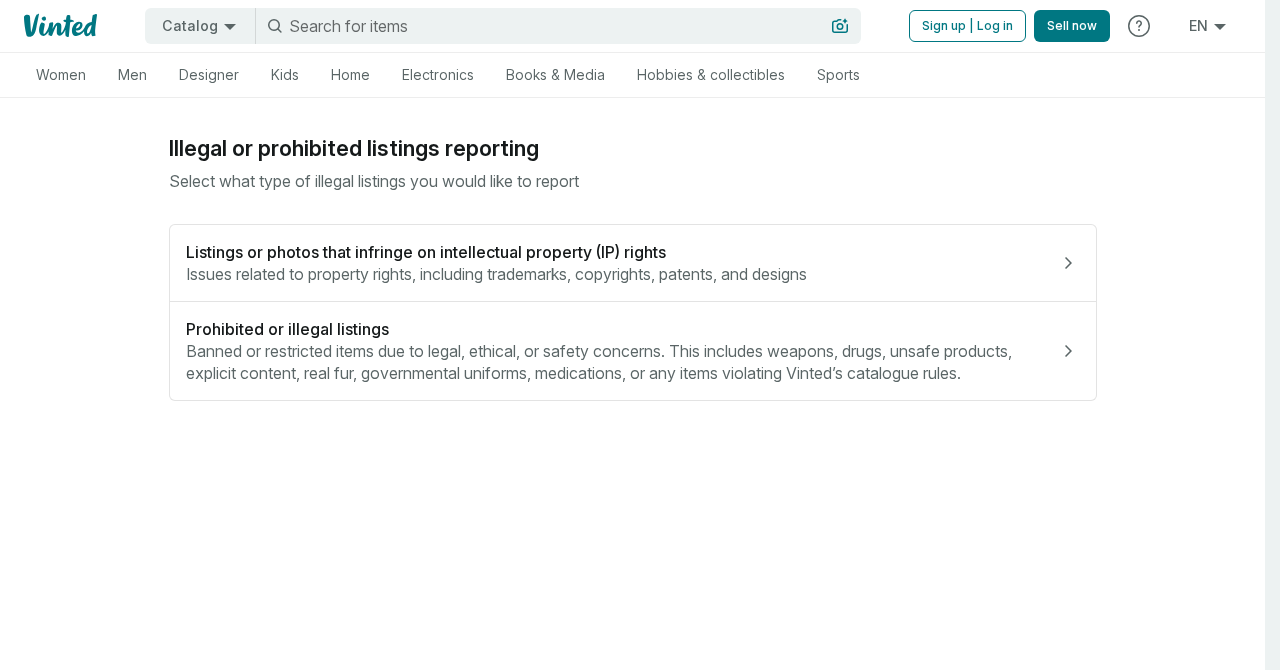
Vinted has a genuine form for reporting prohibited or illegal listings, shown above. The recipient reported that the email appeared to come from Vinted’s no-reply address.
The original email headers and external page are unavailable.
That limits what can be said about who sent this particular email and what the external page would have asked you to do.
Vinted’s phishing guidance separately identifies bogus emails asking sellers to confirm a sale through a malicious link. The sale instruction is what you need to recognise here.
Look for these details in your own inbox
- A report confirmation arrives even though you filed no report.
- A buyer or order is mentioned inside the report’s description.
- The sale instruction leads away from Vinted.
- A separate link to a real listing makes the email look more familiar.
- The transaction you’re being asked to confirm is missing from your own orders.
You only need to verify one thing before doing anything with the supposed sale. Is there an order for the item in the account where you listed it?
Why This Is Different From an Ordinary Fake Sale Email
A classic fake buyer may send you a message that looks like an order confirmation. The message itself tells you that you have a sale and need to complete it.
Here, the email’s overall purpose is different. It says a complaint was filed. The suspicious sales instruction sits inside the material the receipt is supposedly summarising.
Think of the difference between a delivery company sending an envelope and the person who wrote the letter inside it.
You can recognise the carrier and still question what the letter asks you to do.
The same caution applies when a service shows you words written by another user.
An email can include a real title, a real marketplace URL and a sentence that deserves to be treated as untrusted.
A sender check can help a support team investigate the message.
As a seller, you can usually make the important decision faster by opening your account and finding the actual order.
That also helps people who never had an account.
An unexpected notice may look like a reason to register or reset a password. You have no sale to process through that email.
How the Vinted Report Email Scam Works
Step 1: A report receipt arrives out of the blue
The subject sounds administrative. Someone has supposedly raised an issue with a listing. If you sell on Vinted, you may wonder whether there’s a complaint about something in your wardrobe.
If you don’t sell there, the message can still provoke a different question. Did someone sign up with your email address? Either way, curiosity gets the email opened.
A second recipient separately described a burst of similar report notices they hadn’t requested.
Treat each message as its own evidence. The number of emails alone tells you little about the state of an account.
Step 2: The description suddenly changes the subject
Inside the message, the description tells a different story. It says an item sold and gives the reader a way to confirm it.
A report about banned goods and a completed sale belong to different parts of the marketplace. The moment one turns into the other, take your next step inside the app.
Someone receiving the email on a small screen may see the sale message in isolation.
Scroll back to the heading above it. Which part of the email is actually making the claim?
Step 3: A real listing adds credibility
The reported receipt included a normal Vinted listing link in its own section. The sale message was elsewhere in the email, next to an external link.
An authentic listing can look like evidence that the order is real.
A listing shows an item is or was offered. You still need an order record for the specific transaction.
Leave the listing owner out of your investigation unless Vinted’s support team asks for information. The receipt can name a real item without its seller knowing anything about the email.
Step 4: The transaction link tries to take you elsewhere
The sale instruction asks the reader to leave the marketplace to confirm the order. You can stop there.
A genuine Vinted sale is something you can reach through the account where you listed the item.
External pages in fake sale scams may ask for card details, an account password or a banking approval.
The specific link from the public report was withheld, so its exact request is unknown.
If you followed a link and it asked for information, write down what you saw and what you typed.
You can give that account to support without opening the page again.
Step 5: What you do on that page determines the risk
Someone who closes a suspicious page immediately is in a different position from someone who entered a password or approved a transaction.
If you typed your account password, treat that password as exposed. A seller with an account should check active sessions and review orders or changes to their payout details.
If you entered card information, call your issuer. If you approved a request in your banking app, tell the bank what the request said and when it appeared.
How to Check Whether You Really Sold the Item
Open the app from your home screen or use the marketplace address you normally visit.
Go to your own sale or order history and look for the listing named in the message.
A confirmed sale will have a place in the marketplace’s workflow. You can see the transaction, check its status and follow shipping instructions from there.
Vinted’s safety information describes payments made through the service. Use the order itself to see where the transaction stands. Avoid entering card details through a receipt about prohibited items.
Check the order before packing anything
An item still showing as available is worth a second look. Refresh the app and check your sales and messages in the same account you used to list it.
Check which item the order actually names. If you have two similar listings, an email alone makes it easy to confuse them.
Open any shipping instructions from the order. A convincing email can make you pack something and send it before you’ve confirmed who bought it or where it should go.
When you can see a real order and still have a question about payment or delivery, use in-app support from that transaction.
You’ll start with a record that the marketplace can find.
If you don’t have a Vinted account
You can report the message as phishing without creating an account. Forward the original to the address in Vinted’s phishing guidance, then use your mail provider’s phishing report option.
A notice that reached your inbox does not show somebody signed in to your email.
Look for separate evidence, such as genuine sign-in alerts or changes in your email account’s security settings.
If you’re worried someone used your address to register, contact Vinted through its own website. Keep the message available so support can see what kind of email it was.
What the original email can tell Vinted support
Give support the original message if you still have it. It preserves details about how the email was delivered and can help a reviewer examine the separate links.
If you only have a screenshot, include the subject and the part of the description that mentions a sale. Remove other people’s private information from anything you share publicly.
If a forwarded message hides the part that worried you, tell support exactly where it appeared. In this case the instruction was inside the description, under the report summary.
Include whether you ever filed a report or had a Vinted account. That gives support a starting point if it needs to trace why the email reached you.
If the report lands while you’re expecting a real sale
Keep the current sale in the app open separately. That way you can compare the item, buyer and order status against what you know you actually listed.
If the buyer is asking about shipping in the real order, keep that conversation there. It preserves the record if a shipping or payment question comes up later.
Look at what the external page wanted from you. If it asked for your card to release funds, make a note of the request and share it with support.
If a package is already on its way, get the tracking number from your carrier’s official record.
Save the delivery address and the label used, even if you can’t intercept it.
If the suspicious message arrives around the same time as a legitimate purchase, check both separately.
The timing can be a coincidence and the app can show the order you actually made.
What to Do if You Have Fallen Victim to This Scam
-
Close the external page. Open Vinted separately if you use it and check the order from your own account.
-
Change a Vinted password you entered through the link. Secure your email as well if you reused that password. Review recent account activity and security settings.
-
Call the card issuer immediately if you supplied payment information. Explain whether you also approved a payment, confirmed a wallet request or read out a code.
-
Contact Vinted support about changes to orders, delivery details or your payout information. Quote the order reference from the app when one exists.
-
Save the original email and screenshots you already have. Note the destination address and keep a record of any transaction you need to dispute.
-
Forward the email to phishing@vinted.com. If money left your account, make a local fraud report and keep the case number with your payment records.
-
Contact the carrier promptly if you sent an item outside the confirmed order process. Ask whether it can intercept the parcel and keep the tracking history.
Treat each exposure separately. Changing a marketplace password won’t address a card you entered, and replacing the card won’t undo a delivery already arranged through a fake order.
If you downloaded or ran something from the page, stop using that device for payments until it has been checked. An updated scan with Malwarebytes can help assess suspicious downloads.
AdGuard can help reduce some deceptive ads and site visits. The actual order in your Vinted account remains your strongest check.
Keep an eye out for a follow-up that sounds like support stepping in.
Reach support yourself, especially if a new message wants another payment or says you need to act before a deadline.
Frequently Asked Questions
Why did Vinted say I reported a prohibited listing?
The message you received may be a report receipt or may imitate one. If you didn’t file a report, you can forward it to Vinted’s phishing team for review.
Does a real Vinted listing make the sale instruction safe?
Check the sale in your own account. The link to a listing and the separate instruction to confirm a transaction are two different things.
Can a Vinted sale appear only inside a report description?
Use the actual order screen for a sale. A description in an unrelated email isn’t an order record, even if it displays an order-looking reference.
Should I contact the person selling the linked item?
Send the message to Vinted support. The listing’s owner may have had nothing to do with the email. Avoid sharing your address or account details with them.
Does receiving the email mean my Vinted account was compromised?
Check your sign-ins and transactions through Vinted if you have an account.
The email’s arrival alone leaves that question open. Act immediately if you entered your password on the external page.
What if my bank asked me to approve something?
Reject an unexpected approval and contact the bank yourself. If you already accepted it, tell the bank when it happened and what the confirmation said.
The Bottom Line
Leave the sale link in the report description alone. Open Vinted yourself and check your orders. If you’ve never used Vinted, forward the receipt to its phishing team.
If you entered a password or payment details, secure the affected account and contact the card issuer as appropriate.
Save the original email so support can examine the two links in context.

Join the discussion
0 commentsShare your experience or ask a question about this article.
Discussion
Start the conversation
Have a question or something useful to share? Add the first comment.