Battle Best computer maintenance tools

Compare list
WiseCare 365
GlaryUtilities
iOLO system mechanic
Privazer
Ccleaner
Kerish Doctor
Bleachbit
O&O
HiBit Uninstaller
Others ( Please specify )
Platform(s)
  1. Microsoft Windows
I used Microsoft PC Manager, but not Ashampoo's WinOptimizer. Does it offer any advantages over competing programs, and is it safe?
Can't compare, I've never used any of the others. Since I've never used any of the others, except Microsoft PC Manger, I would have to guess that it's as safe as the others unless you get aggressive with the Registry cleaner, which PC Manager does not even have. Ashampoo has a fairly good reputation for their products, the one exception for me though is their backup/recovery program which, when compared to Macrium or Terabyte, absolutely sucks.
Acadia
 
  • +Reputation
Reactions: lokamoka820
@Sampei.Nihira

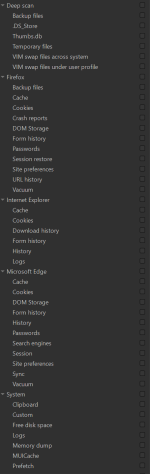
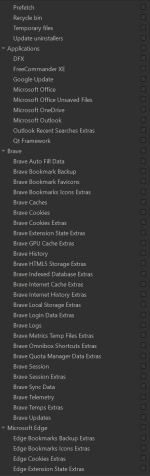
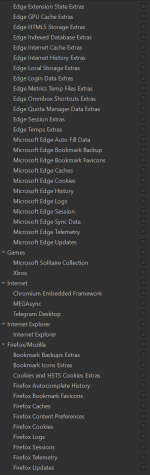
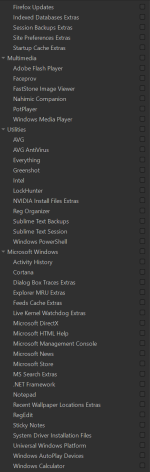
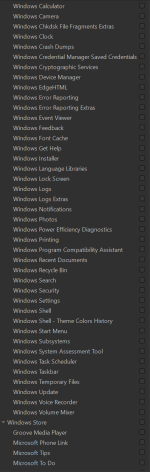
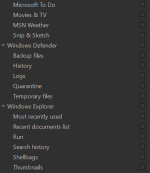
Now that I have BleachBit and have imported the Winapp2.ini file, this is the software list that is available for cleaning on my system. What suggestions do you have? Thanks.

2026-03-16 00_42_58-BleachBit.png2026-03-16 00_43_31-BleachBit.png2026-03-16 00_44_58-BleachBit.png2026-03-16 00_45_28-BleachBit.png2026-03-16 00_46_07-BleachBit.png2026-03-16 00_47_22-BleachBit.png
 
@Sampei.Nihira

Now that I have BleachBit and have imported the Winapp2.ini file, this is the software list that is available for cleaning on my system. What suggestions do you have? Thanks.

View attachment 296356View attachment 296357View attachment 296358View attachment 296359View attachment 296360View attachment 296361
Careful there, @lokamoka820! With that list on your screen, you're not just deciding what to clean anymore, you're choosing which memories of the universe to delete. Winapp2.ini is like a secret grimoire: if you pick the wrong spell, even your virtual coffee history might vanish.

Just a thought: maybe start with the temporary files, they're like Hansel and Gretel's breadcrumbs... nobody is going to miss them. Just be careful, or BleachBit might leave your PC so pure that it forgets Windows even exists! 🧹✨ 🤣
 
@Sampei.Nihira

Now that I have BleachBit and have imported the Winapp2.ini file, this is the software list that is available for cleaning on my system. What suggestions do you have? Thanks.

View attachment 296356View attachment 296357View attachment 296358View attachment 296359View attachment 296360View attachment 296361
Since I’ve already advised you not to use that software, I would recommend using (Brave) at most:

cache
history
cookies
metrics temp files extras

but you’d still be missing some features compared to another cleaner:

download history
last download location
 
I also would be very, very careful to using Winapp2 as well having used it in the past, you actually gain very little & have a lot to lose if you value the Windows install, a few meg will be gained most of which will be recreated quickly, IMO there is very little to be gained by extensive cleaning actually if anything, best policy again in my opinion is just have installed the programs you use, if you don't use them uninstall, that for me makes good sense.

I intend & did yesterday after years to do a full reinstall of 11, I went through & looked at some of the programs I haven't used recently & they wont (weren't) be reinstalled (I did hit a major snag after almost finishing though & ended up restoring an image so got to do it again, Grrrrrrrrrrr :mad::mad::mad:
 
The snag was for unknown reasons & not wanting to mess a thread up Bitlocker decided to encrypt all six drives, (two SSD's) I still don't know what caused it, I'm pretty sure it lost the plot as there is no way I could use a key, anyway I was able to restore a C:\ image & then format the other drives & copy all data over, it took a while but it did prove again to me the value of backing everything up. All is well now but it needs to be done again my only concern is what caused the issue in the first place? I was somewhat cross, it never happened before !!

Edit: I will be disabling Bitlocker on next install at least until the system is up & running well :p
 
Last edited:
The snag was for unknown reasons & not wanting to mess a thread up Bitlocker decided to encrypt all six drives, (two SSD's) I still don't know what caused it, I'm pretty sure it lost the plot as there is no way I could use a key, anyway I was able to restore a C:\ image & then format the other drives & copy all data over, it took a while but it did prove again to me the value of backing everything up. All is well now but it needs to be done again my only concern is what caused the issue in the first place? I was somewhat cross, it never happened before !! :oops::oops:

Luckily,you managed to fix it, even if it took a lot of effort,and I imagine some sweat,too.
It’s a really upsetting experience to lose control of your own PC.
 
@Sampei.Nihira I can't like your post so doing it here, there were a few minutes where I felt the situation was going to be horrendous, as I was able to restore an image I made yesterday from an external drive that saved the day really, then it was just data/portable programs again copied over from an external drive, (over 2TB) if I hadn't copied recent images over & data it would have been very difficult - Backup, backup backup, is my continuing advice, the cat had a bad evening! :):)
 
I totally agree with @Sorrento and @Sampei.Nihira. At the end of the day, the best cleaning is simply not getting the system 'dirty' in the first place (by uninstalling what you don't use).

I'd just like to add a small point about something we often overlook: the cache trap. Many cleaners flag the 'thumbnail cache' or 'font cache' as junk to be removed. Ironically, clearing these can actually make Windows feel slower right after the cleanup.

The cache isn't 'junk' by default; it's work that Windows has already done so it doesn't have to do it again. If you wipe it, the next time you open a folder with hundreds of files, you'll see your CPU spike and icons load slowly while the system regenerates them. Instead of optimizing, we’re forcing the PC to work twice as hard just to get back to where it was.

As the common sense in this thread suggests: if the system is stable, there's no need to over-optimize. You might end up breaking more than you fix.🧹 ⚡ ⚖️
 
Tired of CCleaner?

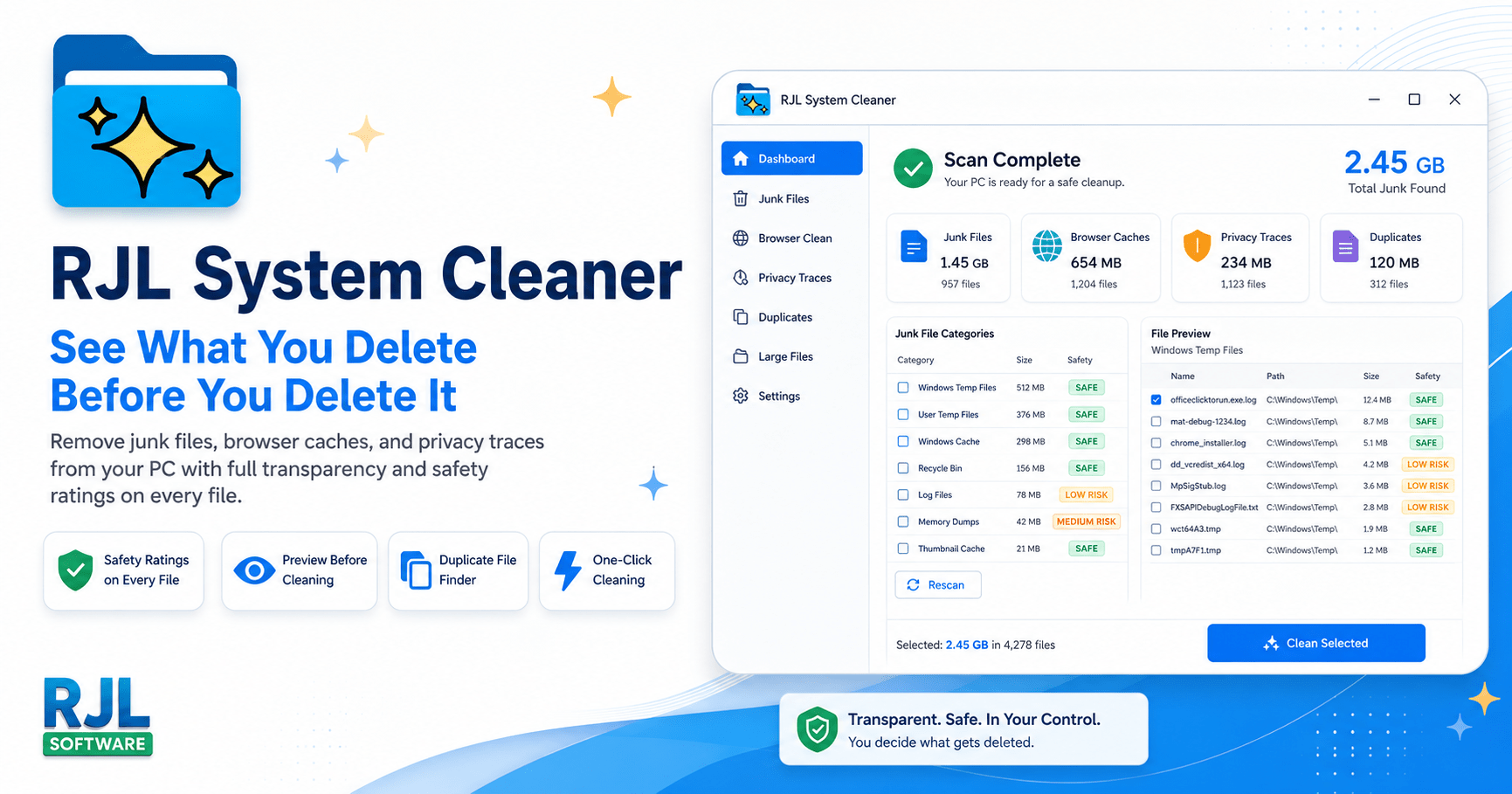
Check this out: RJL System Cleaner

It's free, and has a paid version for 19.95 USD, and no subscription.


NOTES:

CCleaner was the gold standard for 20 years. Then things changed.

In 2017, CCleaner was compromised with malware that affected 2.27 million users. Hackers injected malicious code into the official download -- meaning people who trusted CCleaner got infected because they trusted CCleaner.

After the Avast acquisition, CCleaner added telemetry (data collection), bundled software offers, aggressive upselling with fake warning screens, and a subscription pricing model charging $29.95 per year for features that used to be free.

In 2025 and 2026, users report that CCleaner's "Performance Optimizer" shows scary red warnings even when nothing is wrong -- designed to pressure you into buying the paid version. Others report the software updating itself without permission, auto-renewing subscriptions that are nearly impossible to cancel, and even Blue Screens of Death after forced updates.

How RJL System Cleaner Is Different

Pricing model$29.95/year subscription (auto-renews)One-time purchase. No subscription. Yours forever.
Personal price$29.95/year$19.99 once (lifetime)
Business price$39.95/year per seat$39.99 once per seat -- or team/site/enterprise options
Future updatesOnly while subscription is activeAll v1.x updates included free
Telemetry / data collectionYes -- collects usage data and sends it homeNone. Zero. The app never contacts the internet.
Bundled softwareYes -- offers during install and in-appNone. Single .exe file. Nothing else.
Browser extensionsPushes proprietary browser extensionNone. No browser add-ons of any kind.
Nag screens / scare tacticsYes -- fake red warnings to pressure upgradesNone. No popups, no fake warnings, no urgency timers.
Background servicesInstalls background monitoring and update servicesNone. Runs only when you open it. Closes completely when done.
Auto-updatesUpdates itself without askingNever. You choose when to update.
Duplicate finderPro only ($29.95/yr)Scans FREE -- shows you the problem. Register to clean.
File preview before deletionBasic list of categoriesFull preview with safety ratings on every individual file
Safety ratingsNoYes -- Safe (green), Caution (yellow), Review (orange) on every file
Review gate for risky itemsNo -- one-click deletes everythingYes -- items rated "Review" require separate confirmation
System Restore integrationNoYes -- automatic restore point before every clean
Registry cleanerYes (can cause system instability)No -- because registry cleaners do more harm than good
Application size~112 MB installedUnder 5 MB. One file.
Installation requiredFull installer with background servicesNo installation. Download, run, done.
Portable / USB supportNo (requires installation)Yes -- runs from USB, no install, no traces
UninstallUninstaller that may leave tracesDelete the file. It is gone.
Command-line supportLimitedFull CLI with /scan, /clean, /silent, /category flags
Detailed file loggingNoYes -- timestamped logs of every file scanned, deleted, or skipped
Scan speedNo published benchmarksUnder 2 seconds -- parallel scanning across all categories
[th]
CCleaner
CCleaner
[/th][th]
RJL System Cleaner
[/th]
[td]PRICING[/td] [td]TRUST AND PRIVACY[/td] [td]FEATURES[/td] [td]TECHNICAL[/td]
We do not include a registry cleaner. That is intentional. Registry cleaners have been shown to cause more problems than they solve, and even Microsoft recommends against using them. We clean files that are genuinely safe to remove -- and we prove it by showing you every single one before we touch it.
 
Tired of CCleaner?

Check this out: RJL System Cleaner

It's free, and has a paid version for 19.95 USD, and no subscription.


NOTES:

CCleaner was the gold standard for 20 years. Then things changed.

In 2017, CCleaner was compromised with malware that affected 2.27 million users. Hackers injected malicious code into the official download -- meaning people who trusted CCleaner got infected because they trusted CCleaner.

After the Avast acquisition, CCleaner added telemetry (data collection), bundled software offers, aggressive upselling with fake warning screens, and a subscription pricing model charging $29.95 per year for features that used to be free.

In 2025 and 2026, users report that CCleaner's "Performance Optimizer" shows scary red warnings even when nothing is wrong -- designed to pressure you into buying the paid version. Others report the software updating itself without permission, auto-renewing subscriptions that are nearly impossible to cancel, and even Blue Screens of Death after forced updates.

How RJL System Cleaner Is Different


Pricing model$29.95/year subscription (auto-renews)One-time purchase. No subscription. Yours forever.
Personal price$29.95/year$19.99 once (lifetime)
Business price$39.95/year per seat$39.99 once per seat -- or team/site/enterprise options
Future updatesOnly while subscription is activeAll v1.x updates included free
Telemetry / data collectionYes -- collects usage data and sends it homeNone. Zero. The app never contacts the internet.
Bundled softwareYes -- offers during install and in-appNone. Single .exe file. Nothing else.
Browser extensionsPushes proprietary browser extensionNone. No browser add-ons of any kind.
Nag screens / scare tacticsYes -- fake red warnings to pressure upgradesNone. No popups, no fake warnings, no urgency timers.
Background servicesInstalls background monitoring and update servicesNone. Runs only when you open it. Closes completely when done.
Auto-updatesUpdates itself without askingNever. You choose when to update.
Duplicate finderPro only ($29.95/yr)Scans FREE -- shows you the problem. Register to clean.
File preview before deletionBasic list of categoriesFull preview with safety ratings on every individual file
Safety ratingsNoYes -- Safe (green), Caution (yellow), Review (orange) on every file
Review gate for risky itemsNo -- one-click deletes everythingYes -- items rated "Review" require separate confirmation
System Restore integrationNoYes -- automatic restore point before every clean
Registry cleanerYes (can cause system instability)No -- because registry cleaners do more harm than good
Application size~112 MB installedUnder 5 MB. One file.
Installation requiredFull installer with background servicesNo installation. Download, run, done.
Portable / USB supportNo (requires installation)Yes -- runs from USB, no install, no traces
UninstallUninstaller that may leave tracesDelete the file. It is gone.
Command-line supportLimitedFull CLI with /scan, /clean, /silent, /category flags
Detailed file loggingNoYes -- timestamped logs of every file scanned, deleted, or skipped
Scan speedNo published benchmarksUnder 2 seconds -- parallel scanning across all categories

[th]
CCleaner
CCleaner


[/th][th]
RJL System Cleaner

[/th]​
[td]PRICING[/td] [td]TRUST AND PRIVACY[/td] [td]FEATURES[/td] [td]TECHNICAL[/td]

We do not include a registry cleaner. That is intentional. Registry cleaners have been shown to cause more problems than they solve, and even Microsoft recommends against using them. We clean files that are genuinely safe to remove -- and we prove it by showing you every single one before we touch it.

However, this software is brand-new and only two months old. Can we trust it?
 
  • Telemetry / data collection Yes -- collects usage data and sends it home
  • Background services Installs background monitoring and update services
  • Auto-updates Updates itself without asking

They can be blocked by configuring the firewall and/or the Hosts file.
Of course, cleaning the registry isn't a problem either; if you're unsure, simply avoid using it.
CCleaner 6.39 is available for download here:


How to Roll Back from v7 to v6.39
 
Reading the experiences and warnings shared in this thread about overly aggressive cleanups, I thought it would be useful to contribute a practical example of how I handle it.

In my case, Glary Utilities Pro has been a helpful tool, provided it’s configured with caution. To avoid compromising stability or convenience, I’ve put together a "safe" cleaning profile. I share this as a reference rather than a rigid rule for those who prefer a conservative approach.

🔧 Safe Cleaning Profile – Glary Utilities Pro(Configuration applied in the “1-Click Maintenance” module)

1. Registry

  • Check: Registry integrity, obsolete entries, file associations, startup programs, Windows services, and invalid settings.
  • Do NOT check: "Deep scan and repair" (it tends to be too aggressive).
2. Tracks Eraser

  • Windows: Recent documents, clipboard, temporary files, recycle bin, and search history.
  • Browsers: History, cookies, cache, downloads, and sessions (unless you need to restore tabs).
  • Do NOT check: Saved passwords and form data (to keep autocomplete functional).
3. Temporary Files

  • Check: System/user temp files, error reports, memory dumps, old Windows updates, and cache from rarely used apps.
  • Do NOT check: Thumbnails, font cache, Prefetch data, or Remote Desktop cache.
📌 Final Tips

  • Backups first: Always ensure the "Restore Center" creates a backup before applying changes.
  • Frequency: I run the Tracks Eraser weekly for privacy, but Registry and Temp file cleaning only every 3–4 weeks.
  • Zero Footprint: I disable the program’s auto-start with Windows and the "minimize to tray" option so it doesn’t stay resident in the background.
  • ⚠️ Drivers: I recommend skipping the Driver Update feature. It’s always safer to get updates via Windows Update or directly from the manufacturer's official site to avoid stability issues.
Of course, everyone should adjust these settings to their own needs, but I find this balance keeps my system lean without unnecessary risks. 🧹🛡️⚖️
 
Did you trust ccleaner or bitdefender, or eset at 2 months old.
I tend to follow the advice of professionals who test the products and know exactly what they clean and how aggressive they are, rather than relying on the name of the vendor or how long they have been on the market.
 
I tend to follow the advice of professionals who test the products and know exactly what they clean and how aggressive they are, rather than relying on the name of the vendor or how long they have been on the market.
Except in this case: "However, this software is brand-new and only two months old. Can we trust it?"
 
I did a full reinstall on this a desk PC yesterday (after a failed attempt Sunday) I didn't install programs I don't use much now such as some rippers, transcoders etc, I've found Hasleo Image which I've used now for some time is as good as any I've used & IMO is the best & has never let me down not once & was used to image my system & images saved on more than one hard drive - I've used HD Cleaner now (on default mode) for some time & again IMO is as good as anything I've ever used & free, I don't use registry cleaners I really don't feel they help, I do use Registry Organizer which is a pay program which I've used for years helps in searching the registry when necessary, I installed Hi-bit uninstaller but as its from Iran who knows sadly what will became of it though its an excellent program. :)
 
I did a full reinstall on this a desk PC yesterday (after a failed attempt Sunday) I didn't install programs I don't use much now such as some rippers, transcoders etc, I've found Hasleo Image which I've used now for some time is as good as any I've used & IMO is the best & has never let me down not once & was used to image my system & images saved on more than one hard drive - I've used HD Cleaner now (on default mode) for some time & again IMO is as good as anything I've ever used & free, I don't use registry cleaners I really don't feel they help, I do use Registry Organizer which is a pay program which I've used for years helps in searching the registry when necessary, I installed Hi-bit uninstaller but as its from Iran who knows sadly what will became of it though its an excellent program. :)

Apart from the usual software I use and update, I never install anything else.
Maybe just some portable software, if anything.
So I don’t even need uninstaller software.
 

You may also like...