

The MalwareTips app
Your community, one tap away.
Open MalwareTips from your Home Screen or desktop. Follow discussions, find answers and pick up where you left off.
- Home Screen access
- Optional push alerts
- Your community
You're ready to explore.Explore what's new
Installation instructions
iPhone & iPad
- Open MalwareTips in Safari and tap Share. You may need to open the Page Menu first.
- Choose Add to Home Screen. If it is not listed, use Edit Actions to add it.
- Keep Open as Web App enabled if shown, then tap Add.
Android
- Open MalwareTips in Chrome or another browser that supports app installation.
- Open the browser menu and look for Install app, Install and create shortcut, or Add to Home screen.
- Choose Install and confirm. Wording varies by browser.
Desktop
- Chrome: use the install icon in the address bar, or the menu under Cast, save and share.
- Edge: open the menu, then More tools, Apps and Install this site as an app.
- Safari on Mac: choose Share or File, then Add to Dock. Firefox on Windows: look for the web apps button in the address bar.
If you cannot find an install option, update your browser or use its bookmark option to keep MalwareTips close.
Keep up with your conversations
After installation, open the app and sign in. Enable push notifications in Preferences if you want alerts. On iPhone and iPad, push requires a Home Screen web app and iOS or iPadOS 16.4 or later.
Sign in to manage notificationsInstallation is optional. Your notification settings stay under your control.
You are using an out of date browser. It may not display this or other websites correctly.
You should upgrade or use an alternative browser.
You should upgrade or use an alternative browser.
Advice Request Browser to Download Files from the Internet? [Poll]
Share practical recommendations that address the author's needs.

My life is already complicated, so everything is allowed. Of course only via https, http downloads have to be allowed in the firewall. I download to the moved desktop, hidden and system files are shown, so I should notice, if something appears there. I use a shortcut to cleanup desktop.
Code:
rem takeown /s %computername% /u %username% /f "%SystemDrive%\Users\Public\Desktop" /r /d y
rem icacls "%SystemDrive%\Users\Public\Desktop" /grant:r %username%:(OI)(CI)F /t /l /q /c
rem takeown /s %computername% /u %username% /f "%USERPROFILE%\Desktop" /r /d y
rem icacls "%USERPROFILE%\Desktop" /grant:r %username%:(OI)(CI)F /t /l /q /c

del "%SystemDrive%\Users\Public\Desktop\*" /s /f /q
del "%USERPROFILE%\Desktop\*" /s /f /q
rd "Z:\Desktop" /s /q
md "Z:\Desktop"
I ask to download but love my old firefox Download Manager (S3) extension I have used for a long time. Have it configured just the way I like it and will auto open the download directory for me when done. WIth pretty colors and percentage and speed details and even a voice saying "download complete" 
I believe Insecure (http) downloads are blocked or can be blocked by default in Chromium-based browsers.My life is already complicated, so everything is allowed. Of course only via https, http downloads have to be allowed in the firewall.

Firefox, Always Ask. A bonus is that it can't run executable files: it can only download them to be run manually if desired.

Ask to download. In fact on my PC everything is in ask mode. 

Ask to download. I use Internet Download Manager for most but browser handles smaller files like jpg, png, pdf etc.

It's a habit that our browsers are all set to ask for download, and each time I'm prompted, I've chosen "save file". I've never chosen "RUN", and only manually do this after scanning the download file at VirusTotal.com! 
I always ask to save always and never run from location. Look how I have S3 Downloader configured to show me info as it downloads AND then it will auto open the download directory for me when done with a "download complete" sound file stating so! (Bottom left corner)
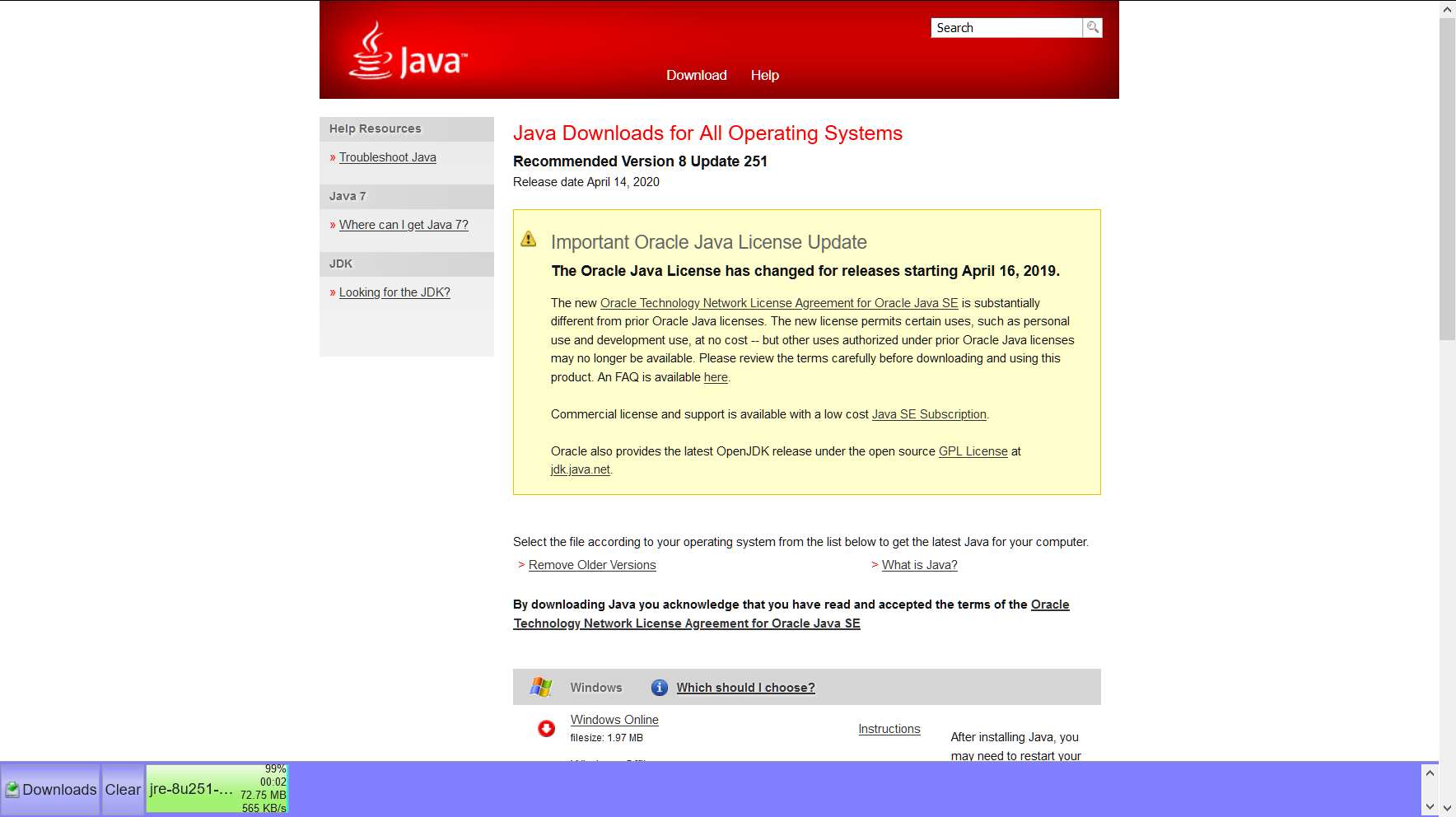
(Bottom left corner)
Recently browsing
Members who viewed this thread in the last 5 minutes
You may also like...
-

-

-

-

-
 New Update Sigma: A new chromium AI-based browser