Troubleshoot (Build1803)Smartscreen can't be reached right now

SumTingWong

Level 28
Thread author
Verified
Top Poster
Well-known
Apr 2, 2018
1,753
1
5,845
2,668
FLorida
Briefly explain your current issue(s)
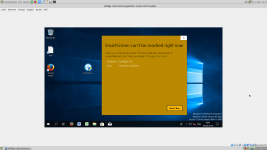
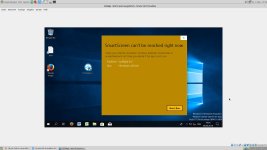
Smartscreen can't be reached right now
Steps taken to resolve, but have been unsuccessful
Check my internet connection
I setup my Windows 10 Build 1803 last night, and I keep getting this Smartscreen pop up every time I tried to run my software. I can check and install updates through Windows Update fine.
Smartscreen can't be reached right now. Check your internet connection. Windows Defender Smartscreen is unreachable and can't help you decide if this app is ok to run.

Do any of you guys have this smartscreen can't be reached when you download a new app and run it? I tested on my laptop, and I am getting the same result as a new clean installation on my desktop.
 
Last edited:
1525624913700.png
I just wanted to test samples two hours ago, but I can't. SmartScreen is really down(?)
 
Upvote 0
Do any of you guys have this smartscreen can't be reached when you download a new app and run it? I tested on my laptop, and I am getting the same result as a new clean installation on my desktop.

Yes, exactly. I had cleaned up some files on my laptop and thought I might have caused it. Now I'm not so sure. I PM'd @Andy Ful earlier and currently waiting to continue conversation.
 
Upvote 0
View attachment 188123
I just wanted to test samples two hours ago, but I can't. SmartScreen is really down(?)

I think so. My laptop and my desktop showed the same result.
Yes, exactly. I had cleaned up some files on my laptop and thought I might have caused it. Now I'm not so sure. I PM'd @Andy Ful earlier and currently waiting to continue conversation.

I thought I bomb my clean installation as well because I asked myself last night. What the hell did I do? All I did is installed Windows Updates, my motherboard and GPU drivers, and my apps.
 
Upvote 0
Do you all use @Andy Ful's RunBySmartscreen on your system, because my feeling is that this is the issue for me. I don't believe it happened right after the update... it appears it was a couple of days or so... but what do I know?

What is RunBySmartscreen? I have never heard that ever. I just found out yesterday when I finished setup a clean installation for my desktop.
 
Upvote 0
What is RunBySmartscreen? I have never heard that ever. I just found out yesterday when I finished setup a clean installation for my desktop.

It's his app configured to enable/force SmartScreen on files other than in Edge browser. It can be added to context menu of file explorer.
 
Upvote 0