Software Review Comodo Firewall Plays with RATs

Reviews reflect the reviewer's setup and methods. Check the evidence and limitations.
Thread details
Content created by
Ophelia

cruelsister

Level 44
Verified
Honorary Member
Top Poster
Content Creator
Well-known
Forum Veteran
Remote Access Trojans (RATs) malware have increased significantly as of late with a great deal send via Email. Unlike in the past where the malicious file would be an exe or vbs, popular now (and confusing to some) are hta (hypertext markup language) and OneNote files.

Here are examples of both.

 
What is your opinion on Sandboxie or Sandboxie Plus?

Sandboxie is a sandbox-based isolation software for 32- and 64-bit Windows NT-based operating systems. It is being developed by David Xanatos since it became open source, before that it was developed by Sophos (which acquired it from Invincea, which acquired it earlier from the original author Ronen Tzur). It creates a sandbox-like isolated operating environment in which applications can be run or installed without permanently modifying the local or mapped drive. An isolated virtual environment allows controlled testing of untrusted programs and web surfing.

I was always curious how something like Sandboxie or Sandboxie Plus would fair against Ransomware and RATs etc...
 
Sandboxie is an excellent sandbox. The protection afforded by SBIE is equivalent to CF at Restricted, the major difference being one must choose in SBIE what to sandbox whereas CF is automatic.
I'm also interested to know how well Sandboxie Plus performs against all types of (zero-day) malware.
For instance, if an unknown app/malware is run sandboxed with FW set to block all incoming and block all outgoing connections for all apps which run inside sandbox (to prevent keyloggers or data theft) how well does Sandboxie Plus protect my system then?
 
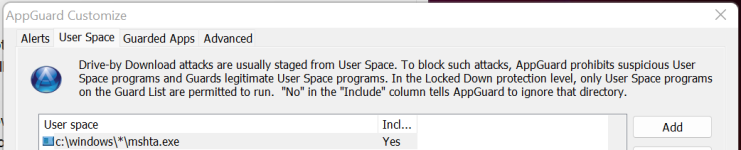
HTA is useless for home users. Just cripple mshta.exe by enabling all protections for it in Exploit Protection of Microsoft Defender (exploit protection works even when you use a different AV)

1676129881439.png

Sandboxie is an excellent sandbox. The protection afforded by SBIE is equivalent to CF at Restricted, the major difference being one must choose in SBIE what to sandbox whereas CF is automatic.
David Xanatos claims Sandboxie protection is much stronger than Comodo's virtualization. I read at Wilders that the lowered SBIE protection should be as strong as Comodo FW. Now I am not a Sandboxie user nor Comodo user anymore and I am not testing any of them with malware, so I have no opinion on this (a respected software developer's word against a respected software tester's word), so maybe some Sandboxie users can chime in to explain this contradiction in claims.

Note: the automatic virtualization of Comodo is a great advantage over Sandboxie IMO, no matter what the ins and outs of the protection mechanisms are (kernel vs user).
 
The issue here is that disabling various things that malware could potentially use is like playing whack a mole- one never knows when something new could be exploited and pop up that isn't already blocked.
General true, but does not apply for mshta.exe, you know that also. I am with you when it comes to recent OneNote abuses. They are a worry. It seems that every time Microsoft introduces a seamless computing mechanisme it has weaknesses and use cases which can be misused.

That is why every user should install Andy Ful's Simple Windows Hardening (to reduce the easy execution in user land of all those risky file extensions) and FirewallHardening (to prevent LolBins going outbound). Probably SimpleWindowsHardening + FirewallHardening would also have blocked those rats.
 
Last edited by a moderator:
General true, but does not apply for mshta.exe, you know that also. I am with you when it comes to recent OneNote abuses. They are a worry. It seems that every time Microsoft introduces a seamless computing mechanisme it has weaknesses and use cases which can be misused.

That is why every user should install Andy Ful's Simple Windows Hardening (to reduce the easy execution in user land of all those risky file extensions) and FirewallHardening (to prevent LolBins going outbound). Probably SimpleWindowsHardening + FirewallHardening would also have blocked those rats.
I have been blocking this one for a very long time. ;)
Besides, I like to wacky my mole :LOL:
 

Attachments

  • Screenshot 2023-02-11 102049.png
    Screenshot 2023-02-11 102049.png
    26.4 KB · Views: 255
General true, but does not apply for mshta.exe, you know that also. I am with you when it comes to recent OneNote abuses. They are a worry. It seems that every time Microsoft introduces a seamless computing mechanisme it has weaknesses and use cases which can be misused.

That is why every user should install Andy Ful's Simple Windows Hardening (to reduce the easy execution in user land of all those risky file extensions) and FirewallHardening (to prevent LolBins going outbound). Probably SimpleWindowsHardening + FirewallHardening would also have blocked those rats.
1676262535784.png
 
Home users need cscript, wscript and PowerShell for what again?:eek: and what is wrong with blocking what is known to be bad and could be bad again?
Microsoft says unmanaged (home users) do not need any of them. 11S and 10S Mode are Microsoft Security's favorite Windows flavor for home systems:

1676271521550.png


A user can easily replicate 11S or 10S mode by adding the above processes to Exploit Protection > Disable Win32 System Calls + set application installs to "Microsoft Store Only."

1676271864784.png
 
Last edited by a moderator:
@Oerlink thanks for the info (you did not see that coming ay :) )

Your info confirms that SWH + FH of AndyFul would have blocked the RAT

On top of SWH hardening options I also disable CMD via registry tweak

Windows Registry Editor Version 5.00

[HKEY_CURRENT_USER\SOFTWARE\Policies\Microsoft\Windows\System]
"DisableCMD"=dword:00000001
 
@Oerlink thanks for the info (you did not see that coming ay :) )

Your info confirms that SWH + FH of AndyFul would have blocked the RAT

On top of SWH hardening options I also disable CMD via registry tweak

Windows Registry Editor Version 5.00

[HKEY_CURRENT_USER\SOFTWARE\Policies\Microsoft\Windows\System]
"DisableCMD"=dword:00000001
Those tools are pure Gold! 🥇
 
Microsoft says unmanaged (home users) do not need any of them. 11S and 10S Mode are Microsoft Security's favorite Windows flavor for home systems:

View attachment 272864

A user can easily replicate 11S or 10S mode by adding the above processes to Exploit Protection > Disable Win32 System Calls + set application installs to "Microsoft Store Only."

View attachment 272865
Thank you. See how easy that was?
 

Recently browsing

Members who viewed this thread in the last 5 minutes

Back
Top