

The MalwareTips app
Your community, one tap away.
Open MalwareTips from your Home Screen or desktop. Follow discussions, find answers and pick up where you left off.
- Home Screen access
- Optional push alerts
- Your community
You're ready to explore.Explore what's new
Installation instructions
iPhone & iPad
- Open MalwareTips in Safari and tap Share. You may need to open the Page Menu first.
- Choose Add to Home Screen. If it is not listed, use Edit Actions to add it.
- Keep Open as Web App enabled if shown, then tap Add.
Android
- Open MalwareTips in Chrome or another browser that supports app installation.
- Open the browser menu and look for Install app, Install and create shortcut, or Add to Home screen.
- Choose Install and confirm. Wording varies by browser.
Desktop
- Chrome: use the install icon in the address bar, or the menu under Cast, save and share.
- Edge: open the menu, then More tools, Apps and Install this site as an app.
- Safari on Mac: choose Share or File, then Add to Dock. Firefox on Windows: look for the web apps button in the address bar.
If you cannot find an install option, update your browser or use its bookmark option to keep MalwareTips close.
Keep up with your conversations
After installation, open the app and sign in. Enable push notifications in Preferences if you want alerts. On iPhone and iPad, push requires a Home Screen web app and iOS or iPadOS 16.4 or later.
Sign in to manage notificationsInstallation is optional. Your notification settings stay under your control.
You are using an out of date browser. It may not display this or other websites correctly.
You should upgrade or use an alternative browser.
You should upgrade or use an alternative browser.
Solved Computer Doesn't Boot Anyway to Save It?
-
 Thread starter
Oxygen
Thread starter
Oxygen
- Start date
- 85 Replies
- 20,454 Views
- Status
- Not open for further replies.

Setup PCPC setup
Please download Hirens Boot CD from this linkYes now that I got another keyboard that works.
http://ftp.bme.hu/pub/mirrors/hirensbootcd/Hirens.BootCD.15.2.zip
Upvote
0

About 5 mins remaning till DL is complete.Please download Hirens Boot CD from this link
http://ftp.bme.hu/pub/mirrors/hirensbootcd/Hirens.BootCD.15.2.zip
Upvote
0
Setup PCPC setup
OK, when it downloads, you extract it (since it's zipped)
and do you have an empty CD to burn it or USB Flash drive (1GB minimum)
Note : Usb must be empty
and do you have an empty CD to burn it or USB Flash drive (1GB minimum)
Note : Usb must be empty
Upvote
0
I have USB.OK, when it downloads, you extract it (since it's zipped)
and do you have an empty CD to burn it or USB Flash drive (1GB minimum)
Note : Usb must be empty
I'm going to use that since I don't feel like using a cd
Upvote
0

Setup PCPC setup
OK better
so, download Rufus also
http://rufus.akeo.ie/downloads/rufus-1.4.9.exe
It will use you to make a bootable USB Flash drive
so, download Rufus also
http://rufus.akeo.ie/downloads/rufus-1.4.9.exe
It will use you to make a bootable USB Flash drive
Upvote
0
Got it now what?OK better
so, download Rufus also
http://rufus.akeo.ie/downloads/rufus-1.4.9.exe
It will use you to make a bootable USB Flash drive
Upvote
0
Setup PCPC setup
OK, now plug in your USB flash drive and open Rufus, select your usb flash drive in Rufus, file system NTFS,
and at the bottom choose the path of your hirens boot cd (ISO file that has ~600mb) and click START
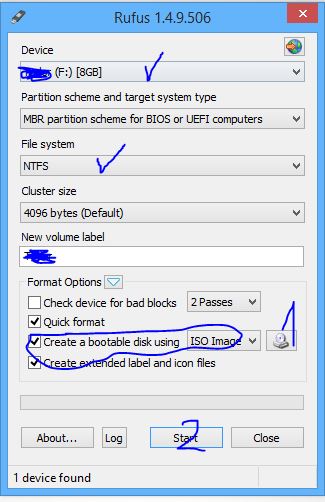
Sorry for handwritting ;D
and at the bottom choose the path of your hirens boot cd (ISO file that has ~600mb) and click START
Sorry for handwritting ;D
Upvote
0
Setup PCPC setup
Wait until it finsh
Also, be sure you emptied your flash drive because Rufus will erase all the contents
Also, be sure you emptied your flash drive because Rufus will erase all the contents
Upvote
0
Wait until it finsh
Also, be sure you emptied your flash drive because Rufus will erase all the contents
It has completed now what.
Upvote
0
Setup PCPC setup
Now eject your usb flash drive and insert it into computer that doesn't work
Power Up the computer and rape the "delete" button until it show you the BIOS
I don't know what our BIOS is, but in every BIOS there are "Boot Options" where you can find the "Boot priority"
so it will be something like this
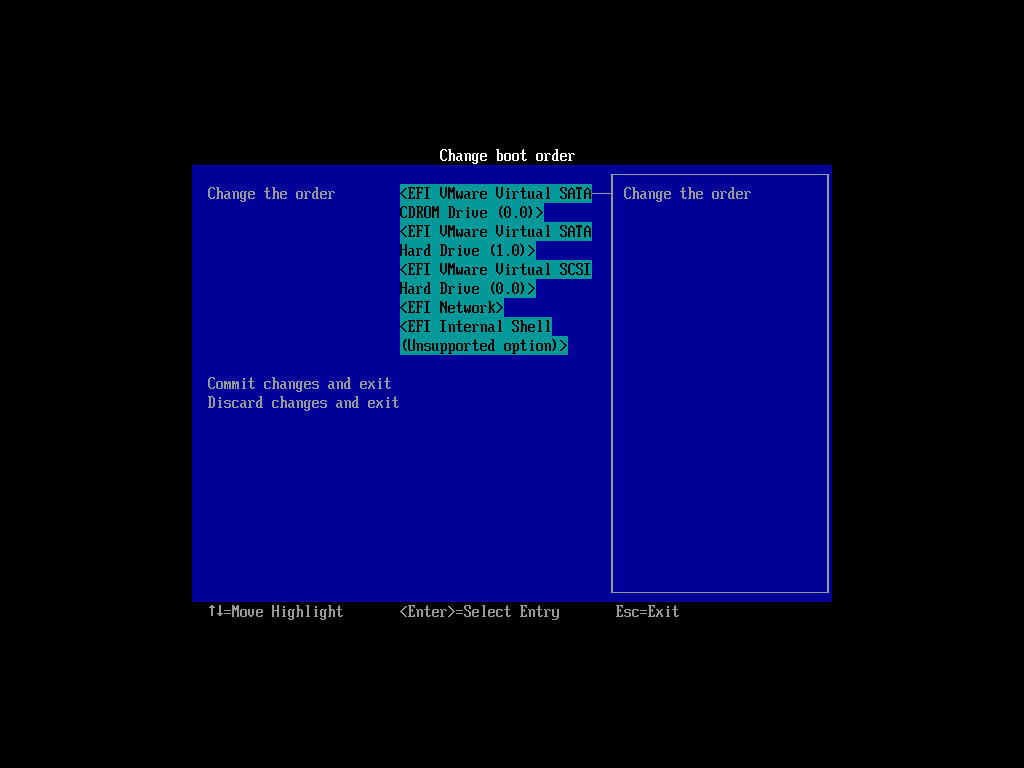
You will need to set up your flash drive to boot the first, before your HDD.
You following?
Power Up the computer and rape the "delete" button until it show you the BIOS
I don't know what our BIOS is, but in every BIOS there are "Boot Options" where you can find the "Boot priority"
so it will be something like this
You will need to set up your flash drive to boot the first, before your HDD.
You following?
Upvote
0
Screen still remains blank even after I set it to bootup with usb.Now eject your usb flash drive and insert it into computer that doesn't work
Power Up the computer and rape the "delete" button until it show you the BIOS
I don't know what our BIOS is, but in every BIOS there are "Boot Options" where you can find the "Boot priority"
so it will be something like this
You will need to set up your flash drive to boot the first, before your HDD.
You following?
Upvote
0
I was in the BIOS everything is setup correctly but it doesn't want to work for me.Did you able to get into BIOS?
Upvote
0
Setup PCPC setup
tell me, does it again shows Windows Logo upon startup?
If it does, then you didn't set up your boot priority properly
If it does, then you didn't set up your boot priority properly
Upvote
0
tell me, does it again shows Windows Logo upon startup?
If it does, then you didn't set up your boot priority properly
It shows blue logo and little circles then goes black as before.
Upvote
0
I think I did it right not sure tho since it doesn't work the first timeCan you screenshot the list of boot menu in BIOS somehow?

Upvote
0
- Status
- Not open for further replies.
Recently browsing
Members who viewed this thread in the last 5 minutes
You may also like...
-

-
 Serious Discussion Core Isolation / Memory Integrity sanfu
 -

-
- S