

The MalwareTips app
Your community, one tap away.
Open MalwareTips from your Home Screen or desktop. Follow discussions, find answers and pick up where you left off.
- Home Screen access
- Optional push alerts
- Your community
You're ready to explore.Explore what's new
Installation instructions
iPhone & iPad
- Open MalwareTips in Safari and tap Share. You may need to open the Page Menu first.
- Choose Add to Home Screen. If it is not listed, use Edit Actions to add it.
- Keep Open as Web App enabled if shown, then tap Add.
Android
- Open MalwareTips in Chrome or another browser that supports app installation.
- Open the browser menu and look for Install app, Install and create shortcut, or Add to Home screen.
- Choose Install and confirm. Wording varies by browser.
Desktop
- Chrome: use the install icon in the address bar, or the menu under Cast, save and share.
- Edge: open the menu, then More tools, Apps and Install this site as an app.
- Safari on Mac: choose Share or File, then Add to Dock. Firefox on Windows: look for the web apps button in the address bar.
If you cannot find an install option, update your browser or use its bookmark option to keep MalwareTips close.
Keep up with your conversations
After installation, open the app and sign in. Enable push notifications in Preferences if you want alerts. On iPhone and iPad, push requires a Home Screen web app and iOS or iPadOS 16.4 or later.
Sign in to manage notificationsInstallation is optional. Your notification settings stay under your control.
You are using an out of date browser. It may not display this or other websites correctly.
You should upgrade or use an alternative browser.
You should upgrade or use an alternative browser.
Crystal Security 3.5
-
 Thread starter
Kardo Kristal
Thread starter
Kardo Kristal
- Start date
- 1,165 Replies
- 286,345 Views
- Status
- Not open for further replies.

And I haven't got this issue
@DardiM When you enable Minimize on start-up and disable Start as Admin then it will not open the window.
Re-produced it on Windows 10 (64-bit).
Regards,
Kardo
Hello,
Crystal Security 3.5.0.174 released
Changelog
Two different types of downloads
Download installer version of Crystal Security 3.5.0.174
Download portable version of Crystal Security 3.5.0.174
Looking forward to your feedback.
Regards,
Kardo
Crystal Security 3.5.0.174 released
Changelog
- Fixed bug in "Move File to" action (right-click)
- Fixed bug in Settings (Minimize on start-up)
Two different types of downloads
Download installer version of Crystal Security 3.5.0.174
Download portable version of Crystal Security 3.5.0.174
Looking forward to your feedback.
Regards,
Kardo

Hello !
Thanks for the quick update.
On "Setting" "Checkup" "File types" :
If I check "custom", it unchecks "common executables" and vice versa, is it the expected behaviour ?
I tried to add ".js" files as it seems it doesn't scan them in Default configuration : I checked "custom" and add ".js".
Then I've done a scan on a folder with 26 recent malwares, using the shell integration scan :
- 24/26 malwares found, but no result for the 2 x ".js" files (no overview / whitelist / Blacklist)
Edit:
Tested with 13 malwares from today, with ".exe"
=> 13/13 detected (10/13 with ZAM , 10/13 with Kaspersky Total Security, 4/13 with MBAM)
Like this result
Conclusion :
- It seems it doesn't detect custom extensions I added (.bin, .js, .doc) !?
- Very good cloud scanner
Question :
- How to make custom extension scans ? for exemple, to detect .js malwares ?
Regards,
DardiM
Thanks for the quick update.
On "Setting" "Checkup" "File types" :
If I check "custom", it unchecks "common executables" and vice versa, is it the expected behaviour ?
I tried to add ".js" files as it seems it doesn't scan them in Default configuration : I checked "custom" and add ".js".
Then I've done a scan on a folder with 26 recent malwares, using the shell integration scan :
- 24/26 malwares found, but no result for the 2 x ".js" files (no overview / whitelist / Blacklist)
Edit:
Tested with 13 malwares from today, with ".exe"
=> 13/13 detected (10/13 with ZAM , 10/13 with Kaspersky Total Security, 4/13 with MBAM)
Like this result
Conclusion :
- It seems it doesn't detect custom extensions I added (.bin, .js, .doc) !?
- Very good cloud scanner
Question :
- How to make custom extension scans ? for exemple, to detect .js malwares ?
Regards,
DardiM
Last edited:

I think I might of found a bug in Crystal Security I just downloaded it on my new computer then I thought I would run a advanced scan. So It minimized to the desktop which is normal but when I tried to reopen Crystal Security by the task bar it wouldn't open. I am running Windows 10 64x. Also I tried it on my laptop which is Windows 10 64x and it doesn't work too so it must be a bug.

These are the two icons I clicked to try and reopen Crystal Security. I also found a way to open the UI. You have to right click Crystal Security and click Enable Stealth Guard otherwise it won't open.
I also got an error which I checked it out it looks like it is coming from SecureAPlus.

Regards, Andrew999
These are the two icons I clicked to try and reopen Crystal Security. I also found a way to open the UI. You have to right click Crystal Security and click Enable Stealth Guard otherwise it won't open.
I also got an error which I checked it out it looks like it is coming from SecureAPlus.
Regards, Andrew999
Hi @DardiM,
Thanks for the feedback.
Yes. It is by design and expected behavior.
You probably forgot to click on Apply in Settings after changes. When you add a new extension under File types then after changes click on Protection tab and then on the Apply button to save changes in File types. I also made a test with .js files successfully.

NB! Please note that Shell integration behavior is connected with Protection settings.
Hi @Andrew999,
Thanks for the feedback.
Bug confirmed and will be fixed in the next version.
Regards,
Kardo
Thanks for the feedback.
Hello !
Thanks for the quick update.
On "Setting" "Checkup" "File types" :
If I check "custom", it unchecks "common executables" and vice versa, is it the expected behaviour ?
Yes. It is by design and expected behavior.
I tried to add ".js" files as it seems it doesn't scan them in Default configuration : I checked "custom" and add ".js".
Then I've done a scan on a folder with 26 recent malwares, using the shell integration scan :
- 24/26 malwares found, but no result for the 2 x ".js" files (no overview / whitelist / Blacklist)
You probably forgot to click on Apply in Settings after changes. When you add a new extension under File types then after changes click on Protection tab and then on the Apply button to save changes in File types. I also made a test with .js files successfully.
NB! Please note that Shell integration behavior is connected with Protection settings.
Hi @Andrew999,
Thanks for the feedback.
I think I might of found a bug in Crystal Security I just downloaded it on my new computer then I thought I would run a advanced scan. So It minimized to the desktop which is normal but when I tried to reopen Crystal Security by the task bar it wouldn't open. I am running Windows 10 64x. Also I tried it on my laptop which is Windows 10 64x and it doesn't work too so it must be a bug.
Bug confirmed and will be fixed in the next version.
Regards,
Kardo
Last edited:

can you implement some other security tool coz this leggy Virus total takes time to take the quarry..
i have some home made tools for protecting from Crypto Malware and etc
at all it is 99% protection of this tool i mean it captures 99% of the Crypto Malware.
and real time cloud monitoring system but it is on build at this stage ... so if you need something or want to buy something in here
i have some home made tools for protecting from Crypto Malware and etc
at all it is 99% protection of this tool i mean it captures 99% of the Crypto Malware.
and real time cloud monitoring system but it is on build at this stage ... so if you need something or want to buy something in here
Hi @DardiM,
...
Yes. It is by design and expected behavior.
You probably forgot to click on Apply in Settings after changes.
When you add a new extension under File types then after changes click on Protection tab and then on the Apply button to save changes in File types. I also made a test with .js files successfully.
NB! Please note that Shell integration behavior is connected with Protection settings.
Sorry, I was adding .js and .bin extension in Checkup, not in Protection
Thanks a lot, it works fine now.
Edit:
Tested today with very recent malware and 'safe' files :
=> I added this tool to my Security config
Regards,
DardiM
Last edited:
can you implement some other security tool coz this leggy Virus total takes time to take the quarry..
@Mr.NoName It depends on your network speed. VirusTotal query is quite fast here.
=> I added this tool to my Security config
@DardiM Thanks for the feedback.
Regards,
Kardo
Hello,
I improved notifications based on the feedback.
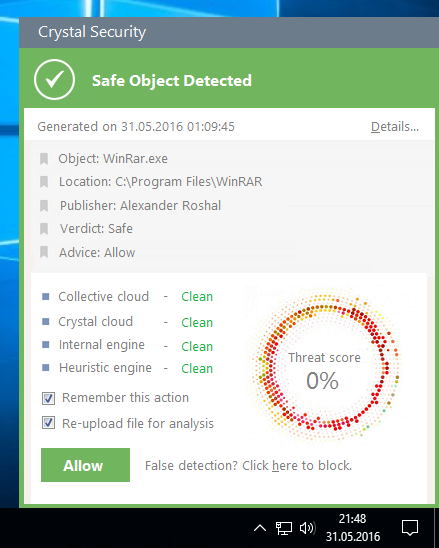
Preview of automatic notification (auto-decision enabled)
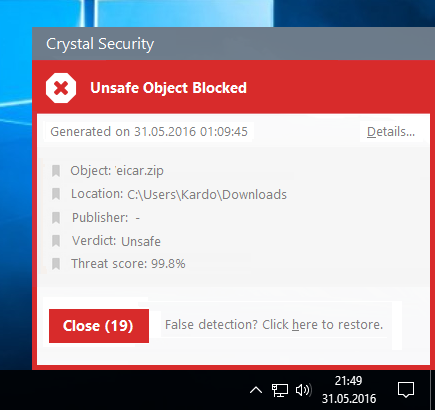
Any feedback is welcome.
Regards,
Kardo
I improved notifications based on the feedback.
- Added icons for different results
- Updated action buttons (Details and second action buttons)
- Added Location (field) of the file
- Visual improvements (text, fonts, Threat score, etc..)
- Other improvements
Preview of automatic notification (auto-decision enabled)
Any feedback is welcome.
Regards,
Kardo
Last edited:
N
Noxx
It may just be the fact I haven't used Crystal Security in a bit, but the scanner seems more efficient and less clunky than before. Good job.
Edit: Nice changes there, Kardo with your most recent update. Looks spiffy!
Edit: Nice changes there, Kardo with your most recent update. Looks spiffy!
It may just be the fact I haven't used Crystal Security in a bit, but the scanner seems more efficient and less clunky than before. Good job.
Edit: Nice changes there, Kardo with your most recent update. Looks spiffy!
Hi @Noxx,
Thanks for the feedback.
I am glad you like it.
Regards,
Kardo

Is this a one man product or a company? This looks fantastic..
Is this a one man product or a company? This looks fantastic..
Hi @J Gamez065,
I am the only developer of Crystal Security. Thanks for the kind words.
Regards,
Kardo
Hi I went to start Crystal Security and I got this error.
This is the Log file
Index and length must refer to a location within the string.
Parameter name: length at System.String.Substring(Int32 startIndex, Int32 length)
at Crystal_Security.Main.b(Object A_0, RunWorkerCompletedEventArgs A_1)
at System.ComponentModel.BackgroundWorker.OnRunWorkerCompleted(RunWorkerCompletedEventArgs e)
Regards,
Andrew999
This is the Log file
Index and length must refer to a location within the string.
Parameter name: length at System.String.Substring(Int32 startIndex, Int32 length)
at Crystal_Security.Main.b(Object A_0, RunWorkerCompletedEventArgs A_1)
at System.ComponentModel.BackgroundWorker.OnRunWorkerCompleted(RunWorkerCompletedEventArgs e)
Regards,
Andrew999

I added this tool to my Security config aswell
All was ok with the last version of Crystal Security, and today, same error that was reported by @Andrew999
The error message pop at the same time than a Crystal Security Warning Window (witch is waiting for my decision on an "unknown" file detected - a zip file password protected)
Log File:
L'index et la longueur doivent faire référence à un emplacement situé dans la chaîne.
Nom du paramètre : length à System.String.Substring(Int32 startIndex, Int32 length)
à Crystal_Security.Main.b(Object A_0, RunWorkerCompletedEventArgs A_1)
à System.ComponentModel.BackgroundWorker.OnRunWorkerCompleted(RunWorkerCompletedEventArgs e)
Regards,
DardiM
The error message pop at the same time than a Crystal Security Warning Window (witch is waiting for my decision on an "unknown" file detected - a zip file password protected)
Log File:
L'index et la longueur doivent faire référence à un emplacement situé dans la chaîne.
Nom du paramètre : length à System.String.Substring(Int32 startIndex, Int32 length)
à Crystal_Security.Main.b(Object A_0, RunWorkerCompletedEventArgs A_1)
à System.ComponentModel.BackgroundWorker.OnRunWorkerCompleted(RunWorkerCompletedEventArgs e)
Regards,
DardiM
Last edited:

- Status
- Not open for further replies.
Recently browsing
Members who viewed this thread in the last 5 minutes
You may also like...
-

-
 Advanced Plus Security harlan4096's PC Security Config
 -
 Advanced Security Spartan's PC Security Config
 -
 Software Review Avira Free Security 2026
 -
