Advanced Plus Security Divine_Barakah's Second Laptop Security Config

Last updated
Jul 10, 2026
How it's used?
For work or educational use
Operating system
Windows 11
On-device encryption
BitLocker Device Encryption for Windows
Log-in security
    • Biometrics (Windows Hello PIN, TouchID, Face, Iris, Fingerprint)
Security updates
Allow security updates
Update channels
Allow stable updates only
User Access Control
Always notify
Smart App Control
On
Network firewall
Enabled
About WiFi router
ISP-provided router.
Real-time security
Panda Dome Essential
Firewall security
Other - Internet Security (3rd-party)
About custom security
- Enabled Application Control
- Enhanced Panda Firewall settings.
- Protected Panda settings with a password
Periodic malware scanners
EEK
Malware sample testing
I do not participate in malware testing
Environment for malware testing
None
Browser(s) and extensions
Vivaldi (no extensions)
Waterfox (no extensions)
Helium (only the pre-installed unlock)
Secure DNS
Adguard Private DNS systemwide (Win 11 DNS over Https)
Desktop VPN
Adguard VPN
Password manager
Enpass Desktop synced to my cloud using WebDav.
Maintenance tools
Smarty Uninstaller
Hard Disk Sentinel Pro Portable
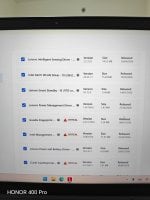
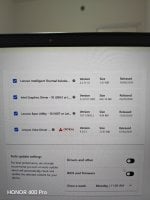
Lenovo Vantage (Commercial) deployed not the store version
File and Photo backup
Koofr
Filejump
Google Photos
Subscriptions
    • Google One AI Premium 2TB
System recovery
AOMEI Backupper Pro
Risk factors
    • Browsing to popular websites
    • Working from home
    • Making audio/video calls
    • Opening email attachments
    • Buying from online stores, entering banks card details
    • Logging into my bank account
    • Downloading software and files from reputable sites
    • Streaming audio/video content from trusted sites or paid subscriptions
Computer specs
Lenovo Thinkpad X13 Gen 3
Notable changes
Reverted to Windows 11 Pro 25H2
- blocked driver updates from Windows Update
- Deferred updates for 14 days.
What I'm looking for?

Looking for maximum feedback.

When I did a Windows install recently on a friends laptop, installing Windows wasn't overly long, installing new updates, adding his bookmarks, setting browser settings! AV, etc did take a long time & he still had to install office & set office up (not quick) after I left, if these people don't do images occasionality i no longer help them its that simple, as my time is still valuable.

Full C:\ 48 seconds, takes a few mins on my £280 laptop but still fast.

Full C.jpg
 
Last edited:
You are usually limited by the processor speed/RAM of the PC in installing & Windows updates & the download speed to install updates, on this PC I haven’t had a need to reinstall for over 3 years thanks to imaging, on the recent reinstall of a friend sorting updates took well over over half an hour, that’s on a gig download - However: if you can install Windows in 15 mins & install Office & set-it up in 3, etc I really take my hat off to you I really must be doing all things wrong.

I don't intend to cause offence ever, though i may do that without realising, if I do that to anyone i apologise! ..:oops::oops::oops:
 
Last edited:
You are usually limited by the processor speed/RAM of the PC in installing & Windows updates
I tried installing W one time from ISO on usb memory containing ventory, and one more time using the usb memory containing ventory but from ISO on HDD; there is a significant difference in duration.
Of course if bundled with a better cpu and ram, it will be even faster.
if you can install Windows in 15 mins & install Office & set-it up in 3, etc I really take my hat off to you I really must be doing all things wrong
W install from HDD ISO: approx 7 min; Office install from offline ISO: approx 75 sec.
 
It has been a very busy day.

I installed Windows 11 Enterprise IoT LTSC and made hudge changes.

-Blocked driver updates in Windows Updates using GP. I rely on Lenovo Vantage Commercial.
- Deferred security updates for 14 days to avoid catastrophes similar to the one I expereinced because of Jan update
- Deferred quality for 1 month.
- Sat Windows Updates to notify of check and download of updates using GP.

- Installed EIS instead of TMMS.
 
It has been a very busy day.

I installed Windows 11 Enterprise IoT LTSC and made hudge changes.

-Blocked driver updates in Windows Updates using GP. I rely on Lenovo Vantage Commercial.
- Deferred security updates for 14 days to avoid catastrophes similar to the one I expereinced because of Jan update
- Deferred quality for 1 month.
- Sat Windows Updates to notify of check and download of updates using GP.

- Installed EIS instead of TMMS.
Congratulations for the fresh install.
I have installed freshly today too.
But I have found four files never seen them before.
Capture.PNG
Capture2.PNG

Do you know what are those files?
 
I don't understand what you are saying. U first install Ventoy onto a USB stick correct?
Correct; it creates a small 32 MB FAT partition for the app install, then you have two options:
1- Add whatever you like of ISO files on the remaining partition (could be formatted as NTFS, exFAT, or FAT), in addition to any files you need to store on the usb memory.
2- Keep the ISO files stored on the HDD, and use Ventoy to install Windows or Linux right from there.
The second option has two advantages:
a- Larger storage space than the usb memory
b- Faster read speed from HDD than the usb memory
 
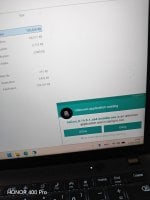
Panda Application Control in action.

IMG_20260711_170830.jpg

Once you allow the app, it gets whitlested. I sat Application Control to "Ask" for unknown applications.


One more point. After running a full system scan followed by a system restart, the system as snappy as it could ever be.
 
  • Applause
Reactions: Jonny Quest
Panda Application Control also warned about Waterfox installer. This is a good sign. Panda does not automatically trust digitally signed apps.