Troubleshoot Error 0x81000203

JB007

Level 26
Thread author
Verified
Top Poster
Well-known
Forum Veteran
May 19, 2016
1,567
1
6,553
2,469
France
Hello,
Yesterday, thanks to MalwareTips community, I have solved an issue with Emsisoft Internet Security using Revo Pro: A major problem prevents the application startup
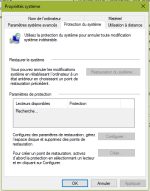
When I used Revo Pro I noticed that it cannot made a restoration point.
So I go to take a look and noticed that there is an error.
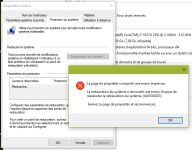
Erreur restauration.PNG
Erreur restauration(2).PNG
I tried to apply the following fix but without success: Problème restauration système - erreur 0x81000203 Windows 7/8
Can you help me ?
 
Last edited:
Sorry in advance for my English I am French.

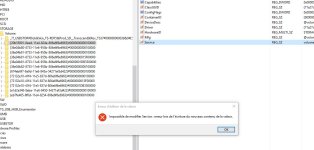
I have the same problem having used kaspersky removal tool (Kavremover), I followed the tutoriel but when I want to change the value "Service" to "volsnap" I have this error message (translation in English): "impossible to modify Service: error during the writing of the new contents of the value"

thank you for your help
 

Attachments

  • 2016-11-01 19_25_00-Éditeur du Registre.jpg
    2016-11-01 19_25_00-Éditeur du Registre.jpg
    90.4 KB · Views: 627
Upvote 0
Sorry in advance for my English I am French.

I have the same problem having used kaspersky removal tool (Kavremover), I followed the tutoriel but when I want to change the value "Service" to "volsnap" I have this error message (translation in English): "impossible to modify Service: error during the writing of the new contents of the value"

thank you for your help
Need Help - Error 0x81000203
 
Upvote 0
Hello, the same problem here and also after using Kavremvr.exe on Windows 10.
Can you wait to close this thread? There are a few questions about the handling of repairs to be done that will be asked another day.
Thank you very much for your understanding.
 
Upvote 0
Hello, the same problem here and also after using Kavremvr.exe on Windows 10.
Can you wait to close this thread? There are a few questions about the handling of repairs to be done that will be asked another day.
Thank you very much for your understanding.
Hello @Nono
Welcome:)
You are on the right forum to solve your problem;)
 
  • Like
Reactions: Xtwillight
Upvote 0
This problem persist @ users who had instaled TuneUp Utilities 2009 / 2010 / 2011,

TuneUp Utilities 2009 / 2010 / 2011 Turbo Mode block system protection / restore.
Which Turbo Mode is on, turn off Turbo Mode and go to Windows / Control Panel / System and Security / System Protection and these not anymore " error code 0x81000203 "
Problem fixed.
 
Upvote 0
This problem persist @ users who had instaled TuneUp Utilities 2009 / 2010 / 2011,

TuneUp Utilities 2009 / 2010 / 2011 Turbo Mode block system protection / restore.
Which Turbo Mode is on, turn off Turbo Mode and go to Windows / Control Panel / System and Security / System Protection and these not anymore " error code 0x81000203 "
Problem fixed.
this problem was solved. The cause was due to kaspersky uninstaller tool not due to tuneup utilities (which is also a known cause)
 
Upvote 0