Hard_Configurator - Windows Hardening Configurator

Hello !

I want to play some tracks with my Echo Dot 5 (Alexa) by bluetooth and it doesn't work.
I have add some changes on my H_C.

If I switch off "Switch Default Deny" and the problem occur, it is not H_C ?

View attachment 282425

View attachment 282426

You should also remove the block list used in FirewallHardening and apply ConfigureDefender default settings (if you use Microsoft Defender). If after Windows restart the issue is still present, then it is caused by something else. Did you check the H_C log for blocked events?
 
ShareX_A9x0q4Z3dY.png
 
Switch default deny tool doesn't seem to properly close for me in some cases and then eats cpu cycles like crazy. Not sure what causes it as it doesn't happen often.
 
  • Like
Reactions: Andy Ful
Switch default deny tool doesn't seem to properly close for me in some cases and then eats cpu cycles like crazy. Not sure what causes it as it doesn't happen often.

Is it related to some actions done before closing SwitchDefaultDeny?
 
Is it related to some actions done before closing SwitchDefaultDeny?
Honestly, I couldn't tell you and ignored it for a while now as it happens so infrequently. Today I said you lose nothing by mentioning it so here we are.

Ok I think you pushed me to figure it out. If you have adhd like me when you click the button to enable protection again you spam the close button the millisecond it happens. If you click fast enough and enough times it doesn't close. Did it twice just now but maybe it's random. Not sure.
 
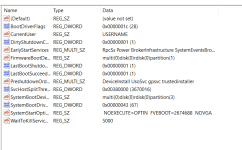
Do I need to add the reg tweak? because I don't see it in regedit?
Code:
[HKEY_LOCAL_MACHINE\SYSTEM\CurrentControlSet\Control\Srp\Gp]
"RuleCount"=dword:00000000

What entries do you see under that key?
 
  • Like
Reactions: oldschool
Scroll down and find the subkey SRP.
Duh! :rolleyes::eek: OK, I see Srp > click > Gp > click > modify value @ RuleCount = (0). It was at (2). I think I've got it. You should probably check the work of this relative noob registry hacker, like a teacher would. :D
 
@Andy Ful I tried a disallowed SRP setup and whitelisted C:/ProgramFiles and C:/ProgramFiles (86) plus some browsers and a few other programs, the latter whitelisted via hash, and nothing would execute. SRP whitelisting via GPO seems broken to me.

I'll stay with my simple security setup of Defender and SAC. Thanks again for the help.
 
Last edited:
  • Like
Reactions: Andy Ful
@Andy Ful I tried a disallowed SRP setup and whitelisted C:/ProgramFiles and C:/ProgramFiles (86) plus some browsers and a few other programs, the latter whitelisted via hash, and nothing would execute. SRP whitelisting via GPO seems broken to me.

I'll stay with my simple security setup of Defender and SAC. Thanks again for the help.
Making SRP default-deny restrictions via GPO is not easy. Most setups are kinda unusable. It is much easier and safer when using H_C. (y)
 
  • Like
Reactions: oldschool