
Hard_Configurator - Windows Hardening Configurator

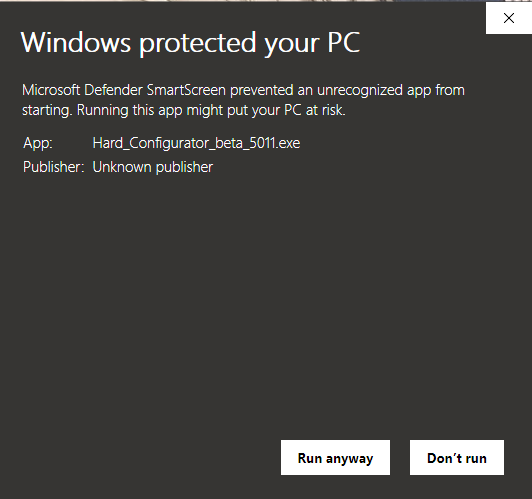
Hello, Andy Ful. Since there were some changes and additions to Firewall Hardening, I have installed the beta 5.0.1.1. SmartScreen was a hurdle this time as usual. Installed over the beta 5.0.0.1 w/ no problems. I will try to read all the read-me files, it's a lot. Somewhere along the way, the ability to hold and drag anywhere on the UI rim got fixed. (y)

hc ss.PNG

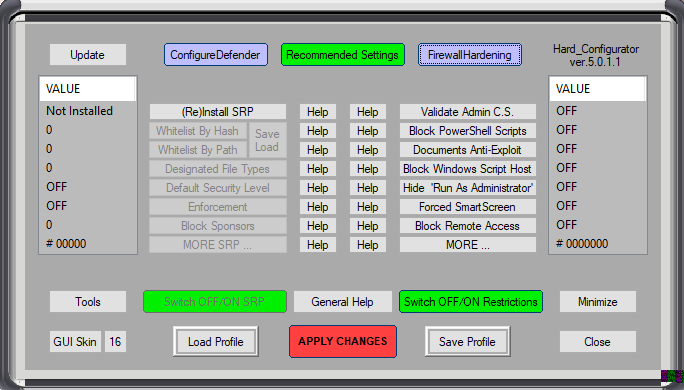
Just a comment: This is a nice skin, #16/Sleek.

hc skin.PNG

Thank you for this wonderful software. 🌸🌷🌼
 
Looking forward to trying this latest version out. I have a couple of programs that are in user spance, namely WinAuth for authenticating work's VPN connection but it's easy enough to just run as smartscreen when i need it so I'm guessing Strict_Recommended would probably suit or I might try the Basic_recommended depending on the security implications.
 
Hello, Andy Ful. Since there were some changes and additions to Firewall Hardening, I have installed the beta 5.0.1.1. SmartScreen was a hurdle this time as usual. Installed over the beta 5.0.0.1 w/ no problems. I will try to read all the read-me files, it's a lot. Somewhere along the way, the ability to hold and drag anywhere on the UI rim got fixed. (y)

Just a comment: This is a nice skin, #16/Sleek.

Thank you for this wonderful software. 🌸🌷🌼
Thanks. The issue with SmartScreen is my fault. This installation file is not digitally signed, but whitelisted by Microsoft and Avast. The signed one still waits for whitelisting. I will replace the unsigned installer soon.
 
I am using 5.0.0.1, install over top is the recommended way to update to the new version?
The new beta can recognize if some other application has tampered SRP. So, if you are on Windows 10, then it is recommended to update H_C. But, you can wait a day or two, until I upload the signed installer.
 
@Andy Ful
I have a problem with firewall hardening when i made a custom rule from avast ui it dont get blocked. But if i create from windows firewall directly it work. Any suggestion?View attachment 238708
I am not sure what is your problem. But, first a simple question. Did you restart the system after applying FirewallHardening rules?
 
Hard_Configurator beta 5.0.1.1 (signed installer):

Microsoft and Avast did a good job. The installer was whitelisted in 4 hours. :)
There are some problems with Symantec. I am waiting for over a week and there is no confirmation about whitelistng. Normally they answered in 2 days.
 
The new beta can recognize if some other application has tampered SRP. So, if you are on Windows 10, then it is recommended to update H_C. But, you can wait a day or two, until I upload the signed installer.
Heh, heh, I updated yesterday, now I know why Smartscreen was chirping at me during the download. Do I need to install the latest version or am I ok?
 
Heh, heh, I updated yesterday, now I know why Smartscreen was chirping at me during the download. Do I need to install the latest version or am I ok?
The previous installer is identical to the current, except the digital certificate. You can delete the previous installer and download the current one, but there is no need to reinstall H_C.
 
Just a couple of stupid questions @Andy Ful

Which option is best in regards to 6. below?

With regards to 7, do I need to do anything? I'm just no fully understanding "update your archiver and email client".

Thanks,

6. If you want to use Command Prompt or PowerShell with Administrative
rights, then the option <Hide 'Run As Administrator'> should be set to OFF
(not recommended on the computers of children).
7. Please update your archiver application and email client. In the Recommended
Settings the below applications are supported:
Archivers: Windows built-in Zip archiver, 7-Zip, ALZip, Bandizip, B1
Free Archiver, Explzh, ExpressZip, IZArc, PeaZip, PKZip, PowerArchiver,
WinRar, WinZip.
EmailClients: Mail for Windows 10 (Windows app), Outlook, Claws-mail,
eM Client, Foxmail, Hiri, Mailspring, PostBox, Spike, Thunderbird, and
any online email client
 
Actually, got around to reading more of the manual and found the answer there. Looks like hiding the option is probably best for me.

Harden Archiver and Email client already enabled in Recommended settings under SRP so I'm guessing that I don't need to do anything.

Thanks @Andy Ful for an amazing product!

RUN AS ADMINISTRATOR
<Hide 'Run As Administrator'> button hides/shows "Run as administrator"
entry in the right-click Explorer context menu.
When applying the Hard_Configurator Recommended Settings, the user is asked
if the entry "Run as administrator" should be visible. The users who want
to use Command Prompt or PowerShell with Administrator rights, should
keep it visible and Hard_Configurator automatically will use the setting:
<Hide 'Run As Administrator'> = 'OFF'.
The average users do not run Command Prompt or PowerShell with Administrative
Rights, so it is recommended to hide the "Run as administrator" entry
on their computers. This entry will be hidden by setting:
<Hide 'Run As Administrator'> = 'ON’
