

The MalwareTips app
Your community, one tap away.
Open MalwareTips from your Home Screen or desktop. Follow discussions, find answers and pick up where you left off.
- Home Screen access
- Optional push alerts
- Your community
You're ready to explore.Explore what's new
Installation instructions
iPhone & iPad
- Open MalwareTips in Safari and tap Share. You may need to open the Page Menu first.
- Choose Add to Home Screen. If it is not listed, use Edit Actions to add it.
- Keep Open as Web App enabled if shown, then tap Add.
Android
- Open MalwareTips in Chrome or another browser that supports app installation.
- Open the browser menu and look for Install app, Install and create shortcut, or Add to Home screen.
- Choose Install and confirm. Wording varies by browser.
Desktop
- Chrome: use the install icon in the address bar, or the menu under Cast, save and share.
- Edge: open the menu, then More tools, Apps and Install this site as an app.
- Safari on Mac: choose Share or File, then Add to Dock. Firefox on Windows: look for the web apps button in the address bar.
If you cannot find an install option, update your browser or use its bookmark option to keep MalwareTips close.
Keep up with your conversations
After installation, open the app and sign in. Enable push notifications in Preferences if you want alerts. On iPhone and iPad, push requires a Home Screen web app and iOS or iPadOS 16.4 or later.
Sign in to manage notificationsInstallation is optional. Your notification settings stay under your control.
You are using an out of date browser. It may not display this or other websites correctly.
You should upgrade or use an alternative browser.
You should upgrade or use an alternative browser.
Hard_Configurator - Windows Hardening Configurator
-
 Thread starter
Andy Ful
Thread starter
Andy Ful
- Start date
- 4,521 Replies
- 1,195,442 Views

By the Windows Hardening sections, I assume you mean the options on the right side, which are not related to SRP?If I activate only the Firewall and the Windows Hardening sections in H_C, do I get about the same protection that I have with SysHardener ?
No, you will not get the same level of protection. SysHardener will block script files of various types, and to get that protection in H_C, you need to use SRP (the options on the left side)

Andy Ful
From Hard_Configurator Tools
Verified
Honorary Member
Top Poster
Developer
Well-known
Forum Veteran
As an addition to the post of @shmu26, the H_C FirewallHardening blocks more LOLBins.If I activate only the Firewall and the Windows Hardening sections in H_C, do I get about the same protection that I have with SysHardener ?
If you want to get something similar to SysHardener (but stronger) you can use H_C and load the predefined profile: Windows_10_Basic_Recommended_Settings. This profile allows EXE and MSI files, so you probably will not see a difference in daily work.
H_C is much easier to switch on and off, in case you need to run a script file for a mainenance task or whatever, so that might be a difference.you probably will not see a difference in daily work.

Nice cred and mention for Andy here. I'm surprised this has not already been posted.... or did I miss it...

 www.bleepingcomputer.com
Windows 10 Defender's hidden features revealed by this free tool
Windows 10's built-in Microsoft Defender antivirus solution has many advanced hidden features that allow you to customize how the security software works. Unfortunately, most people do not know these settings exist or even how to access them.

Gandalf_The_Grey
Level 86
Verified
Honorary Member
Top Poster
Content Creator
Well-known
Forum Veteran
Yes, great to see more recognition of his amazing workNice cred and mention for Andy here. I'm surprised this has not already been posted.... or did I miss it...
Windows 10 Defender's hidden features revealed by this free tool
Windows 10's built-in Microsoft Defender antivirus solution has many advanced hidden features that allow you to customize how the security software works. Unfortunately, most people do not know these settings exist or even how to access them.

It was already posted in the Configure Defender thread:

ConfigureDefender utility for Windows 10/11 | Page 52 | MalwareTips
What triggers this command-line? Is it related to the WD task in the Task Scheduler? Look at the folder: C:\ProgramData\Microsoft\Windows Defender\Platform\...
 malwaretips.com
ConfigureDefender utility for Windows 10/11 | Page 53 | MalwareTips
Nada. Nothing. Maybe it is my system configuration ... but it doesn't matter.
malwaretips.com

I've been reading all of @Andy Ful 's recommended links in H_C manual and I'm wanting to ask some general questions about SRP, except I'm still trying to wrap my head around some of the manual's explanation of H_C's inner mechanics. I guess it will just have to keep percolating in this old brain of mine ... 


Setup PCPC setup
My brain is young still...at least by numbers, and that stuff makes my head spin. I won’t implement SRP default deny until I understand what I’m doing. So it could be a while.I've been reading all of @Andy Ful 's recommended links in H_C manual and I'm wanting to ask some general questions about SRP, except I'm still trying to wrap my head around some of the manual's explanation of H_C's inner mechanics. I guess it will just have to keep percolating in this old brain of mine ...
Maybe I need the new casual user mode.
Well, I have W10 Pro so I'm learning how to deploy with GPO plus @Andy Ful 's expertise, but without his app.My brain is young still...at least by numbers, and that stuff makes my head spin. I won’t implement SRP default deny until I understand what I’m doing. So it could be a while.

 Just for the fun of it!
Last edited:
Andy Ful
From Hard_Configurator Tools
Verified
Honorary Member
Top Poster
Developer
Well-known
Forum Veteran
You are on the right thread to ask.. and you have the right tool (H_C) to check the answers.I've been reading all of @Andy Ful 's recommended links in H_C manual and I'm wanting to ask some general questions about SRP,...

This probably will improve both your knowledge about SRP and the H_C manual.
Andy Ful
From Hard_Configurator Tools
Verified
Honorary Member
Top Poster
Developer
Well-known
Forum Veteran
It is possible for a simple SRP setup. The more complex setups require several hundreds of SRP rules.Well, I have W10 Pro so I'm learning how to deploy with GPO plus @Andy Ful 's expertise, but without his app.

My setup is simple, more like @Windows_Security's Windows Pro Owner? Use SRPIt is possible for a simple SRP setup.
As I got into this I realized more fully how much work you put into H_C. The casual user might think otherwise, that it's just a simple app. I imagine you had to do a lot of coding, and maybe hundreds of rules?The more complex setups require several hundreds of SRP rules.
Andy Ful
From Hard_Configurator Tools
Verified
Honorary Member
Top Poster
Developer
Well-known
Forum Veteran
Yes. But, I like the final effect.My setup is simple, more like @Windows_Security's Windows Pro Owner? Use SRP
As I got into this I realized more fully how much work you put into H_C. The casual user might think otherwise, that it's just a simple app. I imagine you had to do a lot of coding, and maybe hundreds of rules?

Andy, when do you expect the latest H_C beta to be good to go?
Andy Ful
From Hard_Configurator Tools
Verified
Honorary Member
Top Poster
Developer
Well-known
Forum Veteran
It is already good to go. Simply, there can be some unimportant bugs. There were also some, unimportant bugs in the version 5.0.0.0, that were corrected in the beta. Please read about the new <Update Mode>, <Harden Archives>, and <Harden Email Clients> features, because they make the Recommended Settings in the beta different from those in the ver. 5.0.0.0.Andy, when do you expect the latest H_C beta to be good to go?
Hi Andy atm I'm trying the new 5.1. beta and so far no problems at all. Nice work.
When I looked in the manual I saw that you also mentioned "Font rescaling issues". A few month ago some kind soul told me that I could also try to fix it another way while still having my custom 125% for all other stuff. Maybe you could add that for other people desperate to stay at 125% while using H_C. I just used a picture since my explanation would only be more confusing (You have to try if application, system or system enhanced gives the best result). Not sure if it's only an windows 10 Pro option?
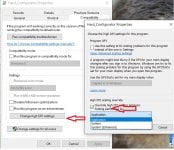
When I looked in the manual I saw that you also mentioned "Font rescaling issues". A few month ago some kind soul told me that I could also try to fix it another way while still having my custom 125% for all other stuff. Maybe you could add that for other people desperate to stay at 125% while using H_C. I just used a picture since my explanation would only be more confusing
(You have to try if application, system or system enhanced gives the best result). Not sure if it's only an windows 10 Pro option?
Last edited:
Andy Ful
From Hard_Configurator Tools
Verified
Honorary Member
Top Poster
Developer
Well-known
Forum Veteran
On my computer, this spoils the display. So, it may work only on some machines.Hi Andy atm I'm trying the new 5.1. beta and so far no problems at all. Nice work.
When I looked in the manual I saw that you also mentioned "Font rescaling issues". A few month ago some kind soul told me that I could also try to fix it another way while still having my custom 125% for all other stuff. Maybe you could add that for other people desperate to stay at 125% while using H_C. I just used a picture since my explanation would only be more confusing
View attachment 240935
Setup PCPC setup
Just for the fun of it!
omG, oldschool called messing around with group policy "fun." What's next?
So you start with an spoiled display which gets worse after these settings?On my computer, this spoils the display. So, it may work only on some machines.
For me it changes a spoiled display to an normal looking one.
Recently browsing
Members who viewed this thread in the last 5 minutes


