Open MalwareTips in Safari and tap Share. You may need to open the Page Menu first.
Choose Add to Home Screen. If it is not listed, use Edit Actions to add it.
Keep Open as Web App enabled if shown, then tap Add.
Android
Open MalwareTips in Chrome or another browser that supports app installation.
Open the browser menu and look for Install app, Install and create shortcut, or Add to Home screen.
Choose Install and confirm. Wording varies by browser.
Desktop
Chrome: use the install icon in the address bar, or the menu under Cast, save and share.
Edge: open the menu, then More tools, Apps and Install this site as an app.
Safari on Mac: choose Share or File, then Add to Dock. Firefox on Windows: look for the web apps button in the address bar.
If you cannot find an install option, update your browser or use its bookmark option to keep MalwareTips close.
Keep up with your conversations
After installation, open the app and sign in. Enable push notifications in Preferences if you want alerts. On iPhone and iPad, push requires a Home Screen web app and iOS or iPadOS 16.4 or later.
oh god.
I just updated Emsisoft emergency kit (13-14-day old). Immediately, it wrote 1.3GB to my SSD . Measured using process explorer
that's too much writing, I believe
perhaps, BD's signatures are the culprit
I used to update other AVs like avast, Kaspersky or wisevector from scratch. None of them were more than 1GB. WV has the smallest write number I have seen. Avast writes more than Kaspersky
oh god.
I just updated Emsisoft emergency kit (13-14-day old). Immediately, it wrote 1.3GB to my SSD . Measured using process explorer
that's too much writing, I believe
The primary SSD in my laptop (a Samsung EVO 840) has had 11.86TB of writes in 286 days, which is about 41GB of writes a day. According to HD Sentinel, the health is at 92%.
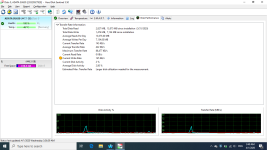
I still don't get how Hard Disk Sentinel operates and how to find how much data is written per hour. I would be glad if you guide me and I will provide the screenshots. Anyway, the number increased significantly after some hours.
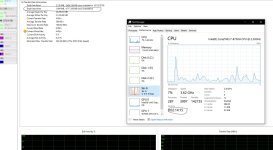
just report the total data write from the hard disk sentinel and the time you used the pc from task manager cpu tab (if you hibernate or sleep, task manager still shows the time from when you first started the pc)
From your crystal disk info screenshot, your pc written 7.19 GB per hour