Advice Request How to do a clean installation of Windows 11 without losing data?

Share practical recommendations that address the author's needs.
Hi, is there any way to do a clean install of Windows 11 without losing all my programs, settings, etc? I have seen videos that the only thing they do is to install Windows 11 on a separate partition to the disk that uses Windows 10. Is there any other method?
If you do a Restore In-Place, then you will keep your data, but your non-Microsoft programs that you installed will be gone and you will have to re-install them.
 
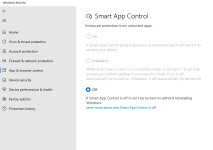
I just wanted to install Windows 11 to test SAC anyway. I am using this .reg file from the Windows 11 forum tutorial, but the problem is that every time I restart the pc SAC appears disabled. Will I have to do a clean install deleting all my data?

 
I just wanted to install Windows 11 to test SAC anyway. I am using this .reg file from the Windows 11 forum tutorial, but the problem is that every time I restart the pc SAC appears disabled. Will I have to do a clean install deleting all my data?

Microsoft probably is the reason, why SAC keep to be turned off even after clean-install Windows 11. Read below on official description:
We start in evaluation mode. This is a period during which Windows tries to determine if you're a good candidate for Smart App Control.
If you are a good candidate for Smart App Control, then it will automatically be turned on. If not, it'll be turned off.
 
I just wanted to install Windows 11 to test SAC anyway. I am using this .reg file from the Windows 11 forum tutorial, but the problem is that every time I restart the pc SAC appears disabled. Will I have to do a clean install deleting all my data?

From that same article.

To turn Smart App Control back on after it's been turned off, you'll need to clean install or reset Windows 11 build 22567 or higher.
 
I have read even on German forums or other tech websites, where users report about SAC doesn't work to keep be enabled automatically (by Microsoft) sometimes even after clean-install or reset Windows 11. Probably that's what is meant quoted from Microsoft:
"If you are a good candidate for Smart App Control, then it will automatically be turned on. If not, it'll be turned off." What is Smart App Control?

Furtermore, at this time point of development (W11 22H2), SAC seems to be more like alpha or may beta phase...
Probably, just a waste of time only for testing SAC, when you are going to clean installing Windows 11.
 
I actually had to install it twice Windows, the first time I installed it and enabled SAC and pretty much couldn't install anything so I reinstalled it from scratch and now I have SAC disabled I don't know why mysteries of Microsoft when it should be in evaluation mode. It's kind of like a blocker for almost all SAC. Well that's my experience with SAC.:LOL:


1.png
 
Hi, is there any way to do a clean install of Windows 11 without losing all my programs, settings, etc?
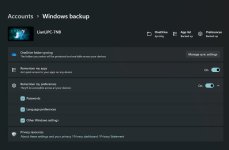
I have dreamed about it, I have even enabled Windows sync, but it did not even restore my desktop wallpaper for crying out loud, so much for MSA.
Well at least winget restores all installed apps and edge restores some settings, but I still have to restore Edge's literal files to restore a backup.
Code:
winget import -i D:\OneDrive\Setup\winget.txt --accept-package-agreements --accept-source-agreements

rd "Z:\Edge" /s /q
taskkill /im msedge.exe /f
takeown /s %computername% /u %username% /f "%LocalAppData%\Microsoft\Edge" /r /d y
xcopy "D:\OneDrive\Soft\Edge" "Z:\Edge" /s /i /y
rd "%LocalAppData%\Microsoft\Edge" /s /q
mklink /d "%LocalAppData%\Microsoft\Edge" "Z:\Edge"
 

Attachments

  • capture_10082022_184651.jpg
    capture_10082022_184651.jpg
    56.7 KB · Views: 210
Last edited:

Recently browsing

Members who viewed this thread in the last 5 minutes

Back
Top