


The MalwareTips app
Your community, one tap away.
Open MalwareTips from your Home Screen or desktop. Follow discussions, find answers and pick up where you left off.
- Home Screen access
- Optional push alerts
- Your community
You're ready to explore.Explore what's new
Installation instructions
iPhone & iPad
- Open MalwareTips in Safari and tap Share. You may need to open the Page Menu first.
- Choose Add to Home Screen. If it is not listed, use Edit Actions to add it.
- Keep Open as Web App enabled if shown, then tap Add.
Android
- Open MalwareTips in Chrome or another browser that supports app installation.
- Open the browser menu and look for Install app, Install and create shortcut, or Add to Home screen.
- Choose Install and confirm. Wording varies by browser.
Desktop
- Chrome: use the install icon in the address bar, or the menu under Cast, save and share.
- Edge: open the menu, then More tools, Apps and Install this site as an app.
- Safari on Mac: choose Share or File, then Add to Dock. Firefox on Windows: look for the web apps button in the address bar.
If you cannot find an install option, update your browser or use its bookmark option to keep MalwareTips close.
Keep up with your conversations
After installation, open the app and sign in. Enable push notifications in Preferences if you want alerts. On iPhone and iPad, push requires a Home Screen web app and iOS or iPadOS 16.4 or later.
Sign in to manage notificationsInstallation is optional. Your notification settings stay under your control.
You are using an out of date browser. It may not display this or other websites correctly.
You should upgrade or use an alternative browser.
You should upgrade or use an alternative browser.
K2021MR1 download
-
 Thread starter
harlan4096
Thread starter
harlan4096
- Start date
- 203 Replies
- 51,968 Views
Thanks for this.
Any details on the installer at all?
It seems En_US:
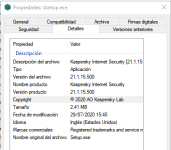
Will look at updating my ENG International and see what happens.
Edit. Installed on laptop over KIS20. Everything seems fine so far.
Edit Two: Some pages seem a little slow to load? Not sure if it's a coincidence or?
Last edited:

Any installer for the free version?

KSC free 2021 (21.0.44.1537) is available to download on your account: My KasperskyAny installer for the free version?
But might be isn't currently available to all regions around the world...

Feel that here too with KSC 21, I guess it's because it didn't install extension on Edge-chromium yet here.Edit Two: Some pages seem a little slow to load? Not sure if it's a coincidence or?
Disabling encrypted connection scanning should improve that.Feel that here too with KSC 21, I guess it's because it didn't install extension on Edge-chromium yet here.
You may also keep encrypted connections on, but disable the activation of Kaspersky Protection add-on and the script injection...

Not yet  I changed in the 1st link KIS by KTS but didn't work
I changed in the 1st link KIS by KTS but didn't work
Anyway You may try to use KIS installer to convert it to KTS typing Your KTS license...
You may also keep encrypted connections on, but disable the activation of Kaspersky Protection add-on and the script injection...
Will give this a go
Running smooth on my PC
. Web pages on chrome are loading fast, just like 2020Also a guide: What's new
Last edited:

I guess You can't setup K. sounds since W10 came to us
Running smooth on my PC
Also a guide: What's new
Hmm are there any security/protection improvements? It’s interesting the release notes don’t seem to call out more than just UI redesigns.

Running smooth on my PC
Also a guide: What's new
No slowdown in Brave, and running smooth too:
This might help a little more: More infoHmm are there any security/protection improvements? It’s interesting the release notes don’t seem to call out more than just UI redesigns.

Recently browsing
Members who viewed this thread in the last 5 minutes
You may also like...
-

-
-
 Software Review Download Sentinel Reviews
 -
Scams & Phishing Fake WatchGuard VPN site steals logins before real download
-
 Serious Discussion Did Microsoft Defender change the way it responds to file downloads?