


The MalwareTips app
Your community, one tap away.
Open MalwareTips from your Home Screen or desktop. Follow discussions, find answers and pick up where you left off.
- Home Screen access
- Optional push alerts
- Your community
You're ready to explore.Explore what's new
Installation instructions
iPhone & iPad
- Open MalwareTips in Safari and tap Share. You may need to open the Page Menu first.
- Choose Add to Home Screen. If it is not listed, use Edit Actions to add it.
- Keep Open as Web App enabled if shown, then tap Add.
Android
- Open MalwareTips in Chrome or another browser that supports app installation.
- Open the browser menu and look for Install app, Install and create shortcut, or Add to Home screen.
- Choose Install and confirm. Wording varies by browser.
Desktop
- Chrome: use the install icon in the address bar, or the menu under Cast, save and share.
- Edge: open the menu, then More tools, Apps and Install this site as an app.
- Safari on Mac: choose Share or File, then Add to Dock. Firefox on Windows: look for the web apps button in the address bar.
If you cannot find an install option, update your browser or use its bookmark option to keep MalwareTips close.
Keep up with your conversations
After installation, open the app and sign in. Enable push notifications in Preferences if you want alerts. On iPhone and iPad, push requires a Home Screen web app and iOS or iPadOS 16.4 or later.
Sign in to manage notificationsInstallation is optional. Your notification settings stay under your control.
You are using an out of date browser. It may not display this or other websites correctly.
You should upgrade or use an alternative browser.
You should upgrade or use an alternative browser.
New Update KAV\KIS\KS\KSOS: 21.4 - 21.5 MR4 / MR5 beta updates
-
 Thread starter
harlan4096
Thread starter
harlan4096
- Start date
- 524 Replies
- 112,878 Views

I know that TR version is out, but it is for internal testing for now... usually TR is almost the same as final, and already accepts commercial licences.
Where did you find this?
The Ordynary
Level 3
it's taking a long time for the final version to come out
Is it?it's taking a long time for the final version to come out
BETA testing finished 10 days ago.
There is already a TR (Technical Release) -> KAV\KIS\KS\KSOS: 21.4.2.189 MR4 beta

Link is not working. Where can i find the TR files?There is already a TR (Technical Release) -> KAV\KIS\KS\KSOS: 21.4.2.189 MR4 beta
Of course is working, I put the link to my previous comment 
Still no TR link
Still no TR link
In Kaspersky Standard, to access Database Update: being with main GUI window opened: 1 click in Security and 1 click over green button [Update], no scroll needed 
Last edited:

Setup PCPC setup
where you downloaded it? can you send me the link please!Yesterday I installed the 21.5.11.384 technical review and didn't like it, before you have to make just one click to know when was the last database update, now you have to make 2 scrolls and 3 clicks to obtain the same information, I'll stay with the older version.
I guess He means the last RC beta...
Read my post again, I don't want to update databases, I want to know when was the last time the databases were updated.In Kaspersky Standard, to access Database Update: being with main GUI window opened: 1 click in Security and 1 click over green button [Update], no scroll needed
This is where I downloaded it, BTW it lasted less than one day in my pc, I went back to KAV 2021. Kasperskywhere you downloaded it? can you send me the link please!
It said "technical preview" in windows start menu.I guess He means the last RC beta...
Last edited:
Then:
1.- If You want to know the last database release date: just hovering mouse pointer over the K icon in Windows taskbar will reveal it.
2.- if You Want to know when was the last time the product tried to get updates: being in main GUI, just scroll down a bit, and You will find it in TimeLine.
1.- If You want to know the last database release date: just hovering mouse pointer over the K icon in Windows taskbar will reveal it.
2.- if You Want to know when was the last time the product tried to get updates: being in main GUI, just scroll down a bit, and You will find it in TimeLine.
1) That's not what I want.Then:
1.- If You want to know the last database release date: just hovering mouse pointer over the K icon in Windows taskbar will reveal it.
2.- if You Want to know when was the last time the product tried to get updates: being in main GUI, just scroll down a bit, and You will find it in TimeLine.
2) All I could find in time line was the date the program started, there were no signs of the last update attempt whatsoever. Do you have a screenshot showing that?
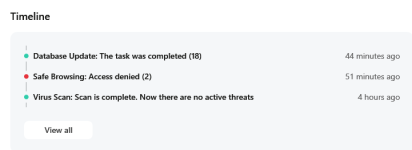
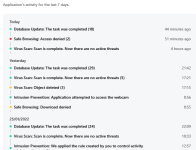
There is no link to TR yet, these screenshots are from the last RC: Kaspersky\VPN\KSOS 21.5.10.384 RC
I guess will be soon, but They are working still in the license migration system from previous versions: KAV/KIS/KTS/KSC...
Last edited:
Recently browsing
Members who viewed this thread in the last 5 minutes
You may also like...
-
New Update Kaspersky\VPN\KSOS 2021MR16 & KES 12 betas
-
Serious Discussion Kaspersky\VPN\KSOS 2021MR15 betas
-

-
 New Update Release v1.16.2 / 5.71.2 Latest
 -
