KIS 2018 & HMPA & VS setings

Doesn't almost every AV have some kind of behavior blocking, or exploit mitigation, or whatever they want to call it? So any time you combo HMPA with an AV that is worth its salt, you are taking a calculated risk...

There is difference between anti-exploit mitigations and anti-exploit-like features. Two completely different things.

Of course there is always a calculated risk. That is what testing is for - to test for such things.

The issue is when a program - for example Microsoft Word - is protected by two security softs simultaneously.

All overlap can result in unintended issues.
 
also i'm fairly certain, developers try to sort out incompatibilities with the known AVs, I'm sure HMPA has somewhat fixed incompaitibilities, but obviously they can't fix all, which gets us to the point of @Lockdown .

As you can see on the HMP.A forums, the Loman brothers are constantly having to fix false positives and breakages.

Vendors are not very forthright about the technical details of conflicts because they do not guarantee that their softs will be 100 % compatible with any other security soft. Sorry... but that is the way of the industry. In other words, if you make combos, you do so at your own risk.
 
KIS has a lot of options to enable/disable certain parts of modules, but i can't, for the love of god, find anything about anti-exploits.
They don't give you the option you are looking for. It is all under the hood.
But getting back to the original question, Voodooshield has good post-exploit protection, so I think you can be happy with KIS+VS.
By post-exploit protection, I mean that VS restricts the access of web apps to system processes, and also monitors command line strings for the commonly abused system processes. So even if an app was exploited, the attack would probably fail.
 
The most effective anti-exploit (known to frustrate the most persistent of malc0ders):

1. Do not use widely-installed, very commonly attacked softs like Microsoft Office, Adobe products, Java, etc.; use alternative softs where possible
2. Disable or uninstall what you do not use
3. Use the latest, greatest version of Windows and keep it updated

1 & 2 = reduction of attack surface
 
It's debatable whether or not piling a bunch of security softs on top of KIS increases security significantly.

I think a few hard tweaks sets K's protection to tippy-top heights.

Next thing you know, you security soft geeks will be demanding combo testing from the AV Labs.

They will gladly do it as long as they get paid.
 
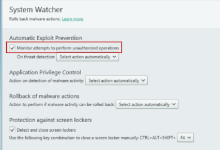
I think Kaspersky's anti-exploit is directly connected with its behavior blocker, which is the System Watcher. :)

You recall any reports in your travels of anti-exploits combo'd with KIS causing issues - especially protection malfunctions - e.g. HMP.A, MBAE, EMET ?

It's not well-documented because nobody bothers to test for them.
 
You recall any reports in your travels of anti-exploits combo'd with KIS causing issues - especially protection malfunctions - e.g. HMP.A, MBAE, EMET ?

It's not well-documented because nobody bothers to test for them.
None, as far as I know. Yeah, no reports because no one has tested the limits of the combos yet.
 
and how are you going to figure out what exactly is your AV covering as anti-exploit, that maybe you could disable it in HMPA? I can't find anything for example for KIS, and no option to disable it either.

I think Kaspersky's anti-exploit is directly connected with its behavior blocker, which is the System Watcher. :)
This --> Automatic Exploit Prevention comes under System Watcher, with a checkbox
kav2015_11237_0313-239192.png
Automatic Exploit Prevention: technology protects your computer from malicious programs that use vulnerabilities in the most commonly used applications.
  • Control of executable files started from vulnerable applications and web browsers (for example, when a program designed for viewing documents tries to run an executable file).
  • Control of suspicious actions performed by vulnerable applications (for example, if the rights of a running vulnerable application are enhanced and it writes itself into the other processes' system memory).
  • Monitoring of previous program starts (for example, whether the program was started by the user or by an exploit).
  • Tracking of sources of malicious code (for example, a web browser that started download of an infected file; remote web address).
  • Preventing malware from using application vulnerabilities.
Kaspersky Anti-Virus 2015 tracks executable files run by vulnerable applications.
If Kaspersky Anti-Virus 2015 detects an attempt to run an executable file from a vulnerable application that has not been initiated by the user, the application blocks this attempt (the user can select a different action to be performed upon threat detection).
Information about blocked executable files is logged in the Exploit Prevention report.

To ensure maximum protection, the lists of applications with detected vulnerabilities are updated together with Kaspersky Anti-Virus 2015 antivirus databases.

 
"Preventing malware from using application vulnerabilities"

Whatever that means; it could be overlap protection between KIS and HMP.A. Hard to say with no technicals.

"Control of executable files started from vulnerable applications and web browsers (for example, when a program designed for viewing documents tries to run an executable file)."

Grab a malicious winword.exe doc that executes cmd, powershell and\or wscript. Test it protected only in KIS. Then test it only protected in HMP.A. Then test it protected in KIS and HMP.A at the same time.
 
The most effective anti-exploit (known to frustrate the most persistent of malc0ders):

1. Do not use widely-installed, very commonly attacked softs like Microsoft Office, Adobe products, Java, etc.; use alternative softs where possible
2. Disable or uninstall what you do not use
3. Use the latest, greatest version of Windows and keep it updated

1 & 2 = reduction of attack surface

Unfortunately points 1 & 2 are not possible sometimes. I have tried mostly every Office suite out there, but only Microsoft Office can do some of the things I need.

The same goes with Java, for instance. Without Java installed in my machine I can't access some of the government sites I need for my everyday work so uninstalling java is unthinkable for me.

In other words a safer practice is not always possible. I have lost count of how many times my computer would have been infected by files sent by my clients if not for the security software in it. I really love it when people say that only your brain is enough.. .I once was nearly infected by a PDF file that had an embedded malware. There was no external reason to consider the file infected and I had actually requested some documents from that client. I didn't even know it was possible to infect PDF files when this happened...
 
Unfortunately points 1 & 2 are not possible sometimes. I have tried mostly every Office suite out there, but only Microsoft Office can do some of the things I need.

The same goes with Java, for instance. Without Java installed in my machine I can't access some of the government sites I need for my everyday work so uninstalling java is unthinkable for me.

In other words a safer practice is not always possible. I have lost count of how many times my computer would have been infected by files sent by my clients if not for the security software in it. I really love it when people say that only your brain is enough.. .I once was nearly infected by a PDF file that had an embedded malware. There was no external reason to consider the file infected and I had actually requested some documents from that client. I didn't even know it was possible to infect PDF files when this happened...

Yeah. Your circumstances are common. Alternatives are sometimes not possible - that is why I stated "where possible."

Government sites still requiring Java use -- really ? L0L...

Most of your attack vectors will be weaponized documents or just outright malware files.

If you are keeping the Office, Java, etc up-to-date, then there is a small risk of an exploit.

There's a bunch of different ways to significantly reduce the already small risk.
 
Yeah. Your circumstances are common. Alternatives are sometimes not possible - that is why I stated "where possible."

Government sites still requiring Java use -- really ? L0L...

Most of your attack vectors will be weaponized documents or just outright malware files.

If you are keeping the Office, Java, etc up-to-date, then there is a small risk of an exploit.

There's a bunch of different ways to significantly reduce the already small risk.

If you think that's bad, just consider that the Government site that will allow a pharmaceutical industry to register and require license to sell, or renew a license to sell any medication or medical equipment in my country only works in Internet Explorer :)
 
Unfortunately points 1 & 2 are not possible sometimes. I have tried mostly every Office suite out there, but only Microsoft Office can do some of the things I need.

The same goes with Java, for instance. Without Java installed in my machine I can't access some of the government sites I need for my everyday work so uninstalling java is unthinkable for me.

In other words a safer practice is not always possible. I have lost count of how many times my computer would have been infected by files sent by my clients if not for the security software in it. I really love it when people say that only your brain is enough.. .I once was nearly infected by a PDF file that had an embedded malware. There was no external reason to consider the file infected and I had actually requested some documents from that client. I didn't even know it was possible to infect PDF files when this happened...

I agree. If we followed blindly rule 1 for example, we would be using Ubuntu, Opera and LibreOffice, which may not fit our needs at all.
I think that common sense is pretty essential here, the ability to identify a scam (like a fake office plugin) is the first thing to worry about if we want to avoid infections like ransomware