
No, only in supported browsers with Kaspersky Protection add-on enabled and Secure Data Input enabled.


Open MalwareTips from your Home Screen or desktop. Follow discussions, find answers and pick up where you left off.
If you cannot find an install option, update your browser or use its bookmark option to keep MalwareTips close.
After installation, open the app and sign in. Enable push notifications in Preferences if you want alerts. On iPhone and iPad, push requires a Home Screen web app and iOS or iPadOS 16.4 or later.
Sign in to manage notificationsInstallation is optional. Your notification settings stay under your control.
 Thread starter
harlan4096
Thread starter
harlan4096

 malwaretips.com
ThanksSW will try to recover always, regardless of this custom tweaks of protected folders.

 www.zdnet.com
I believe it's difficult.SW has its limits of recovering, anyway with these tweaks would be very difficult files are affected.


 :
: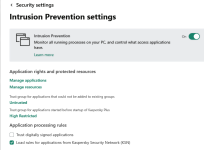
Can you expand on the Protected Folder module? If I protect, for example, my Scripts folder which is actually a network share, then what happens?Good enough
It's a synology NAS so I guess the latterA network share located where? in that system or in a different system in Your local network?
Members who viewed this thread in the last 5 minutes
