

The MalwareTips app
Your community, one tap away.
Open MalwareTips from your Home Screen or desktop. Follow discussions, find answers and pick up where you left off.
- Home Screen access
- Optional push alerts
- Your community
You're ready to explore.Explore what's new
Installation instructions
iPhone & iPad
- Open MalwareTips in Safari and tap Share. You may need to open the Page Menu first.
- Choose Add to Home Screen. If it is not listed, use Edit Actions to add it.
- Keep Open as Web App enabled if shown, then tap Add.
Android
- Open MalwareTips in Chrome or another browser that supports app installation.
- Open the browser menu and look for Install app, Install and create shortcut, or Add to Home screen.
- Choose Install and confirm. Wording varies by browser.
Desktop
- Chrome: use the install icon in the address bar, or the menu under Cast, save and share.
- Edge: open the menu, then More tools, Apps and Install this site as an app.
- Safari on Mac: choose Share or File, then Add to Dock. Firefox on Windows: look for the web apps button in the address bar.
If you cannot find an install option, update your browser or use its bookmark option to keep MalwareTips close.
Keep up with your conversations
After installation, open the app and sign in. Enable push notifications in Preferences if you want alerts. On iPhone and iPad, push requires a Home Screen web app and iOS or iPadOS 16.4 or later.
Sign in to manage notificationsInstallation is optional. Your notification settings stay under your control.
You are using an out of date browser. It may not display this or other websites correctly.
You should upgrade or use an alternative browser.
You should upgrade or use an alternative browser.
malwarebytes not finding malware, issues with running scan and bluescreen
-
 Thread starter
Gbaby614
Thread starter
Gbaby614
- Start date
- 328 Replies
- 63,918 Views

Fiery
Level 1
Gbaby614 said:oh and also, I do think I need to get rid of basicseek.. is that why we are putting it in the OTL file?? I think it is causing the popup screens. It said it is an exe.jarfile
Indeed. Basicseek is a redirector adware.

Fiery
Level 1
Gbaby614 said:oh my! I am so sorry, I had the notepad open, not the Program.. pasting now LOL I got rusty at this with u gone
haha, no worries

here are the results:
All processes killed
========== OTL ==========
64bit-Registry key HKEY_LOCAL_MACHINE\SOFTWARE\Microsoft\Internet Explorer\SearchScopes\{251E6002-154D-42BD-BCE2-460628EE3FA7}\ deleted successfully.
64bit-Registry key HKEY_LOCAL_MACHINE\SOFTWARE\Classes\CLSID\{251E6002-154D-42BD-BCE2-460628EE3FA7}\ not found.
Folder C:\Users\Michelle\AppData\Roaming\Mozilla\Firefox\Profiles\2v64zce3.default\extensions\plugin@selectionlinks.com\ not found.
Folder C:\Users\Michelle\AppData\Roaming\Mozilla\Firefox\Profiles\2v64zce3.default\extensions\staged\ not found.
Prefs.js: plugin%40selectionlinks.com:1.5 removed from extensions.enabledAddons
C:\Program Files (x86)\Mozilla Firefox\extensions\{40D65E82-75AC-47CA-8A73-1CEDC2668EFF}\defaults\preferences folder moved successfully.
C:\Program Files (x86)\Mozilla Firefox\extensions\{40D65E82-75AC-47CA-8A73-1CEDC2668EFF}\defaults folder moved successfully.
C:\Program Files (x86)\Mozilla Firefox\extensions\{40D65E82-75AC-47CA-8A73-1CEDC2668EFF}\chrome folder moved successfully.
C:\Program Files (x86)\Mozilla Firefox\extensions\{40D65E82-75AC-47CA-8A73-1CEDC2668EFF} folder moved successfully.
Registry key HKEY_LOCAL_MACHINE\Software\Microsoft\Windows\CurrentVersion\Explorer\Browser Helper Objects\{300BEC06-B743-4D19-86B9-11DC711D7FFB}\ deleted successfully.
Registry key HKEY_LOCAL_MACHINE\SOFTWARE\Classes\CLSID\{300BEC06-B743-4D19-86B9-11DC711D7FFB}\ not found.
Registry value HKEY_USERS\.DEFAULT\Software\Microsoft\Internet Explorer\Toolbar\WebBrowser\\{604BC32A-9680-40D1-9AC6-E06B23A1BA4C} deleted successfully.
Registry key HKEY_LOCAL_MACHINE\SOFTWARE\Classes\CLSID\{604BC32A-9680-40D1-9AC6-E06B23A1BA4C}\ not found.
Registry value HKEY_USERS\S-1-5-18\Software\Microsoft\Internet Explorer\Toolbar\WebBrowser\\{604BC32A-9680-40D1-9AC6-E06B23A1BA4C} not found.
Registry key HKEY_LOCAL_MACHINE\SOFTWARE\Classes\CLSID\{604BC32A-9680-40D1-9AC6-E06B23A1BA4C}\ not found.
========== FILES ==========
C:\Users\Michelle\AppData\Local\visi_coupon folder moved successfully.
< ipconfig /flushdns /c >
Windows IP Configuration
Successfully flushed the DNS Resolver Cache.
C:\Users\Michelle\Desktop\cmd.bat deleted successfully.
C:\Users\Michelle\Desktop\cmd.txt deleted successfully.
========== COMMANDS ==========
[EMPTYTEMP]
User: All Users
User: AppData
->Temp folder emptied: 0 bytes
User: Default
->Temp folder emptied: 0 bytes
->Temporary Internet Files folder emptied: 67 bytes
->Flash cache emptied: 56468 bytes
User: Default User
->Temp folder emptied: 0 bytes
->Temporary Internet Files folder emptied: 0 bytes
->Flash cache emptied: 0 bytes
User: Michelle
->Temp folder emptied: 7448604 bytes
->Temporary Internet Files folder emptied: 525334999 bytes
->Java cache emptied: 0 bytes
->FireFox cache emptied: 294835803 bytes
->Google Chrome cache emptied: 124554748 bytes
->Flash cache emptied: 83030 bytes
User: Public
->Temp folder emptied: 0 bytes
%systemdrive% .tmp files removed: 0 bytes
%systemroot% .tmp files removed: 0 bytes
%systemroot%\System32 .tmp files removed: 0 bytes
%systemroot%\System32 (64bit) .tmp files removed: 0 bytes
%systemroot%\System32\drivers .tmp files removed: 0 bytes
Windows Temp folder emptied: 5226 bytes
%systemroot%\system32\config\systemprofile\Local Settings\Temp folder emptied: 0 bytes
%systemroot%\sysnative\config\systemprofile\AppData\Local\Microsoft\Windows\Temporary Internet Files folder emptied: 35855664 bytes
RecycleBin emptied: 5102969 bytes
Total Files Cleaned = 947.00 mb
HOSTS file reset successfully
OTL by OldTimer - Version 3.2.69.0 log created on 02012013_223641
Files\Folders moved on Reboot...
C:\Users\Michelle\AppData\Local\Temp\Low\~DF4576.tmp moved successfully.
C:\Users\Michelle\AppData\Local\Microsoft\Windows\Temporary Internet Files\Low\Content.IE5\LQBSN24S\rsa[1].htm moved successfully.
C:\Users\Michelle\AppData\Local\Microsoft\Windows\Temporary Internet Files\Low\Content.IE5\7WLPVDGA\count[2].js moved successfully.
C:\Users\Michelle\AppData\Local\Microsoft\Windows\Temporary Internet Files\Low\Content.IE5\2IUHTDQ2\count[2].js moved successfully.
C:\Users\Michelle\AppData\Local\Microsoft\Windows\Temporary Internet Files\Low\Content.IE5\2IUHTDQ2\Thread-malwarebytes-not-finding-malware-issues-with-running-scan-and-bluescreen[10].htm moved successfully.
C:\Users\Michelle\AppData\Local\Microsoft\Windows\Temporary Internet Files\Low\AntiPhishing\ED8654D5-B9F0-4DD9-B3E8-F8F560086FDF.dat moved successfully.
C:\Users\Michelle\AppData\Local\Microsoft\Windows\Temporary Internet Files\Low\MSIMGSIZ.DAT moved successfully.
PendingFileRenameOperations files...
Registry entries deleted on Reboot...
All processes killed
========== OTL ==========
64bit-Registry key HKEY_LOCAL_MACHINE\SOFTWARE\Microsoft\Internet Explorer\SearchScopes\{251E6002-154D-42BD-BCE2-460628EE3FA7}\ deleted successfully.
64bit-Registry key HKEY_LOCAL_MACHINE\SOFTWARE\Classes\CLSID\{251E6002-154D-42BD-BCE2-460628EE3FA7}\ not found.
Folder C:\Users\Michelle\AppData\Roaming\Mozilla\Firefox\Profiles\2v64zce3.default\extensions\plugin@selectionlinks.com\ not found.
Folder C:\Users\Michelle\AppData\Roaming\Mozilla\Firefox\Profiles\2v64zce3.default\extensions\staged\ not found.
Prefs.js: plugin%40selectionlinks.com:1.5 removed from extensions.enabledAddons
C:\Program Files (x86)\Mozilla Firefox\extensions\{40D65E82-75AC-47CA-8A73-1CEDC2668EFF}\defaults\preferences folder moved successfully.
C:\Program Files (x86)\Mozilla Firefox\extensions\{40D65E82-75AC-47CA-8A73-1CEDC2668EFF}\defaults folder moved successfully.
C:\Program Files (x86)\Mozilla Firefox\extensions\{40D65E82-75AC-47CA-8A73-1CEDC2668EFF}\chrome folder moved successfully.
C:\Program Files (x86)\Mozilla Firefox\extensions\{40D65E82-75AC-47CA-8A73-1CEDC2668EFF} folder moved successfully.
Registry key HKEY_LOCAL_MACHINE\Software\Microsoft\Windows\CurrentVersion\Explorer\Browser Helper Objects\{300BEC06-B743-4D19-86B9-11DC711D7FFB}\ deleted successfully.
Registry key HKEY_LOCAL_MACHINE\SOFTWARE\Classes\CLSID\{300BEC06-B743-4D19-86B9-11DC711D7FFB}\ not found.
Registry value HKEY_USERS\.DEFAULT\Software\Microsoft\Internet Explorer\Toolbar\WebBrowser\\{604BC32A-9680-40D1-9AC6-E06B23A1BA4C} deleted successfully.
Registry key HKEY_LOCAL_MACHINE\SOFTWARE\Classes\CLSID\{604BC32A-9680-40D1-9AC6-E06B23A1BA4C}\ not found.
Registry value HKEY_USERS\S-1-5-18\Software\Microsoft\Internet Explorer\Toolbar\WebBrowser\\{604BC32A-9680-40D1-9AC6-E06B23A1BA4C} not found.
Registry key HKEY_LOCAL_MACHINE\SOFTWARE\Classes\CLSID\{604BC32A-9680-40D1-9AC6-E06B23A1BA4C}\ not found.
========== FILES ==========
C:\Users\Michelle\AppData\Local\visi_coupon folder moved successfully.
< ipconfig /flushdns /c >
Windows IP Configuration
Successfully flushed the DNS Resolver Cache.
C:\Users\Michelle\Desktop\cmd.bat deleted successfully.
C:\Users\Michelle\Desktop\cmd.txt deleted successfully.
========== COMMANDS ==========
[EMPTYTEMP]
User: All Users
User: AppData
->Temp folder emptied: 0 bytes
User: Default
->Temp folder emptied: 0 bytes
->Temporary Internet Files folder emptied: 67 bytes
->Flash cache emptied: 56468 bytes
User: Default User
->Temp folder emptied: 0 bytes
->Temporary Internet Files folder emptied: 0 bytes
->Flash cache emptied: 0 bytes
User: Michelle
->Temp folder emptied: 7448604 bytes
->Temporary Internet Files folder emptied: 525334999 bytes
->Java cache emptied: 0 bytes
->FireFox cache emptied: 294835803 bytes
->Google Chrome cache emptied: 124554748 bytes
->Flash cache emptied: 83030 bytes
User: Public
->Temp folder emptied: 0 bytes
%systemdrive% .tmp files removed: 0 bytes
%systemroot% .tmp files removed: 0 bytes
%systemroot%\System32 .tmp files removed: 0 bytes
%systemroot%\System32 (64bit) .tmp files removed: 0 bytes
%systemroot%\System32\drivers .tmp files removed: 0 bytes
Windows Temp folder emptied: 5226 bytes
%systemroot%\system32\config\systemprofile\Local Settings\Temp folder emptied: 0 bytes
%systemroot%\sysnative\config\systemprofile\AppData\Local\Microsoft\Windows\Temporary Internet Files folder emptied: 35855664 bytes
RecycleBin emptied: 5102969 bytes
Total Files Cleaned = 947.00 mb
HOSTS file reset successfully
OTL by OldTimer - Version 3.2.69.0 log created on 02012013_223641
Files\Folders moved on Reboot...
C:\Users\Michelle\AppData\Local\Temp\Low\~DF4576.tmp moved successfully.
C:\Users\Michelle\AppData\Local\Microsoft\Windows\Temporary Internet Files\Low\Content.IE5\LQBSN24S\rsa[1].htm moved successfully.
C:\Users\Michelle\AppData\Local\Microsoft\Windows\Temporary Internet Files\Low\Content.IE5\7WLPVDGA\count[2].js moved successfully.
C:\Users\Michelle\AppData\Local\Microsoft\Windows\Temporary Internet Files\Low\Content.IE5\2IUHTDQ2\count[2].js moved successfully.
C:\Users\Michelle\AppData\Local\Microsoft\Windows\Temporary Internet Files\Low\Content.IE5\2IUHTDQ2\Thread-malwarebytes-not-finding-malware-issues-with-running-scan-and-bluescreen[10].htm moved successfully.
C:\Users\Michelle\AppData\Local\Microsoft\Windows\Temporary Internet Files\Low\AntiPhishing\ED8654D5-B9F0-4DD9-B3E8-F8F560086FDF.dat moved successfully.
C:\Users\Michelle\AppData\Local\Microsoft\Windows\Temporary Internet Files\Low\MSIMGSIZ.DAT moved successfully.
PendingFileRenameOperations files...
Registry entries deleted on Reboot...
Fiery
Level 1
That was probably from the adware. Do not click that.
basicseek was removed. These logs don't always show the names and make them easy to read
File not found means the registry entries was there but the actual file was not. So it was a registry remnants
Are you still getting pop-ups or redirects?
basicseek was removed. These logs don't always show the names and make them easy to read
C:\Program Files (x86)\Mozilla Firefox\extensions\{40D65E82-75AC-47CA-8A73-1CEDC2668EFF}\defaults\preferences folder moved successfully.
C:\Program Files (x86)\Mozilla Firefox\extensions\{40D65E82-75AC-47CA-8A73-1CEDC2668EFF}\defaults folder moved successfully.
C:\Program Files (x86)\Mozilla Firefox\extensions\{40D65E82-75AC-47CA-8A73-1CEDC2668EFF}\chrome folder moved successfully.
C:\Program Files (x86)\Mozilla Firefox\extensions\{40D65E82-75AC-47CA-8A73-1CEDC2668EFF} folder moved successfully.
File not found means the registry entries was there but the actual file was not. So it was a registry remnants
Are you still getting pop-ups or redirects?
I only see the (NaN) Security Alerts found. as of now, but it takes me clicking on facebook or another firefox page so many times before popups occur.. most of the time a new window pops up or a new tab opens to the site I am redirected to.. but I saw the words at the bottom left corner and right before the (NaN) displayed it said something about adnxs.com? and here is an attachment of what is in the corner, its not going away.. it wants me to view or close it:
Attachments

Adware is as follows, will return w Roguekiller............
# AdwCleaner v2.109 - Logfile created 02/02/2013 at 00:10:45
# Updated 26/01/2013 by Xplode
# Operating system : Windows (TM) Vista Home Premium Service Pack 2 (64 bits)
# User : Michelle - MICHELLE-PC
# Boot Mode : Normal
# Running from : C:\Users\Michelle\Desktop\AdwCleaner.exe
# Option [Delete]
***** [Services] *****
***** [Files / Folders] *****
Deleted on reboot : C:\Program Files (x86)\Ask.com
Deleted on reboot : C:\ProgramData\Ask
Deleted on reboot : C:\Windows\Installer\{86D4B82A-ABED-442A-BE86-96357B70F4FE}
***** [Registry] *****
Key Deleted : HKCU\Software\AppDataLow\Software\AskToolbar
Key Deleted : HKCU\Software\Microsoft\Windows\CurrentVersion\App Management\ARPCache\{86D4B82A-ABED-442A-BE86-96357B70F4FE}
***** [Internet Browsers] *****
-\\ Internet Explorer v9.0.8112.16457
[OK] Registry is clean.
-\\ Mozilla Firefox v18.0.1 (en-US)
File : C:\Users\Michelle\AppData\Roaming\Mozilla\Firefox\Profiles\2v64zce3.default\prefs.js
[OK] File is clean.
-\\ Google Chrome v24.0.1312.57
File : C:\Users\Michelle\AppData\Local\Google\Chrome\User Data\Default\Preferences
[OK] File is clean.
*************************
AdwCleaner[S1].txt - [10561 octets] - [29/01/2013 10:59:51]
AdwCleaner[S2].txt - [1253 octets] - [02/02/2013 00:10:45]
########## EOF - C:\AdwCleaner[S2].txt - [1313 octets] ##########
# AdwCleaner v2.109 - Logfile created 02/02/2013 at 00:10:45
# Updated 26/01/2013 by Xplode
# Operating system : Windows (TM) Vista Home Premium Service Pack 2 (64 bits)
# User : Michelle - MICHELLE-PC
# Boot Mode : Normal
# Running from : C:\Users\Michelle\Desktop\AdwCleaner.exe
# Option [Delete]
***** [Services] *****
***** [Files / Folders] *****
Deleted on reboot : C:\Program Files (x86)\Ask.com
Deleted on reboot : C:\ProgramData\Ask
Deleted on reboot : C:\Windows\Installer\{86D4B82A-ABED-442A-BE86-96357B70F4FE}
***** [Registry] *****
Key Deleted : HKCU\Software\AppDataLow\Software\AskToolbar
Key Deleted : HKCU\Software\Microsoft\Windows\CurrentVersion\App Management\ARPCache\{86D4B82A-ABED-442A-BE86-96357B70F4FE}
***** [Internet Browsers] *****
-\\ Internet Explorer v9.0.8112.16457
[OK] Registry is clean.
-\\ Mozilla Firefox v18.0.1 (en-US)
File : C:\Users\Michelle\AppData\Roaming\Mozilla\Firefox\Profiles\2v64zce3.default\prefs.js
[OK] File is clean.
-\\ Google Chrome v24.0.1312.57
File : C:\Users\Michelle\AppData\Local\Google\Chrome\User Data\Default\Preferences
[OK] File is clean.
*************************
AdwCleaner[S1].txt - [10561 octets] - [29/01/2013 10:59:51]
AdwCleaner[S2].txt - [1253 octets] - [02/02/2013 00:10:45]
########## EOF - C:\AdwCleaner[S2].txt - [1313 octets] ##########
RogueKiller V8.4.3 [Jan 27 2013] by Tigzy
mail : tigzyRK<at>gmail<dot>com
Feedback : http://www.geekstogo.com/forum/files/file/413-roguekiller/
Website : http://tigzy.geekstogo.com/roguekiller.php
Blog : http://tigzyrk.blogspot.com/
Operating System : Windows Vista (6.0.6002 Service Pack 2) 64 bits version
Started in : Normal mode
User : Michelle [Admin rights]
Mode : Remove -- Date : 02/02/2013 00:26:45
| ARK || MBR |
¤¤¤ Bad processes : 0 ¤¤¤
¤¤¤ Registry Entries : 4 ¤¤¤
[TASK][SUSP PATH] Test TimeTrigger : C:\Users\Michelle\AppData\Local\Temp\Runner.exe C:\Users\Michelle\AppData\Local\Temp\DNS.exe -> DELETED
[HJPOL] HKLM\[...]\System : DisableRegistryTools (0) -> DELETED
[HJ DESK] HKLM\[...]\NewStartPanel : {59031a47-3f72-44a7-89c5-5595fe6b30ee} (1) -> REPLACED (0)
[HJ DESK] HKLM\[...]\NewStartPanel : {20D04FE0-3AEA-1069-A2D8-08002B30309D} (1) -> REPLACED (0)
¤¤¤ Particular Files / Folders: ¤¤¤
¤¤¤ Driver : [NOT LOADED] ¤¤¤
¤¤¤ HOSTS File: ¤¤¤
--> C:\Windows\system32\drivers\etc\hosts
ÿþ1
¤¤¤ MBR Check: ¤¤¤
+++++ PhysicalDrive0: WDC WD5000BPVT-00HXZT1 ATA Device +++++
--- User ---
[MBR] 5ca4a47bf4140540db7dbbdb6c993658
[BSP] 45d734369154a017c1343c046781db26 : Toshiba tatooed MBR Code
Partition table:
0 - [ACTIVE] NTFS (0x07) [VISIBLE] Offset (sectors): 63 | Size: 464165 Mo
1 - [XXXXXX] NTFS (0x07) [VISIBLE] Offset (sectors): 950611968 | Size: 12771 Mo
User = LL1 ... OK!
User = LL2 ... OK!
Finished : << RKreport[3]_D_02022013_02d0026.txt >>
RKreport[1]_S_01282013_02d0632.txt ; RKreport[2]_S_02022013_02d0023.txt ; RKreport[3]_D_02022013_02d0026.txt
mail : tigzyRK<at>gmail<dot>com
Feedback : http://www.geekstogo.com/forum/files/file/413-roguekiller/
Website : http://tigzy.geekstogo.com/roguekiller.php
Blog : http://tigzyrk.blogspot.com/
Operating System : Windows Vista (6.0.6002 Service Pack 2) 64 bits version
Started in : Normal mode
User : Michelle [Admin rights]
Mode : Remove -- Date : 02/02/2013 00:26:45
| ARK || MBR |
¤¤¤ Bad processes : 0 ¤¤¤
¤¤¤ Registry Entries : 4 ¤¤¤
[TASK][SUSP PATH] Test TimeTrigger : C:\Users\Michelle\AppData\Local\Temp\Runner.exe C:\Users\Michelle\AppData\Local\Temp\DNS.exe -> DELETED
[HJPOL] HKLM\[...]\System : DisableRegistryTools (0) -> DELETED
[HJ DESK] HKLM\[...]\NewStartPanel : {59031a47-3f72-44a7-89c5-5595fe6b30ee} (1) -> REPLACED (0)
[HJ DESK] HKLM\[...]\NewStartPanel : {20D04FE0-3AEA-1069-A2D8-08002B30309D} (1) -> REPLACED (0)
¤¤¤ Particular Files / Folders: ¤¤¤
¤¤¤ Driver : [NOT LOADED] ¤¤¤
¤¤¤ HOSTS File: ¤¤¤
--> C:\Windows\system32\drivers\etc\hosts
ÿþ1
¤¤¤ MBR Check: ¤¤¤
+++++ PhysicalDrive0: WDC WD5000BPVT-00HXZT1 ATA Device +++++
--- User ---
[MBR] 5ca4a47bf4140540db7dbbdb6c993658
[BSP] 45d734369154a017c1343c046781db26 : Toshiba tatooed MBR Code
Partition table:
0 - [ACTIVE] NTFS (0x07) [VISIBLE] Offset (sectors): 63 | Size: 464165 Mo
1 - [XXXXXX] NTFS (0x07) [VISIBLE] Offset (sectors): 950611968 | Size: 12771 Mo
User = LL1 ... OK!
User = LL2 ... OK!
Finished : << RKreport[3]_D_02022013_02d0026.txt >>
RKreport[1]_S_01282013_02d0632.txt ; RKreport[2]_S_02022013_02d0023.txt ; RKreport[3]_D_02022013_02d0026.txt
i did a second scan just in case:
RogueKiller V8.4.3 [Jan 27 2013] by Tigzy
mail : tigzyRK<at>gmail<dot>com
Feedback : http://www.geekstogo.com/forum/files/file/413-roguekiller/
Website : http://tigzy.geekstogo.com/roguekiller.php
Blog : http://tigzyrk.blogspot.com/
Operating System : Windows Vista (6.0.6002 Service Pack 2) 64 bits version
Started in : Normal mode
User : Michelle [Admin rights]
Mode : Scan -- Date : 02/02/2013 00:29:30
| ARK || MBR |
¤¤¤ Bad processes : 0 ¤¤¤
¤¤¤ Registry Entries : 0 ¤¤¤
¤¤¤ Particular Files / Folders: ¤¤¤
¤¤¤ Driver : [NOT LOADED] ¤¤¤
¤¤¤ HOSTS File: ¤¤¤
--> C:\Windows\system32\drivers\etc\hosts
ÿþ1
¤¤¤ MBR Check: ¤¤¤
+++++ PhysicalDrive0: WDC WD5000BPVT-00HXZT1 ATA Device +++++
it was still there which is why i did the 2nd scan, will return with add on list...
RogueKiller V8.4.3 [Jan 27 2013] by Tigzy
mail : tigzyRK<at>gmail<dot>com
Feedback : http://www.geekstogo.com/forum/files/file/413-roguekiller/
Website : http://tigzy.geekstogo.com/roguekiller.php
Blog : http://tigzyrk.blogspot.com/
Operating System : Windows Vista (6.0.6002 Service Pack 2) 64 bits version
Started in : Normal mode
User : Michelle [Admin rights]
Mode : Scan -- Date : 02/02/2013 00:29:30
| ARK || MBR |
¤¤¤ Bad processes : 0 ¤¤¤
¤¤¤ Registry Entries : 0 ¤¤¤
¤¤¤ Particular Files / Folders: ¤¤¤
¤¤¤ Driver : [NOT LOADED] ¤¤¤
¤¤¤ HOSTS File: ¤¤¤
--> C:\Windows\system32\drivers\etc\hosts
ÿþ1
¤¤¤ MBR Check: ¤¤¤
+++++ PhysicalDrive0: WDC WD5000BPVT-00HXZT1 ATA Device +++++
Fiery said:If you still get the NaN popup after roguekiller, go into the Firefox Add-on Manager. Click the orange tab that saids "firefox" on the top left corner > Add-on. List out all the add-ons you have.
it was still there which is why i did the 2nd scan, will return with add on list...
Fiery said:If you still get the NaN popup after roguekiller, go into the Firefox Add-on Manager. Click the orange tab that saids "firefox" on the top left corner > Add-on. List out all the add-ons you have.
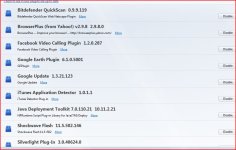
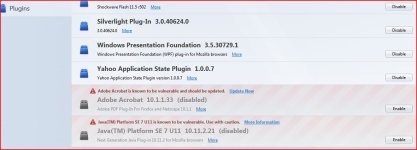
here are 2 attachments to show all add ons:
Attachments
Recently browsing
Members who viewed this thread in the last 5 minutes
You may also like...
-

-
 Serious Discussion Questions events after infection
 - P
-

-
