Serious Discussion Microsoft Edge Stable (Chromium) Now Available for Download

I don't have it either. Maybe it's because I turned off almost every setting under Privacy, Search and Services. I also turned off Bing AI in the task bar and turned it off in the registry too. I only have Windows 11 Home Edition, so no GPO edits are possible. I had trouble with Firefox the last few days not loading some sites I use, and Vivaldi seems to have finally fallen victim to the Youtube ad blocker problem, even with Ublock. So just yesterday I decided to try out Edge again. I was thinking Edge is not too bad, until now. I think I will try Chrome and see what happens there. Chrome is what it is but at least it does not try to force features and settings on you. As far as I know anyway.

C.H.
 
where is this found (or missing) I have 120.0.2210.61 and did not see it listed as option / feature
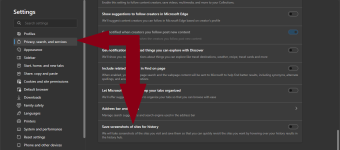
It's the last option in "Privacy, search, and services" settings.
1702052499863.png
 
i don't get the big hype about this happening. Our ISP's already know what we search anyway pictures, url's what are yall searching in your browsers to be this concerned. 🤣
 
It's the last option in "Privacy, search, and services" settings.
View attachment 280149
I initially missed this by not scrolling down far enough.
@TairikuOkami
NEW SNEAKY BLOATWARE ALERT! --> Users who have the History icon enabled on their toolbar may find the the new switch locked!

You may disable the H icon on toolbar to free the new switch, or
  • click on History icon
  • click on three dots ( ... )
  • click on "Turn off image on hover"
@nickstar1 It's not a privacy issue, rather the lengths MS is going to entrap and confuse users with these hidden settings and feature bloat!
 
Last edited:
I initially missed this by not scrolling down far enough.
@TairikuOkami
NEW SNEAKY BLOATWARE ALERT! --> Users who have the History icon enabled on their toolbar will find the the new switch locked!

You may disable the H icon on toolbar to free the new switch, or
  • click on History icon
  • click on three dots ( ... )
  • click on "Turn off image on hover"
@nickstar1 It's not a privacy issue, rather the lengths MS is going to entrap and confuse users with these hidden settings and feature bloat!
I have history icon in toolbar and this switch is off for me 🤔
1702056479623.png
 
Not sure if I missed it reading here but it seems like Version 120 also brings 3P SERP Telemetry again.

Edge 3P SERP Telemetry: It captures the searches user does on third party search providers without identifying the person or the device and captures only if the user has consented to this collection of data. User can turn off the data collection using browser settings or by using Edge3PSerpTelemetryEnabled policy.
A german site says it's enabled by default an english one the oposite.

 
I have history icon in toolbar and this switch is off for me 🤔
I meant to write "may find the switch locked" instead of "will find". I could only disable the new setting as I wrote above.

Edge looks more and more like a Rubic's Cube. :LOL:
 
I initially missed this by not scrolling down far enough.
@TairikuOkami
NEW SNEAKY BLOATWARE ALERT! --> Users who have the History icon enabled on their toolbar may find the the new switch locked!

You may disable the H icon on toolbar to free the new switch, or
  • click on History icon
  • click on three dots ( ... )
  • click on "Turn off image on hover"
@nickstar1 It's not a privacy issue, rather the lengths MS is going to entrap and confuse users with these hidden settings and feature bloat!
Thanks @oldschool (y)
It was the same here, and now it is off thanks to your comment.
 
i don't get the big hype about this happening. Our ISP's already know what we search anyway pictures, url's what are yall searching in your browsers to be this concerned. 🤣
Not mine ISP, using DOH and eSNI, but still I am rather concerned about performance, when I take a screenshot, CPU jumps to 50% + a subtle lag, so infinitive screenshots, that is no for me.