
I have encountered the re-registering issue that some of you have talked about. Rebooted the PC yesterday and it's now coming up and asking me to re-register VS with my e-mail/password.


Open MalwareTips from your Home Screen or desktop. Follow discussions, find answers and pick up where you left off.
If you cannot find an install option, update your browser or use its bookmark option to keep MalwareTips close.
After installation, open the app and sign in. Enable push notifications in Preferences if you want alerts. On iPhone and iPad, push requires a Home Screen web app and iOS or iPadOS 16.4 or later.
Sign in to manage notificationsInstallation is optional. Your notification settings stay under your control.

I have encountered the re-registering issue
every app is pinged on the first usage, in spite of several snapshots and advanced snapshots, I'm using the default settings.

+1VS is telling me it's blocked 12 threats, but I can't see them.

Yeah, VS 4.0 is going to block a few more items than 3.59. It took a long time to get VS 3.59 so that it is "quiet as a church mouse", and it is going to take a little while to get VS 4.0 to the same point. The best way to explain the reason for this is that I basically "tightened VS's lock" in 4.0 and added a few new security features and checks. So it is going to take a little time to reduce these blocks.Yes, every time I get an "unwarranted" ping, I click to allow, then immediately take a snapshot and follow with an Advanced Snapshot to make sure. It seems to work.
I was wondering why the services for ZAM and M B A M were running when they are not providing real-time protection? And maybe they are interfereing with VS? I think I might disable them for a trial period. I'm fairly sure one of them is briefly hanging my box at shutdown.
Thank you for letting me know... are you on WiFi? Does your computer have a consistent internet connection? I will tweak this a little more for 4.10 and release it soon... hopefully today or tomorrow. I think the memory usage issue from 4.09 is resolved as well.I have encountered the re-registering issue that some of you have talked about. Rebooted the PC yesterday and it's now coming up and asking me to re-register VS with my e-mail/password.
Yeah, I am getting close to finally fixing the registration issue for good.+1. It's really annoying as there's no way to park the alert out of the way while we exhume our passwords. FWIW, this W7 build is English (Australia), US keyboard.
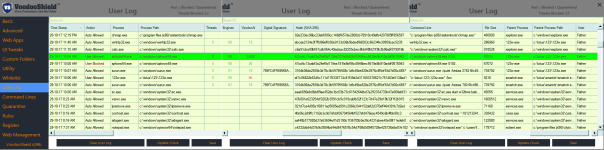
VS is telling me it's blocked 12 threats, but I can't see them. ATM it's got no Command Lines listed... (OK, it's got one now, I had to look at my keyboard off the Region and Language Dialog.) What files do you need?

I have encountered the re-registering issue that some of you have talked about. Rebooted the PC yesterday and it's now coming up and asking me to re-register VS with my e-mail/password.

boredog,Do you run a program like CCleaner?
boredog,
What is the connection please? Under CCleaner applications settings I don't see where I could possibly enable/disable anything related to VS.
Thanks
@danb
FYI I connect with Wi-Fi.
Sorry we may have ours wires crossed here, or I missed something on others posts.For some reason I don't see his post anylonger

I remember something about VodooShield token sometime ago, due to the location of the token, wasn't solved?
CCleaner what will delete of VodooShield? Which path?
If is the case could be set an exclusion in CCleaner.
Thank you for letting me know... are you on WiFi? Does your computer have a consistent internet connection? I will tweak this a little more for 4.10 and release it soon... hopefully today or tomorrow. I think the memory usage issue from 4.09 is resolved as well.
At one time Dan stored info in Appdata\Local\Temp, but that was changed (IIRC) to \ProgramData\VoodooShield, so I'm unsure why CCleaner would cause re-registration.Yes CCleaner can erase cewrtian areas that contain the VS info but it may have been a different program.
If you go into VoodooShield Settings / User Logs, you should be able to scroll vertically and horizontally, and it should tell you what threats were blocked.
 The bubbles do seem to be On Top, so positioning in center screen in our faces would be appreciated.)
Still having problems here. Starting with the 4.0 betas each time the computer first boots it takes a snapshot then saves it, then the intro comes up to ask mode preference , works fine after that until I shut the computer down or restart it, it hangs for up to 5 seconds and then the screen elevates to ( this program is not allowing windows to shut down properly) the place where it's supposed to show what program is causing the problem is blank but it only does it when VS is installed.
VS 4.04b boots up without the snapshot and mode preference but still hangs at shutdown.
Windows 7 HP 64 Bit
Crystal Security
SysRestore = snapshot software
Appreciate this software and know you'll get it right.
That's right! I think a couple of people had some kind of issue like this a few pages back. If we do not hear from who ever it was soon, I will search for it.
Happy Halloween everyone!!!
Any chance you cleared User Log? When you do that, the Threat Count remains unchanged.Er, that's the point. It doesn't.
Members who viewed this thread in the last 5 minutes


