
Pls I'm not an idiot :notworthy:i know how to check it! it's not signed!I was lazy to check it at that time.check it


Open MalwareTips from your Home Screen or desktop. Follow discussions, find answers and pick up where you left off.
If you cannot find an install option, update your browser or use its bookmark option to keep MalwareTips close.
After installation, open the app and sign in. Enable push notifications in Preferences if you want alerts. On iPhone and iPad, push requires a Home Screen web app and iOS or iPadOS 16.4 or later.
Sign in to manage notificationsInstallation is optional. Your notification settings stay under your control.
 Thread starter
Windows_Security
Thread starter
Windows_Security
Pls I'm not an idiot :notworthy:i know how to check it! it's not signed!I was lazy to check it at that time.check it

There is no 1121 EventId, so the script was not blocked by ASR. It is clear that Defender's local Artificial Intelligence (not signatures) detected the script as suspicious, because you have very aggressive Defender settings. If you ran the script on the virtual machine where you tested malware, it is possible that local AI learned to block some suspicious behavior. Anyway, the script was not recognized as dangerous after additional analysis in the cloud, so the signature for it was not created (I can still run it).Here is the test.
I run that .vbs and WDSC block & quarantine file but can't find anything in EV for ASR.
Here are pictures:
View attachment 174784 View attachment 174785

I knew it.Pls I'm not an idiot :notworthy:i know how to check it! it's not signed!I was lazy to check it at that time.

By the way, why there is a 5007 EvenId present in your Event Log. Have you changed ASR or Controlled Folder Access settings, when testing? I can see a fragment of it, that is related to protected folders. This EventID is also created when adding Exclusions to ASR or Controlled Folder Access rules (generally when the antimalware platform configuration was changed).Here is the test.
I run that .vbs and WDSC block & quarantine file but can't find anything in EV for ASR.
Here are pictures:
View attachment 174784 View attachment 174785

By the way, why there is a 5007 EvenId present in your Event Log. Have you changed ASR or Controlled Folder Access settings, when testing? I can see a fragment of it, that is related to protected folders. This EventID is also created when adding Exclusions to ASR or Controlled Folder Access rules.
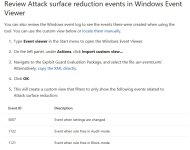
Thanks. I was curious why you had many 5007 EventIds on the log, visible in the posted attachment https://malwaretips.com/attachments/174785/. This is the event: 'MALWAREPROTECTION_CONFIG_CHANGED 'Settings for EV are download from Microsoft site (Use Attack surface reduction rules to prevent malware infection) and then imported:
View attachment 174798
Which folder is the Exploit Guard Package in? I am not seeing it with your directions posted in your screen shot.

Ask me?
Sorry, but don't understand your question...
You have to:
Download the Exploit Guard Evaluation Package and extract the file asr-events.xml to an easily accessible location on the machine.
I have not enough knowledge to assign rules.Members who viewed this thread in the last 5 minutes


