Solved Youtube detect UBlock Origin with this : " Adblocker Are Not Allowed On Youtube "

Status
Not open for further replies.
Unfortunately, here also Firefox + uBO (non-lite) and I get the delay. Or rather, I got the delay until I applied the latest update to the Quick fixes filter. That seemingly took the delay down a little but not completely (don't know if it was for that specific issue) I then applied a rule to My Fitlers that @nicolaasjan provided here. It worked for me--now any YouTube page will load almost instantly for me, like in the olden times. Does not affect me in Brave for some odd reason--Brave has never given me any YouTube trouble to date. So I don't know what the deal is with Firefox + YouTube. But for now: it's OK again.
 
I am using Brave with its built-in adblocker right now and so far no youtube adblock detect popup.

@plat

Have you tried Brave with its built-in adblocker? It works for me.
 
The latest such incident seems to be happening right now as there are several user reports online which suggest that YouTube is being intentionally crippled on Firefox and is being made to load up slower.

At first glance, if your internet connection is fine, it will seem like the issue could be related to performance and hardware optimization on Firefox's behalf, perhaps poor or sub-optimal hardware acceleration support or the improper utilization of the available processor threads, among other system resources. However, users found that the issue—a 5-second delay when loading a YouTube video on the Firefox browser—goes away when YouTube is tricked into thinking that it is running on Google Chrome using a User Agent switcher.

For more information
 
YouTube admits:
YouTube blames ad blockers for slow load times, and it has nothing to do with your browser
Here is the complete statement sent to us by a YouTube spokesperson:
To support a diverse ecosystem of creators globally and allow billions to access their favorite content on YouTube, we’ve launched an effort to urge viewers with ad blockers enabled to allow ads on YouTube or try YouTube Premium for an ad free experience. Users who have ad blockers installed may experience suboptimal viewing, regardless of the browser they are using.
 
It's back. Even updated UBO filters and Ghostery won't work. Adguard will work Incognito mode with Ghostery works as well.
 
Did you purge cache first? Apparently G is increasing its efforts vigorously so the beat goes on, the beat goes on, on, on, etc.... :LOL:
Yes. I had several youtube tabs open and suddenly all of them warned me and said that after 3 videos my player would be blocked.
 
  • Like
Reactions: oldschool
I also have the ad block problem now. The regular Youtube site will not play a video at all. It just shows the ad blocker warning and doesn't even give the 3 video warning. This happens in FF, Chrome and Vivaldi. Youtube plays fine in Edge, no ad blocker drama at all. I wonder if Edge is exempt from the ad blocker baloney or has the almighty Google just not got around to putting this nonsense in Edge yet? I really doubt Edge has struck any sort of Youtube sweetheart deal with Google. Youtube Music is also not affected in any of the four browsers. Not yet anyway. Embedded videos from other sites are working ok too. This is all happening in Windows 11 23H2. I wonder if it happens in Linux?

C.H.
 
I also have the ad block problem now. The regular Youtube site will not play a video at all. It just shows the ad blocker warning and doesn't even give the 3 video warning. This happens in FF, Chrome and Vivaldi. Youtube plays fine in Edge, no ad blocker drama at all. I wonder if Edge is exempt from the ad blocker baloney or has the almighty Google just not got around to putting this nonsense in Edge yet? I really doubt Edge has struck any sort of Youtube sweetheart deal with Google. Youtube Music is also not affected in any of the four browsers. Not yet anyway. Embedded videos from other sites are working ok too. This is all happening in Windows 11 23H2. I wonder if it happens in Linux?

C.H.
I found 2 ways around this issue.
1) Install Ghostery if it isn't already and set it to run in incognito mode. Open YouTube in a private tab and log into your account. This works just fine.
2) A quicker way is to install Adguard if it isn't already, update the filters and deactivate all other adblockers for YouTube. Works fine as well.
 
  • Like
Reactions: oldschool
No ads or warnings, whether I'm signed in or not, using Firefox fork Floorp browser and only uBlockO extension on Linux MX-23.

EDIT

forgot to mention: if using MS Edge on the same platform using uBO Lite set to "Complete", I will get ads - particularly the "switch to chrome" ones, but no anti adblock warnings, until I update uBO lite, close and re-open Edge, then the ads go away for a while. I have been able to reproduce this trend for three days since installing Edge.
 
Last edited:
I did a test today, ran Linux Mint 21.2 from a flash drive on my Windows laptop. In Firefox on Mint I added Ublock on default settings, and Youtube videos played fine. I never saw the 3 video then lock warning either. I removed Ublock and Youtube still worked but it showed me two commercials first. I didn't try Youtube in any other browser on the Mint usb. I went back to Windows and found the same results as yesterday. Youtube is completely blocked with their ad blocker warning on Firefox, Vivaldi and Chrome. In Edge the Youtube video still plays ok with no ad block warnings at all. I have not tried Adblock.

C.H.
 
Last edited:
I noticed there is no ad blocker warning in Firefox if I am not signed in to You Tube. I didn't check that in any other browser but that may be the way to go now, if I want to see any YT videos I could just sign out of Google/You Tube beforehand. I don't really use YT much anyway except for auditioning a band or a song I might run across online, or the occasional how to fix this that or the other thing around my house. I am getting tired of having to monkey around with things like this.

C.H.
 
  • Like
Reactions: oldschool
It's baack! Adblockers no longer work on YouTube as of today. The only thing tat works for me is Tampermonkey.
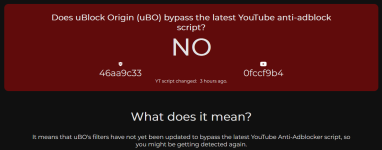
Looks like YouTube updated their script 3 hours ago. A fix will be released by filter maintainers ASAP, I assume.
1705003194759.png
 
Looks like YouTube updated their script 3 hours ago. A fix will be released by filter maintainers ASAP, I assume.
View attachment 280846
By uBO dev:
The issue so far is that I cannot reproduce on my side, so we will other maintainers who can reproduce it to investigate a fix.
 
Status
Not open for further replies.