


You’ve already dealt with something suspicious, and now you want to report it. A familiar government seal and a helpful-looking form seem reassuring.
Before describing what happened, take another look at the address above that form. In this case, the most important detail sits outside the page itself.
Overview
A reporting page copied the agency people trust
The fake FTC ReportFraud website scam involved an unauthorized copy of the government’s fraud-reporting service, including its branding, layout, explanatory material, and reporting form.
The address identified by the FTC was reportfraudftcgov[.]netlify[.]app. That is different from the genuine reporting address, ReportFraud.ftc.gov.
Its appearance invited visitors to describe fraud and supply personal details while believing they were dealing with a federal agency.
Someone looking for help could therefore disclose information to an unrelated operator, even without seeing a payment demand or an obviously threatening message.
The FTC documented the impersonation directly
An October 20, 2026 FTC letter identifies the unauthorized site and preserves screenshots collected the previous month.
The letter says the agency was not affiliated with the people or entities operating it. This is documented impersonation, rather than speculation about an unfamiliar website.
The pictures here reproduce pages from that official evidence. They show the historical copy, rather than a newly submitted complaint or a transaction we conducted.
The form requested information worth protecting
- The reporting process asked visitors for names and contact information.
- Requested details included home addresses, ages, and military affiliation.
- Familiar seals and government wording appeared on the unofficial website.
- A copied warning about FTC impersonators appeared there as well.
The agency documented a false government identity and a form requesting sensitive information. Its letter gives no visitor count or verified financial-loss total.
Why a Fake Reporting Website Is Especially Convincing
A normal phishing message might ask you to resolve a problem you never had. Here, the visitor may already have a real problem.
That changes the emotional setting of the encounter. You’re trying to document an experience, protect someone else, or understand whether money can be recovered.
A request for details about the incident can therefore feel appropriate. The question becomes who receives those details, rather than whether a complaint form should exist.
The copied design supplied a ready-made answer without proving it. The agency’s name, recognizable colors, and official-looking navigation encouraged visitors to assume government ownership.
Even useful safety advice can serve that presentation. A page doesn’t become authentic because several paragraphs contain accurate information copied from a trustworthy source.
This case also reverses a familiar expectation about scams. The fraudulent element wasn’t necessarily an extravagant promise; it was the identity of the party requesting information.
People sometimes check a page for spelling mistakes before checking its address. A copied government page can pass the first test while failing the second.
The distinction matters when helping someone who already used it. They may remember carefully reading the advice and reasonably believing they were making a responsible decision.
Blaming that person won’t recover their information. Reconstructing the route they followed and identifying what they submitted gives them something useful to do next.
How the Fake FTC ReportFraud Website Scam Works
Step 1: A familiar government identity lowers suspicion
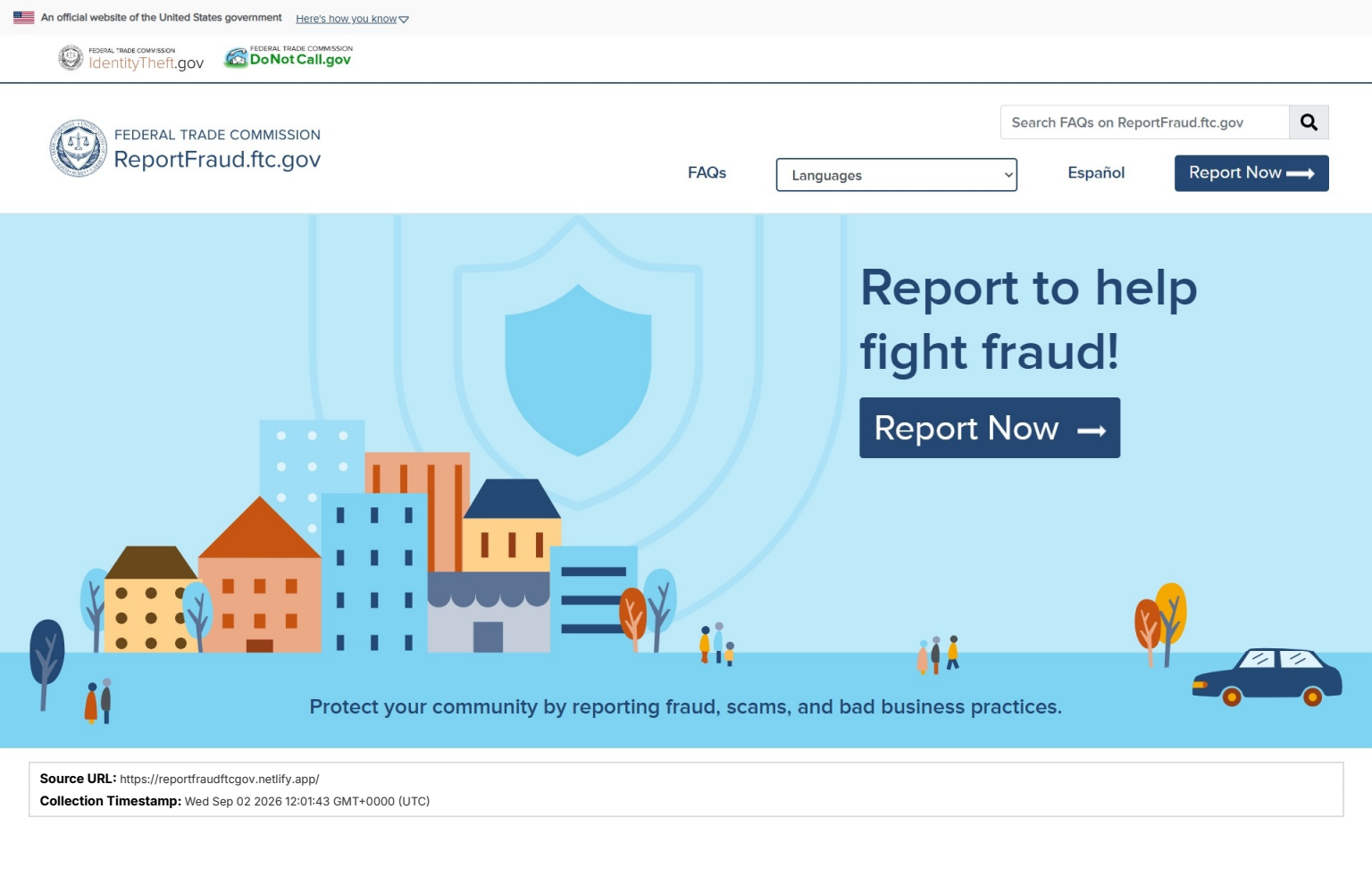
The documented page presented the Federal Trade Commission name and seal alongside a banner describing an official United States government website.
Those elements resembled the genuine reporting service. They were visible statements of identity, rather than proof that the browser was connected to the agency.
The important boundary is between page content and website ownership. An operator can copy words and pictures without gaining authority to represent the organization pictured.
You don’t need to decide whether every graphic is perfectly reproduced. If the destination isn’t the genuine agency service, polished graphics cannot fix that mismatch.
The FTC evidence doesn’t establish how every visitor reached this copy. An unsolicited message, search result, or forwarded link should therefore be checked on its own.
Step 2: The page directs visitors into a reporting process
The apparent reporting links invited visitors to continue from the landing page into a form. That made the copy function as an apparent service.
A long sequence can feel more legitimate than a single suspicious prompt. Progress indicators and familiar questions can make each additional disclosure seem routine.
The official evidence includes more than a homepage resemblance. Its preserved form screens show that the impersonation extended into the complaint-writing journey.
That distinction explains why merely closing a suspicious advertisement may be insufficient. Someone who continued into the form should consider which details they entered.
Don’t revisit the fake site to reconstruct every field. Your browser history, saved screenshots, or notes may preserve the address without creating another interaction.
Step 3: Personal information is requested under a false identity
Names and contact details can be appropriate on a real government complaint. On an impersonating form, the same questions create a different exposure.
The visitor’s willingness to explain a previous problem may also reveal what kind of assistance they want, which makes unexpected follow-up messages particularly sensitive.
That is a risk to watch for, rather than proof of a particular follow-up campaign in this case. Treat each later contact as a separate claim.
Someone mentioning your original complaint hasn’t automatically authenticated themselves. They may know information because you supplied it somewhere else, rather than because they represent the agency.
The safest verification starts outside their message. Independently opening the genuine service prevents the sender from choosing both the question and the apparent answer.
Step 4: The copied appearance obscures the receiving website
The visible page repeatedly referred to the legitimate reporting service, but the identified website ended in netlify.app. Those are separate addresses with separate ownership boundaries.
An address containing familiar government words isn’t equivalent to an address controlled by that government organization. The placement of the dots and ending matters.
This doesn’t make every Netlify-hosted website fraudulent. The problem was the specific unauthorized government impersonation documented by the FTC, rather than the hosting platform alone.
Nor does the letter prove that a hosting provider knowingly endorsed the impersonation. It documents the agency’s notification and request for action.
Keep that distinction when sharing a warning. Describe the exact lookalike address and the copied identity without accusing unrelated websites that use the same infrastructure.
What the Official Screenshots Actually Show
The landing-page exhibit displays government branding, a reporting invitation, and a recognizable blue illustration. Its source annotation identifies the unauthorized address underneath.
Another preserved screen shows questions about the amount paid, payment method, and how an incident began. These resemble information a real fraud report might request.
The FTC letter separately identifies sensitive personal fields elsewhere in the form. The visual resemblance and the agency’s stated lack of affiliation explain the warning together.
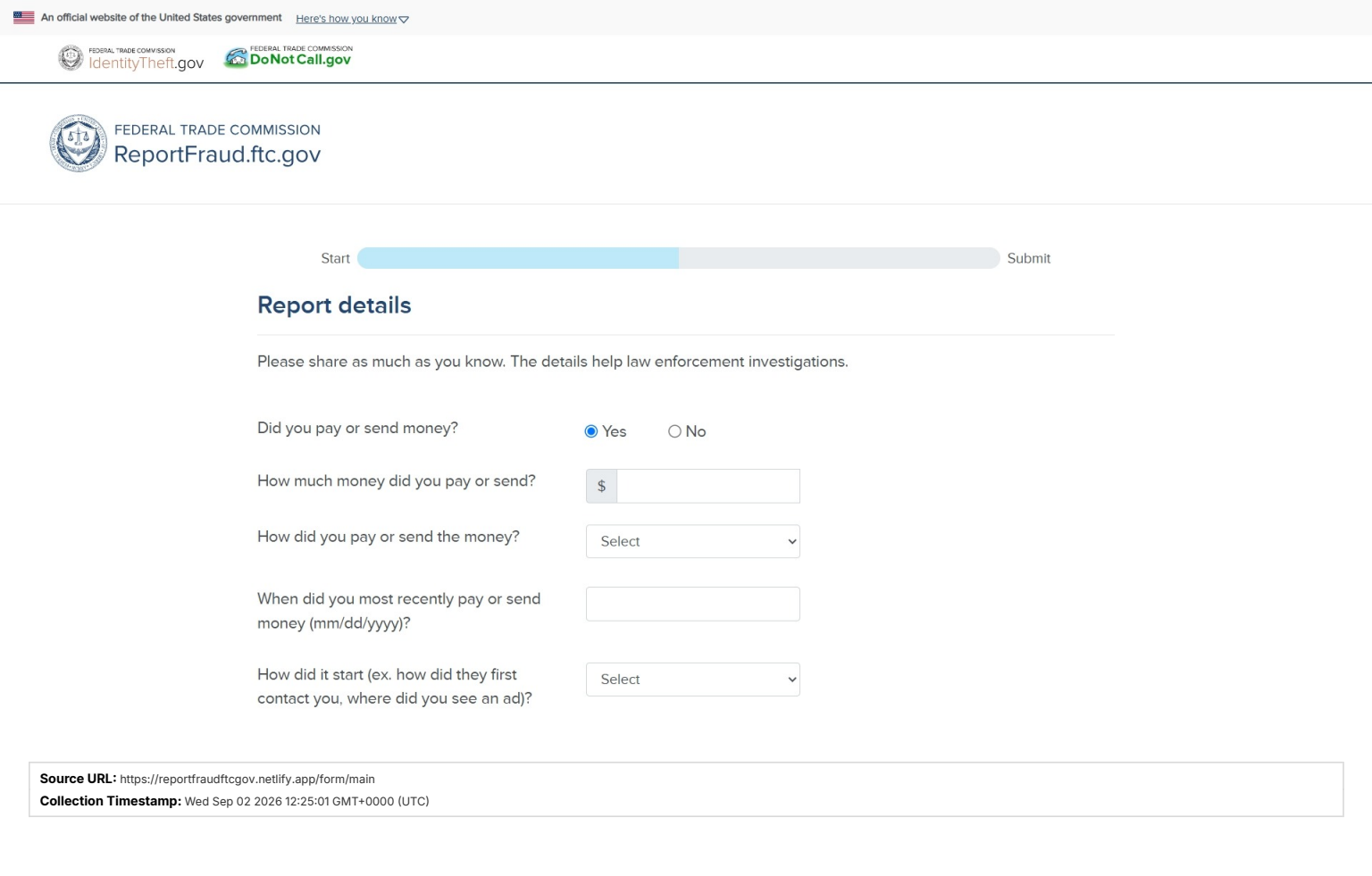
The source annotations are part of the FTC’s preserved exhibits. Their September collection dates describe the historical evidence, rather than the website’s current operating status.
A page disappearing later wouldn’t undo a previous disclosure. Equally, a working page today wouldn’t make the agency’s documented lack of affiliation disappear.
No one needs to test this form with personal information. The official evidence already establishes the identity mismatch that makes submitting information through it unsafe.
Check the Address Before You Describe the Incident
On a computer, select the browser’s address bar so the complete address becomes visible. On a phone, tap it before reading the full destination.
Look at the actual website address, rather than a page heading or search-result description. Those visible labels may repeat the name you expected to see.
For the FTC reporting service, independently type ReportFraud.ftc.gov into a fresh tab. Check the loaded address before continuing through the government’s reporting flow.
Don’t use a bookmark you created while visiting the suspicious page. A saved bookmark can faithfully return you to the wrong destination.
If someone sent the link, avoid asking that same sender to authenticate it. Their reassurance doesn’t provide an independent check of the receiving organization.
Treat an unexpected redirect away from the agency’s service as a reason to stop. Start again through the agency’s known website rather than guessing through lookalikes.
A padlock or HTTPS connection alone cannot establish government ownership. It concerns the connection to the website you opened, which may still be an impostor.
You also shouldn’t upload identification merely to make a reporting page appear trustworthy. Sensitive information belongs only in the relevant verified process that actually requires it.
What to Do if You Responded to the Fake Form
-
Stop entering information and preserve the website address. Record when you visited, how you arrived, and which fields you remember completing.
Keep existing messages or screenshots privately, especially any confirmation shown after submission. Avoid posting your complaint details publicly while asking other people for help.
If you only opened the page, distinguish that from submitting information. The published evidence doesn’t establish that viewing this copy automatically infected your device.
-
List the information you disclosed, separating ordinary contact details from passwords, account numbers, identity documents, or Social Security information.
The information you disclosed determines the response. An email address calls for vigilance about follow-up contacts; a password requires protecting the affected account.
If you entered a password, open that service independently, replace the password, and enable its multifactor authentication option. Change reused passwords on other affected accounts.
-
If financial details or a payment were involved, contact the relevant bank or provider through its established app or the number printed on your card.
Explain the impersonation and specify the information or transaction involved. Ask what protections, replacement credentials, dispute options, or payment-recall steps apply to your situation.
A form submission alone isn’t evidence that a payment occurred. Give the provider an accurate account rather than describing every disclosure as an unauthorized withdrawal.
-
Report the impersonating website through the genuine FTC reporting service. Independently verify the address before adding the suspicious domain to your description.
Describe the original incident and the fake reporting page separately. Make clear which information went to the lookalike and whether you observed any later misuse.
Save the confirmation provided by the genuine process. Reporting creates a record, but it doesn’t promise individual reimbursement or an immediate personal investigation.
-
If identity information has been misused, start at IdentityTheft.gov and select the reporting route matching what happened.
Describe the affected accounts and obtain the recovery plan generated for your circumstances. Keep its records alongside the original messages and your financial-provider case numbers.
Follow up on unfamiliar account activity with the institution involved. Don’t pay a supposed recovery agent who claims the government needs a processing deposit first.
-
Warn anyone who helped complete the fake form, especially if their contact details appeared in it. Share the correct agency address without forwarding exposed personal information.
Agree that unexpected callers mentioning the complaint will be independently checked. A reference to your experience doesn’t give someone permission to demand money or credentials.
For further payment-specific options, the FTC’s scam-response guidance separates bank transfers, cards, gift cards, cryptocurrency, and information exposure.
When a Follow-Up Message Mentions Your Complaint
A later caller may sound helpful because their story fits what you were already trying to resolve. That familiarity can make an unsolicited approach harder to question.
Keep your own incident record nearby so you can distinguish documented facts from information the caller introduces. Don’t let their version replace your original timeline.
Someone promising guaranteed reimbursement needs independent scrutiny. The existence of a genuine agency complaint doesn’t give a stranger control over your bank account or funds.
Never transfer savings into a supposed protection account because a caller mentions the FTC. The agency’s consumer guidance specifically warns against that impersonation tactic.
If a message contains a case reference, preserve it without treating it as authentication. An invented reference can look just as organized as a real one.
Take the conversation out of the sender’s chosen channel. You can end a call, independently visit the agency website, and evaluate the request without their pressure.
For a family member, offer to sit beside them while checking the destination. Practical help works better than asking why they trusted a familiar-looking page.
The goal is to interrupt the next disclosure, not to prove that the original visitor should have recognized every copied detail at first glance.
Frequently Asked Questions
Is ReportFraud.ftc.gov itself a scam website?
The genuine ReportFraud.ftc.gov service belongs to the FTC. The warning concerns an unauthorized copy using a different address, rather than the real reporting system.
Open the legitimate address independently before describing your experience. Don’t judge ownership from the government seal shown within a page.
What was wrong with the Netlify-hosted address?
The FTC said the identified site copied its identity without authorization and prompted visitors to provide sensitive information. That is the specific documented problem.
The hosting suffix alone isn’t a verdict on every website using that platform. Keep the warning attached to this unauthorized reporting-site impersonation.
Did the fake site ask for money?
The FTC letter documents branding impersonation and information collection. It doesn’t establish a particular payment demand or a verified loss total for this website.
If you personally paid someone connected with your visit, preserve that separate evidence and contact the payment provider immediately.
Am I infected if I opened the page?
Opening this page isn’t, by itself, proof of malware infection. The documented mechanism concerns a misleading reporting form and personal information requests.
Your next action should match what happened, including submitted information, entered credentials, payments, or any additional software interaction you actually observed.
Should I submit another complaint on the same page?
Don’t enter more information into the unauthorized copy. Begin again through the genuine agency address and describe the lookalike in your report.
Revisiting the wrong form to correct a typo could disclose further information without delivering anything to the FTC.
Will a real FTC complaint guarantee a refund?
A complaint doesn’t guarantee a refund or personal response. It helps authorities collect information, identify patterns, and pursue enforcement where appropriate.
Payment recovery requires contacting the institution or service involved promptly, while preserving the records that show what happened.
The Bottom Line
Do not submit personal details through the documented FTC lookalike. Its copied government design doesn’t change the agency’s explicit statement that the operator was unaffiliated.
If you already used it, list what you disclosed, protect the affected accounts, and report through the genuine FTC service. Verify the receiving address before sharing anything else.

Join the discussion
0 commentsShare your experience or ask a question about this article.
Community experiences
Did this happen to you?
Your experience could help someone recognize the same scam. Submit a private report for our team to review.
I experienced this tooReports are reviewed before publication. Sharing publicly is always your choice.
Discussion
Start the conversation
Have a question or something useful to share? Add the first comment.