


If your name turns up on FreePeopleDirectory, the opt-out starts with one thing: the exact address of the listing you want removed from that site.
The form is short; the harder part is identifying the right record and telling a successful removal from another listing that still shows your information.
Overview
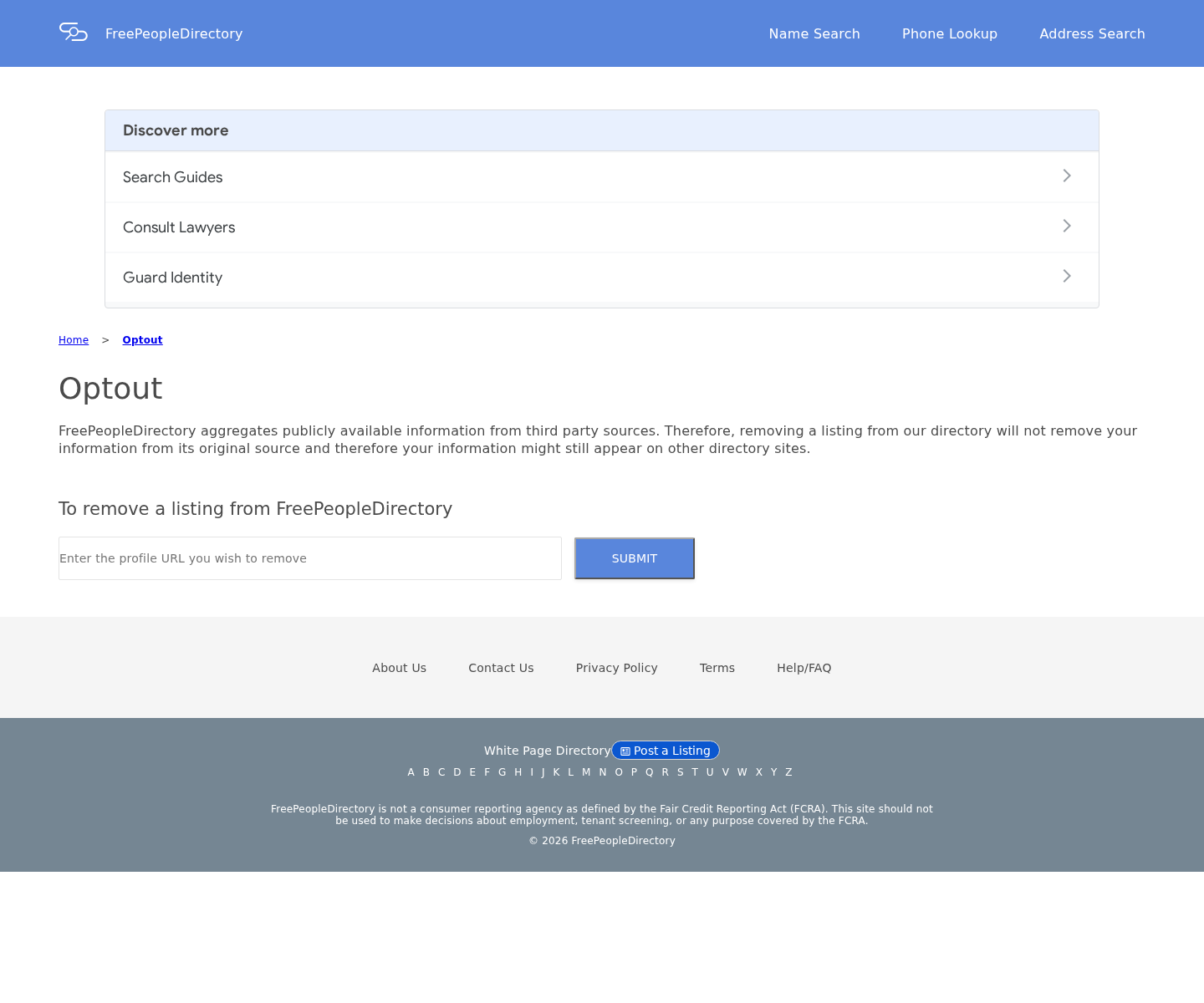
The opt-out form works with a single listing address
The current form asks for a profile URL, not a password, payment card, or email address. Use the address of your individual result, not the directory homepage.
One name can lead to more than one profile
Check whether the records you find refer to the same person and have different profile addresses. Treat each genuinely matching address as a separate request to verify.
Keep three outcomes separate
- Your directory listing: Submit the exact FreePeopleDirectory profile address, look for a result on screen, then reopen that address to check what the site shows.
- A search engine result: If the directory has changed but Google still shows the old page, use the separate outdated-result process for that address.
- A report on another website: Verify the publisher and use its own privacy process. FreePeopleDirectory says its removal does not change the original sources.
Find the Listing That Actually Belongs to You
Open FreePeopleDirectory and use Name Search. You should see fields for the first name, last name, and city and state before the green search button.
Start with your own name and check the details you recognize. You do not need to search for other people while locating your own listing.
If your name is common, narrow the results with a city and state you know the record may contain. Do not assume the first similarly named person is you.
If the site cannot find you by your current city, an older record may still be listed under a previous city. Search only plausible variants that apply to you.
An old initial or former name is another useful way to distinguish the listings. Whether they refer to you matters more than how many results the search produces.
Check enough context to establish the match without opening a sponsored report. The task is to locate the public page generated by the directory, not buy extra information.
When the search result has a link to view its contact information, open the listing you recognize. Copy the address from the browser rather than copying details from the record.
Confirm that the address belongs to FreePeopleDirectory and opens one individual listing. An address containing a person route is a better clue than the text of the search result.
If the address you saved opens several results, go back and open the individual record. A page of results does not identify one profile.
When you already have a link to your profile, you can skip the search step. Check that it still loads the matching record and copy the address you land on.
A search result can link to a directory page whose title contains your name but which lists several people. Check the contents before assuming the title identifies just one person.
If you are checking on a phone, use the browser’s address bar or its copy-link control once the record opens. Do not copy a promotional link alongside the listing.
A previous surname and a current surname can take you to different matches. If you find none after checking relevant variants, you do not need to submit a guessing request.
Submit the Profile Address Without Signing Up for Anything
- In another tab, open the official FreePeopleDirectory opt-out form. The page title says Optout, and the field asks for a profile URL.
- Paste the entire address from the listing tab into that field. Confirm it still points to your individual directory record rather than a search or paid-report page.
- Select Submit once, then look above and around the form for the result. The current form does not collect an email address for a separate confirmation link.
- If the page confirms removal, note the date and exact listing address. Save a screenshot privately if you need a receipt, but keep personal information out of public posts.
- Reopen the exact profile address in a fresh tab and check the result. Compare it with what you saw before submission rather than relying only on the search result.
The directory page may carry ads around the form. Use the visible URL field and its Submit button, not a nearby suggestion for identity monitoring, legal help, or a report.
The public form shown here asks for neither a birth date nor an ID upload. If a page asks for payment, stop and check its domain.
Do not add a phone number to a field asking for a web address. The directory already uses the profile link to identify the record.
The address itself can contain personal information. Paste it only into the first-party form you intended to use, and avoid sending it to an unknown removal service.
If you have several matching records, keep them in separate rows of a private note. Record which exact address you submitted and what changed when you revisited it.
Do not treat a blank field after a reload as proof that a request succeeded. Look for a result on the screen and check the underlying profile directly.
There is no need to sign in or buy an upgraded report to make the public request. If the address works, use that page as the starting point.
If somebody gave you a copied address, open the result to confirm it is yours before entering it. Never submit a record solely because a name matches.
Check that a blank form shows the correct site before pasting anything. You can do that without submitting the profile address or opening another search result.
Keep Similar Results and Sponsored Links From Sending You Elsewhere
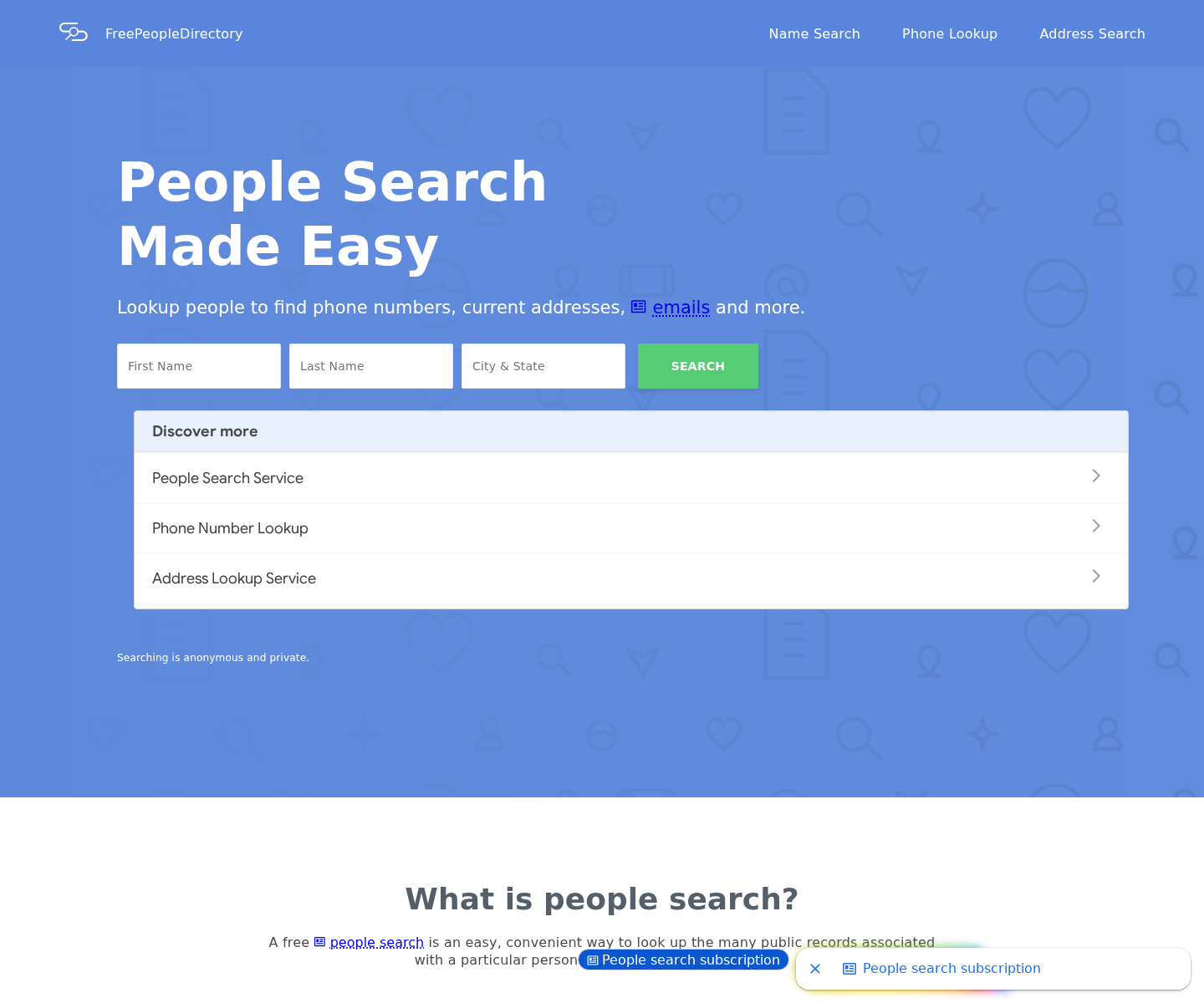
The site’s home page is a search tool. FreePeopleDirectory is not the similarly named Free People clothing retailer, and the clothing store cannot remove one of these profiles.
If a link on the directory sends you to a background-report company, do not submit that new address to FreePeopleDirectory. The report and listing are different items.
Notice whether the browser opened a new tab. The original directory address is often still available in the previous tab even when an ad sends you elsewhere.
Check the browser address bar rather than the company name printed on a search card. Site names, page headlines, and adverts are not reliable substitutes for a full address.
For example, suppose you find a listing under your current city and one under a former city. If both match you and have distinct addresses, check both individually.
A second result for the same name does not automatically mean the first request failed. Open the remaining result safely and compare its address with the one you submitted.
Keep the tabs distinguishable by leaving the removal form in one and the results in another. This helps prevent a press of Search when you meant to submit the address.
If an advert appears above the form, read the heading and check the field beneath it. The site can place unrelated choices immediately above its own privacy tool.
Do not interpret a paid report’s promises as the directory’s opt-out terms. Even if one service advertises through another, each publisher controls the records offered on its own domain.
Check the Site First, Then the Search Engine
A search engine can show an older reference even after the directory removes a listing. Open the exact directory address to see whether it still serves the details.
If the profile is no longer available but Google still shows the old text, go to Google’s outdated-content tool and use the page refresh option for that result.
Do not use a refresh request to pretend a live listing has changed. If the directory still shows the information, resolve that first or consider the relevant personal-information reporting route.
Keep a separate record of which site changed and which search result remained. This makes it easier to follow up with the right service if something still appears.
FreePeopleDirectory’s form says it collects publicly available data from other sources and that removing the listing will not take the information out of those sources.
That can matter if a source record is wrong. An opt-out can reduce what the directory publishes, but only the source or its responsible authority can correct its own information.
If a different directory still shows the same details, open that operator’s verified privacy process. Your FreePeopleDirectory confirmation applies to the address you handled, not every site with a copy.
Choose follow-up checks that match the exposure. If an old phone number is no longer yours, do not use the new owner’s information to try to suppress your old listing.
If only an old snippet remains, a fresh search and a direct visit answer different questions. The direct visit tells you whether the source still publishes those details.
When Google’s tool asks for a page address, use the affected result rather than the company’s root address. Refreshing the wrong address will not refresh the snippet you saw.
If a person can still see your data by opening the original page, do not assume a successful search-engine request fixes it. The source still deserves attention.
Our guide to exposed personal details explains which copy to report when the information appears on several sites. A tracking note can help avoid reporting the same URL twice.
What to Do if the Form Does Not Confirm Removal
- Check whether you pasted the complete profile address. Open the listing itself again if the address you saved only leads to a page of results.
- Look for the result after one submission. Reopen the address in a fresh tab to see if the page actually changed before submitting the same address again.
- Use the directory’s Contact Us page if the correct address still fails. Explain which listing and what happened without sending extra identifiers.
- Keep a copy of the request and response. If a different publisher still lists you, follow that publisher’s own verified privacy process instead of resending your previous request.
If the opt-out page is showing an error, save the error text and the time. Those details help distinguish a broken form from an address it cannot match.
If contacting support, ask about the specific submission instead of sending the entire search history. Start with its date, the result you saw, and the one affected profile address.
Keep the original address even if it now redirects. If your information appears again, compare the new address with the old one before describing it as the same listing.
A redirect to a general search page is not the same as a page that still names you. Record which one happened when you checked the original address.
If the contact form asks you to describe the problem, say whether the page showed a confirmation before you checked. That helps narrow down which step needs attention.
When the same URL is down and another directory still has a copy, stop troubleshooting the first form. Move your attention to the publisher that still exposes the details.
Do not send an identification document merely because a message offers a faster removal. Check the published contact route and ask why any information beyond the profile address is needed.
If publication is connected to harassment, save evidence privately and prioritize help before doing a long round of searches. Do not directly confront whoever is threatening you.
Where an organization relies on a formal background report, ask which provider prepared it. This directory says its results are not for employment, tenancy, or other regulated screening decisions.
Frequently Asked Questions
Do I need an account to opt out of FreePeopleDirectory?
The public opt-out form has a profile URL field and does not require an account. You do not need to register for a paid report to use it.
Will FreePeopleDirectory send me a confirmation email?
The current form does not ask for an email address. Look for an on-screen result and verify the exact profile after submission rather than waiting for a message.
Can I paste a search-results address into the removal field?
Use the address of the individual profile you want removed. A search page can contain multiple people and does not identify one particular listing for the request.
How do I tell whether a second record is mine?
Check context such as a city or name variation you recognize. Only submit a record when you reasonably know it is yours or you are authorized to represent the person.
Why does Google still show the listing?
Google can display an older result after a site changes. Verify the profile at the source, then ask Google to refresh the affected result if the old details persist.
Does the directory remove information from other sites too?
No, the directory says its removal only affects its own listing. Other sites and original record sources require separate checks and, where appropriate, separate requests.
The Bottom Line
Use the FreePeopleDirectory opt-out form for the exact profile address, then check that same address. Do not buy a background report or wait for a confirmation email.
If another result survives, compare its URL and publisher before you act again. A second profile or a stale search result needs a different follow-up from a failed request.

Join the discussion
0 commentsShare your experience or ask a question about this article.
Your progress
Did these steps help?
Let us know how the guide worked for you.
Describe what you see and the step you reached. Keep passwords and other private information out.
Discussion
Start the conversation
Have a question or something useful to share? Add the first comment.