

A passport renewal can feel urgent when a trip is getting close. A polished search result may look like the quickest route through the paperwork.
That convenience can become expensive. Before entering personal details, it helps to know who is actually processing your application and what your payment buys.
Overview
Why travelers ask about USPassportandVisa.org
USPassportandVisa.org presents passport and visa assistance in a way that has confused people looking for an official government service. The Better Business Bureau publicly warned travelers about the site.
In its June 2025 warning, BBB said it had received 78 Scam Tracker reports related to the domain. Reporters described paying about $88 and receiving a PDF application.
That PDF can be obtained without that private service charge through the U.S. Department of State. A payment to a form-preparation site is not itself a government passport application.
What the site can and cannot do
The site is a private third party, not the Department of State. A disclaimer may say so, yet the overall presentation can still mislead a hurried traveler.
A private company may help someone organize paperwork. It cannot issue a U.S. passport, decide eligibility, or guarantee that a government application will be approved.
- The government provides passport forms and instructions through its official website.
- Eligible adults can start official online renewal only through the State Department’s authorized process.
- Government passport fees are separate from any optional private service charge.
- A completed worksheet or PDF is not evidence that an application reached the government.
The practical verdict
The concern is not that every paid paperwork service is illegal. It is the gap between what a traveler may reasonably think they purchased and what they actually receive.
BBB characterized USPassportandVisa.org as deceptive after consumer reports. Treat the domain as a warning sign, and verify your passport status directly with the government.
If you have only visited the page, there is no reason to assume your identity was stolen.
If you paid or submitted sensitive data, the response depends on exactly what you shared.
Why This Passport Offer Looks Convincing
Many people search for passport help only once every several years. That makes it easy to forget the official steps, especially when travel dates are approaching.
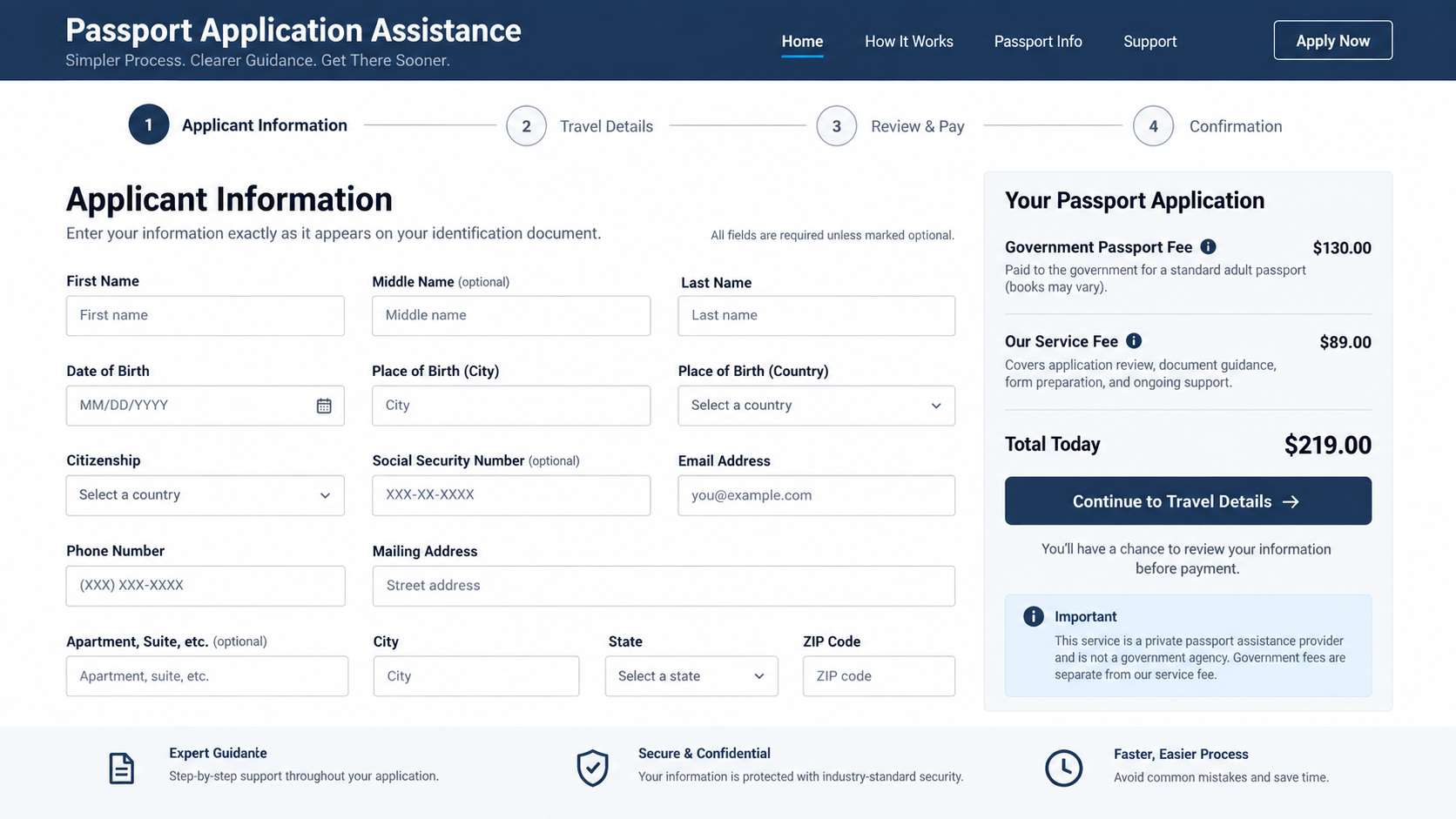
A page with a national color palette, application language, and a tidy progress bar can feel official. Those design choices do not establish government affiliation.
The web address matters more than the colors. USPassportandVisa.org ends in .org, not .gov. A private .org site cannot become official by using government-like words.
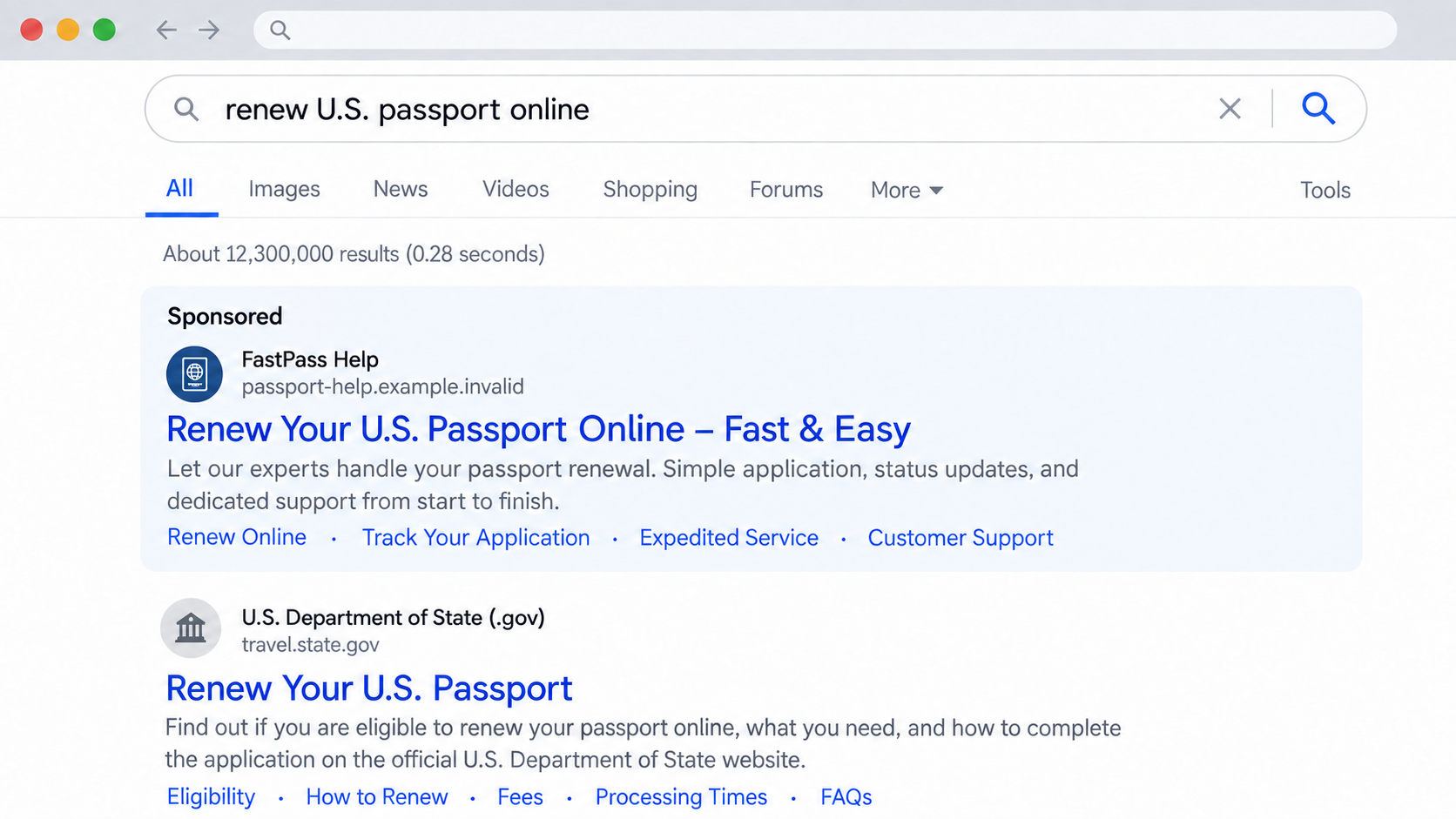
Search placement is another trap. Sponsored results can appear above an agency page. The top result is an advertisement position, not an endorsement by the government.
Look closely at the transaction description. Some visitors may expect a passport renewal, while a private checkout is selling assistance with a form.
Those are different outcomes. The latter can still leave you responsible for every official submission step, supporting document, appointment, and government fee.
The distinction is most painful when time is short. A traveler may wait for a passport that was never ordered through an authorized channel.
How the USPassportandVisa.org Scam Works
Step 1: A traveler searches for a fast answer
The journey often begins with an ordinary search: renew a passport online, replace a lost passport, or get travel documents before a flight.
That search reveals a mixture of official pages, paid advertisements, private couriers, and form-filling services. They can look similar in a small mobile search result.
The user may click a promising result without inspecting the full domain. A familiar government phrase in the headline can overcome the warning supplied by a non-government address.
BBB says this kind of search-driven discovery was central to the complaints it received. The important point is the route into a paid private workflow.
A sponsored label is easy to miss. It means the listing paid for placement, not that the Department of State approved or operates it.
Step 2: The page borrows the language of official processing
On arrival, a traveler may see references to passport applications, eligibility, processing, and support. None of those words alone proves the site can issue documents.
Government-adjacent design can create an impression that the form is a direct entry point into the official system. The fine print may tell a different story.
Read the top banner, footer, terms, and checkout description together. A disclaimer should be clear before payment, not discovered after someone thinks they have renewed.
Do not mistake a progress indicator for application progress at the State Department. It may only show how far you have moved through a private company’s form.
The decisive question is simple: will this step submit an official passport application, or will it prepare paperwork that you must submit yourself?
Step 3: Personal and travel details enter a private form
A passport form naturally asks for names, birth details, and addresses. Entering them into a private form gives that information to the site’s operator first.
Some processes may request more sensitive identifiers. Do not assume a request is necessary simply because the same field appears on an official government form.
Review the privacy notice before typing. Ask who stores the data, whether it is shared, and how to request deletion if you change your mind.
We cannot infer that every visitor’s information was misused. The risk is that a person may disclose more than intended while believing they are communicating with the government.
If you stopped before pressing submit, the exposure may be limited. If you completed and sent the form, keep a record of the fields you supplied.
Step 4: A private service charge appears
The checkout is where the distinction becomes real. BBB says consumers reported paying approximately $88 for a PDF that the State Department makes available free.
That number reflects reported transactions at the time of BBB’s warning. It is not a verified current price for every visitor or every service option.
A private fee is not necessarily the government application fee. If a checkout does not explain the difference clearly, pause before entering your card.
Ask for a plain-language description of the deliverable. Is it personalized assistance, a printable form, a completed application packet, or actual government submission?
If you expected a passport but the receipt describes only document preparation, preserve the receipt. It may be important in a refund or card dispute.
Step 5: The traveler receives a document, not a passport renewal
According to BBB’s reports, some buyers received a PDF application. Receiving a file can feel like progress, but it does not mean the State Department has your application.
You may still need to determine eligibility, gather proof, provide a compliant photo, pay the government, and submit through the approved route.
For eligible online renewals, the State Department directs applicants through its official online service. A third-party website cannot complete that online renewal on your behalf.
Other passport situations require mail or an in-person application. The right method depends on your current passport, age, timing, and individual circumstances.
Do not wait for a private provider to update an official status page unless you have verified that an actual application was filed.
Step 6: Confusion delays the real application
The financial loss may be the first surprise. The worse surprise is discovering that the trip is near and the government has no application in progress.
A traveler can lose days or weeks because a private confirmation email sounds like a government acknowledgment. Compare its wording with an official tracking record.
Never treat a PDF download, a transaction receipt, or a customer-service promise as proof of issuance. Only the State Department can confirm official application status.
If a provider promises to expedite everything, inspect precisely what it is expediting. A private rush fee does not change the government’s published processing rules.
The scam’s power comes from this quiet substitution: paperwork assistance is sold to someone who believes they have completed a government process.
How to Verify a Passport Renewal Before You Pay
Start at the Department of State’s official online renewal guide. Read the eligibility rules before entering personal details anywhere.
If you are not eligible online, the same government site explains renewal by mail, first-time applications, replacements, and urgent travel options.
Type the address yourself or use a trusted bookmark. A search ad may send you to a private business even when its headline mentions an official passport.
Check the exact hostname, not a page title or logo. The words “government,” “passport,” or “official” in an advertisement are not a substitute for a .gov domain.
Compare the fee breakdown with the State Department’s current fee page. Government fees change, and the correct amount depends on the service.
Also ask whether the website is requesting a payment for downloadable forms. Official forms and instructions are available without a separate form-access charge.
Private couriers and application helpers exist. If you choose one, treat it as an optional service and confirm its total fee, refund policy, and exact deliverable first.
A legitimate-sounding service agreement is not proof that the service is worthwhile. Your goal is to know who will receive your application and when.
What a Confirmation Email Actually Proves
A confirmation email can prove that a private company received your order. It does not, by itself, prove that the State Department accepted a passport application.
Look for the sender’s full address, the service description, the amount charged, and any instructions telling you to print, sign, or mail a document.
If the message says “your application is ready,” ask what that means. Ready for you to review is different from submitted to a government agency.
A tracking number from a private business may identify its own order. It is not necessarily a government application number.
If you received a PDF, read its first page before assuming anything was filed. A blank form or partially completed worksheet still requires action from you.
Check the official status only after following the government submission instructions. Government systems may take time to display a newly received application.
If the private service promised a result it did not deliver, document the promise. Save screenshots of the offer and the checkout wording while you can.
This paper trail helps you explain the situation without relying on memory. It can also distinguish a service-quality dispute from an unauthorized card transaction.
What to Do if You Have Fallen Victim to This Scam
- Identify what happened. Save the page address, confirmation email, invoice, card charge, and any PDF. Note whether you only visited, entered data, paid, or mailed documents.
- Check official application status. Use the State Department’s site or verified contact information. Do not rely on a private receipt to decide whether your passport renewal exists.
- Request a refund in writing. Explain the difference between what you believed you were purchasing and what you received. Keep copies of every message and response.
- Contact your card issuer promptly. Ask about a dispute if the service was misrepresented or unauthorized. Tell the issuer the precise facts; a disappointing service is not automatically an unauthorized charge.
- Protect sensitive information. If you submitted a Social Security number or identity documents, review guidance at IdentityTheft.gov and consider credit monitoring or a freeze.
- Finish the passport process safely. Return to the government site and follow the correct application route. If travel is close, use the State Department’s published urgent-travel instructions.
- Report the experience. Submit a factual report to FTC ReportFraud and BBB Scam Tracker. Include receipts without posting sensitive identifiers publicly.
Be cautious if someone offers to recover your private service fee for an additional payment. Refund help that starts with another upfront charge can create a second loss.
Downloading only a PDF from a search result does not prove malware infection.
Scan a suspicious file if your security software flags it.
If you installed a separate program, opened unusual attachments, or granted browser notifications, run a reputable security check. Malwarebytes can help check for malware.
AdGuard can help reduce exposure to malicious ads and redirect pages, but neither tool can reverse a card payment or submit a passport application.
Frequently Asked Questions
Is USPassportandVisa.org a government website?
No. It is a private .org domain. BBB warned that people had mistaken it for an official passport or visa resource despite a non-affiliation disclaimer.
Does paying the site renew my passport?
Do not assume so. BBB described consumers who paid and received a PDF. Verify any official submission directly through the State Department’s authorized channels.
Is every third-party passport service a scam?
No. Some sell optional assistance. The issue is whether the service and extra fee are disclosed clearly, and whether the buyer understands who submits the application.
Can a third party file my online renewal for me?
The State Department says applicants should use its own online renewal process. Check current eligibility and complete the official steps yourself through the authorized portal.
What if I entered my Social Security number?
Record what you shared, monitor accounts, and use IdentityTheft.gov for a tailored recovery plan. Do not assume misuse occurred, but take the exposure seriously.
Can I dispute the charge if I received a PDF?
Possibly. Your card issuer will review the purchase terms and your evidence. Explain the advertised outcome, the actual deliverable, and your written refund request.
The Bottom Line
USPassportandVisa.org is not the U.S. government. BBB’s warning describes travelers paying a private fee while expecting official passport help.
Before paying, separate optional paperwork assistance from the actual State Department process. If you already paid, preserve records, verify your official status, and act on any data or card exposure.

Reviews & discussion
0 commentsShare a firsthand experience, or ask a question.
Community reviews
uspassportandvisa.org
Moderated reader experiences, not an editorial verdict.
Start the conversation
Have a question or something useful to share? Add the first comment.