

The MalwareTips app
Your community, one tap away.
Open MalwareTips from your Home Screen or desktop. Follow discussions, find answers and pick up where you left off.
- Home Screen access
- Optional push alerts
- Your community
You're ready to explore.Explore what's new
Installation instructions
iPhone & iPad
- Open MalwareTips in Safari and tap Share. You may need to open the Page Menu first.
- Choose Add to Home Screen. If it is not listed, use Edit Actions to add it.
- Keep Open as Web App enabled if shown, then tap Add.
Android
- Open MalwareTips in Chrome or another browser that supports app installation.
- Open the browser menu and look for Install app, Install and create shortcut, or Add to Home screen.
- Choose Install and confirm. Wording varies by browser.
Desktop
- Chrome: use the install icon in the address bar, or the menu under Cast, save and share.
- Edge: open the menu, then More tools, Apps and Install this site as an app.
- Safari on Mac: choose Share or File, then Add to Dock. Firefox on Windows: look for the web apps button in the address bar.
If you cannot find an install option, update your browser or use its bookmark option to keep MalwareTips close.
Keep up with your conversations
After installation, open the app and sign in. Enable push notifications in Preferences if you want alerts. On iPhone and iPad, push requires a Home Screen web app and iOS or iPadOS 16.4 or later.
Sign in to manage notificationsInstallation is optional. Your notification settings stay under your control.
You are using an out of date browser. It may not display this or other websites correctly.
You should upgrade or use an alternative browser.
You should upgrade or use an alternative browser.
Solved Apps do not launch from start menu and Windows search do not work
-
 Thread starter
JB007
Thread starter
JB007
- Start date
- 23 Replies
- 11,120 Views
- Status
- Not open for further replies.

Thanks @techienerd1 but I'm not sure to exactly understand your propositionDo you any Anti-Tracking Tools intended towards Windows 10 for Privacy reasons? Have you disabled or unofficially removed Cortana from Windows 10?

Thnaks @Spawn , yes I have disabled Cortana.
I'm not sure what do you mean about "Anti-Tracking Tools" ? I'm using "µBlock Origin" and also "Avast Online Security".
Upvote
0
Not had any issues on Windows 10 since last year, but can try:
How to fix taskbar search not working in Windows 10
Provided link is the Troubleshooter for Windows Apps. Download and Run.
Anti-Tracking Tools such as Spybot Anti-Beacon or O&O ShutUp10, for Windows 10. Sometimes they can cause some issues with Windows 10, but usually should be OK.
How to fix taskbar search not working in Windows 10
Provided link is the Troubleshooter for Windows Apps. Download and Run.
Anti-Tracking Tools such as Spybot Anti-Beacon or O&O ShutUp10, for Windows 10. Sometimes they can cause some issues with Windows 10, but usually should be OK.
Upvote
0
Hello @SpawnNot had any issues on Windows 10 since last year, but can try:
How to fix taskbar search not working in Windows 10
Provided link is the Troubleshooter for Windows Apps. Download and Run.
Anti-Tracking Tools such as Spybot Anti-Beacon or O&O ShutUp10, for Windows 10. Sometimes they can cause some issues with Windows 10, but usually should be OK.
Thanks!
Before continuing, I'm wondering that this problem appears when I apply the two methods for solving another issue: Need Help - Windows Update (KB3213986) fails
You can see the differences between the screen shot before and after (Cortana disppears !)
What do you think ?
NB: I have tried to restore but without success
Upvote
0
Hello,
After applying "Use Windows troubleshooter to restore indexing services" I got the following message, "the problem was found but cannot solved automatically", "Incorrect permissions on directories of windows search service":
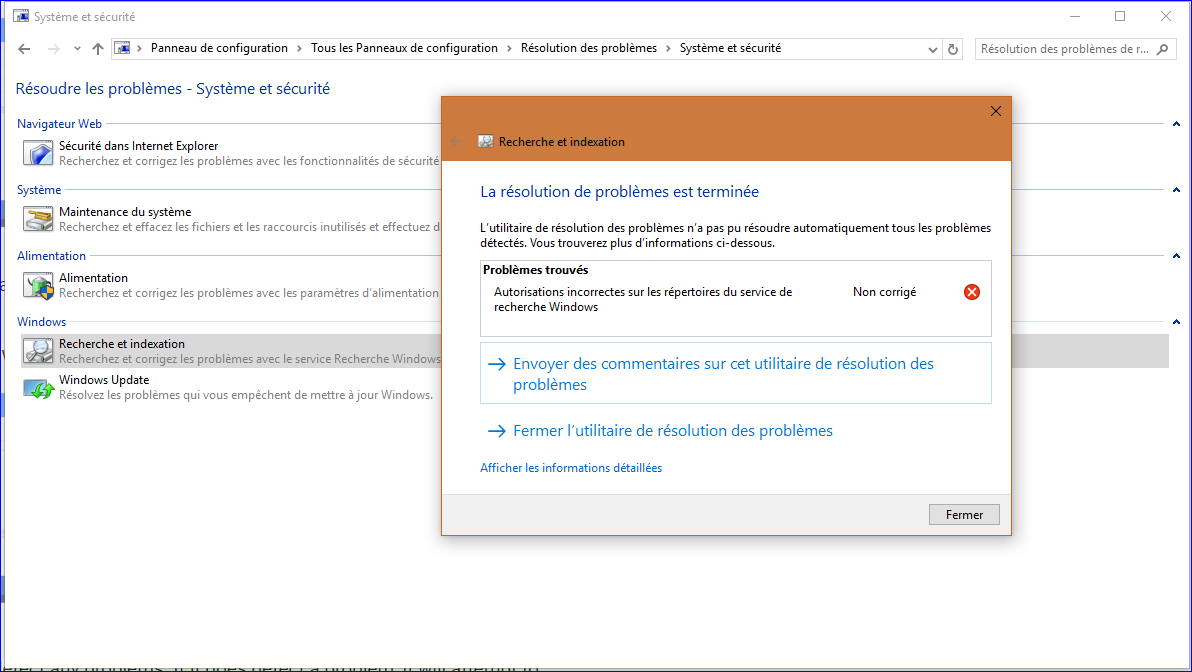
What is the solution ?
After applying "Use Windows troubleshooter to restore indexing services" I got the following message, "the problem was found but cannot solved automatically", "Incorrect permissions on directories of windows search service":
What is the solution ?
Upvote
0
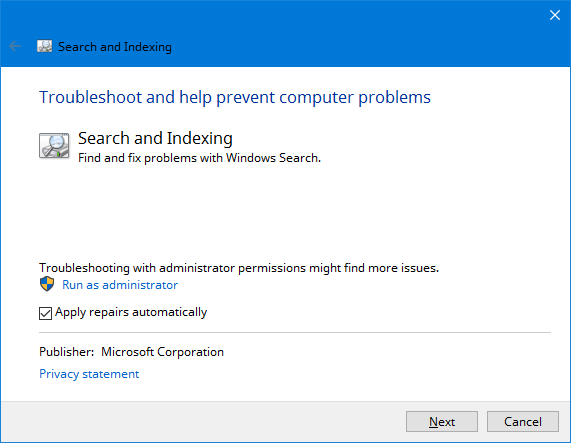
Windows Search will replace Cortana, if it has been disabled.
Re-run with Admin rights - hidden under Advanced
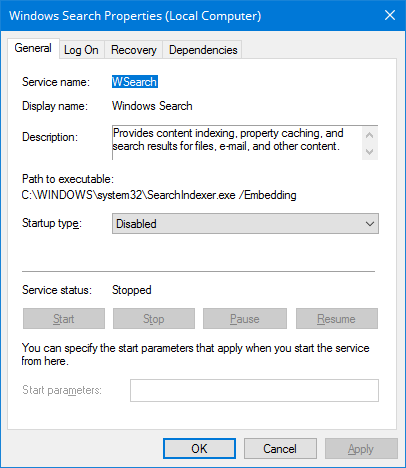
Otherwise check that Windows Search (WSearch) is running under (Win+R) "Services.msc" - without quotes.
I have WSearch disabled, but try Enable + Start yours to see if that sorts the issue.
Re-run with Admin rights - hidden under Advanced
Otherwise check that Windows Search (WSearch) is running under (Win+R) "Services.msc" - without quotes.
I have WSearch disabled, but try Enable + Start yours to see if that sorts the issue.
Upvote
0
D
Deleted member 2913
You tried system restore to fix the issue.
But was the prob caused by system restore i.e you tried system restore to undo something & then faced the prob?
I had once tried system restore to undo something & noticed the same prob. I couldn't find any solution. I even tried creating new user account but it too gave the same prob. Finally I reinstalled OS.
Hope you find a solution.
But was the prob caused by system restore i.e you tried system restore to undo something & then faced the prob?
I had once tried system restore to undo something & noticed the same prob. I couldn't find any solution. I even tried creating new user account but it too gave the same prob. Finally I reinstalled OS.
Hope you find a solution.
Upvote
0
Thnnks @Yash KhanYou tried system restore to fix the issue.
But was the prob caused by system restore i.e you tried system restore to undo something & then faced the prob?
I had once tried system restore to undo something & noticed the same prob. I couldn't find any solution. I even tried creating new user account but it too gave the same prob. Finally I reinstalled OS.
Hope you find a solution.
I continue waiting because I hope to don't need an OS reinstall
Upvote
0
D
Deleted member 2913
@JB007,
You may try this...FixWin10...fixes mention "Windows Store apps not opening. Re-register all apps" & other fixes...
Under "System Tools"...there's a fix "Reset Windows Search to defaults. This will fix issues related to Windows Search".
Hope your both probs are fixed.
Download page...go through the page...couple things mentioned...
FixWin for Windows 10: Repair problems and issues in a click
List of fixes page
List of fixes available in FixWin 10
Screenshots page
FixWin 10 for Windows 10 - Screenshot Gallery
I tried it...its portable & clean little tool...quite a few fixes...I like it...hope fixes are good & effective.
You may try this...FixWin10...fixes mention "Windows Store apps not opening. Re-register all apps" & other fixes...
Under "System Tools"...there's a fix "Reset Windows Search to defaults. This will fix issues related to Windows Search".
Hope your both probs are fixed.
Download page...go through the page...couple things mentioned...
FixWin for Windows 10: Repair problems and issues in a click
List of fixes page
List of fixes available in FixWin 10
Screenshots page
FixWin 10 for Windows 10 - Screenshot Gallery
I tried it...its portable & clean little tool...quite a few fixes...I like it...hope fixes are good & effective.
Last edited by a moderator:
Upvote
0
Tweaking.com - Windows Repair Free/Pro
Settings: Select All.
Edit: This will also revert anything from the above posts that you may have changed and didn't need to.
Settings: Select All.
Edit: This will also revert anything from the above posts that you may have changed and didn't need to.
Upvote
0
@JB007,
You may try this...FixWin10...fixes mention "Windows Store apps not opening. Re-register all apps" & other fixes...
Under "System Tools"...there's a fix "Reset Windows Search to defaults. This will fix issues related to Windows Search".
Hope your both probs are fixed.
Download page...go through the page...couple things mentioned...
FixWin for Windows 10: Repair problems and issues in a click
List of fixes page
List of fixes available in FixWin 10
Screenshots page
FixWin 10 for Windows 10 - Screenshot Gallery
I tried it...its portable & clean little tool...quite a few fixes...I like it...hope fixes are good & effective.
Thanks @Yash Khan
FixWin 10 tried but did not solve my apps problem.
Tweaking.com - Windows Repair Free/Pro
Settings: Select All.
Edit: This will also revert anything from the above posts that you may have changed and didn't need to.
Hello @sudo -i
Thanks.
Are you sure this tool is without danger ?
Upvote
0
Has anyone tried Tweaking .com windows repair all in one?
It would be pretty irresponsible of me to link malicious software, don't you think? In fact, I probably would be banned if I did such a thing, no?
It would be pretty irresponsible of me to link malicious software, don't you think? In fact, I probably would be banned if I did such a thing, no?
Upvote
0
I'd say 50-50 chance of repairing success based on corruption level of Windows Store or SxS. Indeed I tried it on high corrupted install after tweaking so much. I reinstalled to start from fresh.Has anyone tried Tweaking .com windows repair all in one?
It would be pretty irresponsible of me to link malicious software, don't you think? In fact, I probably would be banned if I did such a thing, no?
Upvote
0
Hello @sudo -iHas anyone tried Tweaking .com windows repair all in one?
It would be pretty irresponsible of me to link malicious software, don't you think? In fact, I probably would be banned if I did such a thing, no?
I apologize for the misunderstanding
Be sure that my purpose was not about a malicious link and/or software but my question was only about the difficulty (and not the dangerousity) of use for a non expert like me
Upvote
0
OK for me 50/50 is enough to attempt this before doing a fresh installI'd say 50-50 chance of repairing success based on corruption level of Windows Store or SxS. Indeed I tried it on high corrupted install after tweaking so much. I reinstalled to start from fresh.
Upvote
0
D
Deleted member 2913
You may try under Shadow Defender or Rollback RX.OK for me 50/50 is enough to attempt this before doing a fresh install
SD - If fixes works after system restart then SD is not suitable.
RollbackRx - You may try with Rollback Rx...create a snapshot, try fixes, check restarting system, fixes fixed...you may uninstall RollbackRx, fixes not fixed...revert to created snapshot...& you may uninstall Rollback.
Hope you know RollbackRx & little risks associated to it.
And dont know if fixes will touch Rollback stuffs or MBR...it will be dangerous & system would be not bootable.
Upvote
0
- Status
- Not open for further replies.
Recently browsing
Members who viewed this thread in the last 5 minutes
You may also like...
-

- S
-

-
-
