Yeah, the description is a bit bare-bones. We will get this fixed before the release. Thanks for the feedback. 


Open MalwareTips from your Home Screen or desktop. Follow discussions, find answers and pick up where you left off.
If you cannot find an install option, update your browser or use its bookmark option to keep MalwareTips close.
After installation, open the app and sign in. Enable push notifications in Preferences if you want alerts. On iPhone and iPad, push requires a Home Screen web app and iOS or iPadOS 16.4 or later.
Sign in to manage notificationsInstallation is optional. Your notification settings stay under your control.
 Thread starter
Fabian Wosar
Thread starter
Fabian Wosar


+1will you add search results ratings/warnings in the future builds?
That should be fixed now.@Fabian Wosar
btw ... toggle off does not turn off Emsisoft extension (for me?). Icon is monochrome... but, malware executable url prompts Website blocked! in Chrome and file is blocked.
We may. For now we are looking closely at the rollout and make sure the server backend holds up. Once we are certain, we can add more features to the extension.will you add search results ratings/warnings in the future builds?
Not fixed for me. Toggle off works for domain. Toggle off does not work for domain/executable url.That should be fixed now.
tested in Chrome and my Chrome is 2018.12.0.10Which version do you use? I just tried again using 2018.12.0.12 and it works as it should in both Chrome and Firefox.
No, no plans to make it open source.Any plans on making this extension open source?

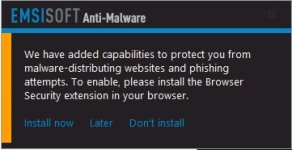
I have the EBS extension installed with Firefox v64.0, it is running as expected and I don't see any related pop-up when I launch FF.Is it intended behaviour to have this pop-up every time I open Firefox, even though I have the extension installed already?
If I do click 'Install now', the add-on page does recognise that the extension is installed ...
I do see now if I launch FF twice in succession, I don't see the pop-up. So it's probably one of my other softs or add-ons that's clearing something. But I have it on both my laptops.I have the EBS extension installed with Firefox v64.0, it is running as expected and I don't see any related pop-up when I launch FF.

First see if you can track the issue. If not you can diable the notification under Setting, Notifications, Browser Security verification.I do see now if I launch FF twice in succession, I don't see the pop-up. So it's probably one of my other softs or add-ons that's clearing something. But I have it on both my laptops.
Will have to track that down, or figure out how to disable just that notification.
Members who viewed this thread in the last 5 minutes