Hard_Configurator - Windows Hardening Configurator

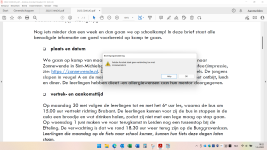
Hi Andy, I installed beta 6.0.1.0 over the top of beta 6.0.0.1. I am running the basic recommended profile. Now i can't open a spreadsheet by double-clicking on it. If i open excel and then open file it works fine. The message i'm getting is:

View attachment 267115

Please advise how to unlock this.

thanks
I am sorry. Please, remove the XLSX extension form <Designated File Types>. If you use other Excel file types then you can also remove XLS, XLSB, XLSM, XLT, XLTM, and XSL.
When using MS Excel and allowing Excel files to open via File Explorer, it is recommendable to harden the MS Office settings via the DocumentsAntiExploit tool or apply the HIGH Protection Level in Microsoft Defender.
 
That worked. Thanks Andy (y)

My DocumentsAntiExploit settings are Adobe + VBA. Is that the setting you were referring to?
Untitled.png
 
That worked. Thanks Andy (y)

My DocumentsAntiExploit settings are Adobe + VBA. Is that the setting you were referring to?View attachment 267116

No. :)
The DocumentsAntiExploit tool is an external application that includes some extended protection in the case when one does not use Microsoft Defender & ConfigureDefender. More details are available in the "DocumentsAntiExploit tool - Manual.pdf". This tool is available from SwitchDefaultDeny or you can find it in the Hard_Configurator folder. It is not included in the main H_C Window because the H_C settings are system-wide. DocumentsAntiExploit tool includes both system-wide and single-user settings. It looks like:

1653988398162.png
 
One question: the firewall hardening tool can it be used without problems even on Windows enterprise?
Yes. FirewallHardening adds rules to the Windows Firewall. You can see these rules in the firewall (Outbound Rules).
 
Yes. FirewallHardening adds rules to the Windows Firewall. You can see these rules in the firewall (Outbound Rules).

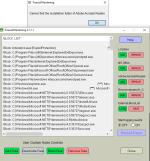
I have adobe acrobat x64 installed. Try to adding rules but receive a error:
 

Attachments

  • 2022-05-31_164513.png
    2022-05-31_164513.png
    23.7 KB · Views: 226
  • 2022-05-31_172423.png
    2022-05-31_172423.png
    15.6 KB · Views: 211
I have adobe acrobat x64 installed. Try to adding rules but receive a error:
Adobe Acrobat Reader is not Adobe Acrobat. To block outbound connections of Adobe Acrobat you must manually add the Adobe Acrobat executable to the FirewallHardening BlockList. If I correctly remember it is Acrobat.exe in the installation folder.
 
  • Like
Reactions: flaubert1971
@Andy Ful

am I missing something important, or is it a major inconvenience to first open a Microsoft Office application such as, for example, Excel then use either the "Recent" or "Open" options to open an xlsx file? if this approach directly results in improved security, rather then simply double-clicking an xlsx file, then what is so wrong with this? Sorry if I am missing the boat here, but I can't help but ask.

EDIT

for some reason, I had thought attempting to open a docx via double-clicking would result in a denial as trying the same on a xlsx file, but it does not, so therefore even less of an inconvenience than I thought.
 
Last edited:
@Andy Ful

am I missing something important, or is it a major inconvenience to first open a Microsoft Office application such as, for example, Excel then use either the "Recent" or "Open" options to open an xlsx file? if this approach directly results in improved security, rather then simply double-clicking an xlsx file, then what is so wrong with this? Sorry if I am missing the boat here, but I can't help but ask.

EDIT

for some reason, I had thought attempting to open a docx via double-clicking would result in a denial as trying the same on a xlsx file, but it does not, so therefore even less of an inconvenience than I thought.

This H_C setup requires installing Microsoft Excel Mobile and setting it as a default application for the Excel files. Microsoft Excel Mobile is a free Windows Universal Platform app from Microsoft Store. It runs in AppContainer, the editing is disabled in the free version and active content as well. Furthermore, it ignores the SRP restrictions made in the H_C. This makes it the safest application for viewing Excel files. It is the second safest just after Application Guard for MS Office (paid subscription). Another good solution is opening Excel files by default via Xodo PDF.
The user can still open the Excel files for editing, but first, the Excel desktop application has to be opened and the file must be opened from the running Excel.

Such a setup can be probably accepted by many users who mostly open files for viewing and not for editing. I blocked only Excel files, because they are the most dangerous. People who use Word and PowerPoint mostly for viewing should do the same for all MS Office files and use Word Mobile, PowerPoint Mobile, or Xodo PDF.
In rare cases when editing is necessary, the MS Office desktop applications can be used similarly to the Excel case.

Others have to change the setup by removing the blocked Excel extensions from the <Designated File Types> and applying some additional restrictions.
The very strong setup can be the H_C Recommended_Settings + Defender HIGH Protection Level + FirewallHardening (Recommended H_C + MS Office).
In the setup Without the Defender ASR rules one has to use the DocumentsAntiExploit tool and apply additionally the "Current user restrictions" for MS Office.

Post updated and extended.
 
Last edited:
I have rewritten and highly extended the last post, so it is probably worth reading again. :) (y)
I am still not sure if the current setup will be applied by default in the stable version. What do you think guys?
 
In my opinion it is getting too complicated.
No doubt that it is providing top notch protection, but if you need other applications to open office files it is going the wrong way in the balance between security and usability.

A problem I have with the settings of DocumentsAntiExploit is that I can't open links in pdf files with Adobe Acrobat Reader DC anymore.
Need that option for newsletters from the school of my kids.
I know that I can use another pdf viewer, or configure the restrictions in the program itself, but I would like to have the option in DocumentsAntiExploit for Adobe Acrobat DC.
 
In my opinion it is getting too complicated.
No doubt that it is providing top notch protection, but if you need other applications to open office files it is going the wrong way in the balance between security and usability.
Please remember that H_C is not SWH. The H_C is intended to protect casual users, too. If the casual user does not need editing Excel files, then this setup will be for him even more usable, because Excel Mobile (or Xodo PDF) is much simpler compared to the full Excel desktop. Furthermore, the user cannot spoil the document by accidental editing.

A problem I have with the settings of DocumentsAntiExploit is that I can't open links in pdf files with Adobe Acrobat Reader DC anymore.
Need that option for newsletters from the school of my kids.
I know that I can use another pdf viewer, or configure the restrictions in the program itself, but I would like to have the option in DocumentsAntiExploit for Adobe Acrobat DC.

There is no problem. You probably use the ON setting which is suited for casual users. You can use the PV setting. The file will be opened in the Protected View. Now, you have the choice to view the file with high restrictions, or <Allow all features> and view the file without most restrictions in AppContainer. The second choice is also OK if you additionally use ConfigureDefender HIGH settings and FirewallHardening.

Blocking the links in PDF documents makes sense for casual users because the current attacks commonly use phishing links embedded in PDF documents. This is a highway that can deliver 0-day malware and redirect to compromised websites. :)(y)
 
Last edited:
I know that H_C is not SWH. I have used them both, but not at the same time :).

I think/hope that you underestimate the number of casual users that have MS Office installed.
Maybe others can also comment on that.

My main point is that H_C was a program that an experienced user could install for a casual user to improve their security.
I could install it on the systems of friends and family members and (almost) never heard of any problem.
Maybe some initial whitelisting.
How it is developing now I think only experienced users can continue to use H_C and that is a loss for the casual users.

I indeed used ON in DocumentsAntiExploit, but changing to PV didn't let me follow the link unfortunately.
Do I need a reboot or something like that for the change?
 
I think/hope that you underestimate the number of casual users that have MS Office installed.
Maybe others can also comment on that.
I am not sure, maybe.:unsure:
How it is developing now I think only experienced users can continue to use H_C and that is a loss for the casual users.
I would like to avoid this. :)

I indeed used ON in DocumentsAntiExploit, but changing to PV didn't let me follow the link unfortunately.
Do I need a reboot or something like that for the change?

No. Just close the Adobe Reader and open the document. It should open in Protected View. Press <Allow all features> on the Yellow Bar. That is all. I use this setting for a while without problems with working links.

Edit.
I use it without the ASR rule for Adobe. I will try to enable this rule and see if this can be your issue.
Retested with ConfigureDefender Interactive settings and FirewallHardening (blocked Acrobat.exe) - everything works as intended.
 
Last edited:
The posts of Gandalf_The_Grey mean much to me because he has a practice in applying H_C / SWH on the family computers. Even if I defend the opposite opinion, this does not mean that I cannot see the pros on the opponent's side. :) (y)
I truly invite more members to post their opinions, this usually helps me to make a proper choice.
 
I'll weigh in. I use SWH on both computers, I do not use HC for one reason, if I get run over by a bus tomorrow and my partner has to adjust any setting or resolve an issue with HC it won't be done, one look at the GUI and it will be game over and be uninstalled. It would be too complicated for her. Basically all my security software has to be simple to use and configure for this very reason.
 
I'll weigh in. I use SWH on both computers, I do not use HC for one reason, if I get run over by a bus tomorrow and my partner has to adjust any setting or resolve an issue with HC it won't be done, one look at the GUI and it will be game over and be uninstalled. It would be too complicated for her. Basically all my security software has to be simple to use and configure for this very reason.
Ha, ha. :)
Yes. There can be a problem when the "home admin" is not available on time.
 
No. Just close the Adobe Reader and open the document. It should open in Protected View. Press <Allow all features> on the Yellow Bar. That is all. I use this setting for a while without problems with working links.

Edit.
I use it without the ASR rule for Adobe. I will try to enable this rule and see if this can be your issue.
Retested with ConfigureDefender Interactive settings and FirewallHardening (blocked Acrobat.exe) - everything works as intended.
It still doesn't work for me :(

Schermafbeelding 2022-06-01 182002.jpg

Schermopname (15).png

Only OFF works.
 
Last edited:
  • Like
Reactions: Andy Ful
It still doesn't work for me :(
...
Only OFF works.
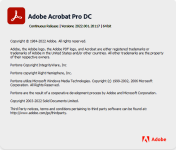
We use the same version 2022.001.20117. Anyway, you do not use Adobe Acrobat Reader DC, but Adobe Acrobat Pro DC. This can be the possible difference (but still strange). I will try to install a trial of the Pro version to confirm this.
 
  • Like
Reactions: Gandalf_The_Grey
We use the same version 2022.001.20117. Anyway, you do not use Adobe Acrobat Reader DC, but Adobe Acrobat Pro DC. This can be the possible difference (but still strange). I will try to install a trial of the Pro version to confirm this.
No, it's not the Pro version:
1654103641372.png
 
  • Like
Reactions: Andy Ful