Troubleshooting How do I use AOMEI and which BACKUP option is best?

JakeXPMan

Level 17
Verified
Top Poster
Well-known
Forum Veteran
Describe the problem
Initilizing don't move and freezes up when I cancel it.
What have you tried?
None, gave up.
Trying to use AOMEI backupper, I never backed up before, and have no idea what i tried to do (it didn't work), and do I need ISO image or can I try something else on AOMEI? .....

My reason for needing a backup, is not for my data... I have that on DVD's already, what I want is for tweaking windows, registry tweaks, uninstalling and installing a new free Anti-Virus, etc.

but I want backup before doing this, in case of problems in these future actions.

How many GB's do these backups take? MY HD is 108 GBs capacity and 46GB remain.

If I cannot figure this out, even with help... I'll put trust in the system restore points.
 
Click new backup.
Screenshot_2014-12-27 17.0.5.png
Screenshot_2014-12-27 17.0.28.png
Click disk backup.
Screenshot_2014-12-27 17.0.48.png
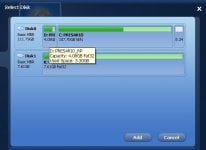
Click select disks to backup.
Screenshot_2014-12-27 17.5.56.png
Select destination. Then start backup after choosing the destination.
 
Upvote 0
Please follow frogboy's post :)

You have to create a restore disk(USB or DVD) to restore the backup image,irrespective of the backup software you use since restore can't be done from the OS.

The USB I have is 8GB.

I do think I have some spare DVD data discs?

I can't seem to find how large the actual size of an ISO Image will be, strange.

Windows XP (sp3) OS.
 
Upvote 0
To restore just boot from the USB created and follow the prompts. Cannot do screenshots of that sorry.
 
Upvote 0
Expanding the excellent @frogboy information :

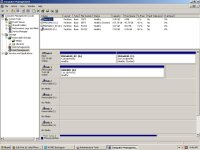
If you not have an external hard drive , you have to create a partition for your backup destination.

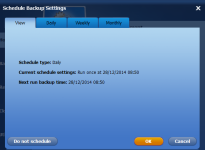
You can configure email notifications , Schedule ...

X0Mf8uP.png


upload_2014-12-27_10-21-2.png


It is really complete , if a little slow . Very important , you can create a recovery CD

upload_2014-12-27_10-21-2.png
 

Attachments

  • upload_2014-12-27_10-19-15.png
    upload_2014-12-27_10-19-15.png
    127.6 KB · Views: 711
Upvote 0
Hi It's all there. It just requires a little effort to learn the program. Macrium Reflect is much easier, but AOMEI seems to have more bells and whistles. You have to understand what a back up image of your OS is and what it does first!!
I'll be still now. You have some excellent help. I will just observe and learn!;)
 
Upvote 0
Expanding the excellent @frogboy information :

If you not have an external hard drive , you have to create a partition for your backup destination.

Attached the C and D drive... the d drive is windows system files.
 

Attachments

  • Disk.JPG
    Disk.JPG
    27.9 KB · Views: 733
  • Disk Management.JPG
    Disk Management.JPG
    111.2 KB · Views: 703
Upvote 0
@JakeXPMan You need to shrink the Windows volume and create a new partition for saving the backup image.If you don't mind,i can help you via TeamViewer.Please install TeamViewer and PM me your ID and password..:)
 
Upvote 0
@JakeXPMan You need to shrink the Windows volume and create a new partition for saving the backup image.If you don't mind,i can help you via TeamViewer.Please install TeamViewer and PM me your ID and password..:)

Oh I get it :)

So it is possible with my HD space, with a compression/shrink and partition?
 
Upvote 0

Recently browsing

Members who viewed this thread in the last 5 minutes

Back
Top