Advice Request New Avast Version 21.1.2449 - CyberCapture off by default?

Share practical recommendations that address the author's needs.
Which scans settings did you change? I set the detection to high and that was it. That seemed to stick with a reboot.

Scans | Deep Scan - BOOT UEFI
Scans | All Sections - Search for Tools (I think that is the setting, I am not using the english version)

Ps: Only the Boot Scan section saved the settings that I changed, all the rest went back to default.

General | Notifications - Enable AVG sounds

Could you test it ?
 
Scans | Deep Scan - BOOT UEFI
Scans | All Sections - Search for Tools (I think that is the setting, I am not using the english version)

Ps: Only the Boot Scan section saved the settings that I changed, all the rest went back to default.

General | Notifications - Enable AVG sounds

Could you test it ?
I will later tonight when I’m back at my desktop.
 
1. I notice no difference from WD (which has no hooks) so far. Your mileage may vary based on hardware. Edit: also I've seen connection speed cause this to make a difference depending on the AV.
2. Yes, but I left it on for now (it doesn't seem to use a certificate)
3. Yes, it took me to the extension store page on first load of chrome, I just closed it.
Thank you. Have you noticed any significant slowdowns on booting time after installing AVG/Avast? What about slowdowns in daily tasks like programs launch?
 
Thank you. Have you noticed any significant slowdowns on booting time after installing AVG/Avast? What about slowdowns in daily tasks like programs launch?
The one test I generally use is launching iTunes, which seems about as fast as usual. I restarted once, but I had a distraction while it was booting so I don’t know yet on that one. I’ll let you know when I test sounds for @Nightwalker .
 
@Nightwalker @McMcbrad
I changed the sound setting and restarted and the change stuck. I didn’t change anything else, so maybe it’s a bug with making other changes.

@RoboMan
I can’t see any major change in boot up time. 20 seconds from power on to loaded desktop, that’s with a delay on the bios and pin entry. Mostly have the delay so I can catch it or else the stupid thing boots too fast for me to get in when I’m half distracted.
 
@Nightwalker @McMcbrad
I changed the sound setting and restarted and the change stuck. I didn’t change anything else, so maybe it’s a bug with making other changes.

@RoboMan
I can’t see any major change in boot up time. 20 seconds from power on to loaded desktop, that’s with a delay on the bios and pin entry. Mostly have the delay so I can catch it or else the stupid thing boots too fast for me to get in when I’m half distracted.
I see, thanks

I tried again with just changing one of those settings at a time and got the same results, oh well.

Ps: I am using the Internet Security version.
 
I see, thanks

I tried again with just changing one of those settings at a time and got the same results, oh well.

Ps: I am using the Internet Security version.
That’s very strange. I installed the IS trial. I was expecting to see the bug as well since both of you saw it, but it seemed to save properly for me. How annoying.
 
How often does AVG get definition updates? The main screen says:

1613451857597.png


But if I update manually it downloads and installs new definitions...supposedly. But the main screen continues to say 11 hours ago...
 
How often does AVG get definition updates? The main screen says:

View attachment 254205

But if I update manually it downloads and installs new definitions...supposedly. But the main screen continues to say 11 hours ago...
AVG is always downloading updates through its streaming update feature.
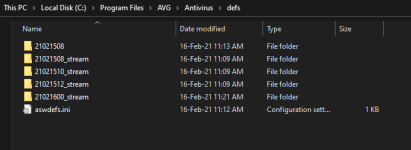
Browse this folder: "C:\Program Files\AVG\Antivirus\defs" and you'll see something like this,
1.PNG
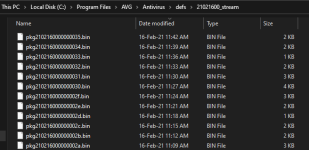
And inside these stream folders there are small 2, 3 kb size signature files which are downloaded every few minutes. These files contain every thing from new malware signatures, web shield signatures, removal of false positives, everything. So your device is almost always locally up to date. Avast/AVG pushes a full signature update once or twice a day. Because of this streaming updates they don't need to push full signature update every few hours like BD/ESET/Avira.
2.PNG
The value on AVG's home page is the last time they pushed a full signature update.
@McMcbrad checked that BD writes more than 500 mb and sometimes even 800mb every time it downloads signatures. I checked ESET and with the feature of locally backed up module turned off, ESET is writing 298 MB files after each update at the moment.
So, I think this streaming update feature of AVG is a nice one which puts less strain on the disk overall.
This streaming update feature is not exclusive to AVG. Norton introduced it first. Even ESET has to some extent. Some other products may also have this. I can't say for sure.
 
AVG is always downloading updates through its streaming update feature.
Browse this folder: "C:\Program Files\AVG\Antivirus\defs" and you'll see something like this,
View attachment 254206
And inside these stream folders there are small 2, 3 kb size signature files which are downloaded every few minutes. These files contain every thing from new malware signatures, web shield signatures, removal of false positives, everything. So your device is almost always locally up to date. Avast/AVG pushes a full signature update once or twice a day. Because of this streaming updates they don't need to push full signature update every few hours like BD/ESET/Avira.
View attachment 254209
The value on AVG's home page is the last time they pushed a full signature update.
@McMcbrad checked that BD writes more than 500 mb and sometimes even 800mb every time it downloads signatures. I checked ESET and with the feature of locally backed up module turned off, ESET is writing 298 MB files after each update at the moment.
So, I think this streaming update feature of AVG is a nice one which puts less strain on the disk overall.
This streaming update feature is not exclusive to AVG. Norton introduced it first. Even ESET has to some extent. Some other products may also have this. I can't say for sure.

Thanks for the detailed information, that’s a great explanation!
 
So is the Payments Fake Website Shield altering the DNS you're using? I'm trying to figure out if it's circumventing my router level filtering. I turned it off for now since I prefer to manage my own DNS settings and I don't quite understand it.

Yes, it forces Windows to resolve DNS by using Avast servers.

For advanced users like most of people on this forum, this feature it isnt that important because they know how to change DNS, to use DNSCrypt and so on, but for the average joe it is a nice security feature to avoid DNS spoofing and similar tactics.
 
It will force your browser to use DNS-over-HTTPS and Avast will be the resolver. If users are not happy with that, they can remove the module entirely.
View attachment 254226

Yes, it forces Windows to resolve DNS by using Avast servers.

For advanced users like most of people on this forum, this feature it isnt that important because they know how to change DNS, to use DNSCrypt and so on, but for the average joe it is a nice security feature to avoid DNS spoofing and similar tactics.
Thank you both. That’s what I thought it was doing. I had turned it off thinking that was the way it worked. Definitely not my preference.

Is Web protection compatible with Chromium Edge? I am having trouble testing it because my (smart) router keeps blocking wicar tests.
 
Thank you both. That’s what I thought it was doing. I had turned it off thinking that was the way it worked. Definitely not my preference.

Is Web protection compatible with Chromium Edge? I am having trouble testing it because my (smart) router keeps blocking wicar tests.

Yes, it is, if I am not mistaken the web protection is browser agnostic, just the password protection that is restricted to Google Chrome, Edge, Firefox and AVG/Avast browser.
 
It will force your browser to use DNS-over-HTTPS and Avast will be the resolver. If users are not happy with that, they can remove the module entirely.
View attachment 254226
Without Avast, I used to had a problem with my original/ISP DNS.

It showed constantly opening sites: DNS Probe started, DNS finished on browsers. Maybe Avast changing DNS settings ended that?

And, a doubt: Why "support encrypted DNS connections" is turned off by default if it's a recommended option? And what does this option mean?
site-real-Avast.png
 
So far, for anyone curious, benchmarking shows approximately 1-1.5% decline in performance vs M$ Defender. This is small, but seemingly repeatable. Occasionally it’s smaller, but it never performs better than it did before. That is a negligible difference, and still ‘may’ be within the margin of error, but seems consistent. Testing was done with an R7 5800x and 32GB DDR4 3600 CL16 and a NVME C: drive, so on something like a laptop or older 4 core CPU it may or may not be more noticeable. But most people don’t usually use their CPU at full tilt for long stretches so anywhere from 1-5% of performance loss isn’t going to be noticed outside of CPU heavy workloads, or heavy multitasking.

Just thought I’d share what I’ve seen performance wise. As with any testing variations in hardware and software can influence outcomes, so use this as one of many data points.
 
I use a bit of a weird system for measuring the load AV's or anything add to my system, comparing AVAST to KIS for example there isn't a great deal of difference is snappiness but CPU core temperatures & CPU fan speeds are much reduced with AVAST - The CPU don't run warm anyway but there is a significant drop overall with AVAST/AVG in temperature & obviously fan speed - Ryzen 3, 32 GIG Corsair Vengeance RAM, decent cooler not stock - Similar results with F-Secure - Just a musing :):)
 

Recently browsing

Members who viewed this thread in the last 5 minutes

Back
Top