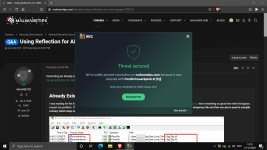
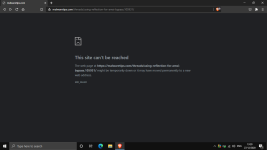
@plat1098 @Gandalf_The_Grey I have disabled EasyPrivacy on uBo and the thread link works


Open MalwareTips from your Home Screen or desktop. Follow discussions, find answers and pick up where you left off.
If you cannot find an install option, update your browser or use its bookmark option to keep MalwareTips close.
After installation, open the app and sign in. Enable push notifications in Preferences if you want alerts. On iPhone and iPad, push requires a Home Screen web app and iOS or iPadOS 16.4 or later.
Sign in to manage notificationsInstallation is optional. Your notification settings stay under your control.
 Thread starter
Jack
Thread starter
Jack

 malwaretips.com

This was removed due to Microsoft having to many SKUs (editions of Windows). Will take a look to implement them if possible.Can you add the option to add Windows 10 editions? Like, Windows 10 Home, Windows 10 Pro, Windows 10 Education. It has happened before that someone suggested a user to change something in Group Policy while the user was actually using Windows 10 Home which doesn't have Group Policy by default. Besides that adding editions also makes the config more complete I think.
Will look into this suggestion.Another suggestion: A field for OS hardening details since it's not real-time protection.
@SpawnIt would be awesome if the Alerts for new posts can be optimised for Desktop, as it looks like:
View attachment 251890
while on Mobile it's better:
View attachment 251891
This can be easily fixed if mouse mover isn't needed on Desktop.

Your AV parse the code and execute it which end in the blockage and site block.Was browsing MT and received this notification from AVG

Probably the opposite, secure. It's parsing the code to check for malicious contents probably and surely nothing is getting executed. The detection is correct.Your AV parse the code and execute it which end in the blockage and site block.
Not very secure

Thanks for the suggestion, I will look into implementing some changes for Password Managers.Good changes in the Computer Security Configuration, but one request:
At the moment there is much confusion / discussion where to put your password manager(app and or extension).
Do you mean Authenticator apps used, or whether the Sign-in account is 2FA/Multi protected?2 factor authentication apps don't really have a place in the computer config template currently. As not everyone uses 2FA, it's probably not a priority but would be nice to be able to put it somewhere.
Authenticator apps used like Authy, Google Authenticator, Microsoft Authenticator, etc. Hardware authentication such as Yubico or Titan could also be included in this section.Do you mean Authenticator apps used, or whether the Sign-in account is 2FA/Multi protected?
For example: Microsoft ID used to login to Windows.
Don't forget NitrokeyHardware authentication such as Yubico or Titan could also be included in this section.
Do you mean Authenticator apps used, or whether the Sign-in account is 2FA/Multi protected?

I'll look into it, but most likely some text/code on that specific page is triggering the detection.Was browsing MT and received this notification from AVG
Again something on that page is preventing you from connecting, most likely is AdGuard but it can also be your antivirus.
What's the difference? I cannot figure it out.It would be awesome if the Alerts for new posts can be optimised for Desktop, as it looks like:
View attachment 251890
while on Mobile it's better:
View attachment 251891
This can be easily fixed if mouse mover isn't needed on Desktop.
Ups i build the comparison screenshot wrong. Better one:What's the difference? I cannot figure it out.
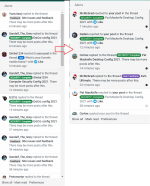
Ok, I've changed it so that the dot is always showing... It's better now?Ups i build the comparison screenshot wrong. Better one:
View attachment 252155
Left is desktop and only display the black / unread "dots" at mouse-hover
while at Right (mobile) the "dots" are displayed directly/ always if unread posts exists.
A lot! Thanks <3Ok, I've changed it so that the dot is always showing... It's better now?
I would understand if this was for the Mobile security threads, but not for PC security threads. Apps like Google Authenticator are primarily used on Android/iOS, not Windows.Hardware keys are not integral parts of a PC either, instead could be attached to a physical keychain/keyring/safe. If you use the Authy extension, it can be listed under the Browsers and extensions field for PC.Authenticator apps used like Authy, Google Authenticator, Microsoft Authenticator, etc. Hardware authentication such as Yubico or Titan could also be included in this section.
Members who viewed this thread in the last 5 minutes