By Staff Site Issues and Feedback

  • Jack Thread starter Jack
  • Start date Start date
  • 2,157 Replies
  • 428,408 Views
Also, I guess You already disabled them here:, in Your profile settings

1639808736019.png
 
Last edited:
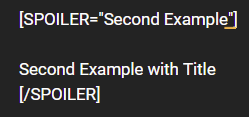
It's easy do to manually, just add the tags :

Example of SPOILER

1645866487128.png

Second Example with Title

1645866911499.png


Third Example: Inline spoiler


To create standard spoiler (not inline) from buttons toolbar:

1645867107988.png
 
Last edited:
It's easy do to manually, just add the tags :

Example of SPOILER

View attachment 264628

Second Example with Title

View attachment 264629


Third Example: Inline spoiler
but I think that in the previous version of MT (please correct me if this is not so) this was done by itself, you did not have to insert anything manually. You would get a banner with the title of the spoiler and then its content. I think it would be easier for all users.
 

MalwareTips community

Join the discussion

Create a free account to reply to this thread, ask your own questions and get help from the community.

  • Reply and ask questions
  • Get alerts when someone answers
  • Free malware removal help

Join 75,700 members who help each other for free, since 2010.

Create free account
or continue with

Recently browsing

Members and guests who viewed this thread in the last 5 minutes

Back
Top