

The MalwareTips app
Your community, one tap away.
Open MalwareTips from your Home Screen or desktop. Follow discussions, find answers and pick up where you left off.
- Home Screen access
- Optional push alerts
- Your community
You're ready to explore.Explore what's new
Installation instructions
iPhone & iPad
- Open MalwareTips in Safari and tap Share. You may need to open the Page Menu first.
- Choose Add to Home Screen. If it is not listed, use Edit Actions to add it.
- Keep Open as Web App enabled if shown, then tap Add.
Android
- Open MalwareTips in Chrome or another browser that supports app installation.
- Open the browser menu and look for Install app, Install and create shortcut, or Add to Home screen.
- Choose Install and confirm. Wording varies by browser.
Desktop
- Chrome: use the install icon in the address bar, or the menu under Cast, save and share.
- Edge: open the menu, then More tools, Apps and Install this site as an app.
- Safari on Mac: choose Share or File, then Add to Dock. Firefox on Windows: look for the web apps button in the address bar.
If you cannot find an install option, update your browser or use its bookmark option to keep MalwareTips close.
Keep up with your conversations
After installation, open the app and sign in. Enable push notifications in Preferences if you want alerts. On iPhone and iPad, push requires a Home Screen web app and iOS or iPadOS 16.4 or later.
Sign in to manage notificationsInstallation is optional. Your notification settings stay under your control.
You are using an out of date browser. It may not display this or other websites correctly.
You should upgrade or use an alternative browser.
You should upgrade or use an alternative browser.
By Staff Site Issues and Feedback
-
 Thread starter
Jack
Thread starter
Jack
- Start date
- 2,059 Replies
- 419,664 Views


It should work now:
Thank you! I'll create a thread where the members can submit short tips that will be added there.
Setup PCPC setup
Ag, what Strict Tracking Protection in Firefox v. 103 can do to one's Twitter links. Changed to Custom and the problem went away. I wonder what changed here?  The link still takes me there if I click on it though.
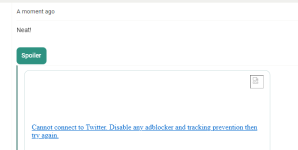
Also, I see a few more blocked domains via uBlock Origin than I used to see. Just sayin'
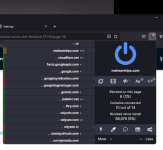
That's just this page.
The link still takes me there if I click on it though. Also, I see a few more blocked domains via uBlock Origin than I used to see. Just sayin'
That's just this page.
forgottenuser79643
Level 8
That's Firefox's built-in "social media trackers" which falls under the "tracking content" module within ETP. In custom, you can turn it off where you can't in Strict. So for that to work, you need to :Ag, what Strict Tracking Protection in Firefox v. 103 can do to one's Twitter links. Changed to Custom and the problem went away. I wonder what changed here?
Also, I see a few more blocked domains via uBlock Origin than I used to see. Just sayin'
That's just this page.
- Disable ETP for MalwareTips, or disable "tracking content" in ETP (pick either one, not both);
- And make a noop in uBlock Origin for "platform.twitter.com".
I generally don't visit twitter, so I don't really care for this, but it may help someone out there.
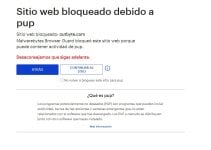

I am having some problems with the CF firewall I think, not sure. I am connected to Fastetvpn vpn and I get this error and also when I am on the live version of the page it won't let me give likes. Thank you very much in advance for checking this out.
Hey @Emanuel TomasinI am having some problems with the CF firewall I think, not sure. I am connected to Fastetvpn vpn and I get this error and also when I am on the live version of the page it won't let me give likes. Thank you very much in advance for checking this out.
View attachment 268732
I was doing some maintenance and this might have been the cause. Can you confirm that it works ok now? Thanks
Yes, it is now running smoothly. Thank you very much for everything. Best regards.Hey @Emanuel Tomasin
I was doing some maintenance and this might have been the cause. Can you confirm that it works ok now? Thanks
Ok. Thanks for the report.Yes, it is now running smoothly. Thank you very much for everything. Best regards.

This is usual, as You just registered in the forum, until You get more active posting, Your posts are pre-moderated in some forum sections 
I can see it:


Is that on desktop? On mobile I don't see neither mine nor other's.
Edit
This is what I'm seeing.
Last edited by a moderator:

Desktop! The mobile view is the same for all as some options simply ain't visible.Is that on desktop? On mobile I don't see neither mine nor other's.

At logon alerts not showing up at all here on Windows 11.Today my alerts flash and immediately disappear, a quick blink and then gone.
Recently browsing
Members who viewed this thread in the last 5 minutes


