New Update Smart App Control - Windows 11 22H2 feature promises significant protection from malware

I encountered a "partial" block of Chromium and what I found was interesting. Windows was blocking access to any Chromium webpage, either official or 3rd party site. This seems to indicate that SAC does more than what is documented by MS. 🤔 I wonder if any members have ideas or info regarding this phenomenon.
I asked Bing's AI about SAC, and it replied as follows:
Smart App Control (SAC) primarily blocks untrusted or potentially harmful applications from running on Windows devices. It is designed to prevent malicious software and potentially unwanted applications (PUAs) from executing before they are verified as safe. While it can block certain websites and applications, it is not limited to just blocking apps; it also acts as a security layer against malware and PUAs by evaluating applications based on their reputation and digital signatures.
But I couldn't find any evidence about website blocking.
 
I encountered a "partial" block of Chromium and what I found was interesting. Windows was blocking access to any Chromium webpage, either official or 3rd party site. This seems to indicate that SAC does more than what is documented by MS. 🤔 I wonder if any members have ideas or info regarding this phenomenon.

A clean install or reset would be needed to re-enable SAC.
Bumping these two posts to @Andy Ful.

I assume the web blocking I encountered was due to Smartscreen but it wasn't the usual SS block page, just black (failure to load). So SS and SAC work together but it's not obvious to the average user what the interaction (or relationship) is. However, it's quite clear to me that the SAC block and web page blocks were related, at least in terms of timing.


It seems a reset of the PC is still required to turn SAC back on after disabling it in spite of the new settings in the SAC UI. Microsoft has not changed its documentation to indicate otherwise.
 
Last edited:
  • +Reputation
Reactions: simmerskool
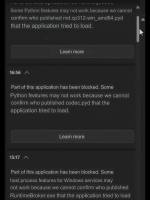
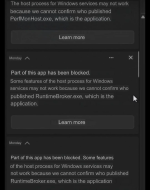
Why SAC was not able to stop the execution chain in spite of blocking python script?


1787678400214.png1787678443106.png
 
Why SAC was not able to stop the execution chain in spite of blocking python script?

This example does not necessarily mean that the execution chain is not stopped. All subsequent execution chains (compiled scripts .pyd extension modules) might be stopped as well. This can happen, for example, when the initial executable (allowed by SAC) that runs .pyd files is signed.
However, we cannot be sure about it because the information provided does not show the full picture.

Edit.
I corrected the post because .pyd is a kind of DLL intended to work in the Python environment and not a script.
 
Last edited:
This example does not necessarily mean that the execution chain is not stopped. All subsequent execution chains (python scripts) might be stopped as well. This can happen, for example, when the initial executable (allowed by SAC) that runs scripts is signed.
However, we cannot be sure about it because the information provided does not show the full picture.
"The file was approximately 6.76 MB and was modified on August 16, 2026 at 14:50, which is the same day my accounts were compromised."
Is not account being compromised a sign of complete execution?
 
Is not account being compromised a sign of complete execution?

The account can be compromised, but the final infostealer can be prevented by SAC or AV. This is a pretty frequent scenario. More information would be required to confirm the full infection.
What exactly do you mean by compromised account? I mean by this some unwanted changes in the system or UserSpace.
 
Last edited:
From the link provided, it looks like the computer was infected and partially healed. The screenshots are related to the time after healing. They confirm that the machine is still compromised. They do not prove that the malware is still active in the memory.
 
What exactly do you mean by compromised account?
The user who posted on Reddit reports the infostealer successfully harvested the data required to log in his accounts (he did not specify if they are email accounts or other accounts such as discord), all of this after the notifications by SAC blocking some pythom scripts and runtime broker exe.
 
The user who posted on Reddit reports the infostealer successfully harvested the data required to log in his accounts (he did not specify if they are email accounts or other accounts such as discord), all of this after the notifications by SAC blocking some pythom scripts and runtime broker exe.

I slightly corrected my post because the *.pyd file is not a script. It is a kind of DLL, which is why it can be blocked by SAC even without a Mark of the Web.
 
A dll file exploited by the malicious script?

If I correctly recall, the malicious Python script can use the "import" statement to load the .pyd module. However, the .pyd files can also be used in attacks related to Python, similarly to DLLs in DLL hijacking.
From the original post on Reddit, it follows that SAC blocked the malware (CryptoMiner) in the path:
C:\Users\[USERNAME]\AppData\Local\Microsoft\Windows\Diagnostics\Performance\PerfMonHost.exe.
 
Last edited:
A popular infection chain can look as follows:

ClickFix (PowerShell code) ---> downloaded Portable Python + malicious scripts/modules ---> binary payloads (EXE, PYD, etc.) delivered and executed

SAC blocks will mainly happen at the end.
SAC will not prevent infection when the final payloads are scripts.
 

You may also like...