VoodooShield discussion

Status
Not open for further replies.
Both seem to work. Delayed start was just easier. :)

I think the reg entry was no longer required by the new VoodooShield service start (except it is not always working now).
Okay, thanks. I suppose the benefit of the reg tweak is that VS starts earlier on boot.
 
On idle machine, Automatic Maintenance triggered CPU. I made AM go away but VS exe kept going until machine was restarted. Strangely, VS 4.0/4.01 always started first on here, never had to manually restart it or apply any registry fix. Hmmm. Shutdown is still impeded unless I exit VS.
 
  • Like
Reactions: Gandalf_The_Grey
I hope @danb gets all the info he needs from the logging.
No high CPU use for me and no problems with shutdown.
I had problems with the registration and with VS not starting.
Patiently awaiting version 4.02 :D
 
Using version 4.01b, I have CPU at over 30% sometimes. The PC (or different programs every time) freezes.

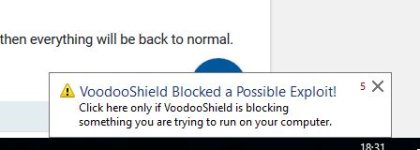
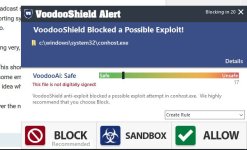
There is a popup about conhost.exe which is rather irritating because even if I allow it, it comes up over and over a few seconds later.
 
  • Like
Reactions: Gandalf_The_Grey
Hello .... I can not handle this .. Unfortunately, I am a new user of the program and I am still studying it .... But in this situation whatever the reaction is done is the same .. Please help the poor beginner with advice and suggestions ..! :rolleyes:
 

Attachments

  • Заснемане.JPG
    Заснемане.JPG
    20 KB · Views: 475
  • Заснемане_1.JPG
    Заснемане_1.JPG
    45.5 KB · Views: 438
  • Like
Reactions: frogboy
C:\ProgramData\VoodooShield directory

Is anyone else missing this directory? I know I had it a few months ago but it disappeared and that where the log file is kept. Not sure but this might be used for the new auto logging reports sent to Dan.
 
Last edited:
  • Like
Reactions: _CyberGhosT_
Installed 4.01b on primary machine, where I experience no-autostart issue (I don't have that issue on secondary machine).

No registration pop-ups, but can confirm auto-start is not fixed. Reset to 'automatic (delayed start)', which solves the issue for me - rather than doing the reg tweak thing - and all is OK again.

I wonder if it isn't due to Emsisoft new Firewall Fortify feature that is causing some sort of delay? I do have VS processes excluded in EAM, and don't get any warnings, but maybe there is some sort of delay there interfering with the automatic start. IIRC there are other reports of (I think different) issues by other users of EAM on Wilders. Just a shot in the dark.
Several reboots later and registration pop-up, snapshot, whitelisting is back ... may give VS a rest on this machine.

Edit: Updated to 4.01b on secondary machine. No registration pop-up, but now that machine did not auto-start on the first reboot, but was OK after that.
 
Last edited:
Hello .... I can not handle this .. Unfortunately, I am a new user of the program and I am still studying it .... But in this situation whatever the reaction is done is the same .. Please help the poor beginner with advice and suggestions ..! :rolleyes:
As a new user I would start with the stable version 3.59 from VoodooShields homepage: https://voodooshield.com/Download/InstallVoodooShield.exe
Put it in autopilot mode and see how that works for you.
You can read the manual to become more familiar with the program: http://www.voodooshield.com/Download/VoodooShieldUserGuide.pdf
As new user I would stay away from the in my opinion not so stable beta version 4.01b.
 
Yes, here also, I reinstalled 4.01 beta over 3.59 and again got the registration box. I followed the developer's advice to confirm registration on VoodooShield.net but the box reappeared on restart. I don't know exactly what to delete in the ProgramData/VS folder so I'm going to leave that alone. Saved my reg. inputs in the VS interface and so far, no boxes but that and the CPU are making a fibber out of me. Only thing consistent is the shutdown delay unless VS is exited prior.

Edit: also no directory in ProgramData on here.
 
  • Like
Reactions: frogboy
As new user I would stay away from the in my opinion not so stable beta version 4.01b.

Agree. I would also add that even if you aren't a new user, you might want to wait on the BETA version(s). We all need to remember that version 4 and 4.01 and 4.01b are all BETA's. I've been a user of VS for quite some time, but I haven't installed the beta version. Like Gandalf (and several others have mentioned) stay with the very stable 3.59 version if you are a new user OR if you don't want to mess with bugs/issues with a beta version.
 
  • Like
Reactions: Gandalf_The_Grey
Agree. I would also add that even if you aren't a new user, you might want to wait on the BETA version(s). We all need to remember that version 4 and 4.01 and 4.01b are all BETA's. I've been a user of VS for quite some time, but I haven't installed the beta version. Like Gandalf (and several others have mentioned) stay with the very stable 3.59 version if you are a new user OR if you don't want to mess with bugs/issues with a beta version.
It's so bad for me that I'll have to go back to v. 3.59. I cannot realistically use v. 4.01b because of this conhost.exe message that freezes the PC.
 
Status
Not open for further replies.