

The MalwareTips app
Your community, one tap away.
Open MalwareTips from your Home Screen or desktop. Follow discussions, find answers and pick up where you left off.
- Home Screen access
- Optional push alerts
- Your community
You're ready to explore.Explore what's new
Installation instructions
iPhone & iPad
- Open MalwareTips in Safari and tap Share. You may need to open the Page Menu first.
- Choose Add to Home Screen. If it is not listed, use Edit Actions to add it.
- Keep Open as Web App enabled if shown, then tap Add.
Android
- Open MalwareTips in Chrome or another browser that supports app installation.
- Open the browser menu and look for Install app, Install and create shortcut, or Add to Home screen.
- Choose Install and confirm. Wording varies by browser.
Desktop
- Chrome: use the install icon in the address bar, or the menu under Cast, save and share.
- Edge: open the menu, then More tools, Apps and Install this site as an app.
- Safari on Mac: choose Share or File, then Add to Dock. Firefox on Windows: look for the web apps button in the address bar.
If you cannot find an install option, update your browser or use its bookmark option to keep MalwareTips close.
Keep up with your conversations
After installation, open the app and sign in. Enable push notifications in Preferences if you want alerts. On iPhone and iPad, push requires a Home Screen web app and iOS or iPadOS 16.4 or later.
Sign in to manage notificationsInstallation is optional. Your notification settings stay under your control.
You are using an out of date browser. It may not display this or other websites correctly.
You should upgrade or use an alternative browser.
You should upgrade or use an alternative browser.
Troubleshooting Windows 10 pro with intel i5 10gen takes like 1 min to shutdown
-
 Thread starter
peter1111
Thread starter
peter1111
- Start date
- 51 Replies
- 13,415 Views
Solution

guys lol he said it felt faster after uninstalled BT. no need to reinstall Windows OS..


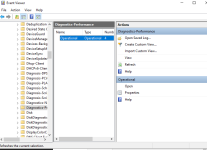
I don't see filter logs tho:Open Event Viewer
1. Go to Applications And Services Logs > Microsoft > Windows > Diagnostics Performance > Operational
2. Right-click Operational > Filter Current log > Type "200-299" in <All Event IDs> > OK
You should see a list of any existing shutdown logs.
Edit: Why use Driver Booster software on a 10th gen PC (2020)? Did you forget how to update drivers?
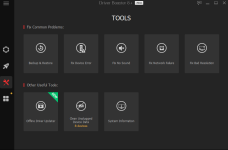
Also, for the driver booster I like this:
These tools are helpful
Last edited by a moderator:
Upvote
0
yea, if not BT, then there is something wrong when I upgrade my system.What do you think? maybe BT?
Upvote
0

I don't know the details of this software, but if it is in this state, isn't page file deletion enabled?I will check If I have any of that, because I think I have : <
Don't think I have tho View attachment 257238
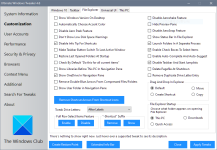
How are you currently adjusting this settings screen? I want to see a screenshot.
Last edited by a moderator:
Upvote
0

I don't see filter logs tho:
View attachment 257330
Click ''>'' arrow down like this:

then click ''Operational'' you will see there...
Upvote
0
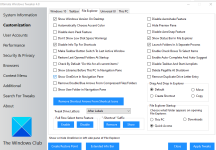
hereI don't know the details of this software, but if it is in this state, isn't page file deletion enabled?
View attachment 257334
How are you currently adjusting this settings screen? I want to see a screenshot.
Upvote
0
NothingOpen Event Viewer
1. Go to Applications And Services Logs > Microsoft > Windows > Diagnostics Performance > Operational
2. Right-click Operational > Filter Current log > Type "200-299" in <All Event IDs> > OK
You should see a list of any existing shutdown logs.
Edit: Why use Driver Booster software on a 10th gen PC (2020)? Did you forget how to update drivers?
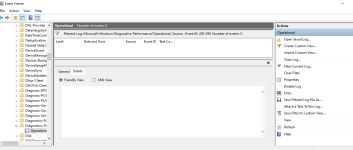
Upvote
0

I'd suggest you to unninstall Driver Booster and others IOBIT's garbage from your system and then check if the problem is solved...
Open CMD or Powershell and type these commands:
chkdsk /f /r
sfc /scannow
DISM /Online /Cleanup-Image /RestoreHealth
Reboot the computer. Do not interrupt the process.
Open CMD or Powershell and type these commands:
chkdsk /f /r
sfc /scannow
DISM /Online /Cleanup-Image /RestoreHealth
Reboot the computer. Do not interrupt the process.
Upvote
0
Windows finds one error, I will restart later to see what will happenI'd suggest you to unninstall Driver Booster and others IOBIT's garbage from your system and then check if the problem is solved...
Open CMD or Powershell and type these commands:
chkdsk /f /r
sfc /scannow
DISM /Online /Cleanup-Image /RestoreHealth
Reboot the computer. Do not interrupt the process.
Last edited by a moderator:
Upvote
0
If you use any third-party disk cleaners, they may delete these Event Viewer logs by default / your custom settings.
Upvote
0
Windows fix the disk error, things seems to be better now. (It took 2-3 sec on the shutting down screen but after that it shuts down normally)If you use any third-party disk cleaners, they may delete these Event Viewer logs by default / your custom settings.
Upvote
0
Recently browsing
Members who viewed this thread in the last 5 minutes
You may also like...
-
 Troubleshooting Dell PC Does not power on
 -

-
M
- Opera
- Maciej Kocemba
- · 0
-
 Setup Idea Pretty Good PC Security Regimen
 -
