


The MalwareTips app
Your community, one tap away.
Open MalwareTips from your Home Screen or desktop. Follow discussions, find answers and pick up where you left off.
- Home Screen access
- Optional push alerts
- Your community
You're ready to explore.Explore what's new
Installation instructions
iPhone & iPad
- Open MalwareTips in Safari and tap Share. You may need to open the Page Menu first.
- Choose Add to Home Screen. If it is not listed, use Edit Actions to add it.
- Keep Open as Web App enabled if shown, then tap Add.
Android
- Open MalwareTips in Chrome or another browser that supports app installation.
- Open the browser menu and look for Install app, Install and create shortcut, or Add to Home screen.
- Choose Install and confirm. Wording varies by browser.
Desktop
- Chrome: use the install icon in the address bar, or the menu under Cast, save and share.
- Edge: open the menu, then More tools, Apps and Install this site as an app.
- Safari on Mac: choose Share or File, then Add to Dock. Firefox on Windows: look for the web apps button in the address bar.
If you cannot find an install option, update your browser or use its bookmark option to keep MalwareTips close.
Keep up with your conversations
After installation, open the app and sign in. Enable push notifications in Preferences if you want alerts. On iPhone and iPad, push requires a Home Screen web app and iOS or iPadOS 16.4 or later.
Sign in to manage notificationsInstallation is optional. Your notification settings stay under your control.
You are using an out of date browser. It may not display this or other websites correctly.
You should upgrade or use an alternative browser.
You should upgrade or use an alternative browser.
Unmaintained WiseVector Free AI Driven Security
- Thread starter Thirio
- Start date
Other security for Windows, Mac, Linux
2,411 Replies
673,417 Views


Hi floalma,
Thanks for your feedback.
Since our engine is based on ML and this engine will extract lots of metadata from files when scanning in the first time . Next time, the metadata will be cached, so the scan will be much more faster.
WiseVector StopX is launched via Task Scheduler. Please check Task Scheduler to see whether there is any error in the history.
( Please refer to How to Open Windows Task Scheduler - dummies)
(This is the way to view Task Scheduler History:View And Clear Task Scheduler History In Windows 7)
This is a known bug, we will do tests and fix it in our next version.
High CPU usage will happen very few times if there are multiple files created(e.g. installing a software)when WiseVector is running, since WiseVector StopX is scanning the files.
Have a nice weekend!
Best wishes,
WiseVector
Thanks for your feedback.
1. Extremely slow scan, it took more than 6 hours to scan my computer.
Since our engine is based on ML and this engine will extract lots of metadata from files when scanning in the first time . Next time, the metadata will be cached, so the scan will be much more faster.
2. It doesn't start automatically when reboot my computer, from my user account. WV process doesn't appear.
WiseVector StopX is launched via Task Scheduler. Please check Task Scheduler to see whether there is any error in the history.
( Please refer to How to Open Windows Task Scheduler - dummies)
(This is the way to view Task Scheduler History:View And Clear Task Scheduler History In Windows 7)
3. Right click to scan with WV, windows failed to appear.
This is a known bug, we will do tests and fix it in our next version.
4. About CPU, peaks a little more than 60% of the CPU.
High CPU usage will happen very few times if there are multiple files created(e.g. installing a software)when WiseVector is running, since WiseVector StopX is scanning the files.
Have a nice weekend!
Best wishes,
WiseVector
F
ForgottenSeer 58943
Question - are the FP's bad on this?
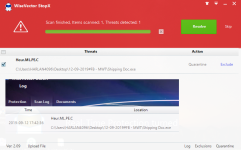
It found a scary sounding piece of malware on the test system I was running it on. However, it was just a PDF I created myself for some stuff related to an estate. Nothing nefarious. VT was 100% clean on it. That sort of makes me feel like like it is just overly chatty. Detection seems great on an application that detects almost everything as malware?
Curious to hear why a generic (totally generic) PDF I made could flag it.
It found a scary sounding piece of malware on the test system I was running it on. However, it was just a PDF I created myself for some stuff related to an estate. Nothing nefarious. VT was 100% clean on it. That sort of makes me feel like like it is just overly chatty. Detection seems great on an application that detects almost everything as malware?
Curious to hear why a generic (totally generic) PDF I made could flag it.

Curious to hear why a generic (totally generic) PDF I made could flag it.
Report it to WV. They're pretty responsive.
Hi ForgottenSeer 58943,Question - are the FP's bad on this?
It found a scary sounding piece of malware on the test system I was running it on. However, it was just a PDF I created myself for some stuff related to an estate. Nothing nefarious. VT was 100% clean on it. That sort of makes me feel like like it is just overly chatty. Detection seems great on an application that detects almost everything as malware?
Curious to hear why a generic (totally generic) PDF I made could flag it.
1. Can you please send me the screenshot of this detection? So I can know more details.
2. Have you uploaded the PDF via WiseVector StopX? (please refer to the screenshot below to know how to upload)Then we can analyze it.
3. It's impossible that WiseVector StopX detects almost everything as malware, since we are an Anti-malware company, not an Anti-everything company.

Best Regards,
WiseVector
@WiseVector
Thank you for your answers.
It's not a matter of Task Scheduler. It start automatically from my Admin Account. The issue is from my User Account, you missed this information.
This is probably because under User Account, Wisevector needs Admin right to start automatically. Hope you fix this issue, so that we can start it automatically in any User Account on Windows 10.
Thank you for your answers.
It's not a matter of Task Scheduler. It start automatically from my Admin Account. The issue is from my User Account, you missed this information.
This is probably because under User Account, Wisevector needs Admin right to start automatically. Hope you fix this issue, so that we can start it automatically in any User Account on Windows 10.
Hi floalma,@WiseVector
Thank you for your answers.
It's not a matter of Task Scheduler. It start automatically from my Admin Account. The issue is from my User Account, you missed this information.
This is probably because under User Account, Wisevector needs Admin right to start automatically. Hope you fix this issue, so that we can start it automatically in any User Account on Windows 10.
Yes, WiseVector needs Admin right to start automatically. But I'm afraid we don't have a plan to fix this issue you described at present, sorry for the inconvenience.

Try something like this for starters...
1. Find the .exes of the program in the program folder
2. Right click on each one and select Properties->Compatibility->"Change settings for all users"->Place a check box in "Run this program as an administrator"
Now every time a process starts UAC will ask your permission, so you must find a way to run them without UAC prompts. I never found a way to do this, but I have heard there is a way. Maybe someone here at MTs knows...
If the program generates .tmp files ever, you might still run into some issues. I guess for me maybe it's not such a horrible thing to be notified of a .tmp file running as long as it's not too often...
1. Find the .exes of the program in the program folder
2. Right click on each one and select Properties->Compatibility->"Change settings for all users"->Place a check box in "Run this program as an administrator"
Now every time a process starts UAC will ask your permission, so you must find a way to run them without UAC prompts. I never found a way to do this, but I have heard there is a way. Maybe someone here at MTs knows...
If the program generates .tmp files ever, you might still run into some issues. I guess for me maybe it's not such a horrible thing to be notified of a .tmp file running as long as it's not too often...
P.S.-just did a search on this, and I suppose I am wrong. Looks like it is not possible to bypass UAC in SUA any way but one way. Here is the info:

 superuser.com
On the plus side, you could at least use a scheduled task to start the main program application at startup and maybe one each for its services that run at all times. Disable their normal startup entries, and maybe it would work.
Likely there are other processes that run on demand, not sure what to do about those...
StartUp Program UAC Bypass
I'm currently using a Windows 10 Desktop home computer and I would like to add a program to the startup folder "C:\Users\%username"\AppData\Roaming\Microsoft\Windows\Start Menu\Programs\Startup" Ho...
superuser.com
On the plus side, you could at least use a scheduled task to start the main program application at startup and maybe one each for its services that run at all times. Disable their normal startup entries, and maybe it would work.
Likely there are other processes that run on demand, not sure what to do about those...

Now every time a process starts UAC will ask your permission, so you must find a way to run them without UAC prompts. I never found a way to do this, but I have heard there is a way. Maybe someone here at MTs knows...

5 Ways to Disable User Account Control (UAC) for Specific Software - Raymond.CC Blog
Whether you like the User Account Control (UAC) feature in Windows Vista, 7, 8, and 10 or not, you should have it enabled if possible. This is because it’s capable of blocking some actions by malware such as adding itself to global startup, adding or modifying files in important folders...
www.raymond.cc
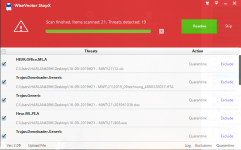
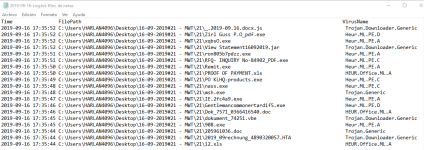

Very impressive detection rate from @WiseVector thanks for updating us @harlan4096 .
One can only wonder when this will be integrated to Virustotal. This paired up with VS sounds like a solid security setup I have yet to try. I hope WV manages to stay free or at least "green". WV seems like a hidden gem right now so please don't end up like 360 once you turn big.
One can only wonder when this will be integrated to Virustotal. This paired up with VS sounds like a solid security setup I have yet to try. I hope WV manages to stay free or at least "green". WV seems like a hidden gem right now so please don't end up like 360 once you turn big.
Setup PCPC setup
Hello: since I have Defender, I had to shut off exploit guard--Force randomization for images (Mandatory ASLR) as was previously noted in this thread. Otherwise, when this is enabled, my installation of WiseVector is silently blocked. Version is 2.09, OK? May I know the name/s of the driver/s?
I don't know if this is answered earlier, but may I have more than one day to review this software and the real time protection? I'm finding its recent testing results by harlan4096 to be pretty impressive. :emoji_ok_hand: My only little quibble is its system "quick" scanning is really slow on a machine with a Samsung 970 EVO SSD and i7 CPU yet there is nothing in the scan logs when you look for the amount of time it took. Of 206130 items, I would say it took about 6 + minutes. Also, as stefanos has noted earlier, the desktop shortcut will not open WiseVector but it is accessible in the system tray. Windows 10 v.18362.356. Defender's real time protection is currently disabled. Will you be optimizing the scanner and making this a subscription-based antivirus anytime soon, WiseVector? I apologize if any of this stuff is already answered.
EDIT: I find this error in Event Viewer. What can you tell me about it? Defender's real time is disabled. I have NVT OSArmor on the system with many rules applied. I also have gpedit.msc with several policies enabled. I can post screenshots if this is helpful. winver is above.
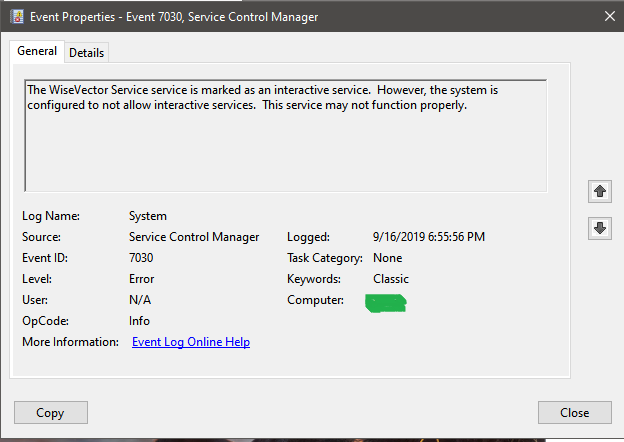
I don't know if this is answered earlier, but may I have more than one day to review this software and the real time protection? I'm finding its recent testing results by harlan4096 to be pretty impressive. :emoji_ok_hand: My only little quibble is its system "quick" scanning is really slow on a machine with a Samsung 970 EVO SSD and i7 CPU yet there is nothing in the scan logs when you look for the amount of time it took. Of 206130 items, I would say it took about 6 + minutes. Also, as stefanos has noted earlier, the desktop shortcut will not open WiseVector but it is accessible in the system tray. Windows 10 v.18362.356. Defender's real time protection is currently disabled. Will you be optimizing the scanner and making this a subscription-based antivirus anytime soon, WiseVector? I apologize if any of this stuff is already answered.
EDIT: I find this error in Event Viewer. What can you tell me about it? Defender's real time is disabled. I have NVT OSArmor on the system with many rules applied. I also have gpedit.msc with several policies enabled. I can post screenshots if this is helpful. winver is above.
Last edited:
Hi Thirio,Very impressive detection rate from @WiseVector thanks for updating us @harlan4096 .
One can only wonder when this will be integrated to Virustotal. This paired up with VS sounds like a solid security setup I have yet to try. I hope WV manages to stay free or at least "green". WV seems like a hidden gem right now so please don't end up like 360 once you turn big.
Thank you.
We are waiting in line to be integrated to VT and they told us in an email that we have to wait nearly one year...
We will have two kinds of versions in the future. The one with basic features will stay free and the other with advanced features will charge.
No worries, WiseVector StopX will stay "Green" forever.
I think we don't have a chance to be a super big company like 360 now, since time changes. We would like to be a small,elegant and professional one.

Regards,
WiseVector

The one with basic features will stay free
Is this on demand only? a portable scanner perhaps?

Is this on demand only? a portable scanner perhaps?
Save the current version in case you have to pay for what you offer today for free.
Recently browsing
Members who viewed this thread in the last 5 minutes
