


Interview materials can arrive just as you start thinking about the role instead of the person who offered it. A familiar employer name makes that shift happen quickly.
If a hiring contact asks you to open something unusual, pause the process where it is. You can verify an interview separately without opening its files.
Overview
A recruiting disguise, followed by a Windows backdoor
ScoringMathTea is a Windows remote access Trojan that ESET has documented in Operation DreamJob activity. The name refers to malware, not a real hiring assessment or a recruiting tool.
ESET reported an earlier sample dressed up as an Airbus-themed offer. Its later research described a related wave affecting European companies in the defense sector, including aerospace work.
These observations describe different examples in the broader campaign.
The research doesn’t show that the named employer sent the lure or that every company in the later wave received the same interview attachment.
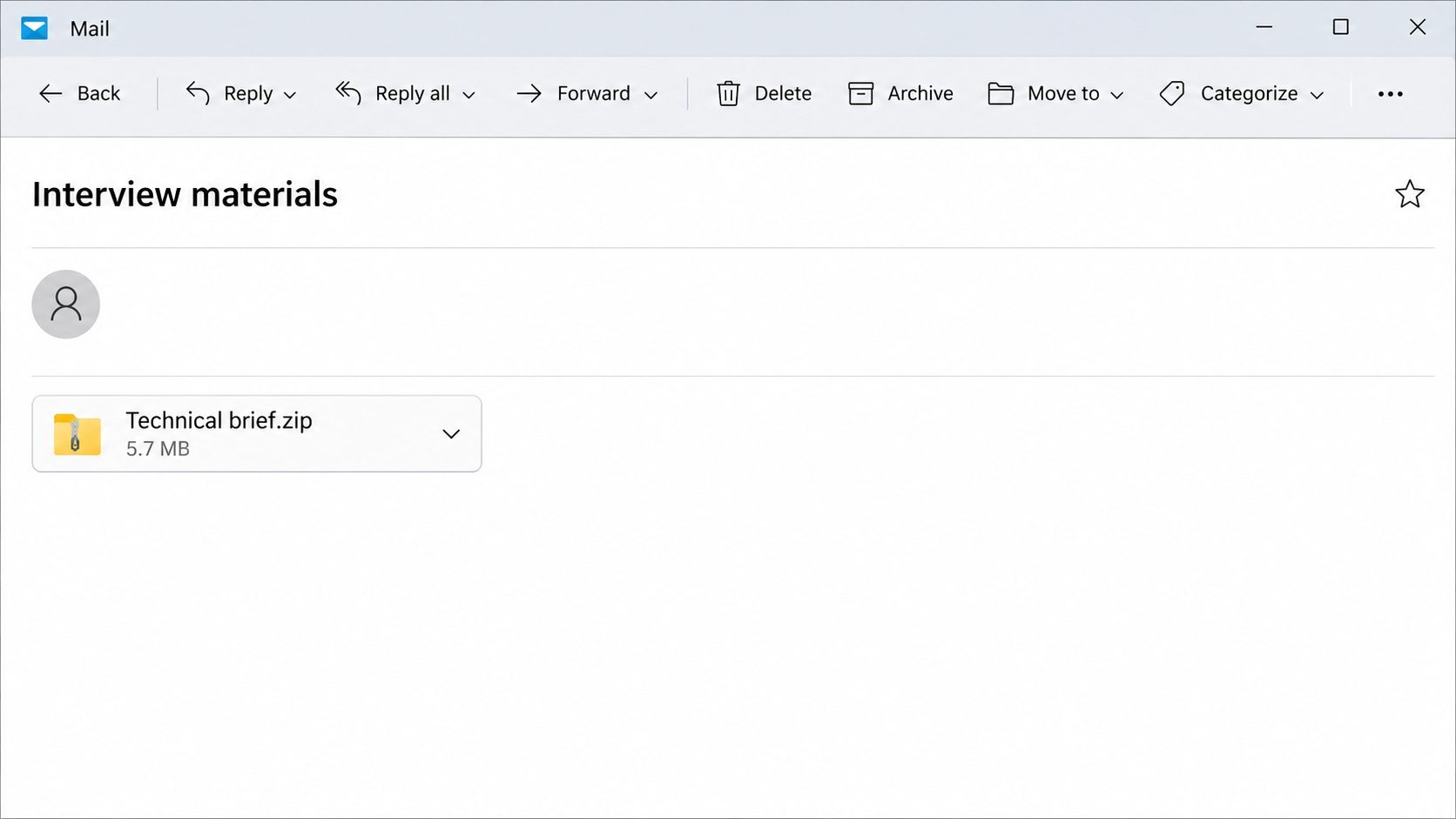
The opening mail view is a fictional reconstruction. It depicts the sort of ordinary hiring material people might expect, not a recovered scam message or proof about a specific recruiter.
Why a real download name is not enough
ESET described altered versions of legitimate open-source software used in the observed campaign. A program name can be genuine while the copy attached to an interview is not.
A legitimate tool used in a project should have an independent source. Verify the employer and the software separately if a hiring contact tells you to use a bundled copy.
An unverified attachment can carry more than its visible document. What you ran on Windows matters more than the file you thought the package was going to show.
The employer’s recruitment process and your company’s endpoint policy should not depend on the same unverified sender. Use contact details you find independently to check both.
Which facts tell support how far the incident went
- Note whether you received a message, downloaded an archive, or ran a program.
- Record where the suspected attachment came from without posting a live link.
- Tell IT if you opened it on a company device or one used to access work.
- Flag accounts, shared drives, and remote services that were already open on that PC.
- Keep the name of the legitimate software separate from the source of the questionable copy.
An unfamiliar process name does not diagnose this particular Trojan. A verified alert, execution record, or source match is more useful than trying to reproduce the installation.
How the ScoringMathTea Infection Happens
Step 1: A job or project gives the file a purpose
The broader Operation DreamJob activity uses fake job opportunities as a pretext. Documents and tools can appear to be part of a normal recruitment exchange.
Check the vacancy on the employer’s own careers site from a clean device. If you can’t find it, contact the organization through its own directory.
An active vacancy doesn’t authenticate the person who reached out. Ask whether they are authorized to recruit for that job and whether the file is part of the real interview.
Step 2: The copy arrives outside the normal publisher route
Some examined chains used packages with modified versions of software otherwise available from legitimate projects. You can recognize a tool without recognizing the origin of that particular copy.
If the recruiter’s file is an archive, don’t open it to check whether the tool is inside. Request the genuine publisher’s instructions and keep the original message untouched for review.
If an employer legitimately needs a specialized tool, confirm the program, exact download route, and device policy with an established contact.
Don’t treat a deadline as an exception to that check.
Step 3: The unwanted software can run behind a familiar presentation
A package can display something that looks routine while other software starts in the background. ESET reported ScoringMathTea as a follow-on payload in the investigated activity.
The Trojan can give an operator remote access to the Windows device. The legitimate application you recognized is not proof that only the expected program ran.
Write down whether Windows blocked the file or asked for permission before opening it. If you already stopped the process, don’t try to start it again for a clearer answer.
Step 4: Investigators have to check what the device could reach
A work computer may have access to email, design documents, shared storage, or connections to other systems.
The fact that a program ran does not tell you which of those were used.
The organization’s security team can compare local records with activity in those other services. Allow it to make that assessment before replacing the computer or wiping its storage.
On a personal PC, tell your employer if the session held work access. The laptop’s ownership won’t tell the employer whether a shared account or document was reachable.
What to Do if You Opened a Suspect ScoringMathTea Package
-
Stop the related activity on the affected PC. Do not continue the interview there or reopen the files. Isolate it from the network when you can safely do so.
On a managed machine, follow the organization’s incident instructions. Ask whether it needs the device left powered on for evidence, rather than rebooting on your own.
-
Report the recruiting contact through a known channel. Give your workplace security team the account display name, the communication date, the file name, and whether you started an installer.
Avoid forwarding the package to a colleague who may open it. Use a trusted incident intake that can tell you what material to preserve.
-
Verify the hiring organization through a separate channel. Open its actual careers page and confirm the vacancy and contact. Do not ask an unverified sender to confirm their own identity.
If the company says the exchange wasn’t authorized, keep that message for support. You don’t need to accuse a real employee whose identity may have been used.
-
Identify where the affected PC had access. Tell your administrator if shared folders, source repositories, design tools, corporate email, or remote work services were open.
Allow the team to decide which sessions or credentials should be revoked. Do not reset sensitive credentials while signed in through the affected machine.
-
Separate personal services from work systems. From a clean device, review personal email and other accounts the Windows profile could access. Preserve any unexplained activity for the providers.
If you gave identity documents to the recruiter, report that disclosure separately. An antivirus scan can’t retrieve a document you sent over chat.
-
Track the files that moved beyond one device. If you shared a copy with another applicant or used a team folder, warn its owner without redistributing the attachment.
Give responders the date and location of the copy. A downloaded file in a folder and a program that actually ran are different facts.
How to Remove ScoringMathTea From Windows
Step 1: Preserve the evidence before deciding how to clean the machine
For a work endpoint, wait for instructions from the team responsible. A consumer scan is not a substitute for investigating sensitive access across several shared services.
On a personal device, open Windows Security > Virus & threat protection > Protection history. Check entries near the time the interview file was downloaded or run.
Use Microsoft’s Protection History guide to tell an unresolved finding from a file that was blocked. Do not restore an item to confirm its appearance.
Step 2: Get the right scanner independently of the suspect package
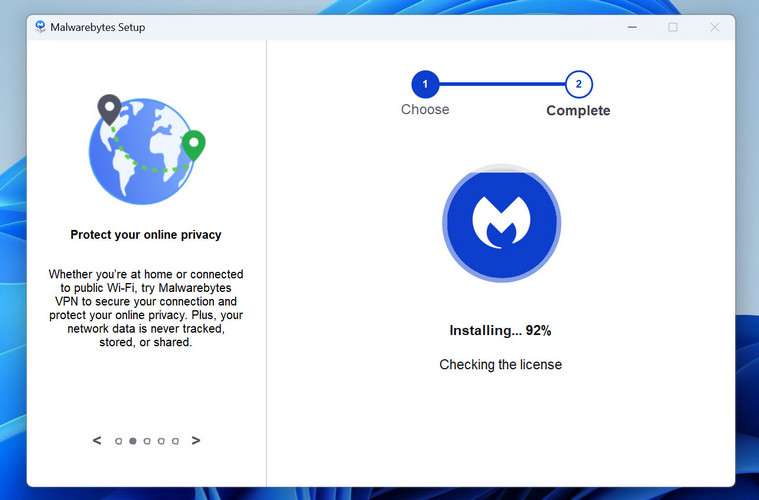
On a personal Windows computer, use the Malwarebytes Windows installer. If the device needs to remain offline, ask support how it wants a verified copy transferred.
Check the installer publisher and follow the normal setup prompts. Don’t get the scanner through a link supplied by the person who sent the interview materials.
Step 3: Act on findings and inspect the next startup
Open Malwarebytes and use Scan on its dashboard. Let it finish, then review the findings and quarantine confirmed threats using the application’s controls.
Write down any item that remains unresolved. If a restart is required on your personal PC, follow the prompt after you have preserved the records you need.
After startup, open detection history again and check whether the same item returned. Don’t allow a quarantined file to try to confirm the original recruitment story.
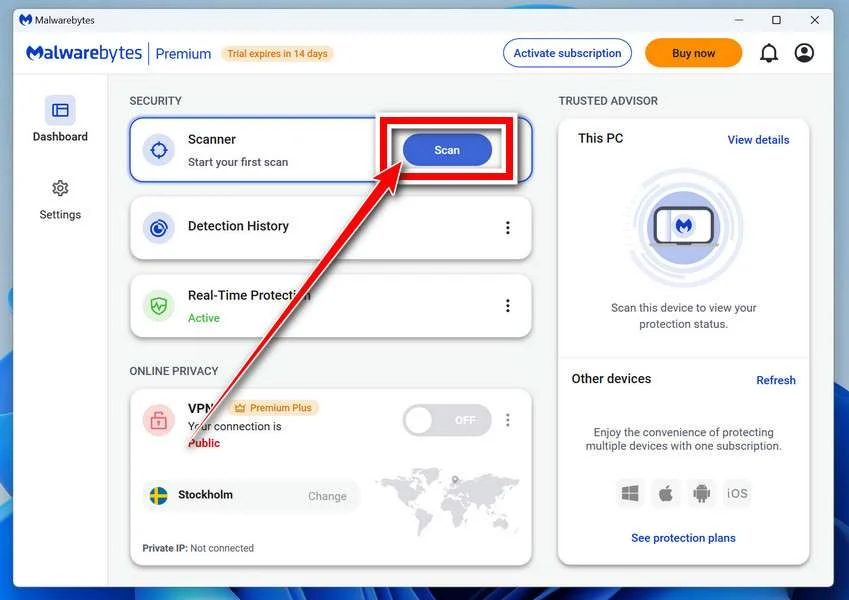
The Malwarebytes Premium affiliate offer is optional. A subscription isn’t a determination about which employer records or account sessions may have been exposed.
Step 4: Replace only confirmed suspect copies
Once support no longer needs the files, remove confirmed suspect downloads from your personal copy of the materials. Do not delete evidence or shared work folders without authorization.
Apply operating system and application updates using official routes. If the work truly needs the original tool, obtain a fresh copy directly from the verified developer.
If alerts return, leave the device out of normal use and ask a technician or MalwareTips support for help. Keep company data and access secrets out of public posts.
Step 5: Establish who can approve the return to work
For an organization, a clean scan is one result rather than release approval. Ask the device owner who is responsible for deciding whether the computer can reconnect.
If it needs a rebuild, verify that the backups and installation media are available before erasing the PC. Restore trusted work files without bringing back the suspect archive.
Before using company accounts again, confirm which credentials were replaced and which devices remain enrolled. The device and the identity records should both be checked.
How to Check an Aerospace Job Without Using Its Files
Verify the recruiting process and the software separately
Search the employer’s careers site from a new tab rather than a link in the message. Look for the job number, location, and responsibilities the contact gave you.
If the role isn’t public, ask the company’s human resources team whether there is a legitimate confidential search. An absent listing isn’t enough to accuse somebody of fraud.
For an outside staffing agency, ask the employer to confirm the agency’s role. Ask how candidates are supposed to receive technical material and who approves the exercise.
A legitimate test may use software, but the organizer should be able to explain the requirement. An approved test environment is a better option than installing an unfamiliar package.
If the contact says the test only works with the attached copy, ask to use a verified browser-based exercise or a supervised session instead.
The device’s job matters more than who paid for it
A personal laptop can still have access to work email, a company VPN, or contractor files. Tell IT about that access even if it didn’t issue the laptop.
Describe which accounts were available and whether you were connected to a work service. Don’t sign back in to the affected PC just to check your account list.
For certain roles, there may be special rules for handling proposals or drawings. Report the incident through the channel your organization uses for that material.
If you did the exercise on a machine with no company access, say so. That detail helps responders spend time on the accounts and files that actually matter.
Keep the real interview separate from the evidence
If the employer verifies that the approach was false, send the recruiting team a profile name and date. It can flag the impersonation without needing an executable from you.
A legitimate hiring conversation can resume in the company’s verified portal. Keep the suspicious thread separate, so a new recruiter doesn’t inherit links and attachments they might open by mistake.
Make a note of when you received the first file, not just when antivirus warned you. Those dates may be different if you downloaded the material and opened it later.
If several files share the same name, include where each came from. A clean installer found later doesn’t prove that an earlier copy was safe.
Frequently Asked Questions
Is ScoringMathTea a genuine hiring test?
It is a name used by security researchers for a Windows Trojan. There is no reason to run a program under that name to qualify for a genuine role.
Did the real employer send the fake offer?
ESET described a disguise, not evidence that the named employer delivered malware. Verify any actual applicant conversation through the company’s established recruiting route.
Can the same name refer to an older campaign?
The malware has been seen across more than one campaign. Compare the actual file and device records rather than assuming every report refers to the same employer or date.
Does reading a recruitment message prove execution?
Reading the message isn’t the same as running a downloaded program. Tell support if you opened an archive, launched software, or approved any unexpected request afterward.
Why investigate work access on a personal computer?
A personal Windows session can still connect to work services. Your employer can check the company side even if it doesn’t administer your laptop.
Will a scan tell me whether drawings or documents were copied?
A device scan cannot establish which records another person accessed or sent elsewhere. The organization needs its own incident review of relevant account, system, and document activity.
The Bottom Line
Don’t run an interview package until you’ve verified the job contact and the download source separately. A real employer name doesn’t make an attachment safe.
If a suspect program ran, isolate the Windows device and report what it could reach. Clean up the computer only after preserving the evidence needed to review that access.

Join the discussion
0 commentsShare your experience or ask a question about this article.
Community experiences
Did this happen to you?
Your experience could help someone recognize the same scam. Submit a private report for our team to review.
I experienced this tooReports are reviewed before publication. Sharing publicly is always your choice.
Discussion
Start the conversation
Have a question or something useful to share? Add the first comment.