


The invitation can sound like the next ordinary step in a business discussion. Somebody has put the project notes in a shared workspace and wants you to take a look.
Before you bring that workspace onto your computer, ask what it needs from you besides a place to read the notes.
Overview
The vault was the important part of the invitation
Elastic Security Labs documented a campaign that used Obsidian during conversations with people in finance and cryptocurrency. The strangers presented themselves as a venture capital firm.
Instead of sending a plain document, they offered access to a remote Obsidian vault. A vault is a folder that can hold notes and the configuration for that workspace.
That difference matters because some of the configuration can affect what the app does.
An invitation to read a note isn’t a good reason to accept another person’s code or settings.
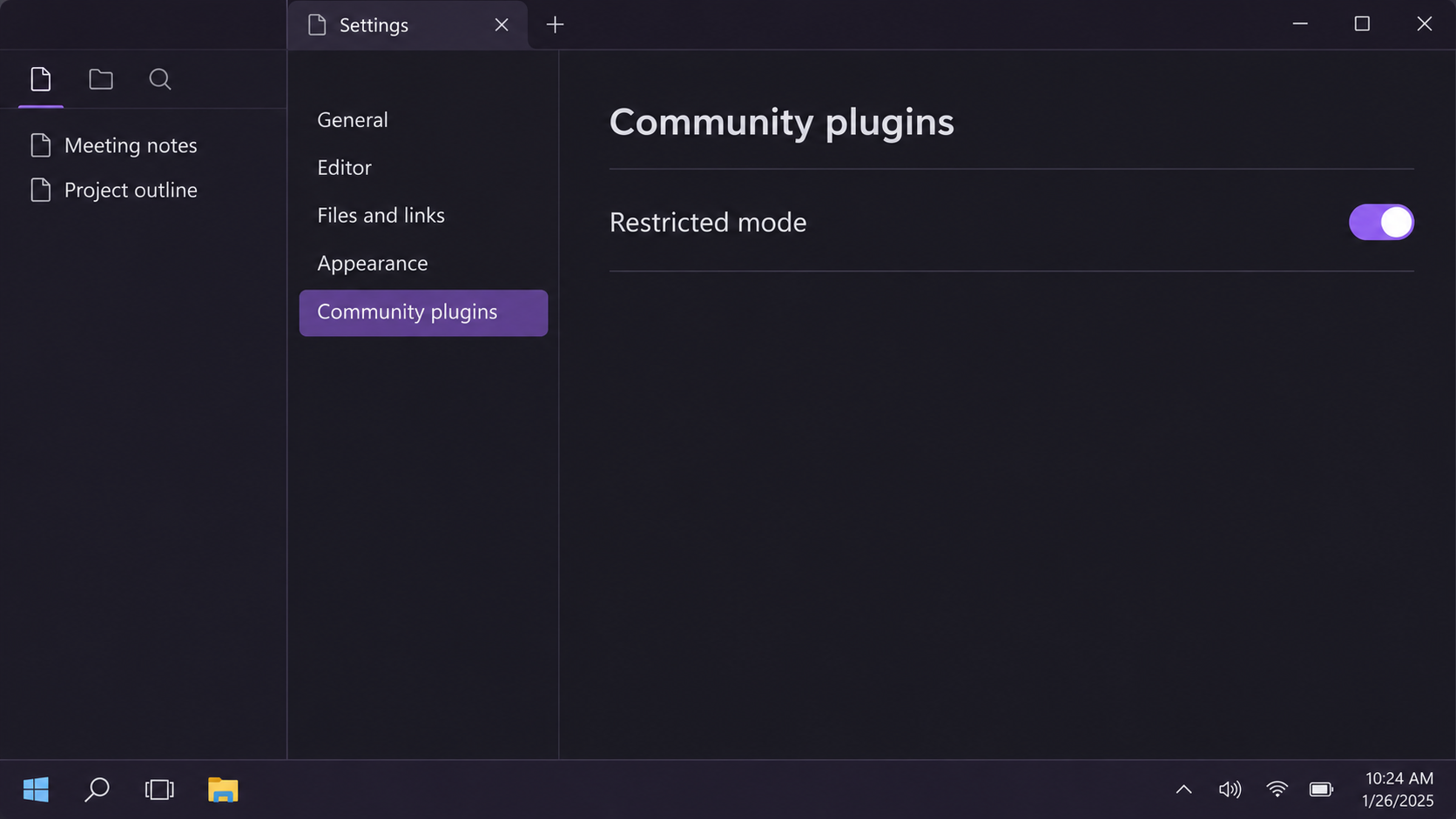
The image above reconstructs a settings view for context. It is not a capture of the campaign or an exact guide to a particular version of Obsidian.
A legitimate app was used in an unsafe way
The copy of Obsidian in the observed incident was legitimate. The danger came from a hostile vault and its configuration, not from downloading Obsidian from its official site.
Obsidian explains that community plug-ins can run third-party code. A normally useful extension can be steered toward an unsafe action through settings supplied by someone else.
It’s fair to ask an unfamiliar partner for a document that opens without extra permissions.
Their insistence on running shared add-ons tells you more than the professional look of the workspace.
What the researchers established about Windows and Mac
The attack framework contained paths for both operating systems. The PhantomPulse remote-access trojan described by Elastic was the Windows payload, while the Mac route used a different delivery mechanism.
In the intrusion Elastic observed, its endpoint product blocked the attack early. That is not evidence that the target lost money or that the Windows backdoor finished installing there.
Keep three actions distinct when you think back to the conversation:
- Reading a LinkedIn or Telegram message did not itself run the Windows payload described in this case.
- Opening an unknown vault and agreeing to load shared community settings increases the concern.
- A Windows endpoint alert after enabling settings warrants investigation even if the notes appeared normal.
How the PhantomPulse Obsidian Attack Works
Step 1: A finance conversation starts somewhere familiar
The first outreach takes place on LinkedIn under a venture capital pretext. The people talking about a crypto-related business arrangement don’t begin by asking someone to launch an unknown program.
A profile that looks like an investor doesn’t prove the owner works at a real firm.
Check a firm’s public contact independently rather than asking the LinkedIn profile to verify itself.
If the project can’t be discussed using an official email address or an ordinary meeting, pause.
Moving the conversation off-platform isn’t proof of fraud, but it removes one set of checks.
Step 2: A group chat supplies apparent witnesses
The contact moves the conversation into a Telegram group.
Multiple people present themselves as partners, creating the impression that a team is involved and other professionals have already accepted the arrangement.
The person’s LinkedIn profile and a friendly introduction from another Telegram participant are not independent confirmations. Both can belong to the same operation.
If you need to check the firm, make contact through a known route and ask whether the people, role, and proposed project are real.
Don’t repeat confidential details to an unknown receptionist.
Step 3: A shared vault looks like a routine work tool
The supposed firm presents its Obsidian vault as a management dashboard.
Readers are offered credentials to the workspace, which can make the invitation feel like access to a scarce internal resource.
Being given a password isn’t evidence that the person granting access controls a legitimate company. It may only show that the person controls the remote workspace.
Ask what a plain PDF or independent video meeting couldn’t provide. A briefing or term sheet doesn’t usually need new code to run on your computer.
Step 4: The request shifts from reading notes to enabling shared behavior
The target is asked to allow community plug-in synchronization. In the documented setup, the combined behavior of configured plug-ins started an attack without the user manually opening a separate installer.
The point to recognize is the change in scope. Reading plain text doesn’t require permission to execute code. Allowing another workspace’s plug-in settings to change your computer is something else.
If you already did it, preserve the relevant alert and stop the session. Don’t reproduce the steps yourself to prove the vault caused what you saw.
Step 5: A backdoor is the risk, not a broken note
The intended Windows result was PhantomPulse, a backdoor that can let another party control parts of a computer. That access could put sessions and sensitive material at risk.
Elastic’s observed block is a useful example of why an alert matters. It does not establish that every other machine prevented the later stages.
The parallel Mac route means a Mac user shouldn’t dismiss the invite as harmless.
The Windows repair instructions below are for Windows, rather than evidence that every Mac runs the same payload.
What to Do if You Accepted a Suspicious Obsidian Vault
-
Remember which action you actually took. Write down whether you only chatted, opened a vault, enabled community settings, or saw an alert afterward.
Don’t log back into the shared workspace to make your record more complete. Use platform messages or screenshots you already have to capture the profile names and times.
-
If you enabled plug-ins or saw a warning, isolate the device. Turn off Wi-Fi and disconnect Ethernet if it is safe for you to do so.
If you use the machine for work, call your security team from elsewhere. Mention the shared vault and any change to plug-in synchronization, not just the app name.
-
Do not open the suspicious workspace again. If you own the device, close the app and keep that vault out of automatic reopening and sync.
Organizations should preserve the workspace and logs through their response team. Avoid sending the configuration folder to a colleague who could import it by mistake.
-
Review financial and messaging accounts elsewhere. On a trusted device, check recent sessions for your business email and messaging services, as well as any exchange accounts used on the computer.
If you notice unexpected withdrawals or altered security settings, contact the provider through its official channel. Don’t share wallet recovery words as part of a support request.
-
Tell anyone you introduced to the discussion. A short message that the workspace is under investigation is enough. Name the time and chat, but don’t forward its credentials.
Report the impersonating profiles through the service you used. If a real firm is being named, independent contact protects both you and that firm.
-
Take the right support route for the platform. The Windows procedure below targets the mechanism documented on PC. If you used a Mac, have macOS security support review that device.
If you never opened the vault or changed settings, this specific infection path is not established. Your next steps depend on any payments or personal information you independently shared.
How to Remove PhantomPulse From Windows
Step 1: Separate the vault from the rest of the computer
Leave the suspicious vault disconnected while investigating. Don’t reopen it to switch off individual plug-ins if that would load the very settings you are trying to contain.
When opening a known clean vault later, consult Obsidian’s security guidance for Settings > Community plugins and Restricted mode. Turn on restrictions while you review your setup.
If business notes must be recovered, ask an administrator to inspect the files first. Import approved plain notes into a fresh vault without old configurations, add-ons, scripts, or attachments.
Step 2: Look at the Windows warning and get an approved installer
Write down an endpoint alert’s source, time, and reported behavior. Don’t override a detection because another window identifies Obsidian as the application that started the action.
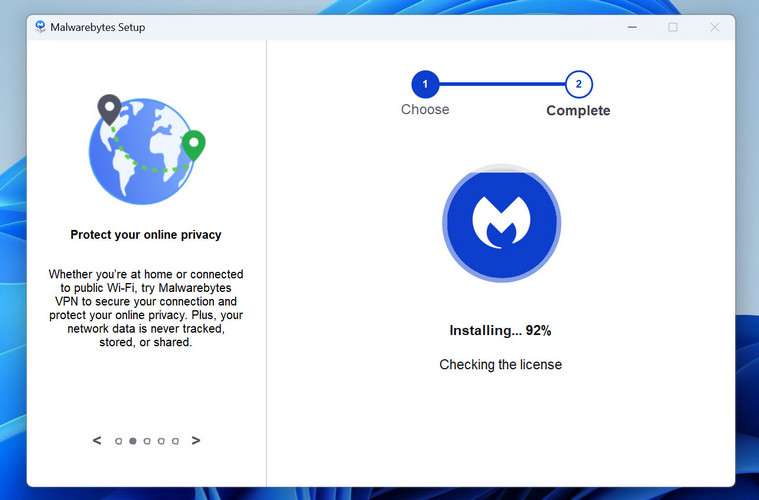
On a home computer, download the Malwarebytes Windows installer from a device you trust if the targeted computer needs to remain isolated. Confirm the setup publisher before proceeding.
Follow the installation prompts or hand the device to a technician if that would require putting it back on your regular network.
Follow the approved response procedure on a managed computer.
Step 3: Scan the endpoint, not only the notes folder
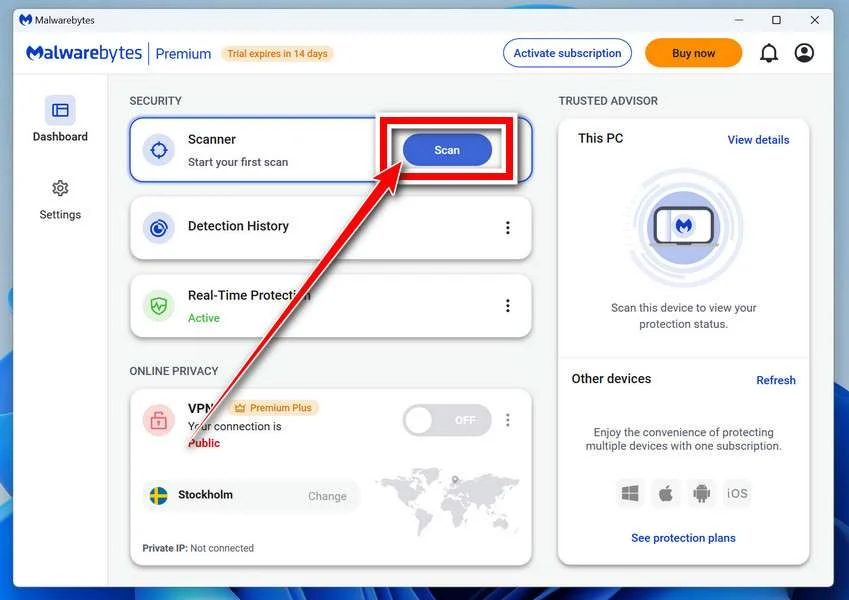
Open Malwarebytes and select Scan under Scanner. Review the complete results when it finishes rather than selecting individual files based on an unfamiliar name.
If you own the computer, quarantine the confirmed threats the scanner identifies. Keep the detection summary and follow the restart instructions only after any required evidence preservation.
A scan that finds nothing needs context. Compare it with the original security alert or the observed vault activity before signing back into sensitive services.
Step 4: Return to a known-good workspace only after review
If endpoint warnings return, or you can’t tell what ran, consider rebuilding the computer or having a professional examine it. Removing Obsidian does not unwind changes outside its own folder.
The MalwareTips support forum can help with non-sensitive questions about personal Windows systems. Include detection names but leave out the vault credentials and private notes.
If you want to compare longer-term protection, Malwarebytes Premium for Windows is optional and linked through an affiliate URL. It doesn’t replace an endpoint assessment.
How to Handle a Real Collaboration Without Sharing Trust
Verify the company before you import anything
Contact a known office address and ask for a short call with the named person. A domain you found independently is more useful than a polished signature.
If the individual represents a portfolio company or consultant, check both the relationship and the authority to invite you. A genuine employee name can be copied without that employee’s involvement.
Set limits on what you will bring onto a work computer
Prefer a plain document without macros or a discussion in your usual meeting tool. If you need a workspace, create it in the environment your business already uses.
When notes must move between users, ask for reviewed text separately from the old vault setup. Preserving the text doesn’t mean copying every hidden setting into the replacement.
Talk about the warning without accusing the note app
On a small team, the first alert may lead coworkers to tell everyone not to use Obsidian. Be specific about the workspace, invitation, and requested change instead.
That helps others notice the same approach even if a different group borrows a different app.
The warning is about handing code execution to an unverified stranger, not about one icon.
If the team recognizes the workspace name, ask who joined and whether any machines synchronized it. Don’t ask another member to open it to check how the settings looked.
Collect the names of affected vaults and devices separately. A device that held local notes and one that accepted the remote configuration belong in different parts of the report.
If you already passed the introduction to someone else, correct it in the same channel through which you made it. Don’t leave a well-intentioned referral looking like a current endorsement.
Finally, if the deal itself was genuine but one message was not, let the real organization decide how to restart the conversation. Do not rely on the suspect group again.
If you already referred another person to the project, correct the referral through the channel where you made it. A past introduction can still look like a current endorsement.
Frequently Asked Questions
Was the normal Obsidian download replaced in this case?
Elastic checked the application that started the suspicious activity and found it was legitimate. The abusive configuration came from the remote vault.
Can an official community plug-in be involved without its developer being responsible?
Legitimate features can still be misused.
An attacker can misuse legitimate features and configuration. The fact that a plug-in was named in the research does not make every installation of it part of the campaign.
Is merely being added to a Telegram group an infection?
No, not by the mechanism described here. The risk changes if you load the untrusted workspace and let it bring community plug-in settings onto the computer.
Does deleting the notes return a potentially affected PC to normal?
No, the notes are only one part of the incident. The Windows endpoint and any accounts used on it need an appropriate review.
Should a Mac user follow the Windows scan instructions?
The Windows guide isn’t suitable for that. Elastic documented a separate Mac path. Use current macOS guidance or have a Mac technician review the settings, alert, and account exposure.
Can I forward the original vault to a friend who works in IT?
Ask their organization how it wants to receive evidence. For an initial conversation, send a sanitized description instead of an archive or credentials from the suspicious chat.
The Bottom Line
Before accepting a shared vault, verify the person offering it and ask for ordinary read-only notes. A business document shouldn’t require trust in a stranger’s workspace settings.
If you already enabled them, close the workspace, preserve the warning, and check what the computer did. Don’t reopen the vault simply because someone in the chat says it’s safe.

Join the discussion
0 commentsShare your experience or ask a question about this article.
Community experiences
Did this happen to you?
Your experience could help someone recognize the same scam. Submit a private report for our team to review.
I experienced this tooReports are reviewed before publication. Sharing publicly is always your choice.
Discussion
Start the conversation
Have a question or something useful to share? Add the first comment.