


A notice says someone searched for you and offers to reveal a name. Another alert says your phone number appeared in Google Search; those claims mean different things.
Before opening a report or entering payment details, check what the service actually measures. A search query, a visit to your profile, and a newly indexed result aren’t interchangeable.
Overview
Google Search Does Not Give You a List of People Who Typed Your Name
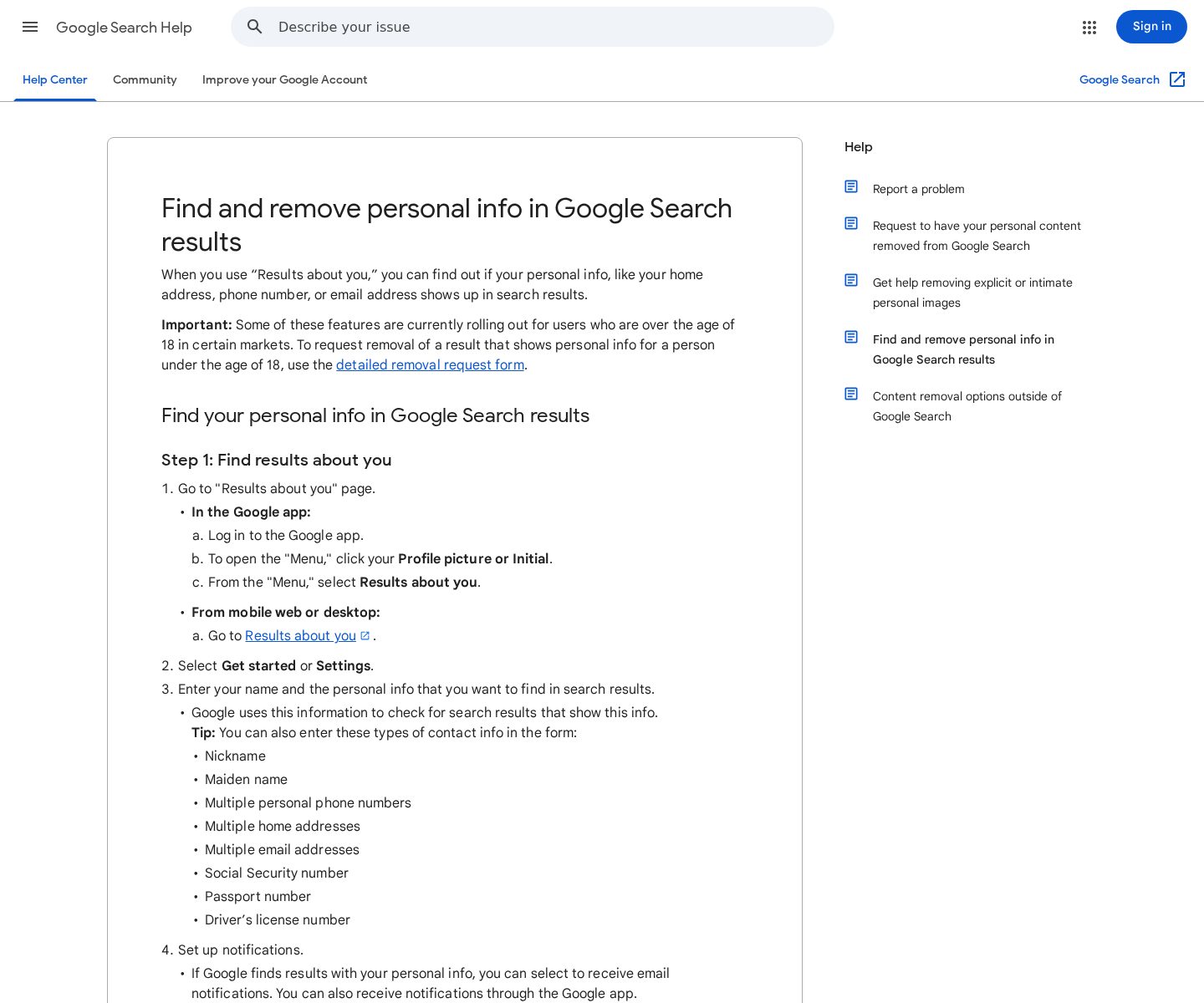
You can check what Google displays about you. Its personal information tools tell you about matching pages, not the people who entered your name as a search term.
A Profile Visit Can Leave a Different Kind of Record
Some platforms show limited visits to a profile hosted on their own service. The platform’s rules and the visitor’s privacy settings determine what details you can see.
Paying for a Report Does Not Prove It Has Better Data
A name list, a count, or an official-looking preview matters only if the seller can account for where the data came from and what event it represents.
- Google match: Open the matching result and address the public information it exposes.
- Platform visit: Check the platform’s own viewer history and respect an anonymous result.
- Paid reveal: Do not enter payment or account details based on an unexplained viewer claim.
Why the Same Word Can Describe Three Different Events
Imagine a former colleague types your name and sees an old employer’s staff page. They might notice the snippet and leave without opening any result.
That is a query and an appearance in search results. Neither event requires the person to interact with your website or sign in to a social account you control.
If they open your portfolio, the website may count the visit. A page view still doesn’t identify the visitor by name or mean they used one particular search phrase.
If the colleague clicks into your LinkedIn profile instead, LinkedIn can apply its own rules for reporting profile activity. The event belongs to LinkedIn, not the Google search box.
There are reasons to care about all three events. Only one question, however, is useful when an alert points to your visible address: which page is publishing that information?
A survey by Incogni of 1,008 U.S. adults found that 47% said they would pay to learn who looked them up. That measured interest, not any product’s ability.
You do not need a reader’s identity to remove an exposed phone number. You need the exact page, a legitimate request path, and a record of the outcome.
What a Real Analytics Report Does and Does Not Show
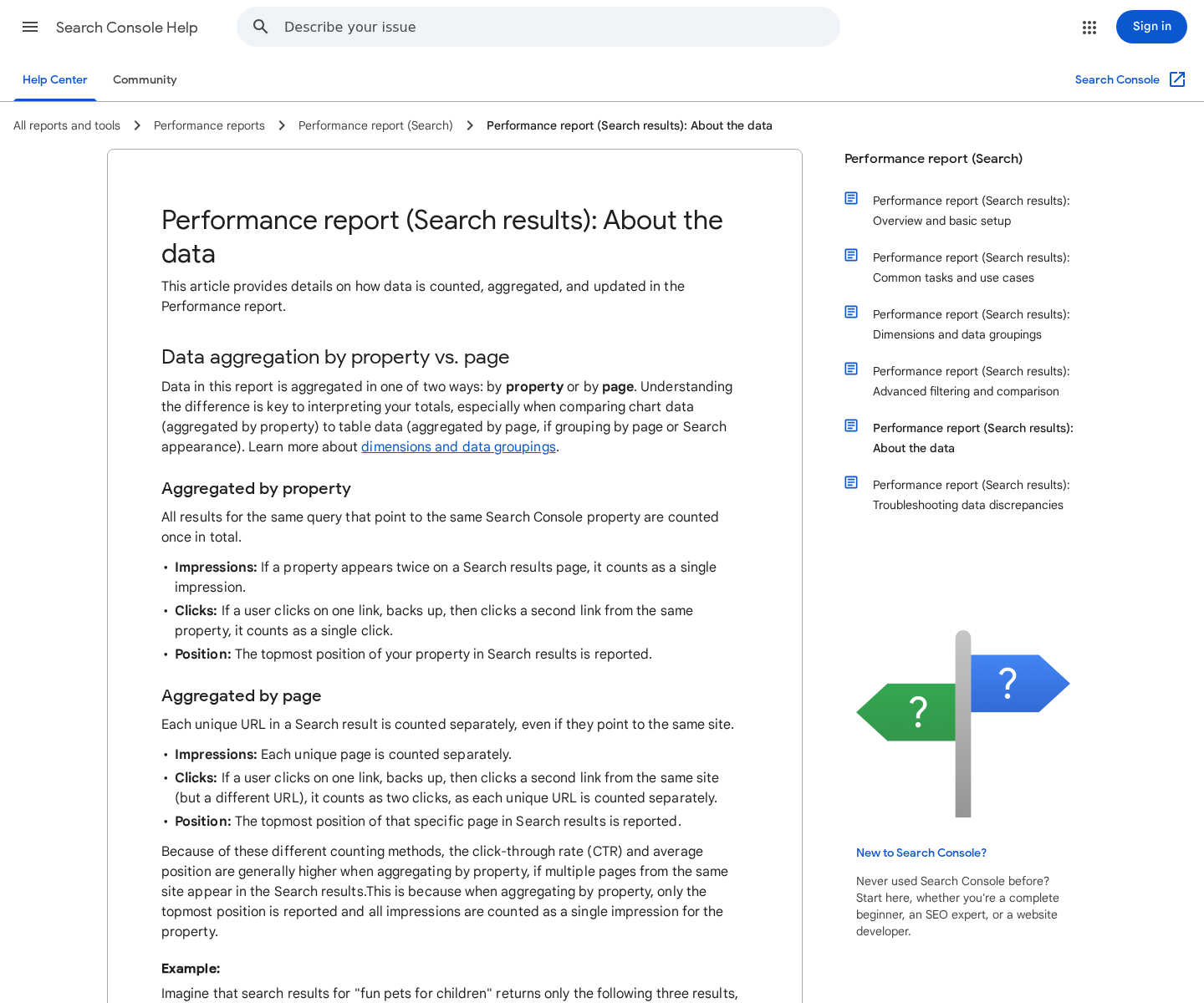
If you operate a website, Google Search Console can show aggregate search performance for that property. Its report describes clicks, impressions, results, and how the data is grouped.
For example, a query that includes your name could appear beside a count for a portfolio page. The report does not supply a roster of people behind those counts.
An impression is not necessarily a visit. Somebody can see a result without clicking, and Google’s counting rules can group several appearances or clicks in ways that affect totals.
Read the Search Console data guide if you manage a property. The metrics describe how the property appears, not a personal search history for visitors.
The same reporting distinction matters for newsletter or portfolio statistics. Traffic counts can help you see when a page drew attention without telling you the reason behind any visit.
If a company proposes to turn those statistics into names, ask what independent identifying record it possesses and which activity those names actually refer to. Numbers alone cannot answer that.
Recognize the Narrow Exception for Profile Views
LinkedIn has a feature called Who’s viewed your profile. Start inside LinkedIn using your own account rather than signing in from a message that promises to unlock viewers.
In the LinkedIn feed, look for your profile views or profile analytics and open the native viewer feature if it’s available to you. Treat any list as LinkedIn activity only.
LinkedIn’s visibility guidance describes full names, limited profile characteristics, or an anonymous LinkedIn Member label, depending on the viewer’s privacy settings.
LinkedIn says Premium does not reveal members who used private mode. A third party promising to decode those anonymous entries should not be trusted based on a sales claim.
If you want to understand what you disclose when you visit other profiles, open Settings & Privacy, select Visibility, then look for Visibility when viewing other profiles.
Changing that setting concerns your LinkedIn profile visits. It does not hide your name from Google, remove your public profile, or grant a broader history of other people’s searches.
Even a named view doesn’t show the viewer’s intent. An employee with a similar role or a friend checking a résumé may have arrived without entering any search at all.
What to Do If an Alert Says Someone Looked You Up
- Do not follow an unexpected alert’s sign-in link. Open the actual service from a saved bookmark or app, then see whether its own notifications show the same event.
- Identify what the alert says happened. Look for an actual profile visit, a search-result match, or a report subscription pitched as a search-history reveal.
- Hold off on buying access if the seller cannot name the data source and event. Review the price, renewal and cancellation terms before giving it any financial information.
- If you see publicly exposed contact information, save the link privately. Use the website’s removal channel and Google’s reporting flow for the search result when appropriate.
- If you already entered a password on an unrelated page, change it at the real service. Review active sessions and use its security settings to enable stronger sign-in protection.
- If you paid, keep the receipt and offer details. Cancel any recurring plan through the verified seller and contact your card issuer about unauthorized or unresolved charges.
A notice might accurately report that your details are public while adding a sales pitch about who saw them. Check the listing separately rather than accepting both claims together.
You can also take the warning seriously without accepting its explanation. A phone number in a result is worth removing even if nobody can tell you who searched for it.
If an alert asks for your Google or social media password to reveal a visitor, stop there. A native profile tool is already accessed from the provider’s own service.
Check the Original Notice Before You Accept Its Explanation
Separate the event from the interpretation in the message. A platform may tell you somebody viewed a specific account, while a paid ad predicts something it did not measure.
Compare the domain named in the message with the official app you already use. The displayed sender name can mimic a provider without establishing who sent the email.
If the real platform confirms an anonymous viewer, leave that result anonymous. Do not install tools that supposedly reveal it by asking to read your private account activity.
Check what a product’s trial unlocks before you agree to renewals. A report that helps find your public listing is selling a different service from identifying who saw it.
If the alert claims several searches happened, look for an explanation of the number before drawing conclusions. In isolation, it cannot distinguish repeat clicks from multiple individuals.
Check Your Exposure Without Buying a Viewer List
Find the Actual Pages and Keep a Private Record
Start with your own name and a city, employer, or other detail you already expect to be public. Avoid typing identifiers such as a Social Security number into public search.
Save the exact addresses of pages that expose information you want removed. Keep the list private, and record what you found without wholesale copies of someone else’s sensitive information.
Decide whether the source is an account you control, a directory, an organization, or a page you don’t recognize. That determines whom you can ask to change it.
If you control the page, remove or hide the detail there first. Verify it is not visible from a separate browsing window after you sign out of that account.
Search results may be different on another device or for a different version of your name. Use that variability to guide follow-up checks rather than treating disappearance as permanent.
For an outdated staff biography, ask your former employer to replace your personal contact details with a general department address if the page needs to remain public.
When a stale result still shows old information, first confirm the source page changed. A cached snippet and an unchanged website require different requests and different follow-up.
Use Google Results About You if It Is Available
- Sign in to the Google app, tap your profile picture, and select Results about you. On desktop, visit Google’s Results about you dashboard directly.
- Choose Get started or Settings. Add the contact information you want Google to match and select whether you want email or app notifications.
- Open To review, select a matching result, and inspect the source and the exposed information. Choose Request to remove for an eligible result you want addressed.
- Check Removal requests for the outcome and keep the result’s address. When it is removed from search, verify separately whether the original page still displays your information.
Google offers this feature in eligible markets and accounts. If you have an eligible result open, its options may also offer Remove result and a contact information reporting flow.
Only enter personal details into the official form you opened yourself, and provide what’s necessary for the request. Google’s help page describes eligibility, settings, and monitoring controls.
A public-interest result can be denied, and an approved request may affect only certain searches. Read the status rather than assuming the page is invisible from every result.
The website owner is usually the right party if you want the original content changed. A search result can be limited while the underlying page remains accessible elsewhere.
For an unexpected listing on a people-search site, start in its official privacy or opt-out page. Check whether the link you saved identifies only your own record.
If a form asks you to buy a full report merely to find the listing, stop and check for a separate privacy path. A purchase is not a removal request.
When you get a confirmation, write down which page it covers. A different copy on another site can remain after the one you reported has gone.
Recognize Which Changes Actually Reduce the Risk
Start with current contact information and pages that reveal more than necessary. Removing an address from your profile is more directly useful than counting clicks on a public biography.
For posts from another account, use the platform’s reporting or contact option if appropriate. Share only the relevant page and detail when making a request, not your entire identity history.
Record dates and outcomes if an item reappears. That gives you something practical to take back to a publisher or directory without relying on an unsupported count of searchers.
If someone is threatening you and knows details about your home, treat the messages as a safety issue. Preserve them and get appropriate local or workplace help rather than replying.
For routine screening before a job interview, look at the public pages that matter for that purpose. Clean up unnecessary contact details rather than paying for unverifiable watcher histories.
If you don’t want Google monitoring the information you entered, return to Results about you settings. Its Remove all personal info option stops that monitoring; it does not edit websites.
Frequently Asked Questions
Does Google Tell Me Who Searched for My Name?
No, a match about you in Google Search identifies a result. It doesn’t tell you which people entered your name or whether anyone clicked the page.
Can I See Who Searched for My Name in Search Console?
Search Console reports performance for a property you manage, using measures such as impressions and clicks. It doesn’t attach the identities of searchers to your reports.
Can LinkedIn Premium Reveal an Anonymous Profile Visitor?
LinkedIn says names aren’t shown for visitors using its private mode, including to Premium members. It also doesn’t report their searches on other services.
Does a Results About You Alert Mean Someone Viewed the Page?
The alert means Google found a result that matches the personal information you chose to monitor. It is not evidence that a particular person visited that page.
Will Removing a Search Result Delete the Website’s Copy?
No, removal from results does not edit the source page. Check that site separately and use its contact or privacy route if you need the material removed there.
What If I Paid to Find Out Who Looked Me Up?
Identify the seller and keep the original offer and receipt. Cancel unwanted renewals through a verified route and talk to your payment provider if the charge needs review.
The Bottom Line
Don’t pay for an unexplained promise to list everyone who searched for you. A genuine profile view or search-result notice has a narrower meaning and its own independent source.
If you discovered exposed contact details, focus on the original page and the result that makes it easy to find. If you paid a seller, check the renewal today.

Join the discussion
0 commentsShare your experience or ask a question about this article.
Discussion
Start the conversation
Have a question or something useful to share? Add the first comment.