Gandalf_The_Grey
Level 86
Verified
Honorary Member
Top Poster
Content Creator
Well-known
Forum Veteran


Open MalwareTips from your Home Screen or desktop. Follow discussions, find answers and pick up where you left off.
If you cannot find an install option, update your browser or use its bookmark option to keep MalwareTips close.
After installation, open the app and sign in. Enable push notifications in Preferences if you want alerts. On iPhone and iPad, push requires a Home Screen web app and iOS or iPadOS 16.4 or later.
Sign in to manage notificationsInstallation is optional. Your notification settings stay under your control.
 Thread starter
Petrovic
Thread starter
Petrovic
No particular reason other than to check out the browser extension which I've used previously@JasonUK Why you decided to not use AdGuard for Windows?
 There is a slight time-lag when loading webpages using AdGuard for Windows compared to uBlock Origin or AdGuard Browser Extension in my experience. If the ad/tracking protection is pretty close to desktop version in v4 may switch to the extension for a while.
Does AdGuard Browser extension, requires Adguard for Desktop to be installed?Thanks. Taking it for a spin.
Thanks for your input. Today, I started getting ads on YouTube, while Adguard for Windows is installed.Switched back to AdGuard Browser Extension from AdGuard Windows to try v4. Only side issue to decide on is whether to set up secure DNS in Browser (Brave & Edge) or use a DNS client (YogaDNS).

 malwaretips.com

Does AdGuard Browser extension, requires Adguard for Desktop to be installed?
Can I enter the same license I have for Adguard for Windows, to activate AdGuard Browser extension?

 kb.adguard.com

Global Privacy Control feature is not working in 4.0.64 beta.

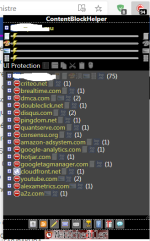
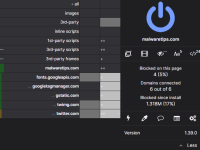
I wish it had a UI like this to instantly check what's allowed and what's blocked without requiring to open filter log and reload the page.
View attachment 262373
Members who viewed this thread in the last 5 minutes