Troubleshoot Error 0x81000203

JB007

Level 26
Thread author
Verified
Top Poster
Well-known
Forum Veteran
May 19, 2016
1,567
1
6,553
2,469
France
Hello,
Yesterday, thanks to MalwareTips community, I have solved an issue with Emsisoft Internet Security using Revo Pro: A major problem prevents the application startup
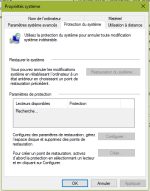
When I used Revo Pro I noticed that it cannot made a restoration point.
So I go to take a look and noticed that there is an error.
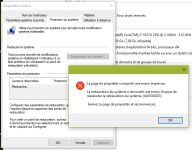
Erreur restauration.PNG
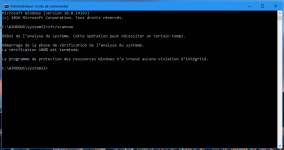
Erreur restauration(2).PNG
I tried to apply the following fix but without success: Problème restauration système - erreur 0x81000203 Windows 7/8
Can you help me ?
 
Last edited:
Untitled.png

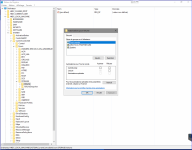
I tried to check the option for OWNER RIGHTS but it said "Unable to save changes on Volume" - ... denied
I took ownership for the key and successfully was able to change the permissions like the screenshot

however, VSS and Microsoft software... = Automatic + started -> VSS still doesn't work
 
Upvote 0
Okay i have see it what JB007 and Evjl´s Rain write.

I try one Instructions to make,
That is with a Reg Tool System.

We can try that, To allow it to Repair.
I hope that it works.

It takes a while. Until I post it here.

see you later.
Hello @Xtwillight
Is it necessary for me to do some modifications on the registry ?
 
Upvote 0
Upvote 0
View attachment 117730

I tried to check the option for OWNER RIGHTS but it said "Unable to save changes on Volume" - ... denied

Hi.

I'm also facing the same issue. I've tried to check the option as well but couldn't. What are the steps to be allowed to check that option?

By the way, my guess is that KIS (Kaspersky) is the responsible for the problem. I've sent a ticket to support but haven't got an answer up to now.
 
  • Like
Reactions: JB007 and Logethica
Upvote 0
Hi.

I'm also facing the same issue. I've tried to check the option as well but couldn't. What are the steps to be allowed to check that option?

By the way, my guess is that KIS (Kaspersky) is the responsible for the problem. I've sent a ticket to support but haven't got an answer up to now.
hi
First go to permissions -> choose Advanced -> Owner: -> change -> enter your use name (must be exact) if it is exactly the same as your user name you can press Enter on your keyboard. If you don't know the exact user name, click Check Names and select your user name
When you see Owner: "your current user name" -> click OK

Then you can click on OWNER RIGHTS (there may be 2 OWNER RIGHTS) change the permissions. 1 of them may be successful

This is a difficult problem. Perhaps kaspersky needs more time find the answer but this problem could be irreversible. At that time, we have to reset windows or restore from a backup or permanently turn off VSS
It may be,l but wait I am whith more Users About that problem.

Try the following:

I think I did this step before I restored windows from my img backup last time and it was not successful. Could be the same this time :(
waiting for the result from @JB007
 
Last edited:
Upvote 0
The Problem ist not absolutely bye Kaspersky Removaltool 'Kavremover.
That seems a Problem from allocation right in Windows to be.

Errors:
ANOTHER ERROR: 0x81000203
We are looking for the needle in a haystack ;)
 
Upvote 0
The Problem ist not absolutely bye Kaspersky Removaltool 'Kavremover.
That seems a Problem from allocation right in Windows to be.

Errors:
ANOTHER ERROR: 0x81000203
We are looking for the needle in a haystack ;)
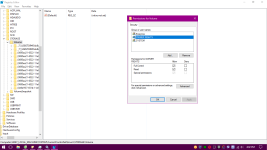
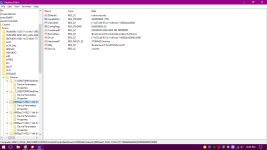
regardings the solution in veritas.com, they said "service" = "volsnap"
all "service" values are set to "volume". Not sure if we should change it or not,safe or not safe :(
Untitled.png
 
Upvote 0
regardings the solution in veritas.com, they said "service" = "volsnap"
all "service" values are set to "volume". Not sure if we should change it or not :(

The Registy to back up.
And service" = "volsnap" all "service" values are set to "volume".
Then new Start Windows.

If that does not work, then Registy back.
 
Upvote 0