How was your first experience with Windows 10 April Update?

Status
Not open for further replies.
I did a clean install a few hours ago, and so far no issues (that I know about). (y):)

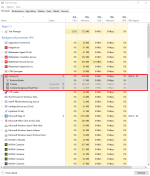
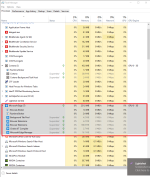
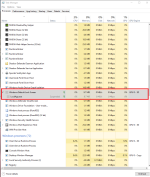
Does your task manager show these? Does Edge start by itself when Windows boot up?
 

Attachments

  • Screenshot_8.png
    Screenshot_8.png
    100.5 KB · Views: 320
  • Screenshot_9.png
    Screenshot_9.png
    128.9 KB · Views: 308
  • Screenshot_10.png
    Screenshot_10.png
    107 KB · Views: 312
Do any of you guys have this suspended processes listed in your task manager? Open up Task Manager > Processes tab > Right click on tab Processes tab > check Status. For some unknown reasons, Microsoft Edge start by itself when Windows boot up. It like Microsoft Edge is the startup browser.
I have some suspended processes, but Edge did not run again, after the first boot.
The suspended processes I have are as follows:
Cortana
Microsoft Outlook Communications
Microsoft Skype
Windows Shell Experience Host
 
Guys, I am seriously need help. Why is my UEFI GPT Bootable Windows 10 installation media USB listed on where do you want to install Windows? I try to install Windows 10 in UEFI. I download the Media Creation Tool and then choose ISO and then burn ISO to Rufus software to USB drive in UEFI that listed here: How to install Windows 10 from USB with UEFI support
Drive 0 Unallocated Space : SSD
Drive 1 Partition 1: My UEFI USB Bootable Windows 10. Type is Primary as well.
 
Last edited:
Guys, I am seriously need help. Why is my UEFI GPT Bootable Windows 10 installation media USB listed on where do you want to install Windows? I try to install Windows 10 in UEFI. I download the Media Creation Tool and then choose ISO and then burn ISO to Rufus software to USB drive in UEFI that listed here: How to install Windows 10 from USB with UEFI support
Drive 0 Unallocated Space : SSD
Drive 1 Partition 1: My UEFI USB Bootable Windows 10. Type is Primary as well.

why use Rufus when you can directly make a USB with MCT...
 
Well I give up on this version for the time being. Three times I installed and I cannot get away from a screen resolution of 1024X 768 instead of 166X768 everything looks squashed and I can't find a way around it. Not sure what to do next. :mad:(n)
clean install?
did you installed the VGA and GPU drivers?
 
  • Like
Reactions: frogboy
I am experiencing complete system freezes. Reading some other forums, the problem seems to be with hardware acceleration when using Chrome. I'll try siabling it to see if it solves the problem.

*Update*
Just received a notification from NVidia about a driver update.. maybe this will sove the problem.
 
I haven't updated my system yet, I didn't have the guts to bring myself to do it so quickly. The thought of being forced to revert back with a backup after waiting for the update download and installation just did not seem very appeasing to me at all... Since I knew there would probably be bugs waiting for me around the corner. As there was for many other people, practically 99.9% of the people I know.

I will update my system after Microsoft have addressed some of the bugs on the latest build, but in the mean-time I will update on the virtual environment which I use a majority of the time anyway. At-least then it doesn't matter if there's bugs and I won't have to waste more time reverting back only to re-update later on in a few days/a weeks time.

TIP: It is probably not a very good idea to try and upgrade to a brand new build of Windows which has underwent so many changes with your primary real-time security solution installed unless you've checked with the vendor that compatibility is fine - not just enabled, but literally installed - and using no security post-update is neither a good idea since it leaves you vulnerable, therefore in such a scenario I'd wait until your vendor confirms compatibility or switch to another vendor who are compatible temporarily at-least. I know many people did this and were fine but with a sensitive product from a vendor like Kaspersky or COMODO (who have rather intriguing technology for features like virtualization), I wouldn't recommend it unless you're asking to be set-back by update failure or post-update problems.

Be careful of driver compatibility as well... The new build of Windows has had changes for the actual Windows Kernel, this can affect device drivers you're using non-security package related which were originally compatible with your system. What happens then? More problems.

Make sure you at-least have a backup before updating... Standard stuff.
 
Just an update. After the NVidia update I experienced no more freezes... My HP printers also complained about Windows changing HP drivers for generic Microsoft drivers. Reintalling the printer software solved the problem.

I hope I it's over.
 
Status
Not open for further replies.